hello.
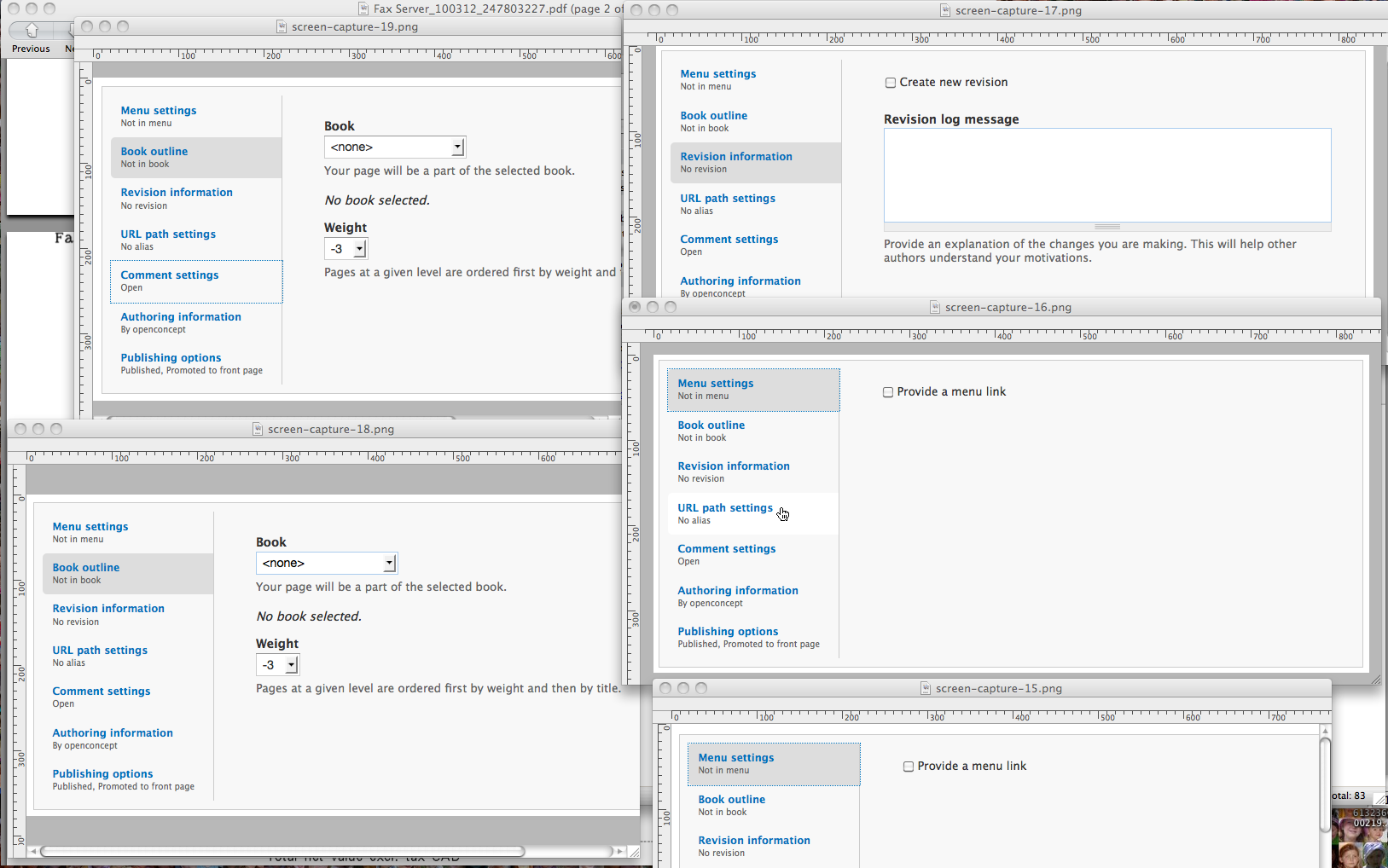
the new vertical tabs for d7 makes tab order unpredictable when navigated by a screen reader. one would first read "Menu settings
Not in menu" clicking it doesn't expand the fieldset as we're used to, but rather changes the form below the links. this is also true for Revision Information, comments settings, etc. so it took me some time to find out that clicking the link actually change the form below the links.
I wouldn't deem this chritical, because once one is used to this beahaviour it becomes easier to deal with the situation. the old way was certainly easier for us, screen readers users, because it took one click of the link to expand it. now you need to click the link, navigate through the remaining links to get to the form.




Comments
Comment #1
webchickThanks a lot for looking into this, mohammed!
Do you have any specific recommendations that we could do to help make this more accessible while retaining the overall usability improvement that it offers to our sighted users?
The justification for moving to this approach was:
a) Collapsed fieldsets did not provide enough context to know what it was they were really saying. "Revision information?" What's that? So users would expand *all* fieldsets to discover what was there, leaving them with a monster form that is 3x the length in their wake.
b) Vertical tabs allow you to check, without clicking into a fieldset, whether or not the setting you want to change is already done. For example, if you're adding a node and can't remember if you checked the "Promoted to front page" checkbox, you can scroll down and read the description of the tab and it will tell you.
c) Probably something else I can't think of right now. :D
So if we can retain those qualities and still improve your user experience, I'd be very interested to know how. :)
Comment #2
mohammed76hi webchick! thank you very much for explaining the gain this makes for sighted users, because i was wondering. well, the only thing I can recommend is perhaps improve the tab order when avigating those tabs? like when I click "menu settings" then erow down, or press the tab key I would land on to the form, rather than land on the next tab as is the case now.
however, the new status discription attached to those vertical tabs is a plus even for us screen readers. very useful to know without having to expand the tab. as I said, I don't find this very buggy, and I can certainly live with it. it just took some getting used to.
Comment #3
mgiffordHey mohammed76,
This is a related issue - http://drupal.org/node/323112
Don't think it's a duplicate issue, but wanted to tie them together.
Comment #4
Everett Zufelt commentedApologies for not getting to test this sooner. But, IMO there are accessibility problems with vertical tabs.
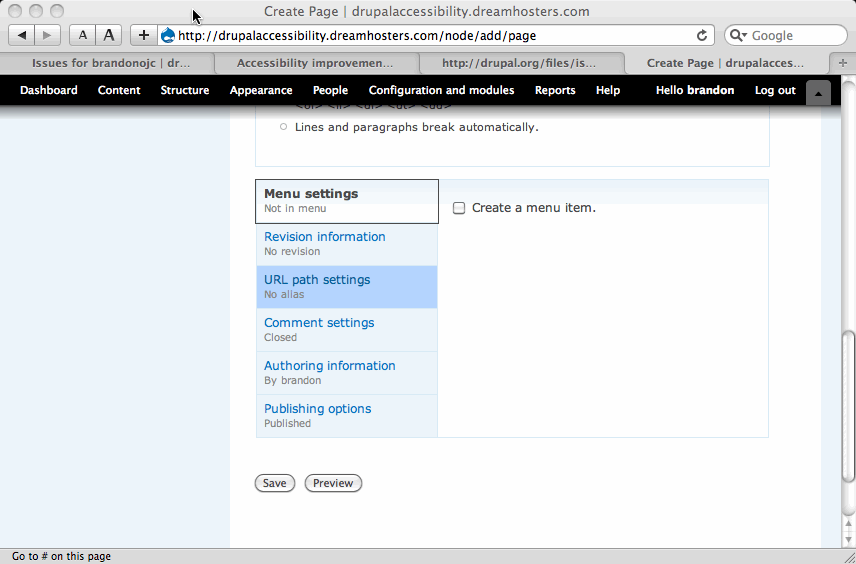
1. As a screen-reader user there is no way for me to know which tab is selected, or what clicking on the link to show / hide each tab will do.
2. I expect that if I click on a link that will show content, that the content will be somewhere near the link, it took me some time to figure out where the display content was.
Recommendations
1. There needs to be clear non-visual indication that this is indeed a tabstrip.
2. There needs to be non-visual indication of which tab is active.
3. There needs to be an easy way to find the displayed content once a tab is selected. This problem may become an easier task if 1 and 2 above are solved.
See #323112: Vertical Tabs
Somewhat Related Issues:
#521852: Local tasks lack semantic markup to indicate an active task
#541568: Link to expand / collapse fieldsets has poorly accessible link text
Comment #5
owen barton commentedSubscribe.
Could problem 3 be solved by having an anchor at the top of the tab content and setting focus there (in addition to the JS switching code)?
Comment #6
bowersox commentedsubscribing
Comment #7
Brigadier commentedSubscribing. I love the look of the new tabs, I'm sure they can be made to work well with AT also.
Comment #8
mgiffordOk, we haven't got the examples in core yet, but want to make sure we've got the right models yet for these:
1. There needs to be clear non-visual indication that this is indeed a tabstrip.
http://drupal.org/node/545610#comment-1931830
Adding this to the top of the tabstrip:
2. There needs to be non-visual indication of which tab is active.
http://drupal.org/node/521852#comment-1969646
Adding something like this to each of the vertical tabs when selected:
This does make me wonder though if having two 'active tab' strips in an edit page is going to be confusing. Maybe that phrase isn't good.
3. There needs to be an easy way to find the displayed content once a tab is selected. This problem may become an easier task if 1 and 2 above are solved.
http://drupal.org/node/467296#comment-1967328
Having an anchor at the top of the tab content and setting focus there (in addition to the JS switching code)
Is this the right approach?
Comment #9
Garrett Albright commentedIf all else fails, could we use anchors to allow screen readers to skip the links and go straight to the tab content?
Comment #10
annmcmeekin commentedIf these can be made to work well for users accessing the non-visually it'd be a really good day.
+1 for @Garrett Albright's suggestion if all else fails.
Comment #11
mgiffordOk, I think that I have a solution for the first problem with this patch to form.inc It just adds the following to the top of the vertical tabs. Might be that there needs to be a more generic name for it, but:
I've been looking into the second problem and have real problems as I don't know and playing with the AJAX in misc/vertical-tabs.js isn't working too well.
I believe that the Drupal.verticalTab.prototype function is what is applying the class selected to the lists of vertical tabs.
I'd been hoping to add something like this to this function, but it didn't work at all:
I really don't know what to suggest and have no idea how to remove this when it is unselected.
I think we'd be able to extend this inserted text to include an anchor to the tab content @Garrett Albright but for this code here:
I'm thinking it should look like:
This does need a lot more thought (and someone who understands aJax!
Mike
Comment #12
rvilarExcuse me, but the /small tag isn't permitted in XHTML because it's a esthetic tag. It must be changed with the /span tag like:
Ramon
Comment #13
Everett Zufelt commented@mgifford
It would be nice if there was a way to either make the heading more generic, like 'Vertical tabs' or to provide the ability for the name to be set on a case-by-case basis.
Comment #14
Everett Zufelt commentedOne thought of an approach to append the text (activ tab) to the active vertical tab is.
1. Append
<span class="active-tab-text element-invisible">(active tab)</span>to each tab.2. When the page loads use a jQuery selector to set all of the above tabs to display:none jQuery.hide().
3. Use jQuery.show() to show the active tab.
4. When a new tab is selected repeat steps 2 and 3.
Possible problems:
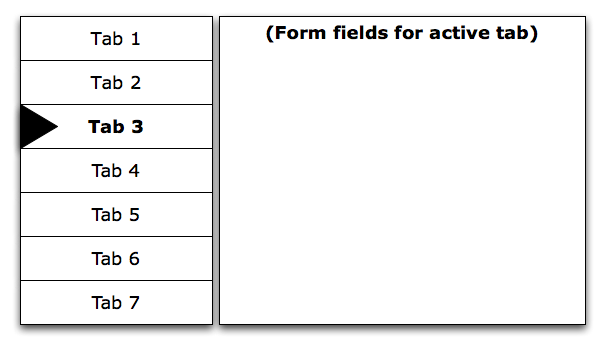
1. Anyone with CSS disabled will see (active tab) on all tabs.
2. A different class would need to be used on the tabs for each vertical tabstrip on the page.
Alternate approach.
1. Store a global JS variable that points to the selected tab and append the span above to that tab, a different global variable would need to be used for each vertical tabstrip on the page.
2. When a new tab is selected remove the span from the formerly active tab and repeat step 1.
Comment #15
mgiffordOk, a bit more progress here. @Everett Zufelt I changed the text to 'Tab strip' which is more generic. Agreed it should be something that you can set manually though to provide meaning.
@rvilar I'm not arguing for the /small tag, but it's what's in the code now. There are a few other references to it here too:
I did find it quite interesting to learn that AJAX is adding in the summaries however using module specific files:
Could make it easier ot insert accessibility tags, or not.
Mike
Comment #16
mgiffordadding tag for vertical tabs
Comment #17
mgiffordIs there any reason not to make this RTBC even though it's only a partial solution?
I'd sure like to see better ways to identify active tabs and skip through to the relevant content, but info hasn't been forthcoming on that here.
Comment #18
Everett Zufelt commented@mgifford
I think that it would be best to wait until there is a more thorough patch, that addresses all issues here. The patch that is currently proposed is good, but I believe it can be commited after code freeze.
Comment #19
kat3_drx commentedAs Everett and I have been discussing, I'm actually working on a JQuery-ish patch for this issue right now...I'm on my way to a long-term solution along the lines of Everett Zufelt's and Garrett Albright's suggestions that is addressing the serious concerns here. It's my goal that this patch a) will not require major API changes and b) will not have any negative impact on the vertical tabs as they are visually styled now.
It looks like it won't be ready for thorough consumption and therefore robust review by tomorrow, but I should have it ready for review very shortly thereafter.
Comment #20
mgiffordThanks for the update. We're looking forward to seeing it!
Comment #21
attiks commentedFYI #567390: Use vertical tabs with keyboard only
Comment #22
mgiffordwith some ajax added for displaying active tab
Comment #23
kat3_drx commented@mgifford: God bless you. Admittedly I haven't been able to devote the time I'd like to this issue in the last week, but I'm so glad that you've come up with an AJAX solution and one that looks very elegant at that. I'll shelve my code on this unless and until it may be needed. :)
Comment #24
mgiffordThat happens. I don't know jQuery but was able to look at @attiks code to get the results.
I think this patch deals with issues 1 & 2, but doesn't hit on 3 yet from comment #4.
Now, there still needs to be a way to link the menu to the content with the pane.
I don't have any good ideas on that.
@kat3_drx, thanks for the review of the patch. Did you have any trouble installing it?
Comment #25
Everett Zufelt commentedThis is a nice patch. I think that it would make things more accessible if the "(active tab)" text was part of the link text for the tab, and not a separate element.
Reasoning behind this is:
1. When tabbing through the links with a screen-reader the (active tab) text is currently not read, as it is not part of the link text.
2. When arrowing through the links active tab is read after the active tab, and before the next tab, users may be confused as to which tab is actually active.
3. To be more consistent with the solution proposed of active tabs for local tasks at #521852: Local tasks lack semantic markup to indicate an active task.
Comment #26
cliffMike, it looks like I need to sit down with your latest patch before I get too deeply into this. But here's a thought: These vertical tabs are essentially flyout menus, except that forms, not submenus, are the content revealed on flyout. How do screenreaders get to the content when the tab in an accessible flyout menu is clicked? Or is the accessible flyout menu one of the great unsolved problems of modern Web design?
Comment #27
kat3_drx commented@mgifford: nope, no trouble at all installing the patch! It works like a charm for issues 1 - 3. I do have some JQuery code from a previous example that I can roll into a patch for issue number 4 and bring on here for review early next week. It's somewhat like what Cliff is talking about; accessing the flyout menu but using that as a trigger for additional markup, if that makes sense.
Comment #28
mgiffordI'm just not sure how to adjust the jQuery to have the (active tab) show up within the link text. I understand how that would be better, but don't have a sense of how to do it.
Comment #29
frank ralf commented@#25
Hi Everett,
Would it help, if the text would be additionally provided as a "title" attribute on the links (see http://reference.sitepoint.com/html/core-attributes/title )?
Frank
Comment #30
Everett Zufelt commented@Frank
Thanks for your comment. Unfortunately the title attribute is not well supported by assistive technology, and is inconsistently supported by the AT which does support it. See H33: Supplementing link text with the title attribute | Techniques for WCAG 2.0.
Comment #31
frank ralf commentedJust some more ideas off the top of my head:
1) Using tabindex or access keys.
2) The jQuery code in vertical-tabs.js mainly changes HTML and CSS classes/ids. What about using some more of jQuery's event handlers for navigation (e.g. keyboard short-cuts)?
Frank
Comment #32
Everett Zufelt commented@Frank
The ideas that you have suggested may indeed be part of the solution. I would still like to have a keyboard only (non-screen-reader) user do some usability testing with the current implementation so that we can determine what changes need to be made.
Comment #33
frank ralf commentedOne question:
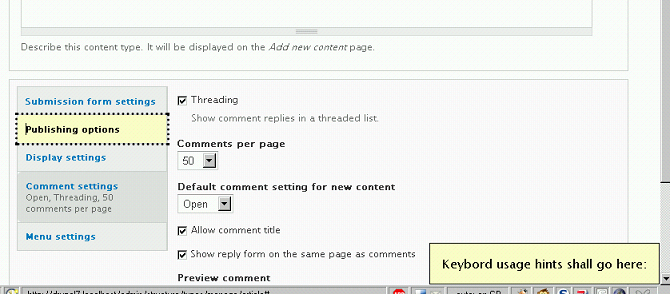
Shouldn't the keyboard only behavior be the same with JavaScript turned off?
Comment #34
kat3_drx commented@mgifford re: #28: what about storing a variable or triggering an action based on the content box that the vertical tab is attached to, ie when that changes, the active tab variable changes within the link text. I haven't gotten a good sense of how the content of the tab is changed or swapped out in core, but what do you think?
Comment #35
mgifford@Frank - are you wondering about setting tab order for keyboard users? Not sure what the context is. It's probably a good precedent though.
@kat3_drx That might be doable. My jQuery is getting better but it's still pretty rough though. I'm not sure what the best path is. Not sure who developed the vertical tabs in the first place, but it would be useful to get some experienced jQuery support here to see that this is done properly. We're closer with the patch in #22, but it should be much better!
Comment #36
frank ralf commentedI don't know whether this will help solve #25 but I deem it at least a more semantic solution. Instead of using unordered lists like this:
we could use definition list like so:
A similar approach has been suggested in #323112: Vertical Tabs (#23), but for the whole tab content not only the summary.
Comment #37
mgifford@Frank
I don't think that will solve the problem in #25. I'm not absolutely sure though.
There's also a problem in that there are 3 not two types of data.
The title, the summary & the new tab content.
Are you referring to this comment? http://drupal.org/node/323112#comment-1079086
Comment #38
frank ralf commented@mgifford
Yes, that's the one, #23 (mixed up the numbers with the other #25).
The new tab content seems to be the old fieldset, only pushed to the right to make room for the tabs.
Comment #39
frank ralf commentedFollowing my own suggestion from #31 this little patch adds a "tabindex" attribute to every list item.
The nifty thing is the index of "-1". This will indicate that the item is tab-navigable without putting it in any actual tab order. Tab key and shift-tab let you navigate back and forth among the vertical tabs.
What's left to do is selecting the active tab's content. I would suggest right arrow key or enter key. That behavior has still to be added using jQuery.
Cheers,
Frank
BTW
I learned that trick from "The JavaScript Anthology" which contains a very good chapter 16 on "JavaScript and Accessibility" (http://www.sitepoint.com/books/jsant1/)
Comment #40
frank ralf commentedThis updated version of my patch follows the suggestion in #36 and changes the list for the tabs to a definition list. The respective CSS was also adapted but might need some additional fine tuning.
TODO:
1. Adding behavior for selecting the tab content.
2. Getting rid of the "junk" href values
<a href="#">which might pose a problem for screen readers which will regard them all as pointing to the same page and will announce them as "visited links" after the first one was activated.Comment #41
mgiffordCan you re-upload that last one. It's a 0 byte file.
Comment #42
frank ralf commentedOops, sorry. Here it comes again.
Comment #43
frank ralf commentedAnd here's the next one:
I added a keyboard event so that releasing the enter key will open the tab content. Note that this is far from perfect as there is still no way to get directly to the fields of the opened tab using your keyboard. Instead you have to go through all of the tabs first.
That might be amended by giving the form elements of the open tab tabindex values with a higher priority or using another key for that kind of navigation.
All those patches need further testing in different browsers. I only tested with FF3 and IE6 on Windows 2000.
(FYI The patches are cumulative, i.e. this last one contains all three modifications mentioned above.)
Comment #44
cliffMike, if you can add one of these patches to your dev site, I would be happy to test tab behavior and do my own accessibility evaluations. I'm starting to feel a lot better about this issue. Thanks much for your help, Frank!
Comment #45
cliffFrank, have you looked at the code behind http://www.harvard.edu/?
They do something similar with menus, and I think you can tab from the selected topic's tab (need a different term) to the corresponding subtopics without going through all the other tabs.
I could be wrong, but it might not take you long to check their site's behavior and then their source. (Their tabs are horizontal, but I think the same approach would work here.)
Comment #46
frank ralf commentedThanks for the link, Cliff. I had a quick look at the menu and they have the other problem: You have to tab through all of each tab's items to get to the next tab...
Each tab is a crossroad and it's difficult to decide which is the desired behavior for tabbing: Going to the next tab or going to the current tab's content.
I think the best solution is to use different keys for each action. Is there some canonical way?
Comment #47
frank ralf commentedOT
Is there a way to subscribe to this issue to get new postings by e-mail?
[EDIT] Forgot that we're not on groups.drupal.org here and just found the usual subscribe link on the project page...
Comment #48
frank ralf commentedThere are similar efforts under way at #567390: Use vertical tabs with keyboard only.
The other related Issues:
#323112: Vertical Tabs
#521852: Local tasks lack semantic markup to indicate an active task
#541568: Link to expand / collapse fieldsets has poorly accessible link text
#569080: To change the tabindex on vertical tabs or not?
We better join forces - where's best?
Comment #49
Everett Zufelt commentedHas anyone performed usability testing of vertical tabs with a keyboard only user to see what actually should be modified?
Comment #50
mgifford@Frank
There's also just looking at your issues here http://drupal.org/user/216048/track
I regularly start by looking at issues I've commented on in the past just to see if there's an update.
These are available via rss I believe.
Comment #51
cliff@Frank:
What if we use two approaches — tab order plus headings? I don't have time to figure out which heading level just now, but here's the idea:
Then the keyboard-only experience takes you through all tasks (considering each individual form input field to be a "task") in order, and screen-reader users can at any time ask for the heading structure of the page to find the next (or any, actually) vertical tab.
Doable?
Comment #52
frank ralf commented@mgifford RE #50
Thanks for the tip! I've been using http://drupal.org/project/issues/user but the track page is even better. And yes, I should be using more RSS feeds... ;-)
BTW I use the "Morning Coffee" Firefox add-on (https://addons.mozilla.org/en-US/firefox/addon/2677 ) for having a look at such pages first thing in the morning.
Cheers,
Frank
Comment #53
frank ralf commented@Cliff
These are interesting sounding suggestions. At the moment the code and behavior seems to rely heavily on the tabs being links with a fake anchor tag
<a href="#">for using CSS pseudo-classes like :hover for their behavior. Changing that to using headers should be possible but might need some more work than the other approaches.However, I agree with Everett (#49) that me need some input from keyboard only users to decide which is the best approach.
Cheers,
Frank
Comment #54
cliffI'll ping Jim Thatcher. He could give us a lot of insight.
Comment #55
mohammed76hello,
@mike, have the latest patches been installed at the dev site? I could deffinitely look at it from a keyboard only user perspective.
Comment #56
attiks commented@Cliff,
This is doable and was my attempt in #567390: Use vertical tabs with keyboard only except for set the headings, for me this works the best but we need to know what the general user wants. If there's an agreement I'll adapt or merge the patch
Comment #57
cliffWaiting for input from potential users is great if we know where we can get those users. Also, we need to be sure we realize who is being helped most by each element. I'm thinking:
So those are the groups who would need to user test it, right?
The more I think about it, the more it makes sense to make the tab text into headings: We have some kind of (hidden) heading that identifies that group of tabs for people using AT. Each tab item groups related content; therefore, from a semantic standpoint, each tab's wording is a subheading to the hidden heading we have applied to the group of tabs.
Everett, wouldn't that make sense to you from the standpoint of a JAWS user? I don't think that would cause navigation problems for JAWS users. Am I right?
Comment #58
frank ralf commentedSome more thoughts in that direction:
<legend>elements of the original fieldsets which are indeed a kind of heading. So rendering them as headings on the tabs would be in line with the general semanctics.That should also get rid of the "fake" anchor elements mentioned above.
The obvious and intuitive choice for two-dimensional navigation are the arrow keys. So vertical tabs could use the arrow keys for navigating between the tabs and its content and leave the tab key for moving between the form fields on the active tab. However I don't know whether this behavior is in line with screen readers and other AT.
Cheers,
Frank
Comment #59
attiks commented@Frank, two remarks
1/ Using arrow keys to navigate will be a problem since people use arrow keys inside textboxes, textareas and radio buttons to navigate and/or select
2/ When using a screenreader i don't think people there's a knowledge of left/right so for those users it doesn't really make sence to press the right arrow to enter the tab content.
One remark about changing the taborder is that as it is now you can easily skip all the tab content by just tabbing down, so if you don't want to alter anything inside the tabs you can quickly tab through and hit the save/submit button. If we change the tabindex or force people to tab through all the tab pages this will take longer. Unless of course if we provide a general shortcut key for the submit/save button, but I guess this is out of scope for this patch.
Comment #60
cliff@attiks, Everett could address this better than I, but I believe people who use screen readers do use left and right arrow keys for some operations — for example, navigating within tables in "Tables" mode. So I think Frank might be on to something there.
Also, however we fix the problem of navigating within tabs, we could easily add a skip link before this feature and point it at the save/submit button. Technically, that might be outside the scope of this issue, but, if so, I would think it's a trivial distance to cover to fix a vexing problem that clearly is within scope.
@Frank, since I'm not actually looking at the code (haven't figured out how to do that, for one thing, and it tends to look like a lot of gibberish to me after a while, for another), I didn't realize that the tab text was actually a fieldset legend. I'll have to do a little research to see if we would be violating an important principle by embedding headings in fieldsets. (I'm not sure.)
Finally, Jim Thatcher has let me know he's on vacation. I'm not sure when he's returning, but I hope we can continue thinking through possibilities and eventually have a prototype for him to test.
Comment #61
frank ralf commented@Cliff
The jQuery code does the following AFAIU:
Come to think of it, pages with normal fieldsets might be more accessible when tabbing through the fielsets's legends (like tabbing through the vertical tabs) and "entering" the fieldsets only if one wants to change its settings. That way the tabbing experience could be more concise with JavaScript turned on or off. But that's another issue (and might be related to #541568: Link to expand / collapse fieldsets has poorly accessible link text).
EDIT:
The default behavior of collapsible fieldsets is:
* You can move between the closed fieldsets using tab/shift tab.
* The enter key toggles opening and closing of the focused fieldset.
Comment #62
Everett Zufelt commentedGlad to see all of the thoughtful comments here.
I think that one important thing we need to keep in mind here is that vertical tabs is a complex UI component, or widget. We are asking the browser, and to some extent the user, to perform in a way that the html spec did not originally anticipate. IMO we should keep custom keyboard commands (left / right arrows) to the absolute minimum, to reduce the learning curve on users who encounter this type of component.
Some questions which need to be answered.
1. When a tab receives keyboard focus does the styling of the tab change to look the same as if it were being hovered by a mouse? This will give a clearer notification that a tab (link) has focus.
2. Is the hover / focus style sufficiently different from the non-hover / focus state that it is perceptible?
3. Can a user tab through the list of tabs and get to the content of the selected tab and the remainder of the page content which comes after?
4. Can a user tab back up to the tabstrip and select a new tab to then repeat the steps in #3?
Comment #63
frank ralf commented@Everett
Thanks for your input!
AFAIK only 4) is possible yet (at least with my patch).
I am working on 3). At the moment you can only open the tab by hitting the Enter key but not get to the content yet.
I noticed that this is also difficult/impossible without vertical tabs but with the usual collapsed fieldsets: You can tab through the legends of the fieldsets but cannot open them using the keyboard (but perhaps I'm missing something there).
1) and 2) are important aspects I haven't thought of yet.
EDIT:
Regarding 1) and 2) I just added some background-color settings to vertical-tabs.css (not yet in patch, as my choose of colors might not be ready for production use...):
Cheers,
Frank
Comment #64
Everett Zufelt commented@Frank
I have had no problems expanding collapsed fieldsets, or vertical tabs, via the keyboard. I am using a screen-reader, but I don't see how this would be different for keyboard only users without a screen-reader, unless the links themselves are not receiving focus.
Comment #65
frank ralf commented@Everett
I have no experience with screen-readers and none at hand. I am only using the screen-reader emulator "Fangs" for Firefox (http://www.standards-schmandards.com/projects/fangs/).
Which keys are used for navigating with a screen-reader? Are they the same across all different screen-readers?
Comment #66
Everett Zufelt commented@Frank
Navigation keys are different across screen-readers. generally tab should take a user through the focusable items on a page, in the DOM / tab order. You may want to look at the opensource NVDA screen-reader sometime http://nvda-project.org
Comment #67
frank ralf commentedThanks for that hint, Everett. (It takes some getting used to getting one's whole desktop read aloud, though... )
I updated my patch:
However, there are still some issues:
Comment #68
kat3_drx commentedI'm glad to see some good work really getting done on this. Work obligations have kept me from devoting any kind of decent coding time to this, and promise to continue to do so, so I'll disengage myself from the code for the time being and apply Frank's awesome-looking patch ASAP. ^^
Comment #69
Everett Zufelt commented1. You can tab back and forth between the tab buttons.
2. When you press the Enter key the focus changes to the first input field of the selected tab pane.
3. You can tab through the input fields in the usual order.
* This all sounds good
4. If you press the Escape key you get back to the selected tab button.
* How will a user know about this behavior?
However, there are still some issues:
• After the last input field of any tab pane, tabbing will bring you to the Save button. But this might very well be a desired behavior. The reason is that all the tab buttons (the list in markup) come before the tab panes in the DOM.
* This is what I would expect as behavior. The only way that this would differ from a vertical tab UI in most desktop applications is that once on the Ok, Cancel, etc., buttons tabbing again would normally take a desktop app user back to the list of tabs. I am comfortable with this being omitted, as doing otherwise would 1. not be what most browser users are expecting, and 2. make it difficult to get to any focusable elements past the tab pane.
• Doesn't work on the "File attachment" field yet.
* Can you please explain the behavior that occurs with the file attachment field?
Comment #70
mgiffordchanging this to needs review by bots. I think it may need to be re-rolled to get by them, but want to have them validate first.
Comment #72
mgiffordOk, this should get by the bots, but it should be no different.
Functionality still seems to work in this patch but I haven't done much testing of it.
Comment #73
cliffDon't know if this affects the current patch, but I need to respond to an item in #67:
4. If you press the Escape key you get back to the selected tab button.
* The "Escape" key stops the screen reader — at least, that's what it does in JAWS — so it isn't available for other functions.
I agree with Everett that the transition of focus from the last item in a tab's pane to the "Submit" button is a feature, not an issue — so long as the next tab does, in fact, bring the focus back to the list of tabs. So long as focus doesn't shift from the "Submit" button to, say, the url, we're in good shape.
Of course, we do need to fix whatever problems we're having with file attachment.
Comment #74
frank ralf commentedGlad that I could help. Just some short remarks:
* Escape key
As a Windows user I know the Escape key as kind of "emergency button" which brings you back to where you came from. Changing this key is just a matter of changing its keycode in the jQuery code (http://www.js-x.com/page/tutorials__key_codes.html). You could also assign more than one key for that function. Perhaps it might even be possible to make this configurable if Drupal had something like "Accessibility settings".
* Semantic markup
There are still some more suggestions around regarding improving the semantics of the underlying markup for the vertical tabs (e.g. making them headings). My patch uses definition lists. There might be some more evaluation necessary in that direction.
EDIT
* File attachment field
I suppose there's another focus() event handler getting in the way because the default behavior is opening the Browse dialog box when clicking in the field.
Cheers,
Frank
Comment #75
mgiffordWe've got to find a solution for all input fields including the file attachment field before this can get in.
I'm not a jQuery person so have limited insights here.
However, I did a quick grep to see if I could find files that might be responsible:
grep -r focus misc/tabledrag.js misc/vertical-tabs.js modules/ | grep .js
Unfortunately this came up blank for me. However I don't really understand the vertical tabs javascript. I've just been hacking it.
Not sure about the escape key solution. Arrows work don't they? Think they'd be more natural than hitting escape.
I'm wondering if we can get agreement on some of these enhancements and get an improvement in core. With that and more testing hopefully we can figure out the rest before Nov.
Comment #76
Everett Zufelt commented@Cliff
The escape key does stop JAWS, but only because it is being used to invoke a new operation. When JAWS is in forms mode the escape key will exit forms mode. Otherwise, the escape key is passed through to the application. That is, using JAWS I can press the escape key to interrupt a page loading in IE / Firefox.
I really don't belive that we need to provide a keystroke to bring the use back to the vertical tab list. Users are capable of shift-tabing back to the list. Any automated tab-ordering would make it confusing, if not impossible, to get to the remaining focusable elements on the page. And, any keystroke to jump to the list of vertical tabs would be non-intuitive, and rarely used, by users.
@frank
On an unpatched version of head does the file browse dialog open when tabing to the file attachment field? I don't think that this is desirable behavior and a separate bug should be filed against that if it is the case. If, however, it is something in the patch that we are working on here that is causing the file browse dialog to open when the file attachment field receives focus then we need to track down and correct the problem. I myself have never experienced the behavior you have described in d6 / d7, but I don't know if I've used the file attachment field in d7, and I have not applied this patch.
Comment #77
frank ralf commentedI went back to an unpatched version and tried key navigation again.
@mgifford
* Not sure about the escape key solution. Arrows work don't they? Think they'd be more natural than hitting escape.
- Arrow keys don't work for me (XAMPP, Win 2000, FF3). So this might be a substantial difference between browsers and screen-readers.
- And #59 gives some reasoning why arrow keys can/should not be used for navigating between tab panes.
@Everett
* On an unpatched version of head does the file browse dialog open when tabbing to the file attachment field?
No, only when I set the focus using the mouse. I tried this with JavaScript turned off. FF3 still shows this behavior. IE6 works ok, also with patch. So this seems to be browser related. We really need some thorough browser testing.
* I really don't believe that we need to provide a keystroke to bring the use back to the vertical tab list.
- I would prefer such a short-cut key to shift-tabbing back, but that's my personal preference.
- Shift-tabbing back will bring you to the beginning of the currently open tab pane but then not to the corresponding tab button but instead start tabbing back from the last tab button. That's because of the DOM order mentioned above (#67).
Comment #78
webchickLooks like this still needs more discussion...
Edit: LOL Sorry. I thought this was in the RTBC queue. :D
Comment #79
Everett Zufelt commented@Frank
I think that the file attachment issue needs to be left separate from this issue, as it is a browser issue, which does not seem to effect accessibility of the vertical tabs UI.
As far as the tab order you have described above, it is acceptable to me and should be understood by users. If we provide a keystroke to return to the list of tabs how will users be informed of the keystroke?
I think that the following needs to be done in order to make vertical tabs resonably accessible, perhaps other additions would be nice, but we're getting down to the wire on D7 api changes.
1. There must be an indication of which tab is active (both visually and for screen-reader users. Ideally the indication for screen-reader users is part of the link text.
2. The :hover :focus and :active states of the tabs must provide the same visual effect and have a sufficient visual contrast to the non-focused tabs to be perceivable.
3. Users must be able to tab through from the beginning of the list of tabs through to the end, and then through the contents of the selected tab and out of the UI component to the remaining focusable elements on the page.
4. Users must be able to reverse steps in #3.
Comment #80
cliff@webchick: Oh, how we wish!
@Frank: Everett has summed up the challenge quite well. I would like to reiterate what he has said about the active tabs being identified in a way that provides sufficient contrast to the other tabs. Somewhere — were we discussing this in the Accessibility group? I can't find it if we were — I pointed out that in the Seven theme the only way a person who needs high contrast can tell which tab is active is to look for the one they can't read:
I would really like to see something like the attached image, in which the font for the active tab's text is bold and a high-contrast arrow points to the text. I don't know what it would take to do it, but I think this approach would make the active tab obvious even in the low-contrast themes that seem to be so popular in Drupal today. (There would also need to be hidden text to identify it for people who use screen readers.)
Whether you come up with this precise solution is not important. But it is important that the solution present the information this clearly.
Comment #81
cliff@Frank: I think shift-tabbing is the normal way for people who navigate with the keyboard only to back up. I will look into this more this weekend. But just for clarity, where you said:
- Shift-tabbing back will bring you to the beginning of the currently open tab pane but then not to the corresponding tab button but instead start tabbing back from the last tab button. That's because of the DOM order mentioned above (#67).
In the attached image, where Tab 3 is active and let's say the cursor is in the second form field associated with Tab 3, what exactly are you saying that shift-tabbing would do? Take me through the results of three or four shift-tabs, if you would, please.
Comment #82
seutje commentedSubscribe
Comment #83
frank ralf commentedBeen busy the last few days, will have a look at your comments ASAP.
EDIT:
Just some pointers to relevant documentation:
Non-Traditional Navigation
http://drupal.org/node/464492#keyboard
Keyboard Accessibility
http://www.webaim.org/techniques/keyboard/
Cheers,
Frank
Comment #84
robloachHitting the virtual subscribe button!
Comment #85
frank ralf commented@Cliff
We're discussing at least three different aspects regarding the accessibility of vertical tabs at the moment:
1) The underlying markup and its semantics (e.g. unordered list vs. definition list; headings vs. links).
2) The behavior of the tabs for non-mouse navigation (achieved using jQuery JavaScript).
3) The appearance of the tabs (hover state and the like), achieved using CSS.
ad 3):
One idea would be to use System Colors (http://www.iangraham.org/books/xhtml1/appd/update-23feb2000.html). That way the color/contrast scheme would be independent from the theme used and would provide for some configurability for the user. That will need some thorough cross browser checking.
If we go that route all these accessibility enhancements might better be provided by a new (core) module than hard-coding them into core. That might even provide for enhanced configurability (e.g. by letting the user decide which keyboard keys to use or which color-scheme).
Comment #86
cliff@Frank, even though I really have my heart set on the arrow, relying on system colors could work. (Technically, couldn't each tab have the arrow in it, but only the active tab have the system color of the arrow set to "active"? In the inactive tabs, the arrow would share the color of the rest of the tab, so it wouldn't show up. So long as the active tab also had a hidden label that screen readers would pick up, I think that would work.)
I realize this is asking a lot. If that means that particular feature needs to be a D8 fix, so be it. Just fixing the keyboard navigation and adding a text label to indicate the active tab for screen readers would be a huge improvement to get into D7. (So that means we're talking about only at least two problems to solve.)
;-)
Comment #87
cliffOops. Saved twice! (Working too late.)
Comment #88
frank ralf commented@#85:
1) Underlying semantics - unordered list vs. definition list
The unpatched version will be rendered by screen-reader emulator Fangs as:
The patched version will be rendered as:
Some remarks:
<a href="#">are read as "This page link" which doesn't provide any semantics at all (see # 53). If we could get rid of those the patched version would read without any "noise". Seems to be related to #541568: Link to expand / collapse fieldsets has poorly accessible link text.2) Behavior of the tabs for non-mouse navigation
I still struggle with the question what the expected behavior of screen-reader users is. Which keys do they use for accessing a link? How do they know which keys to use for what action? Any indication we give on the page will clutter the page for normal users and might be useless for blind users. Using "Access Keys" might be an option but might suffer from the same restrictions (http://en.wikipedia.org/wiki/Access_key).
3) Appearance of the tabs (hover state and the like)
IMHO we should provide only some basic styling with vertical-tabs.css. After all, this is a theming issue and the preferred display of the tab buttons depends heavily on the user's preferences (contrast, color-scheme etc.).
Perhaps we should move some of the preliminary findings of this thread (if there are any...) to some documentation page?
Cheers,
Frank
Comment #89
Everett Zufelt commented@Frank
I appreciate the thought that you have given this issue. However, I think that you may be overcomplicating things. I still feel that a patch that addresses the points that I made in comment #79 would go a long way to improving the accessibility of vertical tabs.
To clarify 79.1, the text for screen-reader users would likely be best included in the anchor element as something like this:
<span class="element-invisible">(active tab)</span>. The .element-invisible CSS class is defined in system.css and appropriately makes elements invisible to sighted users, while leaving it available to screen-reader users.Comment #91
frank ralf commented@Everett
You're right. Otherwise this might become a sad case of Centipede's dilemma ;-)
But I don't quite know what to make of the system's error message: "Failed: Invalid PHP syntax in misc/vertical-tabs.js". This is a JavaScript file so what's it to do with PHP syntax??
Comment #92
mgiffordThink the bot was just having a bad day. Setting it to needs review.
Comment #93
frank ralf commentedI have created a new patch which incorporates some of the suggestions made above:
NOTE: Full toggle behavior is not yet implemented.
Please test these changes.
Cheers,
Frank
TODO:
- #89 is still to be addressed.
- Apply the CSS changes also to the RTL version of the stylesheet file.
Comment #95
frank ralf commentedSame patch, this time with correct UNIX line endings, sorry.
Comment #96
frank ralf commentedFor those of you who don't have a Drupal 7 installation at hand to test this patch I created a screencast with CamStudio in SWF-format. It's a bit rough but should give you an idea what we're talking about.
It first shows the tabbing behavior using the keyboard and then the hovering behavior using the mouse.
Cheers,
Frank
Comment #97
mgiffordSadly the enter key isn't going to work as it's needed for any text area boxes that would enable two lines (but with this ajax moves you back to the main list of vertical tabs.
Although we've got to find a different key, I wanted to re-roll it to move this along. Rolling the patch within /misc/ will cause it to break.
This should pass the bots I think. However we have to find an alternate solution.
Comment #98
Everett Zufelt commentedI don't think that there should be * any * keystroke to move the user from the tab pane to the list o tabs. There are two reasons for this: 1. users won't know that the keystroke exists, 2. it may interfere with browser or assistive technology keymaps.
I'd be careful using a combination of custome and system colors, if users are using a high contrast, or custom, color scheme it may make the text unreadable.
Comment #99
frank ralf commentedThanks for the feedback!
@mgifford
- I haven't thought of that. We might still use the enter key but look more precisely at the context where the event is triggered. I will give it some thought (and check the default behavior with collapsible fieldsets).
- Will roll the next patch correctly from the root directory, sorry.
@Everett
- I don't agree. We *do* need a keystroke to get back to the tab buttons. Otherwise you are stuck at the end of a tab pane. Further tabbing will bring you directly to the save button which is the desired behavior as we've already established (#67, #69).
- You are right with being careful mixing color schemes. Will give it some more thought.
Cheers,
Frank
Comment #100
Everett Zufelt commented@Frank
Being a keyboard only user I have to say that it would be completely expected behavior for me to have to shift-tab from the end of a tab pane back to the list of tabs on a web page. I cannot say what the expected behavior would be for a sighted keyboard only user.
How will you educate users about the keystroke to return to the list of tabs?
Comment #101
frank ralf commented@Everett
The tabbing behavior is the same as with Drupal's usual collapsible fieldsets:
You can tab through all collapsed fieldsets and toggle the opening and closing of the fieldsets using the enter key. Actually, I found that out only by trial and error and I don't know whether this behavior is consistent across operating systems, browsers, and websites.
I would like to pose you the very same question: How do you know which keys to use on a specific website? I suppose it's dependent on the screen-reader? Or is there a kind of standard? What I learned about access keys (http://en.wikipedia.org/wiki/Access_key), there isn't much standardization yet regarding keyboard access to websites. I hope you will prove me wrong.
Comment #102
frank ralf commentedThis patch addresses some of the above mentioned problems:
Cheers,
Frank
Comment #104
frank ralf commentedOT: Sorry for my failing patches. Seems to be a bug of TortoiseCVS (http://drupal.org/node/113172).
EDIT:
Seems like the patch program requires the -p option like
diff -u -p -r1.379 form.inc. Adding this manually to the patch files seems to work.Comment #105
cliff@Frank, Everett and others I follow on Twitter recently tweeted http://tinyurl.com/yaukt5y, a list of recommended keyboard shortcuts for use in website widgets. According to it, we should use the tab key to move focus from an opened tab to the first form field or link associated with that tab. Also, the Enter key should do nothing when focus is on the opened tab.
I know that answer doesn't make it easier on us, but at least it's clear.
Comment #106
frank ralf commented@Cliff
Thanks for the link. That's what I've been looking for all the time. I haven't read all of the suggestions yet but I don't think they will solve the fundamental problem(s) we already have been talking about (#46, 58.2, 59 etc.), namely that this is kind of a two-dimensional navigation:
Flattening a two-dimensional navigation?
Accessibilty vs. usability?
IMHO If we used only the tab key for proceeding through all of the tab buttons in linear order with no other key for making these two-dimensional decisions that wouldn't improve usability and accessibility at all, but to the contrary as it would force the user to tab through each and every input field in a one-dimensional way. That might be the familiar way for screen-reader users but IMHO would miss a chance to improve usability for other keyboard users.
Better off without vertical tabs?
In fact, in that case it would be better to use the usual collapsible fieldsets which would at least allow skipping fieldsets you don't want to make any changes to. It might very well be the case that improving the accessibility of vertical tabs for screen-reader users might mean to just provide and option to disable them in favor of the proven collapsible fieldsets.
I think these fundamental question have to be tackled first and a consensus has to be reached before we get lost in technical details about which colors to use (which is in danger of becoming a Bike shed discussion).
I hope these remarks don't come across too pessimistic but I feel we have reached kind of an impasse here.
Frank
EDIT:
Just stumbled across http://www.w3.org/TR/wai-aria-practices/#tabpanel">TabPanel widget design pattern in WAI-ARIA Best Practices. It seems to suggest using the arrow keys to move among the tabs.
Another useful resource: Code Talks: Keyboard navigable JS widgets
Comment #107
mgiffordI do hope that we don't have to do the brutish disable javascript option to go back to a collapsible fieldset approach as visually the new layout is quite nice. Part of the problem is that we're in a transition period and that there aren't really good, understood standards available with ARIA yet. We're still using a Draft - W3C Working Draft 24 February 2009 - after all.
For keyboard users tabbing through the interface is still a core way to go through the site. Everyone should be able to use tab (and shift-tab) & enter to get through in a 1D format (forward & back) everything that they need. However using the arrow keys and implementing some of the suggestions in the WAR-ARIA best practices might be a nice addition for those who want a 2D experience (up/down left & right). If it works works well with this case then we should be good for those folks who don't know about the extra options.
It's encouraging though to see that in the W3C best practices that they do list some good examples of where this is going. Possibly when folks actually start adopting this next year these examples will be much more prevalent:
http://codetalks.org/source/widgets/tabpanel/tabpanel1.html
Expanding it a bit there's this more comprehensive list of possible changes that we might want to implement for D7:
It would be nice to have this available as an optional tab as they do in the codetalks example above. I edited the bullets above with the *.
As far as conflicts it would be useful to know if there are problems with any of the combinations above. There might be an issue with some folks, but I suspect that these are going to be better than say the Ctrl+letter combinations.
We should talk more about this though.
Mike
Comment #108
frank ralf commentedSome more unsorted comments:
One size to fit them all?
A "visually nice layout" is of minor or no importance to blind or visually impaired people. By aiming at what I would call "invisible accessibility" which works "under the hood" without impacting the visual design we might impose unnecessary constrains upon us. Most of those users either don't see the design at all or override it with a high contrast color scheme, larger font etc.
Arrows won't work
Arrow keys won't work as mentioned in #59.1 because they get in conflict with certain form elements. Imagine a tab pane which first input field is a set of radio buttons: Setting the focus on the radio buttons with the right arrow key, which behavior should be expected when pressing the left arrow key?
More feedback needed
We need far more feedback from real users than we can give among each other in this thread. I see some possible ways to go:
Cheers,
Frank
Comment #109
mgiffordI don't think we're going to be able to get rid of vertical tabs. Not even sure we'd get turning them off per user in core (although that's more likely). It doesn't address issues for non-users and people will be developing new modules with them next year to be used in all kinds of places.
I'm not the jQuery person, but I'm pretty sure that it's possible to set up events such that you need to be on the tabs in order for the arrows to work. You did something similar before before with "The enter key won't trigger the leaving of the tab pane when inside a textarea field." I've edited the list above though as it would be really counter intuitive to not be able to go right into pane from the tab. One would expect it to go to the right and not down. In anycase look at the edited comment #107 to see if this new list. Arrows work in the tabs but not with form elements, but that's easy enough to deal with (I think).
I can certainly set up a demo site with this and toss it around for a few keyboard only users to play with. In comment #93 you go through some of what this patch does. Can you outline it a bit more, particularly if you can line it up with any best practices here -> http://www.w3.org/TR/wai-aria-practices/#tabpanel
Comment #110
cliff@Frank and Mike, I'm having trouble sorting out the details, but aren't the references saying that we should be using arrows to go from tab header to tab header and the tab key to go between a tab header and the contents of the tab panel?
If so, then the tab key insulates navigation within form elements from navigation between tab headers, so the problem raised in #59 isn't really a problem, right?
Would that be any easier to build?
Mike, in playing with the examples in the W3C page, I get confused. The only way (in Firefox, at least) that I could get from the last element in a tab panel to the next tab panel was to use Shift-Tab to back up to the current tab header and then use the right or down arrow to move one tab header over. (Hitting the tab key while on the last element in a tab panel took me out of the set of tab panels and to the next stop in the tab sequence.) When the tab panel included a set of radio buttons, I could not get past that to get back up to the tab headers.
:-|
Cliff
Comment #111
frank ralf commented@Cliff
Default keyboard behavior - even without JavaScript
I think the tab key should be the primary key for keyboard navigation. After all, this is already the default behavior for websites even without any JavaScript. You can move between all elements which can get focus (usually links) within the taborder (which you can change with the tabindex attribute).
Pressing the enter key will follow/open that link.
Within forms the arrow keys will toggle between radio buttons, and the space bar will toggle checkboxes.
Can screen-reader users confirm this default behavior?
IMO any JavaScript should only enhance this expected behavior or make it possible in the first place as is the case with vertical tabs.
Documentation needed
I think we need a place for documenting some of the (preliminary) findings and results of this thread (and others), e.g. collecting links to important resources. This will also make it easier for others to join this important discussion.
Frank
Comment #112
Everett Zufelt commented@Frank
With JAWS 10 / FF 3.5 tab moves through focusable elements, arrows will move between radio options (if in "forms mode") and enter will activate a link / button.
Comment #113
frank ralf commented@Everett
Thanks for the information. Some more questions for clarification:
1) What about the space bar, does it have any function?
2) How do the arrows behave outside of "forms mode"?
tia
Frank
Some more relevant resources
JAWS Keystrokes
http://www.freedomscientific.com/training/training-JAWS-keystrokes.htm
IAccessible2
I learned from the JAWS website that JAWS supports the IAccessible2 API. Will have a look whether this helps us with the issue at hand.
Comment #114
mgiffordJust updating patch 102 so that it passes.
I've also applied it to the demo here - http://drupal7.dev.openconcept.ca/
Please sign up for an account if you want to test this.
Totally agreed on a space to discuss & document keyboard navigation. A wiki in the groups page would be a good start - http://groups.drupal.org/accessibility
Thanks again for all of the links on this subject. I've researched accessibility a lot in the last year but it's a pretty complex issue with lots of perspectives to consider. It also really doesn't help that the information isn't all kept up-to-date and there is no authoritative source other than the W3C.
To some degree this is just addressing the issue of the accessibility of the new vertical tabs feature, however it's also exploring other elements that will be important for other modules/features which extend D7.
Comment #115
frank ralf commentedGreat idea! Done it:
Keyboard Navigation - Resources & Best Practices
http://groups.drupal.org/node/27992
Comment #116
frank ralf commentedHere's another screencast (SWF file), demonstrating the behavior of the latest patch. This time taken from
/admin/structure/types/manage/page/editto show the use of the enter key inside a textarea field.Comment #117
Everett Zufelt commented@Frank
1) What about the space bar, does it have any function?
The space bar acts as a space bar in an editable field in forms mode. It also activates focused items that are actionable (links, buttons, etc.).
2) How do the arrows behave outside of "forms mode"?
Outside of forms mode the arrows read the page by line.
Comment #118
frank ralf commented@Everett
Thanks for the information! At the moment I am tackling your still unsolved issue #89.
Marking the active tab for screen-readers
I hope to post a first patch in the next days.
(Example taken from documentation at Drupal 7 accessibility notes.)
Comment #119
frank ralf commentedVertical tabs - the Microsoft way
Just stumbled across http://www.microsoft.com/Security_essentials/support.aspx?mkt=en-us#mainNav which also uses vertical tabs. Nice chance to test for usability and accessibility ;-)
Comment #120
frank ralf commentedThis patch incorporates two features of mgifford's patch (#22) into my last patch (#102/114). It adds two invisible items for easier access with screen readers:
However, this is still not perfect, mainly due to my changing the list from an unordered one (OL, with LI elements) to a definition list (DL, with DT and DD elements). The resulting HTML now looks like this which is quite jumbled:
It might be best to revert to the original markup as can be seen in #12 above.
Comment #121
mgiffordI've installed this and it seems to work alright.
I'm not sure that the move to a definition list is going to provide much enhancement for the user, so I'd be fine with reverting back.
It's going to be a challenge enough to bring over a keyboard accessible interface.
Comment #122
frank ralf commentedI reverted to the unordered list and moved the invisible "active tab" hint into the link as requested by Everett in #25. The active tab will now be rendered as follows:
Please test.
Comment #123
mgiffordI applied this here - http://drupal7.dev.openconcept.ca/
I still don't see a change in focus when tabbing (keyboard) through the vertical tabs (display). I just get that when I hit enter on a tab.
On the documentation side I'm not clear what we're testing for. The tab/enter works to get into the pane, but I need a list or a reference for what this should do and what we're testing for here.
Comment #124
frank ralf commented@mgifford
Which browser do you use? The CSS pseudo class ":focus" doesn't work with every browser.
Comment #125
cliffOkay, this might be completely off the mark, but have you guys read about the coding behind Yahoo's accessible tab interface?
Just askin'.
Comment #126
frank ralf commented@Cliff
Thanks a lot for that hint! Looks very promising. Will read ASAP.
OT:
The great thing about YUI3 is that it looks a lot like jQuery ;-)
Comment #127
mgiffordFrank, I was using FF 3.5.3 which supports focus as far as I'm aware.
Could you make a video demonstrating how it works? Maybe it's just something weird in my config, but would be nice to see both the focus elements but also how you're making this more of a 2D experience from the previous 1D (tab back & forth) reality.
I'd like to see what keys are actionionable.
Cliff, thanks for the link to the Yahoo example!
Comment #128
frank ralf commentedHere's a slightly modified patch (only some minor changes to the CSS) and a screen-cast showing its tabbing behavior:
AFAIK this behavior mimics the behavior of the usual collapsible fieldsets so keyboard navigation should be identical.
For rendering the different states of the tab buttons (hover, selected, focus...) there is heavy use of the "outline" CSS property (http://reference.sitepoint.com/css/outline) because this won't destroy any layout and should work across themes and color-schemes. Any of the CSS settings can easily be overridden on theme level.
Comment #129
mgiffordI can navigate through it fine, but whipped clean my install and still couldn't see the focus properly in Firefox 3.5.3 on the Mac.
Focus works fine when tabbing to see the Skip Nav stuff though.
Took a screenshot here - sorry about the music in the background - http://screenr.com/n9H
Comment #130
frank ralf commentedThanks for the screen-cast. Really strange. I suppose it's the Mac. I don't have one at hand but will do some research regarding CSS compatibility.
EDIT
Found an interesting links on CSS and accessibility: CSS for Accessibility
Comment #131
frank ralf commentedI added the pseudo class :active selector to the CSS for :focus. That improves the display in IE at least. As this is still work in progress I only post the modified CSS file instead of a patch.
Comment #132
mgifford@Frank - Ann McMeekin who did the CSS for Accessibility article back in 2007 has contributed to the Accessibility & Drupal 7 initiative. Has contributed some well thought out ideas here and helped move the discussion forward on some critical issues. EDITED COMMENT: The ideas are still relevant even though it's about 2 years old.
I couldn't track down how to change the colors properly even with firebug.
Comment #133
annmcmeekin commentedSorry I haven't had the time to contribute as much here lately as I'd hoped to.
Mike, what is it about that article that you don't think is still relevant?
Comment #134
mgiffordSorry Ann. I misunderstood twitter comment from earlier in the day. Let me go edit that comment.
Comment #135
bowersox commentedHere's some preliminary observations:
I'm just starting to test and get a handle on this important work. I'm so glad you all are tackling this. I hope this is helpful feedback. Let me know if there's other testing or input I can help with.
Comment #136
frank ralf commented@Brandon
Many thanks for your most valuable feedback.
ad 1) That's because I am using "System Colors" for the background color but not yet for the foreground color (as discussed somewhere above in this thread). That still needs amending but it's already on my To-do-list.
ad 2) The whole patch requires a JavaScript enabled device as the additional functionality is only provided using JavaScript. The described behavior by you indicates that you can only access the tabs in DOM order. (Come to think of it, the DOM order of the vertical tabs is also changed by jQuery... )
How does your screen-reader behave with Drupal's usual collapsible fieldsets? The vertical tab behavior for keyboard navigation should mimic that.
tia
Frank
JFTR:
Comment #137
frank ralf commented@#129
Theme related problem
The CSS of my patch does work with Garland but not with Seven yet. Will do some more testing.
Frank
EDIT
Seven comes with its own vertical-tabs.css file which overrides the one in /misc/.
Comment #138
frank ralf commentedHere's a quick hack to overcome the problem with the Seven theme. I just renamed the CSS file and made some minor modifications so that both CSS files for vertical tabs can live in peaceful coexistence. This surely needs some refinement. That's why I didn't role a proper patch but just attached the two modified theme files.
I also created an issue:
#611896: Seven's vertical-tabs.css interferes with accessibilty improvements
Comment #139
frank ralf commentedThis slightly modified version of vertical-tabs.css should solve the problem mentioned in #135. It uses system colors for both foreground and background color of hover and focus state of elements:
Comment #140
mgiffordCan you re-roll this into a single patch that can be applied to test this!
Comment #141
frank ralf commentedHere it is. This is a cumulative patch of all the modifications mentioned above. Note that this patch will also make changes to the Seven theme.
Tip: Use Dreditor for in-place review of these patches - it's a hell of a tool!
Comment #142
mgiffordOk, applies nicely. Like the new look of this patch. Much easier to see where the focus is.
With Tab, Tab-shift, arrow keys, & enter navigation through the site is much easier as a keyboard only user.
My only concern now is how use this? Should we have a question mark like with "More information about text formats ?" in the box above with say:
"More information about keyboard navigation ?"
Thanks for pushing through with this. Just need a few more folks to look at it and i think we'll be good to go.
Comment #143
frank ralf commentedJust a quick note to myself not to forget to adapt the RTL CSS file before this goes into production ;-)
Comment #144
frank ralf commentedAny update on this? What's left to do to move this issue forward?
Frank
Comment #145
mgiffordI think we're just looking for another review.
It worked fine for me, I'd like a help link or something so that people get an explanation about how to navigate with the keyboard. However, that can come afterwards.
+1
Comment #146
frank ralf commented@mgifford
I've been thinking about those usage hints but haven't come to a conclusion yet which might be the best and unobtrusive solution (see screenshot).
1) Shall the information be shown by default with the option to disable it?
2) Shall it be triggered somehow (mouse movement or absence thereof)?
3) Shall it only be shown on request? (But that leaves us with the very same problem, that the users must be aware of that feature in the first place...)
Is there a place anywhere else in Drupal which could serve as a model?
Frank
PS:
The patch does also work perfectly well with RTL languages, so no adaptation of vertical-tabs-rtl.css necessary.
Comment #147
mgifford@Frank Ralf - Damn good questions.
I'm going to mark this as RTBC. It would be good to get more feedback from keyboard only users, but I haven't succeeded in getting volunteers for this.
I think the question of how to inform folks about the keyboard navigation options probably should be something we think of after we get patch #141 into core.
I don't think that there are any other examples of this. I do like the idea of it being triggered by tabbing into the vertical tabs box, but this is setting a precedent and think it needs usability input.
Even undocumented this patch is an improvement for the current vertical tabs.
Comment #148
cliff@Frank Ralf, @mgifford: With the instructions far from the action — way down at the right bottom, whereas the tabs are on the left — I suspect a lot of people will miss them. If this is the best we can do now, I would like to put out an idea for the next round of improvement.
In a lengthy discussion in the WebAIM archives on the topic of dropdown or flyout menus, one suggestion was that the item in the main menu should remain an active link to a new page that presents the contents of the flyout menu. (There are so many WebAIM discussions on this topic that I haven't been able to find the same one again.) People who cannot see or mouse into the flyout menu could then click the link in the corresponding main menu item to go to a page that presents them the same options they would have encountered in the flyout menu.
Would that approach work here? In other words, it would depend on having each vertical tab become a link at the same time it becomes active. The target of that link would be the first form element. Thus, we might be able to get screen readers to announce the alternative to continuing down the column of tabs. At the same time, people using keyboard access could use the tab key when they want to continue down the list of tabs or use the space bar (or whatever activates links in this context) when they want to move into the form elements.
If my hunch is right, that approach would make instructions unnecessary.
Comment #149
frank ralf commentedThanks for the feedback, Cliff. The current behavior of the patch is described in #128. It is intended to mimic the behavior you described in your posting.
And you are right, providing instructions is a general issue and should be discussed more thoroughly in another thread. My screenshot was taken from my development machine and doesn't reflect the current patch's state (which comes without any instructions).
Cheers,
Frank
Comment #150
frank ralf commentedI've created a new discussion for the general question of informing users about available accessibility features: "Meta Accessibility" - How to Make Accessibility Features Known to the User
Frank
Comment #151
mgiffordGreat discussion post Frank! Definitely it's an area that we will need to address (though probably not in core).
For folks who don't have time to set up their own D7 install to test this patch I've got a simple version up here that's open for anyone to edit:
http://drupal7.dev.openconcept.ca/node/add/article
That should be up for the next week. Also a great way to take a look at accessibility enhancements in D7 core. There aren't too many customized patches there.
Comment #152
seutje commentedhmm, some weird behaviour there:
expected behaviour: jumps to "browse" button or "attach" button
actual behaviour: jumps to "skip to main content" button at the top and tabbing more just continues down the page as it would when it was first loaded
Comment #153
frank ralf commentedHi seutje,
Thanks for testing. The file attachment field behaves a bit strange in Firefox, as already noticed above (see #74 and #77). Is this the same behaviour you noticed? If yes, it's a browser specific problem and will have to be tackled separately from this patch.
Cheers,
Frank
Comment #154
seutje commentedas far as I can tell #74 and #77 are about the browse to file not opening when the field gets the focus by any other means than clicking
the weirdness I tried to explain is that when being in that field, pressing tab brings me to the very top of the page instead of the browse... button or the attach button as I would of expected, so perhaps make the focus go to the Browse... button when pressing enter on the vertical tab?
Comment #155
frank ralf commentedAh, I think I understand now. I will look into this ASAP. Which browser do you use?
Frank
Comment #156
seutje commentedbehaviour described above was experienced on FF 3.5.5 on vista & XP
using Safari 4.0.3 (vista) I couldn't manage to tab into the vertical tabs at all, it goes from the Tags field to the URL alias field to the Save button
using Chrome 3.0.195.33 (Vista), IE8 (vista) or IE6 (vista) I experienced no weird behaviour
Comment #157
webchickLooks like this still needs work?
Comment #158
frank ralf commentedWell, yes, especially cross-browser testing. The patch relies mainly on jQuery's cross-browser capabilities so it might be difficult to discern, whether such issues stem from the patch or from browser incompatibilities in general.
I would be great to have kind of a matrix for all those browsers to compare the keyboard navigation with and without the patch.
Frank
Comment #159
frank ralf commented@seutje
Unfortunately I don't have that many different browsers available for testing. Could you try whether this behavior only concerns file upload fields? That would be really helpful to isolate the problem.
tia
Frank
EDIT
I could reproduce the problem and will look into it. The correct behavior is that of the image upload field on http://drupal7.dev.openconcept.ca/node/add/article (FF 3.5, Win 2000):
* start tabbing on the title field
* pressing the tab key will bring you to the browse button of the image upload field
* pressing the space bar will open the file browse dialog
* the escape key will close the dialog box
* the next tab key press will bring you to the upload button which you can trigger by pressing the space bar
I suppose the jQuery code must behave differently for input fields of type "file" which seem to not be able to take the focus correctly.
Comment #160
mgifford@webchick - yes, sounds like we should do a matrix of some popular browsers and see how well the keyboard only enhancements work.
I think we're very close here, but need to investigate these issues.
Comment #161
seutje commented@Frank Ralf: instead of explicitly forcing the focus to the next field, is there not a way we can emulate a keypress event for the tab key? (keycode 9) Because if we can do that, it should eliminate the FF weirdness, as it is only triggered by hitting enter on a tab (which forces focus on the next element, I assume). But I'd have to look into a reliable way to trigger a tab keypress, best thing I can come up with off the top of my (slightly intoxicated head) is something like
but I think that only triggers handlers associated with that event, so it won't work
EDIT:
the above won't work as it won't actually perform a tab but just fire all keypress handlers passing keycode 9
I tried a couple other things
throw a click event on the label -> nothing
throw a click event on the input -> nothing
throw a focus event on the label -> jumps to top
throw a focus event on the input -> jumps to top
I actually ended up trying a bunch of weird stuff, crashing my FF a good 27 times and I can't seem to find a way to make this work q.q
I'm actually starting to think that FF simply does not allow a script to set the focus to a file input
for instance, using this will effectively break tabbing to file fields without breaking tabbing to any other fields even though it does the same for all input fields, focus it without throwing a focus event (otherwise it'd be too much recursion)
why you ask? I have no clue, but if I had to guess I'd say they are intentionally blocking scripts from setting the focus to a file input fields by making the focus jump back to the window object
so logically, this will break all your input fields (xcept textareas coz they're not input elements but textarea elements)
same if u replace the ID with the ID of any file field...
in one of the aforementioned examples I used this.focus() instead of $(this).focus(), thus using regular js focus method, so it's definitely not jQuery, but firefox (afaict right now)
I'm going to try poke some non-drupal js geniuses tomorrow and see if they can think of a way to sneak in a focus to a filefield
if this doesn't work out, would you consider it a good idea to leave the focus on the vertical tab and let the user manually tab to the contents of the tab or would this be pure weirdness for blind people? And how many people who need the accessibility stuff actually use firefox? a.k.a. would it be acceptable to ignore it? I'd say this is too much of a weirdness to ignore, even if 1/100000 users use firefox and use tab navigation, but I'm far from an expert on these matters... but I often use tab navigation when on my laptop without a proper mouse nearby
also, I currently have bigger concerns about the safari issue, as it doesn't even allow me to tab to the vertical tabs, I can only tab to their content...
I'm going to leave it at that for now as I'm sorta passing out, I apologise in advance for any mayor brainfarts in this post (I read it to myself a good 5 times though :P)
Comment #162
frank ralf commentedJFTR
Found this other thread regarding a similar issue #385732: Focus on first input element but still no clue how to overcome the problem.
This must be the crucial line in the patch:
Frank
Comment #163
frank ralf commentedI have created a simple test file for testing the keyboard navigation behavior of different form field types. The behavior of file upload fields seems to be indeed quite strange and not consistent across browsers.
That would indicate, that the problem at hand is not one of Drupal or jQuery but a more generic browser/JavaScript issue. (Which doesn't absolve us from finding a solution.)
Frank
Comment #164
mgiffordI just want to put this in perspective. Right now nobody can use vertical tabs who doesn't have a mouse. With patch #141 it seems to be working in most instances. It might just be 95% of where it needs to be.
@seutje I'm using FF 3.5.5 for the Mac and haven't had it crash. Wonder if there's some strange windows vs Mac issue here as that's the only difference. There's a test case for FF here that's useful for keyboard navigation: http://www.mozilla.org/access/qa/win-webcontent-kbnav.html
With Safari you can tab between forms, but to tab between links you need to use Option-Tab or Shift-Option-Tab. The vertical tabs are links and not standard form elements. It seems to work fine if you use the silly Safari convention and add in the Option key. There might be a way to configure that to work without the Option key. God only knows what they are doing for this with Safari on Windows. It works for everything but the file upload for me. Don't think there are many Windows Safari users out there.
@Frank, thanks for the sample text file. I like how all of the form elements are so strongly highlighted on focus. I'd hoped something like that would work it's way into D7, but don't think that's practical at this point.
Comment #165
seutje commented@mgifford I didn't mean that the patch crashed my FF, I was throwing weird stuff at it in an attempt to find a way to force focus on input type file, but there doesn't seem to be a way
Comment #166
mgifford@seutje - thanks for the clarification. In trying to seek some advice on this I pestered a few jQuery folks on twitter and got:
http://twitter.com/usejquery/status/6011601304
$('input[type=file]').trigger('click');

will only work for Safari and IE.Other browsers prevent non-human click events for security
So it is possible that this just isn't possible. If this is the case then we've got the best implementation we can derive in the last patch.
Comment #167
frank ralf commentedI might have found a solution using location.hash with the id of the file upload field instead of focus():
I haven't tested the code thoroughly yet so I simply attach the modified vertical-tabs.js file and an updated version of my test file to demonstrate the technique. Will roll it into a proper patch after more testing.
Cheers,
Frank
Comment #168
seutje commentedhmmm, this might actually work sorta kinda, in a way
I've set up a test page at http://jsbin.com/upasu and I'm getting the following behaviour:
When activating the link, the focus will sit in between the file field and the previous item, thus a tab will bring focus to the file field and a shift+tab will bring focus back to the item preceding the file field, so I'd suggest something like this:
that should trigger the focus on the first visible input field, causing the focus in FF to jump to the window object and then it should set the hash to that field's ID
do note that this will probably collide horribly with the overlay as it also uses those fragments, and we should probably utilize the same BBQ jquery plugin
Comment #169
frank ralf commented@seutje
Many thanks for your input (and pointing me to jsbin.com which I haven't known before).
I added some more CSS to your demo page to better see where the focus is, see http://jsbin.com/unoza
AFAICT the behaviour is ok (at least with FF 3.5 on Windows 2000). Will have a closer look as soon as I find the time.
Cheers,
Frank
Comment #170
seutje commentedYea, it isn't ideal, but I think it beats throwing focus to the window object
I guess that leaves us safari's unwillingness to focus non-inputs like the vertical tabs
Comment #171
frank ralf commented@seutje
Focussing the vertical tabs is used by means of the tabindex attribute.
"Safari 1.2 does support tabindex (earlier versions do not), but the default setting is only partial support. To turn on full tabindex support, go the System Preferences keyboard shortcuts and check the Turn on full keyboard access check box."
http://www.webaim.org/techniques/keyboard/tabindex.php#browsersupport
I don't have Safari available. Could you try the above?
tia
Frank
Comment #172
mgiffordThis works for me on the Mac using Safari Version 4.0.4 (6531.21.10), Opera 10.10, FF 3.5.5 & Chrome 4.0.249.12
There were some display differences but the the biggest change was that Safari required me to tab once while the others I needed to tab twice.
Seems like we've found the solution!
Comment #173
frank ralf commentedComment #174
frank ralf commentedI quickly rolled this into a patch for further testing. There's some additional code in it for development and testing purposes which has to be taken out before using this for production.
Frank
Comment #175
seutje commented@Frank Ralf: oh oops, I did not know that *blush*
will try patch tomorrow
Comment #176
mgiffordThe patch applied well, but on the Mac I couldn't replicate the results that I'd had in http://jsbin.com/unoza
I wasn't able to get it to pull up the browser's file manager to load the file.
It was like I could just get half way there. Was an improvement, but not a working solution.
I liked the red backgrounds for debugging purposes.
Comment #177
frank ralf commented@seutje
No need for blushing - I didn't know that either and found out only by some googling after reading your comment ;-)
Comment #178
mgiffordI would like to suggest now that we bring the patch in #141 to be RTBC. We've spent a great deal of time looking for a solution for the file upload field and haven't nailed the solution.
Keyboard navigation needs to be in core.
@Frank, do you have any new code to test that might address this one last issue today?
Comment #179
frank ralf commented@Mike
This is basically the patch from #174 but without the additional CSS for debugging and also without the modifications to the Seven theme. This issue should better be addressed separately (#611896: Seven's vertical-tabs.css interferes with accessibilty improvements).
Keyboard navigation for file upload fields doesn't work as smoothly as for other fields:
1) The viewport might change but is still on the vertical tabs in general.
2) You have to tab twice to get to the "Browse" button for making the Enter key work to bring you back to the vertical tab buttons.
But IMO these are minor issues compared to the one which got us looking at file fields in the first place, namely totally loosing focus on file upload fields with keyboard navigation.
Cheers,
Frank
Comment #180
mgiffordsetting this as needs review
Comment #181
frank ralf commentedThe seemingly missing highlighting stems from the problem with the Seven theme mentioned above (#137, #138), namely the Seven theme overriding our CSS with its own. This issue can easily be amended by renaming one of the involved CSS files. See #611896: Seven's vertical-tabs.css interferes with accessibilty improvements for this problem in the Seven issue queue.
If you test the patch with any other theme (e.g. Garland) you should see that the highlighting works.
Frank
Comment #182
mgiffordOk, it's good to hear it's an issue with Seven (I'll comment on that as well).
This patch does extend the accessibility of Drupal 7 for keyboard only users and I am quite happy to recommend it to core.
Comment #183
Rich Caloggero commentedFirst, let me post a disclaimer: I'm not a drupal developer, so I cannot offer patches. I am a blind web developer, so I do have a suggestion on how to make tabbed UIs a bit more screen reader friendly.
1. Use headings at the top of each tab's content panel. If you don't want these headings vissible, use the .screenReaderOnly class (drupal has another name for this which I'm forgetting at present). See the code below for the CSS for this.
2. Use liveregion markup to cause the screen reader to speak all changes to the tablist (the list of links which you click to activate the various content panels).
3. When a new tab opens, add some text to the content of the link you click to activate it showing that its active. Tag this with the screenReaderOnly class (see above). Be sure to remove all other active tab markers previously set.
The effect of this is that when the new tab is shown, the text of the link which was clicked to activate it changes to reflect the fact that it is now active. Since the list of tabs has the aria-live="assertive" attribute set, then the change will be spoken.
See section 5.2 of the aria Best Practices guide:
http://www.w3.org/WAI/PF/aria-practices/
*** Note: the liveregion markup works only in recent versions of screen readers such as Jaws, Window-eyes, and Orca, Older versions will happily ignore the attribute(s) so the experience gracefully degrades.
I've posted an example of this which uses jQuery UI's tabs module. Have no idea how one would implement this in Drupal. jQuery-ui is nice because it fires an event when a new tab is shown, making it very easy to add this functionality.
Comment #184
seutje commentedThank you very much for this valuable suggestion and documentation, it seems like a small addition we can easily slide in before getting this committed, but it also seems reasonable to do this as a follow-up, either way, I really think we should implement this
the screenReaderOnly class u mention is the element-invisible class I think
is there a reason you are going with a span instead of a heading?
also, your example uses a single output div, whose content changes as another tab is clicked, as far as I know, this isn't how vertical tabs work, as they just hide the content of inactive tabs, so I'm not sure if your example is applicable as-is, but I'm sure we can do something in that direction
also, may I ask if you have tried the patch in #179 comparison to current state in HEAD? I think you can still test it here without having to apply the patch yourself (can you confirm this is the right version, Frank?)
Comment #185
frank ralf commented@seutje
At first glance http://drupal7.dev.openconcept.ca/node/add/article doesn't seem to have any of the patches applied. The site was set up by mgifford.
Comment #186
mgifford@Frank - Yes, sorry I've been using that to test a number of patches. Must have had to clear the file system at some point. It's there now.
I'm putting this back to needs work so we review some of these changes. I modified this line in the existing patch:
@RichCaloggero can you review the sandbox above and get back to us? Thanks for suggestions.
Comment #187
mgiffordI wanted to try to validate the aria-live suggestion that @RichCaloggero provided but it's being produced by javascript so the validators (well ok http://validator.w3.org is the one I used) rolls past it.
I've added it into this patch though for folks to review. It's just like the one that was RTBC'd but includes the aria-live for screen readers.
Comment #188
mgiffordI haven't found someone else to review the aria-live addition that I added in the patch above so am setting it back to RTBC on issue #179.
#187 is a pretty trivial change, but we needed more feedback on it.
Comment #190
mgiffordSince you retested the patch from #187 I thought I'd add that the only difference between that one and #179 is:
aria-live="assertive"
This should give better performance for screen readers but I wasn't able to get user feedback to confirm this.
I'd be happy with either patch getting into core and they are both still passing the bot. I was just trying to be more conservative.
Comment #191
mgiffordsetting it back to rtbc.
Comment #192
webchickWow. Excellent team work on this issue, folks.
I ran through some quick tests and didn't see any regressions for sighted users. It sounds like there might be some clean-up work required for this patch once it gets broader testing, but committing this should get those bugs fleshed out quicker than leaving this patch here in the issue queue.
Just some minor clean-up work and this should be good to go. This is a review against the version with ARIA support:
I believe these should all be in lowercase. Or at least I don't remember ever seeing Proper Cased colours in core before.
We don't need that comment there. Also, we don't run wordstogetherlikethis. Please name the variable tab_focus.
same. tab_list
vertical_tab
Comments should end in a period.
I don't quite parse JS, but it looks like this is defaulting to the upload module vertical tab? If so, we no longer ship D7 with upload module. This should probably default to something else (or better, the first vertical tab in the list).
If this means something else entirely, then ignore me. ;)
This review is powered by Dreditor.
Comment #193
robloachInstead of just "Vertical Tabs", could we use that as a fallback to $element['#title']? If you disable CSS in your browser, you end with with "Vertical Tabs" as headings for all the tabs, which has absolutely no meaning to the user. Maybe something like:
.... or perform that processing and inject the default t('Vertical Tabs') #title in the vertical tabs Form API element processing? Forgive me if this has been discussed before, I wasn't quite looking forward to reading through #190 comments.
Comment #194
robloachWhoops, sorry for the status cross posting.
Comment #195
frank ralf commented@webchick
Thanks for the feedback. Will amend the patch ASAP.
Frank
Comment #196
frank ralf commentedI just applied the suggested improvements by webchick to the patch, not tested yet.
The last comment regarding the Upload module still needs to be investigated.
location.hash = "#edit-upload";was added because of the problem setting focus to an upload field when it's the first field on a tab (see above).Frank
Comment #197
frank ralf commentedI just applied the suggested improvements by webchick to the patch, not tested yet.
The last comment regarding the Upload module still needs to be investigated.
location.hash = "#edit-upload";was added because of the problem setting focus to an upload field when it's the first field on a tab (see above).Frank
Comment #198
frank ralf commentedUploaded the patch again, seems to be broken.
Frank
Comment #199
mgiffordsetting to needs review.
Comment #200
mgiffordI've added this patch to one of my sandboxes and tested it for keyboard navigation. Seems to still work well.
I believe that the outstanding concerns about the minor code cleanup have been done so I'm setting this back to RTBC.
Comment #201
frank ralf commentedAs I had some problems applying the patch from #198 to my most recent installation of Drupal 7 I recreated the patch. This patch only contains the modifications to /misc/vertical-tabs.css and /misc/vertical-tabs.js. I incorporated webchick's suggestions from #192.
@mgifford
I didn't include your modifications to /includes/form.inc as it seems to me that the respective function has changed considerably (line 2709 ff.):
Your addition from #186 is also missing.
And the problem of #611896: Seven's vertical-tabs.css interferes with accessibilty improvements still persists so you better test the patch with Garland to see the whole effect.
Frank
Comment #202
frank ralf commentedAccidental click... sorry.
Comment #203
frank ralf commentedchanged status
Comment #205
frank ralf commentedAnother try...
Comment #206
frank ralf commentedChanging status to "needs review".
Comment #208
mgiffordresubmitting for bots
Comment #209
mgiffordI tested this and it works. Thanks for the feedback on this everyone!
Comment #210
Everett Zufelt commentedWow, a lot of great work has gone into this since I was last involved several months ago. Great work.
A few questions:
1. Can someone please explain all of the changes in one comment?
1.1 Has visual appearance changed?
1.2 How has expected behavior changed for keyboard only users?
1.3 How has expected behavior changed for screen-reader users (if this varies by screen-reader please let me know)?
2. Are there any concerns (visibility of focus / contrast) for low vision users?
Thanks
Comment #211
frank ralf commented@Everett
1.1 The patch uses system colors and CSS outline for visual highlighting of the focused tab. Both settings are theme independent and don't change the layout of the page (as using CSS borders would do for example). Unfortunately both properties are overridden by the Seven theme's own vertical-tabs.css (see #611896: Seven's vertical-tabs.css interferes with accessibilty improvements).
1.2 The tab panes can be accessed by keyboard only users from the tab buttons without the patch, but there's no way back. With the patch you can tab back and forth between the tab buttons. Pressing the enter key brings you to the respective tab pane and back again to the tab buttons.
1.3 The patch only relies on the tab and enter key for navigation which should be accessible to screen readers (but I don't have any firsthand experience).
2. No, on the contrary. Using system colors (which can be set by the user independent from any application) and using outline actually enhances the visibility of focus and contrast. The effect can best be seen when using Garland as admin theme due to the mentioned problem with the Seven theme. There also is a screencast further up in this thread.
hth
Frank
Comment #212
Everett Zufelt commentedtagging
Comment #213
Everett Zufelt commented1.1 The patch uses system colors and CSS outline for visual highlighting of the focused tab. Both settings are theme independent and don't change the layout
of the page (as using CSS borders would do for example).
Tagged issue as needs usability review particularly to get feedback on using system colours here. Are these colours used only on focus, or on active / hover as well?
Can themes override the colours we have chosen here?
1.2 The tab panes can be accessed by keyboard only users from the tab buttons without the patch, but there's no way back. With the patch you can tab back
and forth between the tab buttons. Pressing the enter key brings you to the respective tab pane and back again to the tab buttons.
I just tried an unpatched install of D7 with a screen-reader with virtual cursor disabled (which should provide me similar functionality to a keyboard only user). I was able to tab through the tab buttons through the tab pane and out of the tab pane back into the document. I was able to reverse this without an issue. I was able to press enter on a tab button to switch active panes, to tab to the pane, tab back and press enter on another button to switch active panes again without a problem.
Can you let me know if this is behavior consistent with what you've experienced on an unpatched system? I'm not sure what I am supposed to expect for changed behavior here.
With the patch:
When in the strip of tab buttons what is the expected behavior of: tab, shift + tab, enter?
When in the tab pane what is the expected behavior of: tab, shift + tab, enter?
Just having a hard time identifying the problem that we are trying to solve for keyboard only users and exactly how the patch is supposed to change the expected behavior. I definitely think the patch needs a peer review before being ready to be RTBC
Comment #214
Bojhan commentedJust reviewed this it seemed to create no visual appearance changes, so that's good to go from my part. Tried to figure out what has been made more accessible, but couldn't really figure that out either - Everett said it works, so I am leaving it for others to put RTBC.
There needs to be a visual cue that a tab is on:focus the common thing would be to underline the link. Probably worthy for a new issue though
Comment #215
Everett Zufelt commented. Realized that Bojhan was testing on Seven, not Garland. We already have an issue (I just marked critical) for Seven's implementation of vertical-tabs.css that prevents us from being able to show the focused tab button.
2. Still needs usability review for colours on focused tabs in Garland.
3. Tested the aria-live region for changing status of tab buttons "(active tab)". Tested with JAWS 11 and NVDA 2009.1 (both with FF 3.6). JAWS announces inconsistently NVDA doesn't announce at all, can be fixed after patch is committed.
Comment #216
Bojhan commented2. Is fine.
Comment #217
frank ralf commented@Everett
@2.
The active tab button is rendered with a white background in Garland which is low contrast to the light blue of the other tab buttons. The patch enhances that with a thin solid outline in the system color "HighlightText".
The tab button with the keyboard focus will get a thicker dotted outline and the background color switches to the system color "Highlight".
If the keyboard focus is on the active tab button the dotted outline changes to a solid one.
In addition to that the patch also uses the same color scheme for highlighting the tab button over which the mouse hovers but without the outline to make it distinguishable from the keyboard focus.
I added a screencast which shows the patch in action with Garland.
Frank
Comment #218
frank ralf commentedSomething's wrong with the attachment. Try again.
Comment #219
Bojhan commented@Frank No way, we are not doing that. That looks very bad.
Comment #220
frank ralf commented@Bojhan
Could you please be a bit more specific (and contructive)?
tia
Frank
Comment #221
Bojhan commented@Frank Well I am not sure what more I can say, look at this from a designers perspective. Would this be favourable? Does this look good? I am very inclined to say no, it took us a lot of time designing vertical tabs - and this introduces a new visual element, where there is actually already a visual element (the color of the link).
Comment #222
Everett Zufelt commentedI would say that we absolutely need to get this patch into D7. Some things that I think are necessary to get us there.
1. A concise list of any ways in which vertical tabs are unusable (e.g. tab focus not perceivable) by persons with disabilities. If this can be clearly identified we can likely mark this issue as Critical.
2. A detailed description of expected keyboard behavior in the current patch, so that it can be QA tested. Without expected behavior we cannot test, without testing we cannot commit.
3. A way to visibly identify the difference between a) inactive tab button b) active tab button, c) tab button with focus, that can pass usability testing. Any ways in which Seven's vertical-tabs.css blocks this isn't a big issue, as there is already a Critical issue open about that.
Comment #223
frank ralf commented@Everett #213
@1.2
I tried again on an unpatched system (XAMPP 1.7.1, Windows 2000, FF 3.6).
Using tab, shift + tab I can move between the tab buttons in the strip of tabs. Pressing enter activates the respective tab pane but leaves the keyboard focus on the tab button. There's no way to actually enter the tab pane using only the keyboard.
The patch solves this problem by changing the behavior so that the focus is set to the first field of the tab pane when pressing the enter key. When on the tab pane using tab, shift + tab lets you move among the fields on the tab pane. Pressing the enter key while being anywhere in the tab pane will bring you back to the respective tab button (with the exception of text area fields for making multiple line entries possible).
hth
Frank
Comment #224
Everett Zufelt commented@Frank
On an unpatched system, if focus is on the last tab button in the tabstrip and you press tab, where does the focus go?
Comment #225
Bojhan commentedSince a lot of questions are raised, how it actually works - I am putting it back to needs work, not obvious apparently.
Comment #226
Everett Zufelt commented@bojhan
Thanks for setting this back to needs work, I didn't notice the status had been changed.
Comment #227
frank ralf commentedSetting this to "needs review" by the same token as http://drupal.org/node/448292#comment-2634666
@Bojhan
Admittedly this is a very long thread but most of the questions have already been dealt with.
Comment #228
mgiffordThe introduction of vertical tabs is a nice feature, but as we've been saying (since it got into D7) it has some significant accessibility problems that will set accessibility back for Drupal if we don't deal with them. Considering all the efforts that have gone into accessibility improvements in Drupal over the last two years I don't see this as acceptable.
Even in Drupal 6 people could just use a keyboard to navigate through and administer Drupal. As it is in Drupal 7 you can't.
One of the issues that we've struggled with for keyboard navigation is that it is often difficult to tell exactly where you are. Changing the element so that it looks more distinct on focus helps position keyboard users. There are probably better ways to deal with this, but it was overlooked in the designs of Seven.
There are questions about how this will work for both keyboard only users and screen-readers. We do need to have this functionality better documented. I would like to see an accessibility help link available from /admin/help this needs to be documented clearly so that people know that it is there and how to use it. As I've said with the Drag/Drop issue, I didn't know that it was navigatable with a keyboard until @webchick told me it was.
@Bojhan do you want to know "how it actually works" in terms of better user documentation or a technical description of what it is doing? Also, if there are design changes in the patch that you feel are incorrect, can you suggest a way that we can keep them more in line with the vision of Seven?
Comment #229
Everett Zufelt commentedI would really like to have a few clear responses (in one place) on the following questions:
1. Description in detail of current problem for keyboard only users.
2. Description in detail of current problem for screen-reader users.
3. Description in detail of current problem for low vision users.
4. Do any issues in 1 - 3 make the vertical tabs unusable by any group of users?
5. How are 1 - 3 addressed in the current patch?
This might be annoying and repetitive of earlier comments, but I really think it will help us all to get a clearer understanding of the issue and to get the solution over the hump and into d7.
Comment #230
Everett Zufelt commentedJust to follow-up on my prior comment. I think that all of the collaboration and effort that has been put into this issue should make it into Drupal 7. It would be incredibly disappointing to me for this issue not to be resolved.
Without answers to my questions in the prior comment I do not think we will get this into D7, I am quite certain we will not. I hope we can rally the troops for one final collaborative effort on this issue.
Comment #231
frank ralf commented@Everett
I hope I will find the time to answer your questions today.
Comment #232
frank ralf commentedThere's been a slight modification to vertical-tabs.js during one of the recent updates so I had to re-roll the patch to make it work again.
Comment #234
frank ralf commentedAnother try.
Comment #235
frank ralf commentedChanging status.
Comment #236
mgiffordHi @Ezufelt
1. Description in detail of current problem for keyboard only users.
Using just my keyboard I can only highlight the left main headings for everything in the vertical tabs. So in my sandbox, when I go to /node/add/article I can only tab through and highlight these items:
* Menu settings
* Book outline
* Revision information
* URL path settings
* Comment settings
* Authoring information
* Publishing options
I can't edit anything within them. So a keyboard only user cannot change any of the items in the vertical tabs as it is right now.
2. Description in detail of current problem for screen-reader users.
Not sure it is a problem. I'm sure I'd have heard if there was one.
3. Description in detail of current problem for low vision users.
There isn't as much contrast in Seven. I've tried to outline them here - http://drupal.org/node/740756
4. Do any issues in 1 - 3 make the vertical tabs unusable by any group of users?
Absolutely. #1 makes it unusable for sure. If you don't have a mouse you can't currently edit anything in vertical tabs. You can look at it, but that's all. This is a critical patch in my view!
5. How are 1 - 3 addressed in the current patch?
The patch adds in functionality so that you can use the arrow keys & tab to get into the main content area and edit it.
A lot of this has been explained more. We really need to have an accessibility help page that describes how this works. However, I haven't seen it yet.
Comment #237
frank ralf commented@mgifford
Thanks for stepping in!
Just a clarification to 5):
The patch makes changes in two separate (and independent) areas:
a) Keyboard behavior (that's what we're talking about here).
b) Visual indicators for keyboard users (this can be factored out, e.g. in a separate theme).
Behavior without the patch:
Using tab, shift + tab you can move between the tab buttons in the strip of tabs. Pressing enter activates the respective tab pane but leaves the keyboard focus on the tab button. There's no way to actually enter the tab pane using only the keyboard.
Behavior with the patch:
The patch solves this problem by changing the behavior so that the focus is set to the first field of the tab pane when pressing the enter key (not the arrow keys, as Mike said) . When on the tab pane using tab, shift + tab lets you move among the fields on the tab pane. Pressing the enter key while being anywhere in the tab pane will bring you back to the respective tab button (with the exception of text area fields for making multiple line entries possible).
The behavior of all other keys (arrow keys, space bar) is left unchanged. They behave identically on every form field with and without the patch.
So the patch adds only a single desired behavior for keyboard only users without disturbing any other behavior which IMHO is the least intrusive enhancement possible.
Comment #238
Bojhan commentedOk factor it out in a seperate theme then, I have been clear enough. If you want this in core, it cannot have such an intrusive change to vertical tabs.
Comment #239
mgifford@Bojhan, I really wish you were more clear in your stated objections. It blocks progress on these issues and I know that isn't your intention.
Factoring these out into a separate theme or module really isn't an option. Support for keyboard only users has been something that has been essentially supported since (well at least Drupal 6, but probably earlier). I think Drupal 7 is the first Drupal release which would limit use by keyboard only users (if we aren't able to properly address this issue).
I've attached 5 different screenshots of the vertical menus (note that they are condensed into a single attachment). I know which were taken before the patch & which were taken after the patch but 99% of Drupal 7 users wouldn't notice. Two of the three are accessible via the keyboard & thanks to many revisions by @Frank Ralf it seems to work fine & look like the pre-patched site.
So, if it's not visually different, it must be different in some other way you object to.
We're not just talking about a handful of users who would benefit from the accessibility enhancements we've been working for over the last two years, but millions in the USA alone:
http://www.census.gov/Press-Release/www/releases/archives/facts_for_feat...
http://www.ilru.org/healthwellness/html/census.html
Furthermore, there are increasingly legal obligations that are coming into effect, particularly in the Western world. Both Canada & the USA have now signed onto Convention on the Rights of Persons with Disabilities:
http://www.un.org/disabilities/convention/conventionfull.shtml
Please be more exact about what exactly you object to. If it's visuals, please provide CSS changes or at least a screenshot of what is wrong. If it's Javascript, please let us know what you object to.
Comment #240
Everett Zufelt commentedBased on @mgifford and @Frank's comments in #236 and #237 respectively it would seem to me that this issue is critical. Keyboard only users cannot access fields within vertical tab panes with D7 head.
Comment #241
Bojhan commentedReally I dont have to be convinced that this is important. See #221 and #219, I already explained that the outline we chose to indicate an tab on:focus was not the way this should go into core. And I see no discussion over trying out alternatives. I can only guess if Frank changed the visual style, but I see no mention of that.
The outline of #239 is somewhat better, but I would rather go for showing an underline on the link or something similar - rather then a visual outline.
Comment #242
mgiffordHey Bojhan,
Ok, I'd read #221 and #219 previously & just re-read them now. They really aren't specific enough to know what you don't like. However, "I would rather go for showing an underline on the link or something similar - rather then a visual outline." is perfectly clear.
So, if that's the only remaining issue, let's break that down into options for how tab headings will be displayed on focus for keyboard only users:
1) outline box with dots
2) underline the link text only
3) make the focus display look exactly like the hover display
Personally, I don't really care as long as keyboard only users are able to edit the content.
Practically, the outline is more consistent with how I think a keyboard only user would expect to see it. Those little dotted lines are pretty much identical to those which one would get when jumping between the focus on links. I think Keyboard only users would have no trouble understanding what it is or how it looks. That being said I'm usually happy when there is more highlight to the focus than the browser provides.
I think just underlining the link would be confusing as it's changing the function of what links do. Generally links send a user somewhere else.
Perfection, would I think be having the mouse navigation & keyboard navigation to look essentially identical. So rather than having a dotted line around it, the background would become distinctively lighter.
My only concern with this is that I'm not sure that visually there is enough contrast between the three states of the vertical tabs. Active is clear, but there is only a subtle difference between the Inactive color & the Focus/Hover color.
So, if we're agreed on implementing this patch with one of the three visual solutions implemented above then @Frank, are there any barriers with making hover/focus behave the same way visually? Also, is there any way to make it themable? I do think it would be cool to be able to just edit either the styel.css file or seven.info file & have it over-ride the settings displayed by the javascript.
I think we're getting closer.
Comment #243
frank ralf commentedI choose outline and system colors as a means for visual highlighting because they are theme independent.
And I think distinguishing between mouse hover and focus is important so keyboard users can see whether they are navigating with the keyboard and not with the mouse cursor which might be lingering over some area on the vertical tabs.
Comment #244
Everett Zufelt commented@Frank
Does the patch in #234 add a heading before the vertical tabstrip?
If not I am thinking that we can modify theme_vertical_tabs() to add a heading.
Possibly something like:
Perhaps some instructions like 'Selecting a tab will change the form that follows'. But, this might be to much.
Comment #245
frank ralf commented@Everett
I will have a look. But IMHO this should better be put in theme_vertical_tabs() anyhow, as JavaScript code should only/mainly be for the behavior of vertical tabs.
Mike Gifford might know more about this.
Comment #246
Everett Zufelt commented@Frank
Sorry if I wasn't clear. I meant that we would put the heading in theme_vertical_tabs(), not in the JS. I figured we could roll it into the same patch, as the issue title is general to improving accessibility for vertical tabs.
Comment #247
frank ralf commentedHere's the patch with a modified CSS according to mgifford's suggestions in #242.
Everett's suggestion from #244 is not yet included.
Comment #248
Everett Zufelt commentedCurious why we decided we needed to allow enter to move between tabstrip and tab pane? Not criticising, just don't recall the reasoning and issue tracker pages with this many comments seem to kill my screen-reader.
Comment #249
frank ralf commented@Everett
We decided on the Enter key to get back from the selected tab pane to its tab button for two reasons:
1) The tabbing behavior is the same as with Drupal's usual collapsible fieldsets (from which the vertical tabs are derived, see #61): You can tab through all collapsed fieldsets and toggle the opening and closing of the fieldsets using the enter key (see #101).
2) All other keys already have their familiar function/behavior within the context of a form:
- tab/shift tab for moving back back and forth.
- spacebar for toggling the status of checkboxes
- left/right arrow for changing the status of radio buttons
So the enter key was the most natural choice for a consistent user experience.
Comment #250
mgiffordI've added in the header that @Everett suggested & tested the patch. It seems to work fine.
I didn't modify the .js or .css files of the previous patch. Just added the includes/form.inc change.
Comment #251
mgiffordDuplicate, sorry.
Comment #252
mgiffordThis screen cast isn't going to be visible to anyone using a screen-reader (@Everett & others), but it should help demonstrate how the patch at #250 looks in Seven & how it functions with just a keyboard. It is a pretty boring video, but for folk who like visuals.
http://screenr.com/ppg
Comment #253
Bojhan commentedOk, agreed on the rationale for this change and the visual changes along with that. Lets put this off to RTBC if everyone agrees!
Comment #254
frank ralf commentedThanks Bojhan! Changed the status accordingly.
Comment #255
bowersox commentedWow! Based on the screencast (#252) this appears to be a wonderful improvement! You all have done an amazing job!
Comment #256
Everett Zufelt commentedSetting back to NR. I think we could use a peer code review before this patch is ready for RTBC. Please correct me if this patch has received code review from someone not involved in developing the patch.
Comment #257
frank ralf commentedBojhan to the rescue ;-)
Comment #258
jacineI can't really review the JavaScript, but there's my 2 cents on the CSS file :)
There are a few new empty lines scattered in the patch. That should not happen.
The background-color change is probably fine, but can we please go back to the hex value for consistency?
Can we please remove the font-size here? The .summary class is already on a
<small>tag, so any additional font-size adjustments belong in the theme. Also, is the padding-bottom: 0 really needed?Other than that, it looks good to me. Nice job :D
147 critical left. Go review some!
Comment #259
yoroy commentedNeeds work then
Comment #260
frank ralf commentedMade all the changes suggested by Jacine (#258). Thanks for the feedback!
Comment #262
frank ralf commentedThe system is complaining about some localization issue with JavaScript:
As the JavaScript hasn't changed from the last passed patches I suppose there might be some problem with the test script.
EDIT
Just retesting did work.
Comment #263
frank ralf commented#260: vertical-tabs_467296.260.patch queued for re-testing.
Comment #264
frank ralf commentedRe-rolled the patch because of recent modifications to vertical-tabs.js.
Comment #265
frank ralf commentedPatch does work with the latest release of HEAD, so setting this to RTBC.
Comment #266
mgiffordI'm confirming this as RTBC, this patch maintains the functionality and I didn't notice any javascript changes.. I just wanted to highlight the differences as I've seen it in comparison with the previous one.
You set up the fieldsets variable to handle > better than the fieldset did previously:
You consolidated references to the tab link:
It does seem like the spacing is off on this line, but that's not serious.
Comment #267
frank ralf commented@mgifford
Those changes are not by me but were already included in the most recent version 1.10 of vertical-tabs.js:
#741726: Move Filter module's vertical tabs extensions into vertical-tabs.js
#567224: Vertical tabs still appears, even if empty
Comment #268
mgiffordGreat. Thanks for clarifying!
I should have read that from the diff.
Comment #269
yoroy commentedFor when a core committer comes by this issue: maybe somebody can give a summary of the agreed on approach here, or point out the crucial comments to read? Reading 268 comments is probably not the best way for dries or webchick to know what the problem and solution is here.
Comment #270
frank ralf commented@yoroy
For a summary which issues this patch addresses and how and why please read #236, #237, (#243 - using system colors - was dropped in favor of #242), and #249.
Comment #271
webchickThanks, all, for the great and thorough discussion here. And thanks too for the highlights. :)
I tried the latest patch and noticed no visual differences, which I know was a big concern earlier in the issue. Glancing through the code, this looks good, and I can see how this would make a vast improvement over the current situation. I wasn't sure about chr(13) stuff, but if it has sign-off from the a11y team then good enough for me!
Committed to HEAD! w00t! :)
Comment #272
mgiffordThat's great news!
Comment #275
nithinkolekar commentedfacing the same issue as #567390: Use vertical tabs with keyboard only and posting here as this is a parent issue for all other issues.
OP's issue from #567390: Use vertical tabs with keyboard only
This still not working with the latest drupal 7.37.
Is there any other element which is more easily accessible than vertical tab that makes this issue inactive from long time?
Comment #276
frank ralf commentedPlease don't re-open this more than five year old and rather long issue but create a new one if you face the same or a similar problem.
TIA
Frank