

 Come together with the global Drupal community in Rotterdam, 28 Sept – 1 Oct 2026. Sessions, contribution, connection, and Early Bird savings until 8 June.
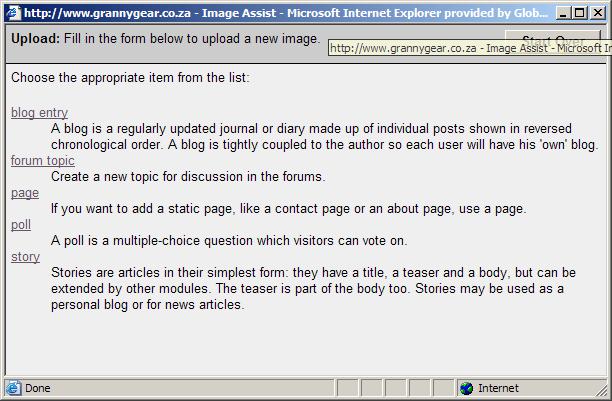
I'm not sure if i'm doing something wrong, but on the site i'm developing (www.grannygear.co.za) when I click the IMG_ASSIST button when creating a blog post, it brings up a window stating that no images are available (which is fine), but when I click the "Upload" button, the next window that opens has the "Create content" page contents.
See the file attachment for more info.
Strange behaviour here.
Once I get img_assist working on its own, I will start trying to get tinymce to work.
Thanks for the assistance!
jacauc

Comments
Comment #1
nevets commentedActually you are seeing the correct behaviour. img_assist uses the image module to actually add the image (hence the create content page). If you add the image using that form you will then be able to insert it with the img_assist module.
Comment #2
benshell commentedActually, that shouldn't be happening. I've never seen that happen before, but it looks like either you don't have the image module enabled, or your user account doesn't have permission to create images. "Image" isn't even showing up in that list, which is probably why you're seeing the list.
I just added a couple more checks to img_assist to verify that the image module is enabled and the active user has permission to upload images. Hopefully this will at least result in a helpful message when this situation occurs.
Comment #3
sunAttached screenshot clearly shows that image module is either not installed or the current user has not the access permissions to create images.
I'm wondering if img_assist accounts for user access rights to create images in front of displaying the upload button.
Hm..., seems so:
img_assist.module:489