Problem/Motivation
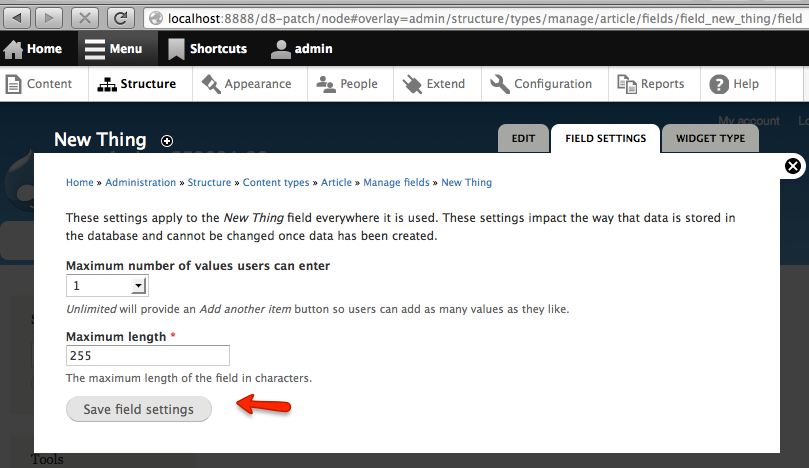
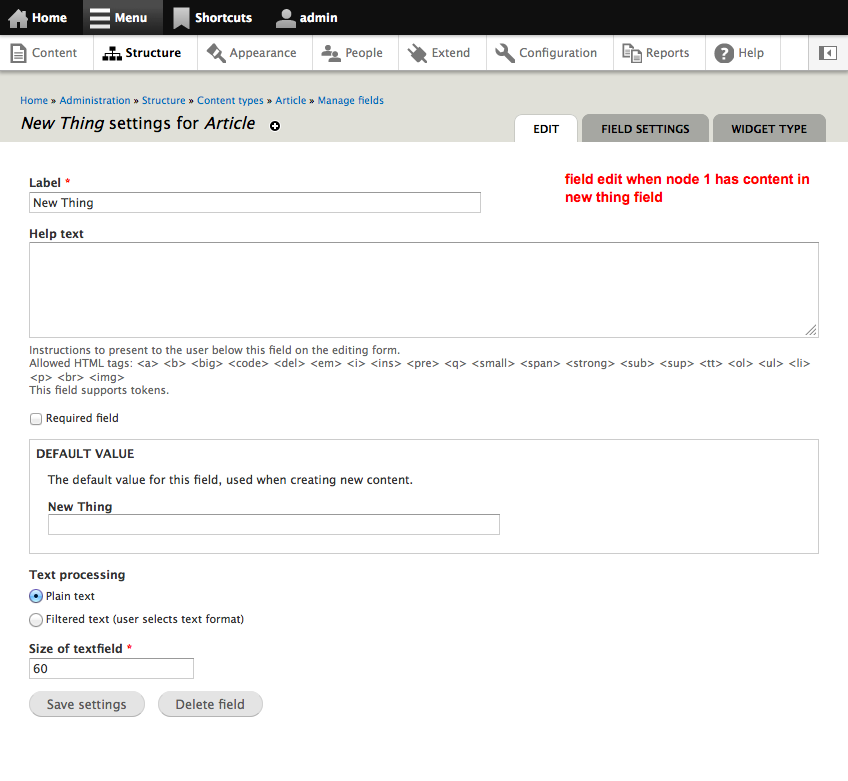
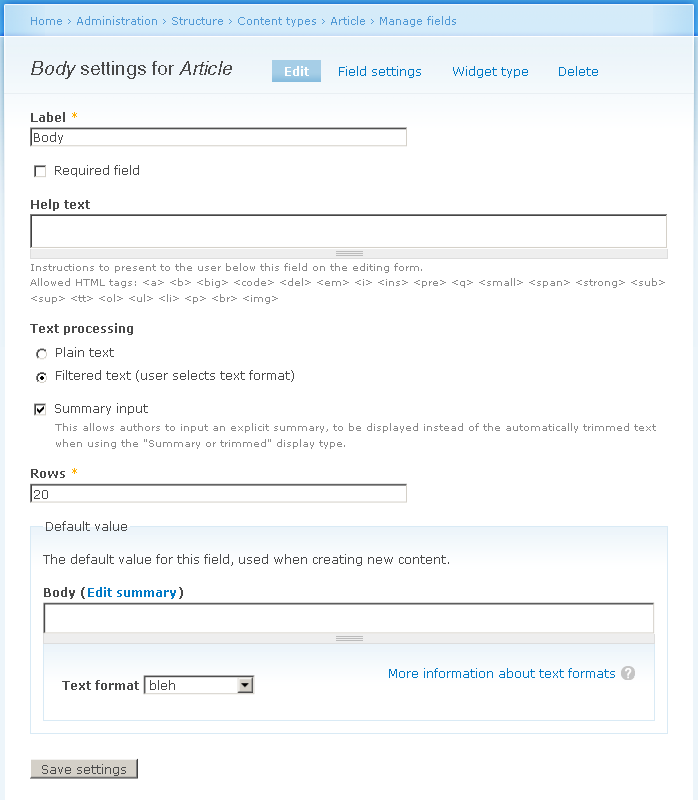
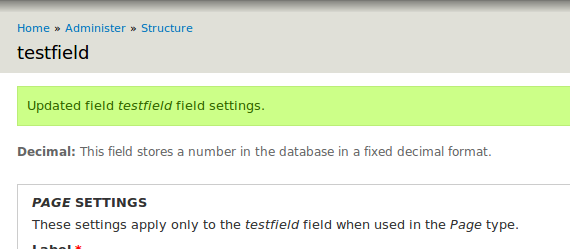
This is a breakout issue from #516138-139: Move CCK HEAD in core. The first screen upon adding a field is confusing, given that you are sent into field settings which may or may not have anything editable, and then still need to complete another screen. Steps to reproduce:
- add a field to the article content type
- you got redirected to a page with settings for the field
- BUT the field may not have global settings, and even though we are apparently under the Article content type (see page title), Article specific settings are not displayed either
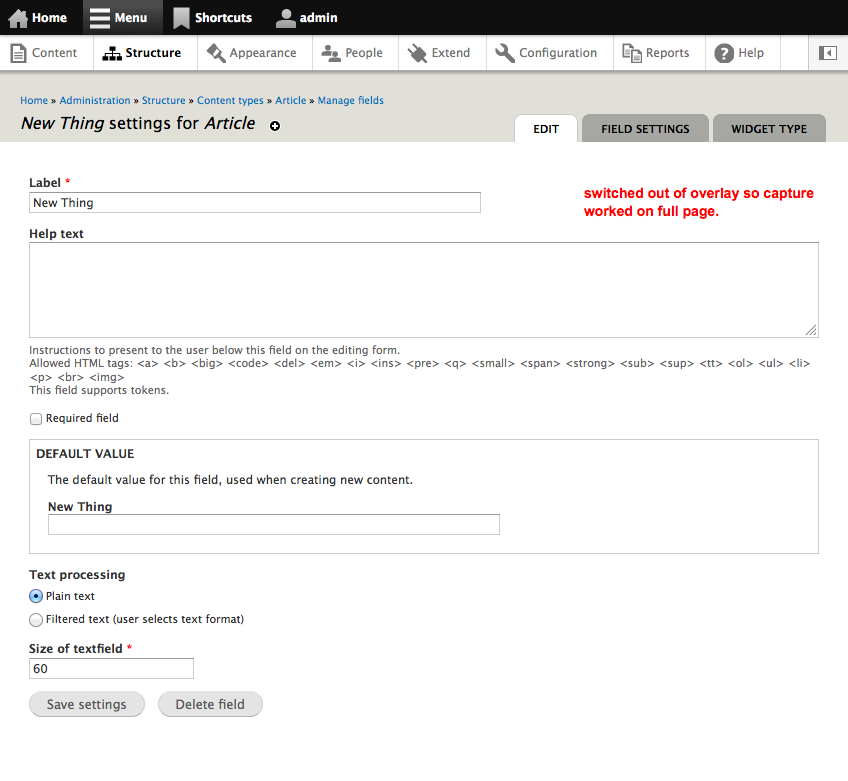
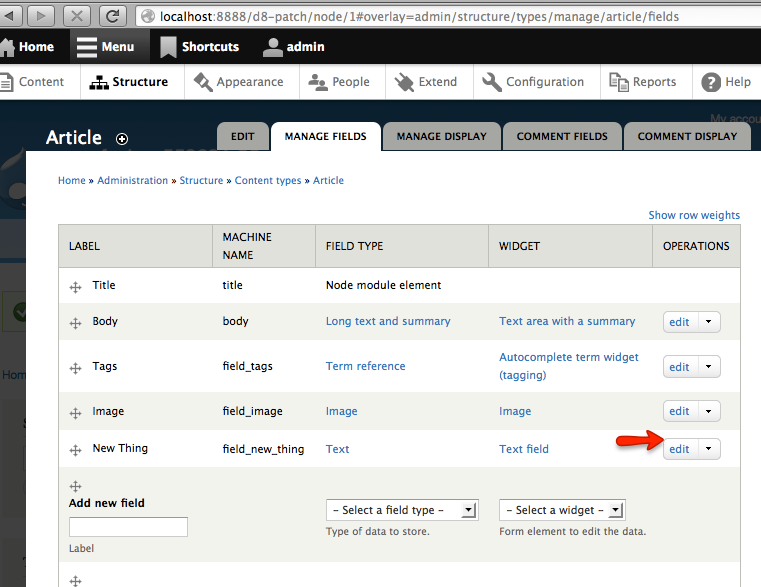
- go to manage fields again and to edit the particular field and now you get both Article specific settings and actual global settings (which in the previous screen were said to be nonexistent)
Proposed resolution
Display field settings right away:


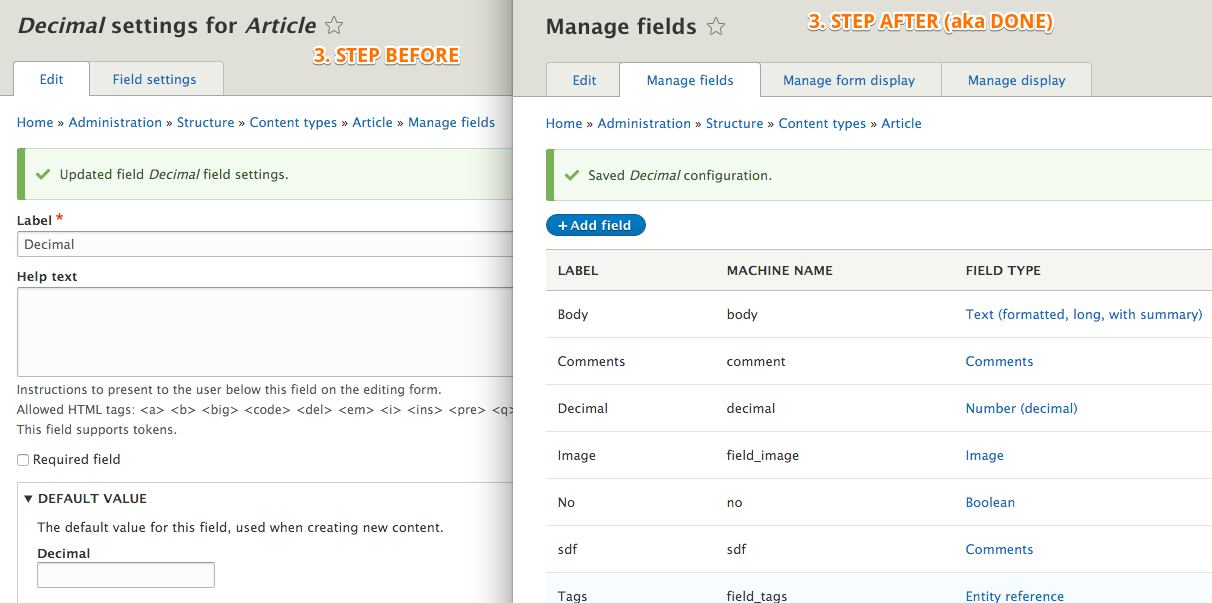
Remaining tasks
Ensure we want to do this. Fix tests. Fix any outstanding problems.
User interface changes
See proposed resolution.
API changes
Maybe, depending on extent of UI change needed.
Data model changes
None.


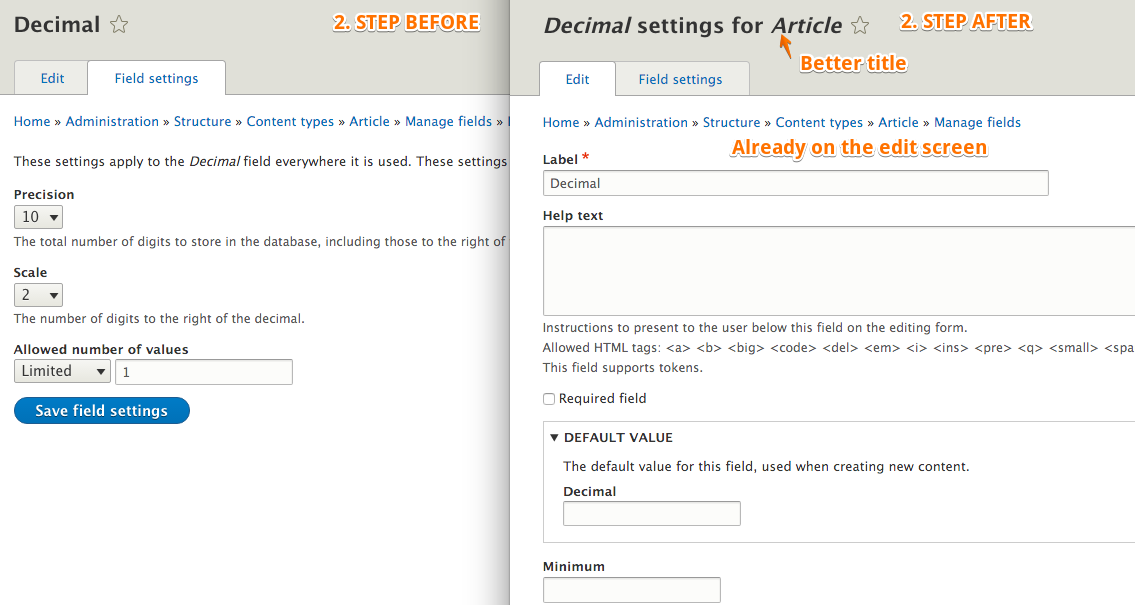
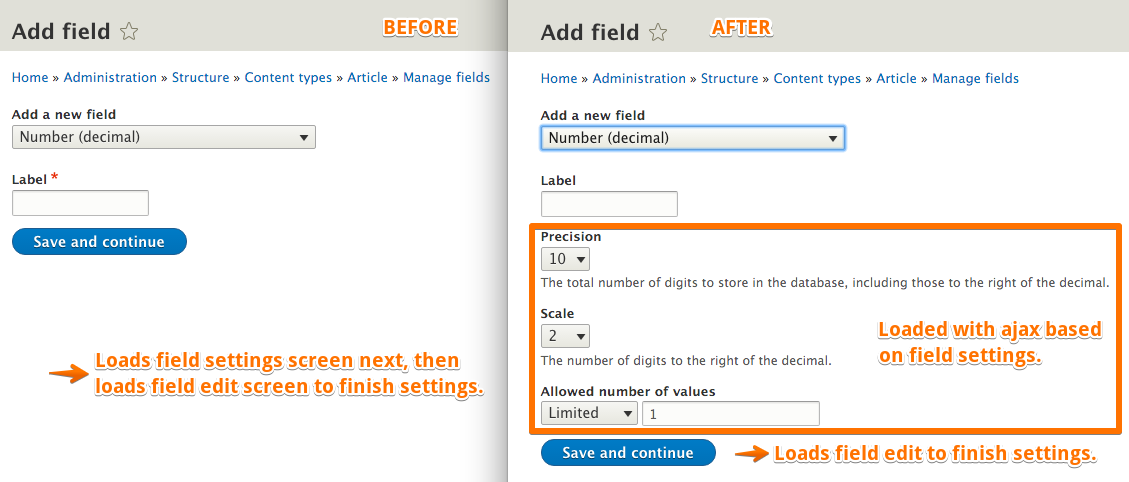


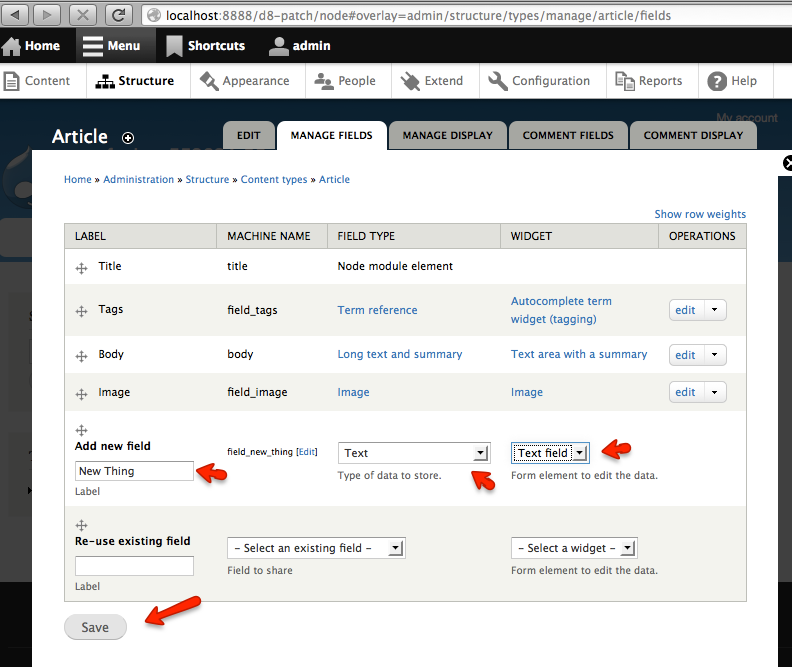






Comments
Comment #1
yched commentedComment #2
lambic commentedI'm attaching a patch to fix the title issue, but ideally the first screen should be skipped completely when there are no applicable settings.
Comment #3
lambic commentedComment #5
lambic commentedrerolled patch
Comment #6
lambic commentedComment #7
Bojhan commentedSorry, but requires screenshot
Comment #8
dave reidLet's also remove that check_plain() w/ drupal_set_title() since it would be run through that function twice.
Comment #9
lambic commentedcheck_plain() removed.
Comment #10
Bojhan commented@lambic How can you not make a screenshot, with check_plain() removed? It should be beautiful now :P
Comment #11
yched commentedI might be missing something, but I don't see where $instance['title'] would come from ?
Comment #12
lambic commentedfinally got around to screenshots:
Comment #13
lisarex commentedApplied the patch in #9 and this a definite improvement.
Comment #14
MichaelCole commented#9: 552604.patch queued for re-testing.
Comment #18
webchickBack looking at this workflow again after awhile, I really think this is a bad enough problem we ought to see if we can do something to smooth it out before release. What, I don't really know, since it's quite late. But while it might make sense to Field API folks why adding a field results in two settings screens shown right after another, the second with exactly the same options as the first (only at the bottom this time for extra pizazz!), I can assure you that no one else on the entire planet will understand why this happens.
Over at #867968: Field UI settings workflow is dumb, Bojhan writes:
To me, #4 - the fact that there are two settings pages, with no remotely obvious difference between the two - is the biggest UX wtf here. I do not understand why the first one is even needed, since presumably if I navigated away from the first settings form without saving it, my entire site would not explode, which means that Field API must be doing something smart under the hood in terms of defaults. But the rest of those sound good, too. Separate issues might make sense, but let's come up with a plan first.
Can someone remind me again why we have two settings pages in the first place, and can't just immediately show the widget configuration form assuming the defaults from the field?
Comment #19
yched commentedSigh. I'm already buried deep down in #616240: Make Field UI screens extensible from contrib - part II ...
Comment #20
yched commentedPart of the issue is #821390: Fields usable before all steps to create them are completed. : The forms you go through when creating a field are in fact just the edit forms for the field and the instance. You're editing a field that has been created with default settings and properties the moment you pressed 'Save' on the first screen ('Manage fields')
Comment #21
webchickYep, agreed there on the edit form thing. So forcing users through this workflow is really awkward, as we don't do this elsewhere in core (congratulations, you just created something! here, now edit its settings. and now edit MORE of its settings!). I would say just ditch the redirection to the settings forms altogether except for the fact that it's not at all clear that clicking a link titled "Autocomplete term widget (tagging)" will take you to a settings form, so I'm not sure how someone would ever find their way back there (actually, that's true even now).
What was the reason again that we can't just stick all of the settings on admin/structure/types/manage/article/fields/field_tags like it was with CCK, instead of having 3 separate settings pages? Then that at least would mesh better with our existing UX elsewhere, which is "to change something's settings, click the edit link next to it".
Comment #22
yched commented- separate form to change the widget type:
Because the current widget has an effect on the content of the instance settings - back then #ajax was not where it is today.
This being said, I've been thinking lately that we could let users pick and change the widget with a select dropdown straight from the 'Manage fields' table, rather than linking to a separate form that has a single select.
- separate form for field settings:
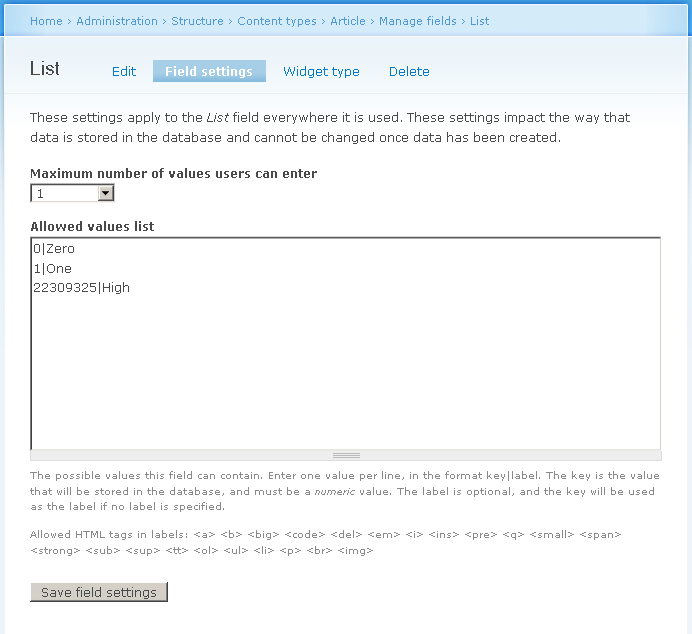
Because in D6 everybody screamed that the one-form-including-field-and-instance-settings was too damn big and scary.
Also, in D7, with storage abstraction niceties, some *field* settings (the ones that would affect the schema) cannot be changed after the field creation. While you can change anything at the instance level (doesn't affect schema anyway).
This being said, when doing the initial port of D7 CCK in contrib, Karen left a copy of the 'field' settings form at the bottom of the instance settings form, and this was left as is in #516138: Move CCK HEAD in core...
I've been willing to write a patch to remove that bottom 'field settings' fieldset for weeks :-/.
Also of note:
The 'instance settings' form actually contains
- widget settings, that only affect the how the field is edited, and which can vary depending on the selected widget
- and instance settings : properties of the field that can vary from a content type to the other (required, label, allowed file extensions...), that will be there no matter what the widget)
Those two garbled and intertwined in the same fieldset.
While working on #516138: Move CCK HEAD in core, I advocated for a clearer separation of the two, but quicksketch voiced against.
Comment #23
webchickCool, thanks for the brain-dump, yched. I'll do some thinkering.
Anyone else, feel free to chime in with suggestions, too.
Comment #24
yched commentedThx webchick, much appreciated :-)
Comment #25
sunProbably not of much help here, but I think:
+1 for clearly separating field from instance from widget settings. If there's a technical design concept behind it, then it doesn't make sense to try to hide that concept in the UI. First source of confusion.
+1 for either directly jumping to instance settings or back to "Manage fields" overview page after creation. The field settings page is the least interesting, and changing configuration options most probably is a rare action anyway, as you're performing site-wide changes to the field.
In general, I think that we badly need to clarify the on-screen tips and descriptions, so as to make users understand when they ought to re-use an existing field, and in which common cases it isn't really a good idea. I'm struggling myself in trying to explain it.
+1 for more #ajax. However, given that the other ajaxified field formatter settings patch was relatively simple, we would have to start with "ideal world mockups" here.
Comment #26
sun.core commentedCan we distill what's still possible to do for D7? Some of the sub-issues raised here are indeed major, some others are too late for D7.
Comment #27
naught101 commentedsubscribe
Comment #28
sunRemove confusion.
Comment #29
sunAdditionally resolving:
Comment #30
sunComment #32
webchickMuch as I would love to say otherwise, I honestly don't think we can do anything about this in D7 now. We're post-RC. :(
Comment #33
sunI'd agree, if it wouldn't be technically, fundamentally wrong to expose the field settings form on the instance settings form. Most field settings of most fields cannot be (and must not be) changed, so exposing the field settings on that form in the first place makes absolutely no sense at all.
...not to mention that, during debugging of the List field patch just recently, @grendzy reported that you *can* change field settings on the instance settings form without getting a form error... (rather off-topic - actually needs to be a separate issue, because, regardless of where the field settings are getting exposed, we need to ensure that they cannot be changed)
Comment #34
webchickIs the patch you have uploaded reviewable? (it's failing tests but not sure if those are academic failures or horrible problems failures.) I'd need to evaluate the UI impact to make a call on this, I think. If the patch isn't reviewable, I'd be fine with just a general old vs. new workflow description, too.
Comment #35
yched commented(if webchick approves this, I'm all for it - thanks sun !)
Comment #36
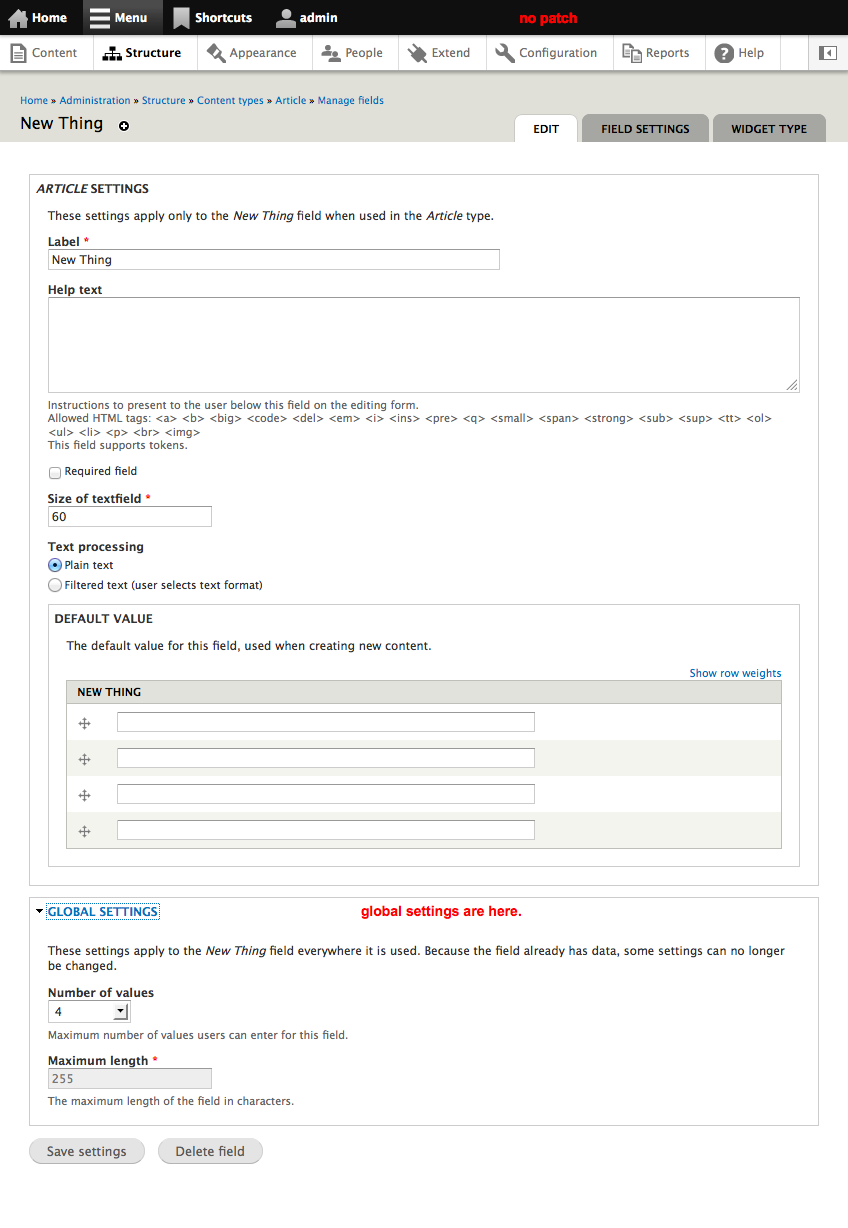
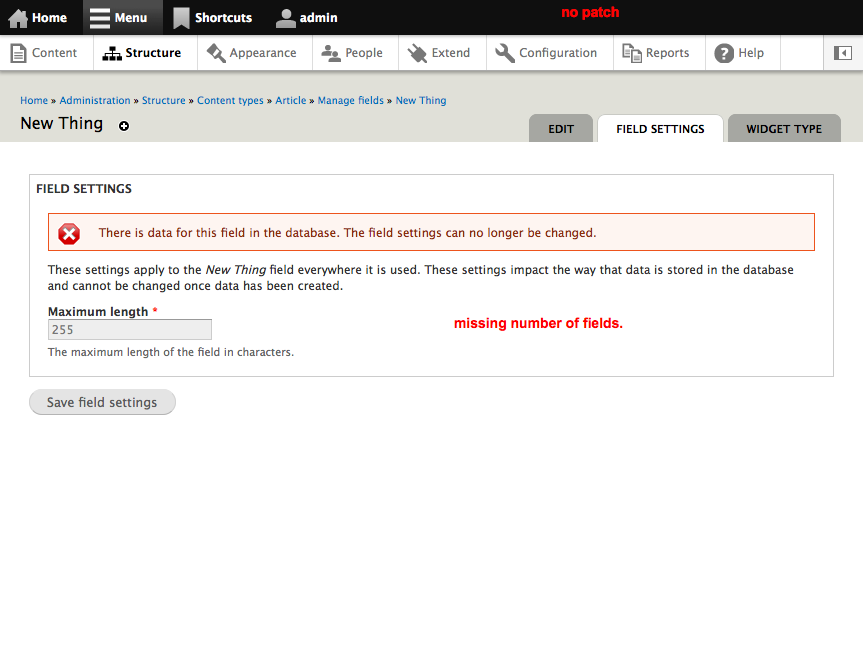
sunThe patch works and can be applied. The test failures only seem to be caused by test code that expects the field settings on the instance settings form, so fixing those should be relatively easy.
Comment #37
sun@yched: Manual testing of this patch reveals that the field settings on the instance settings form currently contain the "Number of values" configuration option... which is not contained in the dedicated field settings form... so does that belong into field settings or instance settings? ;)
Comment #38
yched commentedCardinality is a field-level setting. it does belong in the 'field settings' form.
Comment #39
sunAlright, so:
1) Moved the "Maximum number of values" setting that was previously hard-coded into the instance settings form into the field settings form, where it's supposed to be.
2) Due to 1), now it makes sense to always show the field settings form as first step after creating a new field, even when the field itself has no settings. Thus, reverted that change from the previous patch and added an inline comment instead.
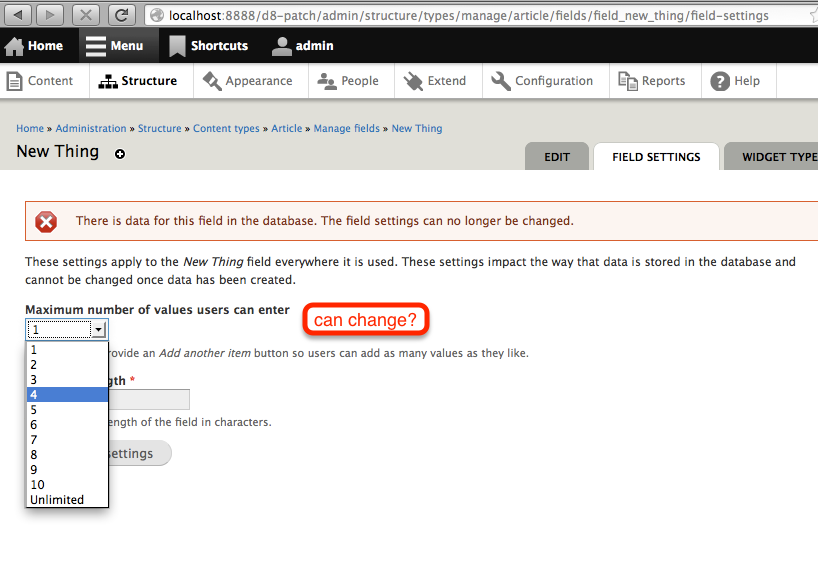
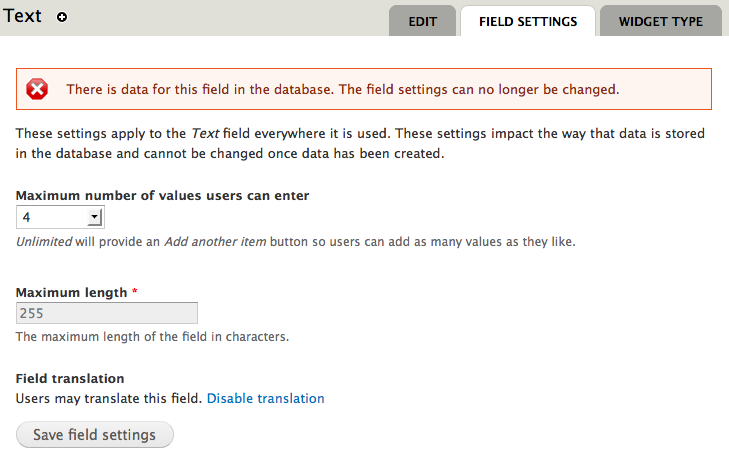
The field settings form behavior for fields that have stored data already is a bit weird, as it outputs a message that field settings can no longer be changed, but actually does not prevent the form from submitting. That's a different problem and should be tackled in a separate issue.
Comment #41
yched commentedshould take care of a few fails.
Comment #43
sunFixed some more tests.
Comment #44
sunScreenshots (with patch applied).
Comment #45
sunSorry, screenshots in #44 actually map to attached patch.
Comment #46
sun#45: drupal.field-instance-settings.45.patch queued for re-testing.
Comment #47
yched commentedGave it a final test and code review, this is good to go.
Summary :
In current HEAD, Field-level settings are present in both
- The 'Field settings' page, that displays a warning that some settings are not changeable any more when the field has data. The 'Number of values' select dropdown is missing there.
- In a separate fieldset at the bottom of the 'Instance settings' page. The 'Number of values' property is displayed, but not the warning about unchangeable settings. Attempts to change an 'unchangeable setting' (in case the field type module fails to disable the corresponding form element) are not detected there and can produce unpredictable effects.
The patch :
- removes the 'Field settings' fieldset at the bottom of 'Instance settings' page. Field settings are on 'Field settings', instance settings are on 'Instance settings'.
- adds back the missing 'Number of values' select in the 'Field settings' page. This also prevents the WTF effect when creating a field with a type that has no settings, and stumbling on a 'Field settings' step with nothing to set.
Comment #48
webchickSo I spent about an hour with this patch tonight with backup from sun on IRC.
Things I like about this patch:
- There are no longer two places to configure fields. That was dumb.
- One of said places is no longer NOT validated. That was really dumb.
Things I don't like about this patch:
- It doesn't solve the actual issue. Adding a new field still leads to a confusing "Field settings" form all by itself. And now it's worse because we have another confusing "Field instance" form all by itself and we force site builders to understand Field API internals enough to know the difference.
- It moves around the cardinality setting which breaks UI freeze, several books, and various documentation, not to mention 1000s of existing D7 sites who expect to find that setting on the second form and not the first, and have since CCK D5. (or maybe even 4.7)
- Because it moves this setting, which can always be changed, to a form that displays a "Settings here cannot be changed" error message after data is added to the field, it introduces a UX bug where instead of this message usually lying to people, now it will always lie to them.
So on the whole, it's about a wash. :\
This is what I would really, really like us to do instead:
1. Actually remove the field settings form. It's not needed. The field gets created in the database with default schema values without me ever having to save that form.
2. Add validation to the field settings form that's living at the bottom of the field instance form, along with all the other settings. It's definitely a nasty bug that that isn't happening.
3. Instead of displaying that error string as a non-targeted dsm('error') that lies half the time, append it to the field description instead in the case where it's a disabled field.
When I suggested doing this in IRC, sun said that the only way we could do this is to also cram in the widget settings on the same form, which would be another big change and likely one better suited for D8. Though this might be nice, I actually disagree that the widget settings form needs to move. Why? Because when you add a field, the "field stuff" and the "widget stuff" are already two separate concepts in the user's mind:
So two separate links going to two separate settings forms kind of makes sense. At least in the "what we can reasonably do for D7" world. (In D8 we should probably re-do this entire thing to be more WYSIWYG or... something else better.)
What they are not exposed to here though is the difference between a "field" and a "field instance". And this level of detail is totally irrelevant for them to be exposed to until much later in their learning process when they discover you can re-use fields among bundles and they can come up with an actual use case for doing that. I think of all the Drupal sites I've ever built, I've used this feature maybe 5 times. So forcing this knowledge on hapless, non-Field API guru site builders who are still trying to wrap their heads around the fact that content types are "entities" and you can add "fields" to "entities" and here's what "fields" are is way, way too much. Hence the "major" priority of this issue, and hence why I don't like sun's fix. It only makes this problem worse.
Because, if you try and write hands-on instructions for a complete newbie on how to add a field to a node type in HEAD, you end up writing something like this:
1. Go to admin/structure/types and click "manage fields" next to "Basic page".
2. Under "Add new field," fill in the following values, and click Save:
- Label: Number field
- Name: number
- Field type: Decimal
- Widget: Text
3. At the first field settings form, choose a precision value of 16 and click Save field settings
4. At the second field settings form, enter the allowed values of "1.030" and "3.203" and click Save settings
It's really, really sad.
If there's only two forms for them to care about here -- one for "everything to do with fields" and one for "everything to do with widgets" -- it radically simplifies things and also matches more closely to what users are used to from CCK.
Comment #49
webchickOk, after a detailed IRC session, here's the plan sun and yched and I agreed to.
The changes #48 asks for is too much for D7 as the UI change would be pretty drastic and yched has concerns with it. Similarly the patch in #45, though technically correct, also alters the UI too much for D7 -- the "all in one" field settings form gets removed, which many users depend on since it's been there since early versions of CCK.
So we've decided to (mostly) respect UI freeze, and scale back to only fix the actual bugs in this issue, which means:
1. Add the cardinality selector to the solo field settings form. This is a field-level setting; changing it once will change it everywhere, so it makes sense to show it with the rest of the field-level settings.
2. Fix the lack of validation on the "all in one" field settings form. If there are fields that need to be "locked" once the field has data in it, they should be #disabled.
3. Fix the just plain wrong message that says none of the field settings values are changeable once the field has data in it. Cardinality, for example, will always be changeable with field_sql_storage. Replace with a more loosey-goosey worded one like "Because this field has data in it, some of its settings may be locked and unchangeable." This message needs to appear both at the top of the field settings form and on top of the fieldset in field instance form.
Comment #50
karens commentedYeah. The original idea was to have a field settings form that had only the unchangeable stuff on it and show only the changeable stuff on the regular edit form, but when that was created there was no way to differentiate between them, so *temporarily* they were shown in both places. And that never got fixed. And the message about not changing settings would have made sense if it was done that way -- you can't change the stuff on the unchangeable form, you can change the stuff on the regular edit form. And since the cardinality is changeable, it went on the regular edit form.
I also thought it would be nice to add information about the widget to the manage fields screen, which we don't have in D6, with a link to change the widget, and remove that part from the global edit form.
So that's more or less the 'why it was done this way' originally.
Comment #51
karens commentedIn other words, the idea was to not say anything about 'field settings' or 'instance settings', just differentiate based on settings that can or cannot later be changed, with all the settings that are changeable and non-problematic on the big edit form and the others tucked away into the field and widget forms.
Comment #52
webchickHm. Well #50 makes a heck of a lot of sense. So basically just remove the non-changeable fields from the all-in-one form and make the distinction between the two forms "set 'em up once and never change 'em" vs. "configure 'em any time" rather than "field settings" vs. "field instance settings"? Cool!
I think the problem though from talking to yched is that we don't have an easy, standard way of knowing what fields are changeable and what are not. It'd be the responsibility of the field module author to get this right, and they probably won't. Hence the confusingly worded error message. And some are not quite black and white. For example, list items' allowed values. It's fine to add new ones after the field has data, but not ok to change the keys of a list item that has data associated with it. (Or so is my understanding.)
Still though, Karen's approach is even easier if we can figure out a way to do it.
Comment #53
mlncn commentedSubscribing. I have read the entire issue, but i'm not clear on if this will / can result in removing the completely pointless first Field settings page when there are no field settings.
Namely, this screen:
Comment #54
webchickIt does not remove it, no. :( I tried to summarize in #48.
And this issue is fully D8 now, although a D7 appropriate patch (separate issue) would be fixing the validation of the second copy of the field settings form on the instance settings page.
Comment #55
Shai commentedsub
Comment #56
David_Rothstein commentedFor anyone who's interested, I implemented @webchick's preferred idea in #48 (getting rid of the separate "field settings" form entirely) as part of the Backports module in Drupal 7.
See: #1277270: Remove the separate field settings page
The code as written probably isn't that useful for an eventual Drupal 8 patch, but I thought I'd mention it anyway. (It also may be useful if anyone wants to click around and see what the UI would look like if we wind up going in that direction here.)
Comment #57
David_Rothstein commentedIn my own testing of it, it mostly seemed to work well, but I saw some issues when creating List fields.
There, the current workflow of having two forms actually makes a lot of sense. On the first form, you enter the allowed values (which is basically the most important thing you want to focus on when adding a List field), and then when you get to the second form they are already saved, which means that you are able to select one of them in the "default value" dropdown if you want to.
When everything is on one page, though, the allowed values are hidden down at the bottom of the form, and furthermore, since they don't exist yet, you have no options that you can choose from for the "default value". You have to enter the allowed values at the bottom of the form, save the field, then go back and re-edit if you want to set a default value. This is not a great user experience.
Comment #58
karens commentedThere are other kinds of fields where decisions made on the first form affect what appears on the second, esp anywhere that those field settings affect the choices made later (or when those choices affect the way the default value is constructed). Also we have some settings that can later be changed and some that cannot, and it makes sense to have them in separate places, and for the unchangeable settings to be somewhat hidden by not being on the main edit form. And the other issue is that the main edit form is already really too long for good UX, I don't think we want to make it longer by adding back all the things that got moved off of it.
I think the fundamental problems are 1) some fields have no settings and we should really not make a stop on the settings form when a new field is created if there is nothing to do/choose, 2) some values are showing up in two places but they should show up in only one, and 3) The first form should really be a somewhat hidden form that is limited to values that cannot or should not be altered after there is data and the second form, which is easly discovered, should include values that can safely be changed even if there is already data.
Comment #59
webchickCould these types of dependency problems not be mitigated with the use of AJAX or the #states system, though?
Comment #60
David_Rothstein commentedYes, AJAX could fix that probably. But there's the question of order too (what fields should appear next to each other to make the relationships clear).
It's worth pointing out that any problem along these lines is actually a pre-existing bug/issue, just one that would be more noticeable after this change. (Because even in D7, for example, after a field is created you can go back and change its allowed values later, and the default value options will not update to reflect those until the next page load.)
Comment #61
Bojhan commentedI am not quite sure what to review here?
Comment #62
sunWe absolutely need to get this resolved for D8.
Attached patch is a plain re-roll of #45 against HEAD, which obviously had many conflicts. I didn't test it manually yet.
Comment #64
tim.plunkettI've added this to #1770720: [META] Gradual changes to Field UI and am demoting.
Comment #65
gábor hojtsyThis would also solve / help solve a usability WTF for translatable fields, since you cannot actually set the translatability of a field when setting it up initially due to certain things not appearing in the form :/ #1831608: Show or hide the "Make field translatable" checkbox on the add field form depending on translatability was marked postponed on this one.
Comment #66
luksakI rerolled the patch and fixed the test issues.
Here is how the UI looks like now:
1. Choose field name and type (nothing has changed)
2. Make global field settings (All global settings are available now)
3. Make field instance settings
4. Editing global settings after it contains data displays a message that doesn't make sense anymore since global values can be changed.
Local tasks wording
I find the wording of the tabs misleading. A first suggestion which does make it clear to me, but maybe not understandable for other people:
"Edit" -> "Instance settings"
"Field settings" -> "Global settings"
Comment #67
luksakComment #69
Bojhan commented@Lukas Awesome that you are working on this! It looks like a good solution, I would however like to split off this multilingual fix from what this issue is about. Because your solution doesn't really solve what this issue is about, could you perhaps open a new issue for your solution specifically?
Comment #70
gábor hojtsyOr just take this back to #1831608: Show or hide the "Make field translatable" checkbox on the add field form depending on translatability as-is.
Comment #71
karens commentedThere is a difference between things like the 'number of values' setting (which can be changed at any time, and things that affect the database storage (like the type and length of a field). The number of values can be changed at any time and it is wrong to indicate that it cannot. Other things cannot be changed later. In some cases it is physically possible to change them but a bad idea (you might mess up your data).
The most logical way to construct this is to make the first form things that should be set once and never changed and the second one things that can be changed any time. The problem is that the first form is used to create the field, which means you need to have all the field settings, including those that can be changed later. So the first form has to ask what it needs to know to create the field, not just for things that cannot be later changed.
The second form can be more flexible. There we can display only things that can be changed (which includes the number of values). The problem here is that we don't have a good way to know which field values can be changed because we never implemented an API that would tell us that. I'm not sure we can fix this form without fixing that underlying problem.
Comment #72
sunHm. The interdiff in #66 is actually not complete. I've manually constructed an interdiff against #62.
The big difference seems to be that #66 introduces an entirely new form submit handler, whereas earlier patches did not have to do that. Was there any particular reason for that?
Comment #73
sunThat additional submit handler didn't appear to be necessary.
Attached is a straight re-roll of #62 against HEAD.
Also attaching an interdiff against #66.
@Lukas von Blarer:
I somewhat like your suggestion of changing the tab titles to "Instance settings" and "Global settings". However, I think that should happen in a separate issue.
@KarenS:
Yes, we're definitely missing an API there. However, that doesn't really change the fact that the global field settings really shouldn't be exposed on the instance edit form, since touching those performs changes to something completely else than the context of the form suggests (editing instance settings).
Comment #75
berdir@sun: We've talked quite a bit about this in IRC and our sprint, the problem is that there are multiple possible directions and according to Bohjan, adding more things to the initial form is the oppositive of what they want. ( Which is also the opposite of #1831608: Show or hide the "Make field translatable" checkbox on the add field form depending on translatability, so consider me confused).
I totally agree with you that this is technically the correct solution, certainly compared to the mix that we have right now, but it seems what the UX team wants is to merge those two settings pages into one.
This was done to implement the mentioned issue as a proof of concept. Which also required the $form['#field'] change from above.
That said, this should probably be done in that issue, as a follow-up, as it will also require documentation updates and so on, which would make this patch unecessarly bigger. *If* this issue is actually implement like this. If not, then that other issue might become irrelevant anyway.
@KarenS: Apart from what sun said, the field types are also very inconsistent in regards to what they allow/prevent. Changing the cardinality to a lower value than you have entities with number of items is allowed, e.g. removing allowed values that are used is not (which in most real world examples that I've encountered - during development, is a huge pain, as it's not even possible through the API, e.g. with features).
Comment #76
luksakIn my opinion there are three types of settings for a field:
Global settings which can't be changed after field creation (data structure)
Global stetting that can be changed after field creation but and can be potentially destructive
Number of values
Translation
Field specific setting E.g.: File field upload destination
Field instance settings
Label
Help text
Required
Field widget (I don't see the requirement of that being on a separate page)
Field specific setting E.g.: File field upload destination
I think we should group the settings similar to this and present them on one page visually clrearly separated with fieldsets or similar.
Comment #77
yched commentedI fully agree that the current Field UI organisation is not optimal.
However, do we really want to reshuffle this now (which IMO can easily take another couple 10s of comments, between those that want to split and those that want to merge), and start over again when core has an official Popups API that we're officially allowed to use ?
Or start to come up with a solution that works well with popups ?
Comment #78
sunre #75:
Mmm, I'm confused — this patch here does not "add more things" to the initial form. It only removes the form elements from the second form, which are on the initial form already.
In short, the difference is this:
Before:
1) Field settings form
2) Widget settings form
3) Instance AND Field settings form
After:
1) Field settings form
2) Widget settings form
3) Instance settings form
Whereas 3) is especially confusing when adding a new instance by re-using an existing field — the instance settings form suggests that you'd be able to edit the global field settings, too (I'm allowed and supposed to change the controls that I'm presented with, right?) and gives no indication or whatsoever that touching those controls will have a site-wide impact on the field wherever it is used.
The global field settings controls should not be exposed on the instance settings form to begin with.
That is the sole and only purpose of this issue since the beginning. This was originally discovered very late in the D7 cycle, and it was deemed to be too late to change it for D7 (#49). Very soon, we are in the identical situation for D8.
For the sake of sanity and doing pragmatic progress, let's please, please, please not make that same mistake again. :)
We can still completely revise this flow and do whatever we think would be nice, but let's please do that in a dedicated follow-up issue.
Comment #79
gábor hojtsyI think if we can do this simple fix quickly, then it would be great to get it in ASAP and then work on even more rework later. Leaving it in the D7 stage would be pretty sad. If we are hooked up here discussing how to do it for a non-trivial time, than it is not worth it to do in multiple layers (IF somehow the better improvement happens sometime).
Comment #80
yched commentedRight, sorry, got confused by some comments above.
#78 is a plan I'm perfectly fine with.
Comment #81
sunFixed all test failures.
Comment #82
berdir@sun
- The form that I meant is the one you see when adding new fields (see issue title :)). Right now, you often have very few or no settings at all there, this patch means that all field settings show up there. Bohjan wants to get rid of that step completely.
- Make sure you test your changes with translation_entity.module enabled. Without changing it, it means that the setting which it adds shows up outside of the fieldset on the instance settings form.
Comment #83
sun1) Yeah, understood. :) There's room for rethinking this user interface entirely. But let's first make sure that we don't continue the current weirdness. :)
2) Thanks for the pointer — manually tested that and adjusted it.
Comment #84
berdir1. In case I wasn't clear. I agree 100% with you. And I tried to explain it to Bohjan but wasn't very successful :). He's the person you need to convince that it makes sense to do this as a first step and *then* try to improve it further.
Comment #85
sun@Bojhan: I hope we can agree on a pragmatic intermediary commit to facilitate progress. :) I'm waiting for this clean-up to happen since August 2010 (#25) and I wouldn't like to see us run into the same pitfall as with D7. ;) It almost looks like it would be best to retain this issue for further mockups and discussions afterwards, since there's plethora of background, technical, and usability information in the above comments already.
Comment #86
Bojhan commented@sun I dont get the solution, and or how it moves us closer to solving this issue. All it seems to do is change some labels, and trow some fields around. It probably doesn't make it worse, so from that pov I am fine with committing it.
Comment #87
swentel commentedI like the change, it cleanly separates the configuration on the page it needs to be - granted, probably more on technical reasons (fields vs instances vs widget), but then again, it makes sense. We can always clean up more in follow ups, so let's get this in!
Comment #88
sun#83: drupal8.field-instance-settings.83.patch queued for re-testing.
Comment #89
yesct commentedUpdating the issue summary might make this easier for a committer to evaluate. (It was RTBC since Nov 9 and has not gotten in) Anyone up for re-doing the issue summary?
Comment #90
sun#83: drupal8.field-instance-settings.83.patch queued for re-testing.
Comment #91
webchickShucks. This one no longer applies due to the details patch. REALLY happy to see it RTBC though! Can we get a quick re-roll?
Comment #92
swentel commentedHere's the re-roll, should be fine I think.
Comment #94
swentel commented#92: 552604-92.patch queued for re-testing.
Comment #95
swentel commentedTest passes on my local machine and the failing one was in views which really doesn't have anything todo with this patch.
Comment #96
swentel commentedAnd moving back to RTBC
Comment #97
yesct commentedmanual testing, screenshots, trying to understand the scope of the (proposed) fix
00a. screen shots with 8.x edit field (shows all global settings in a collapsed/expanded fieldset at bottom)
00b. and 8.x field settings (only some of the global settings, no number of fields for example, has warning cannot change these)
with patch
01. creating a field on manage fields
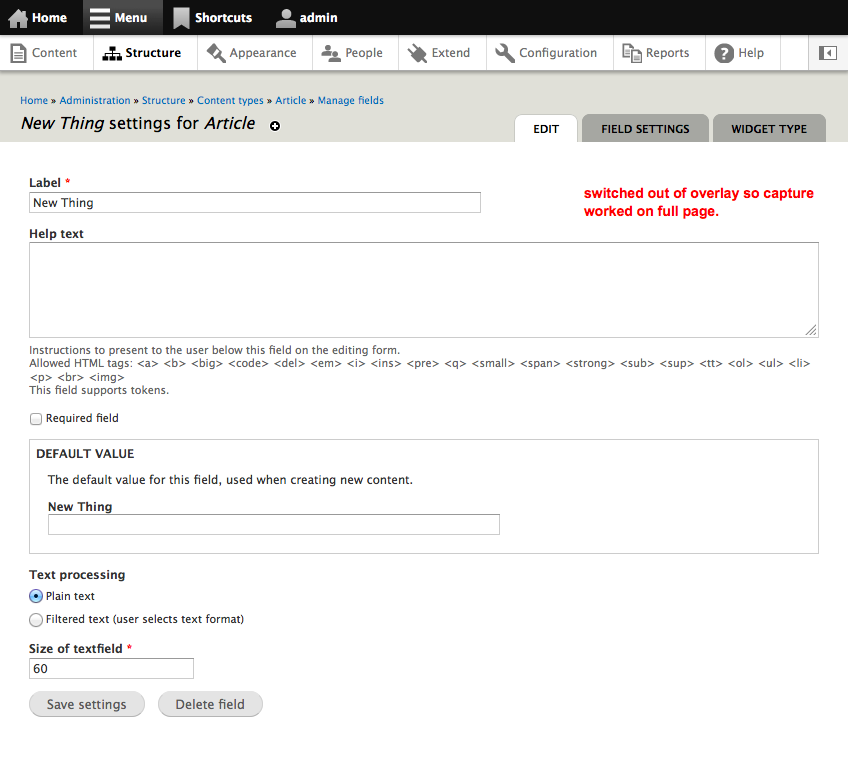
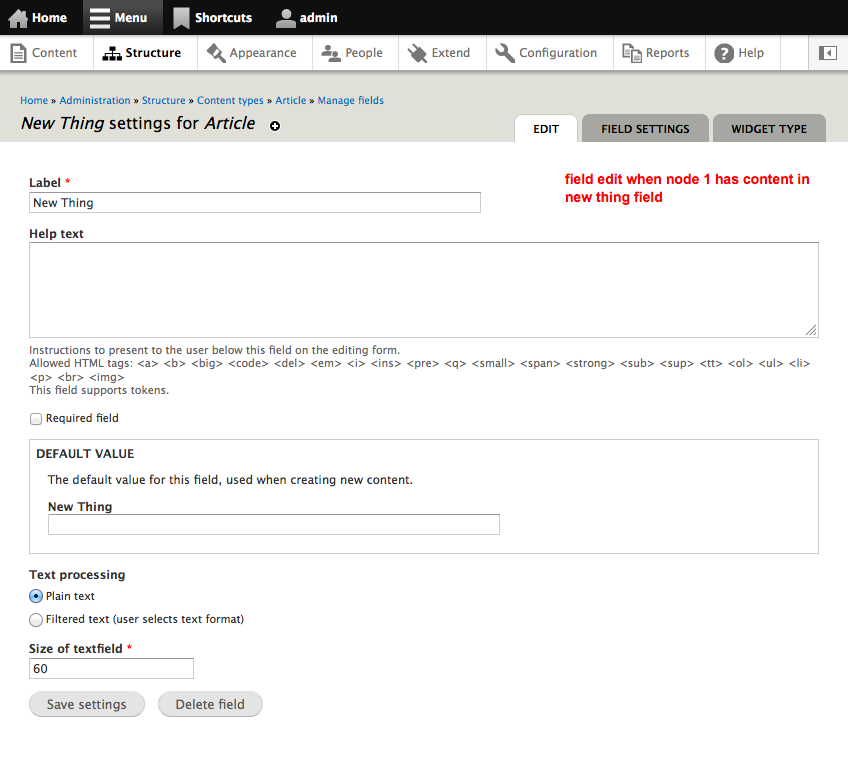
02. after save global field settings
03. non global settings edit field page
04. make a node with content in the field
05. mangage fields
06. edit field (shows just the settings that are not global, no global collapse/expand)
07. field settings (show all global settings, with wanrning cannot change. but can change them)
seems like plan is to fix this like that here.
then make follow-ups for remaining things to change, like:
fixing the red [edit: read->red] warning,
relabeling the tab to global settings..
were there any other follow-ups that need to be opened?
Comment #98
swentel commentedNeeds re-roll after #680546: Add a custom 'number of values' for 'multiple / multi-value' field. (e.g. nodereference, imagefield) got in - give me an hour.
Comment #99
swentel commentedRe-rolled.
Comment #100
yesct commentedI can't edit the issue summary, which is ok.
Here are the follow-up issues.
#1854990: Warning about global fields needs better words (follow-up to Adding new fields leads to a confusing "Field settings" form)
#1855002: "Field settings" tab needs renaming to "Field storage settings"
Comment #101
catchLooks like webchick's already given this a good, look, and it's had to be re-rolled a few times, so committed this while it still applies. Thanks!
Comment #102
yesct commentedthis commit (git checkout 08df7b0db2369bb) introduced #1872786: Can't change widget types
Comment #103
webchickThat is actually a bit more nefarious than mere notices; it prevents you from changing the widget type at all. Escalated to a critical.
Comment #104
David_Rothstein commentedAccording to #85 and others, this was only an intermediary commit and the issue should remain open. (Or at least, a new issue should be filed as a followup.)
Comment #105
yesct commentedRelated issues
Comment #106
yesct commentedrelated: #1876176: Be more accurate with field name when referencing shared field, make re-usable API to list shared locations
Comment #107
swentel commented@YesCT - I guess we can close this one now then with the new ones ?
Comment #108
David_Rothstein commentedWell, the main new issue that's needed (or the reason to keep this open) is for the fundamental usability issue that you still get redirected to a confusing Field Settings form (and confusing multi-step process involving fields vs. instances) in order to simply create a field.
So for example, #48 or other ideas mentioned above...
Comment #109
gábor hojtsyNot an API change anymore. Cleaning out the API changes proposed against Drupal 8.
Comment #110
tim.plunkettComment #111
amateescu commentedAfter #1963340: Change field UI so that adding a field is a separate task got committed, I started working on this one but I hit a roadblock with entity forms not being flexible enough for the use case of field_storage_config forms: #2399219: Allow entity form handlers to determine the entity object they need to work with. I'll resume the work and post a patch here when that issue is fixed.
Comment #112
andypost@amateescu please update summary with approach you trying to implement, the blocker is in
Comment #113
xjmIf this is blocked on #2446869: Convert the "Field storage edit" form to an actual entity form should it be postponed? Also holy cow at this issue; six years old. :)
Coming here from #1847596: Remove Taxonomy term reference field in favor of Entity reference, where it was suggested that this issue could resolve this problem, described in #261 of that issue:

That doesn't seem quite in the main scope here though, so maybe it should be a followup issue postponed on this one?
Comment #114
amateescu commentedSometimes I just get too busy working on stuff so I forget to document all the issue dependency chains I'm going through :/ But you're right, that specific problem should be solved in a followup to this issue.
Comment #115
xjmComment #116
jibran#2446869: Convert the "Field storage edit" form to an actual entity form is in.
Comment #117
amateescu commentedI worked a bit on this during the D8 accelerate sprint in London and since we're still in the beta phase and UIs are not frozen, I think it's still a good time to get it done.
Here's a patch that works and is ready for architectural reviews, I'm going to wait a bit for feedback before updating all the tests :)
Comment #118
amateescu commentedDiscussed the addition of labels to field storage configs with @alexpott and he feels that it's a a bit out of scope for this issue. I only added it because it makes it easier for the form embedding part, but we can also work around it somehow if needed.
Comment #119
amateescu commentedAlso discussed with @yched and he agreed that we shouldn't add labels to field storage config entities here, so I removed that part from the patch.
Comment #120
Bojhan commentedCan you explain what impact this has on UX? I dont want to just descope a important UX aspect, because we think it doesn't belong.
Comment #121
amateescu commented@Bojhan, the discussion about the label element doesn't have any impact on UX, it's still shown in the same place with the latest patch :)
Discussed this patch at length with @yched and he suggested the following improvements.
Note that there is still a bug in there which doesn't allow you to upload a default image for an image field, but I wanted to post the current work just in case someone wants to take it for a spin and do a UI/UX review.
Comment #122
gábor hojtsyGiven that many improvements in the field UI scene seem to depend on this, rerolled. Also looking at test results for once.
Comment #124
gábor hojtsyAdding some screenshots to the issue summary. Are we sure we want it to work this way still?
Comment #125
Bojhan commentedCan anyone explain to me why we can't have 2. on the same screen and just reload settings with AJAX when someone changes something above (and lock after creation)?
Comment #126
amateescu commented@Gábor Hojtsy, thanks a lot for the screenshots! They help a lot with reviewing the UI impact of this change :)
@Bojhan, if you mean step 2 from the 'after' screenshots, we can certainly do that, but it would be better suited for a followup so we can keep the patch here in a reviewable size.
Comment #127
gábor hojtsy@Bojhan: agreed with @amateescu, a first step here is to merge the two forms with the Ajax experience. We can merge the third one later if we believe that makes sense. Those two are currently on two separate tabs too later on when you edit the field, so that needs more consideration as well. The two forms currently merged are not appearing separately in the later flow so they don't pose such questions.
Comment #128
gábor hojtsy@amateescu do you have time/interest to help bring this up to passing again? :)
Comment #129
amateescu commented@Gábor Hojtsy, of course, that's why I kept it assigned to me. Just like you asked in #124, I'm waiting for a confirmation that we still want to do this given all the recent discussions around "the great Field UI overhaul" :)
Comment #130
Bojhan commentedOk, lets do this first step then.
Comment #131
gábor hojtsy@Bojhan: Thanks for the go-ahead :) @amateescu: can you take it forward? :)
Comment #132
amateescu commentedYup. Let's see how far these fixes take us.
Comment #134
jibranNo need to use
#attributewe can set#iddirectly forcontainer.Comment #135
berdirNo, we can't. That's an #ajax wrapper and must remain the same, #id has special handling that generates new unique ID's on ajax updates.
Comment #136
jibranYes, we can. :) I know this is an ajax form and it has to remain same all the time that is why in D7 theme_container or D8 template_preprocess_container doesn't pass it to drupal_html_id or Html::getUniqueId. This is a common misconception which we always miss,
containertype element supports#idfor exactly same reason so that it can't be changed.Comment #137
amateescu commentedFixed the rest of the tests and #134.
Comment #139
amateescu commentedA debugging change crept up in there :/
Comment #140
jibranI tested it on all the available field_ui add-form in standard profile for user ER, content ER, comment field and text field it works like a charm. This is RTBC imo but let the usability team review this.
We should add comments explaining these.
Comment #141
amateescu commentedNote that there's still one bug mentioned at the end of #121 that we need to fix. I'll try to track it down in a couple of days but anyone is welcome to give it a try before then :)
Comment #145
drugan commentedThe issue of a field add/manage confusing interface is still in place as I think so I suggest to move field settings to their relative widget/formatter settings page. Some attempt is done to resolve this issue for the number field's widget. Motivations are explained here.
Comment #149
jibranNW for #121.
Comment #153
panchoIndeed, commits #142 to 147 seem to be unrelated, and this issue remains relevant.
Therefore, here's a rather straight reroll of #139. Almost no hunk applied anymore, so I had to port most changes manually. While I tried my best in not changing more than absolutely necessary, I didn't manage to create a usable interdiff, so please give the code another thorough review. Also, for now, I skipped the tests, so we might have a few test fails.
From my manual testing, I don't think we're 100% there, but already this seems to be a major improvement over our current UI.
Comment #154
panchoWith JS being disabled, this (both #139 and #153) doesn't work at all.
Suggest we add a non-JS "update" button (like in "Add view" etc.) that rebuilds the form in the case of adding a new field. And suggest we do that before reinstating/fixing test coverage, because otherwise we need JavascriptTestBase/FunctionalJS for every single test which seems superfluous for many aspects.
Also, label and machine_name fields need to be marked required.
Comment #155
panchoAs suggested above, I made the non-JS version work using a (non-JS-only) update button. Label and machine_name are now properly marked required, too (Don't really get why JS styling was necessary at all).
Also merged in some code from #3037625: Duplicate label field when adding field w/o JS by @mcannon (don't want to postpone on that one, please credit if committed). We actually don't need a Label field at all at this point when adding an existing field. While the label can still be changed right in the next step, both UI and code may be significantly simplified.
Tests still missing plus quite a number of them will be broken. I will take care of that.
In the meantime, please test (both with and w/o JS) and review whether the approach is what we want.
Comment #158
andypostThis issue should be closed because already commited
If feedback from #121 still needed, please file follow-up