Hello. I have what is probably a somewhat basic question that I am struggling with. I am interested in overriding the provided stylesheets, parent.css and child.css. For the purposes of this question, assume that all Drupal performance options are off (no CSS optimization, etc.) and we are using a Zen-based theme with Firefox.
I followed this tutorial: http://drupal.org/node/263967 and copied parent.css and child.css to my theme directory, added them to my .info file, and cleared my cache. I made some changes to the css, however the modal boxes still come up with the default css.
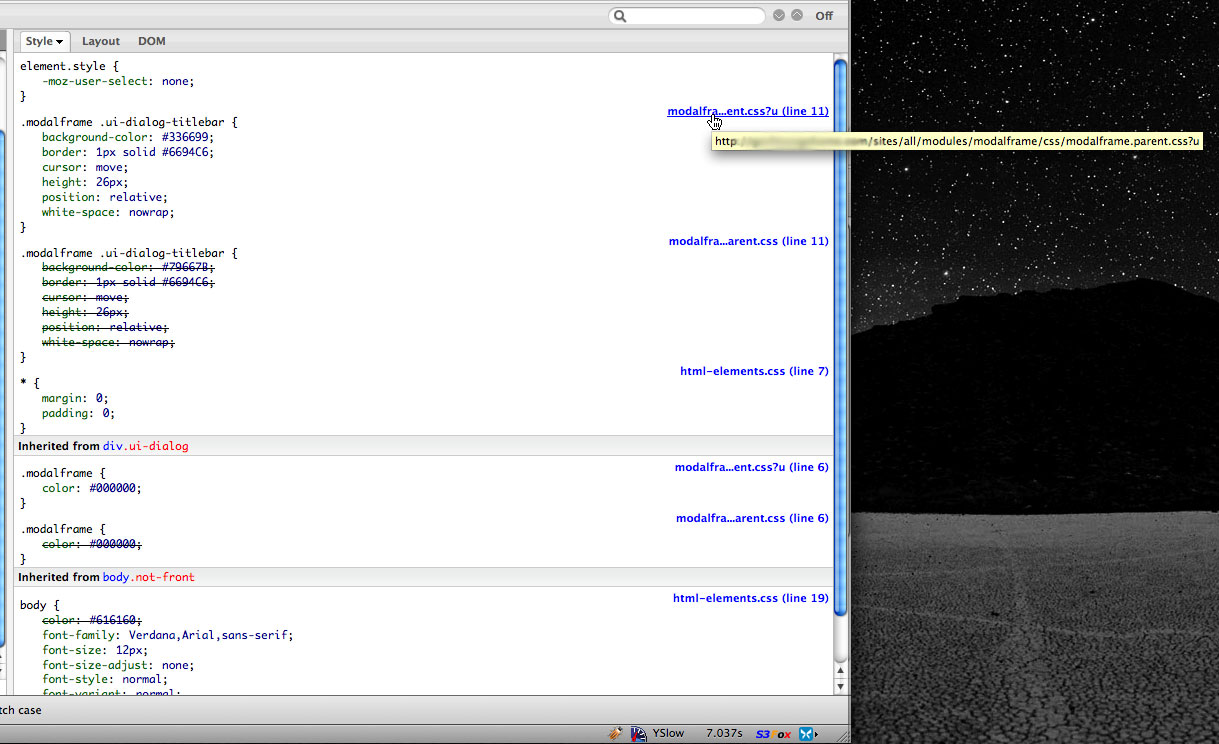
I then checked it out in Firebug, and I see the ordering of the classes as follows:
/sites/all/modules/modalframe/css/parent.css?Y
/sites/all/themes/mytheme/parent.css
So even though it is included in my .info file, the modules css files are still winning the battle so all of my changes are eliminated. I initially thought that perhaps the argument was doing it, but the API seems to indicate that is just for caching: http://api.drupal.org/api/function/drupal_get_css/6
I'm not sure where to punt this - if it's a module or theme question so I thought I would start here. Thoughts are welcome.


Comments
Comment #1
rjbrown99 commentedOh, and if it matters - this is not a subtheme and each successive retry on my part has included a clear of both the Drupal cache and the browser cache.
Comment #2
markus_petrux commentedI was not aware of this feature in D6 theming layer. I have not created any theme for D6 yet. This probably affects other modules I have written. :(
hmm... I think I would have to rename to files so that they have a unique name. And this would avoid file name conflicts, and you would have only one CSS file.
Please, try this:
1) Rename css/parent.css to css/modalframe.parent.css
2) Rename css/child.css to css/modalframe.child.css
3) Apply the following mini patch to modalframe.module:
Other than that, if you can test this in firefox, the HTML tab in firebug allows you to see which stylesheets are applied to any DOM element.
Comment #3
rjbrown99 commentedThanks for the reply. I renamed as indicated, patched the module, cleared Drupal cache, and cleared the browser cache. I also then copied parent.css to modalframe.parent.css in my theme directory and called it via my .info file.
The new CSS files do come up via Firebug but unfortunately the module's theme file still 'wins' - see Firebug screenshot. This seems contrary to the handbook page explaining that when a .css file from a module is redefined in the main theme it wins and the local css file is loaded instead of the module's version.
The next thing I decided to do was to figure out if my theme is messing with the expected behavior somehow. I took the default Garland theme, edited garland.info to include a stylesheet with the same name (modalframe.parent.css), copied modalframe.parent.css into the Garland dir, cleared my theme cache, and switched to the Garland theme. The same thing happened - the modalframe module stylesheet still wins the battle over the theme's stylesheet with the same name.
Finally I wanted to see if the function would work at all, so I tried it with nodereference explorer's stylesheet. They include a sheet nodereference_explorer/css/explorer.tabs.css with their module. I copied explorer.tabs.css to the Garland directory, edited the .info file, cleared caches, reloaded the page, and now the theme version of explorer.tabs.css does win the battle and overrides the module's sheet.
Here's what they seem to be doing in that module:
and then...
Hopefully that is helpful. I may try to hack in a similar css loading function to modalframe and see what happens.
Comment #4
rjbrown99 commentedOk, very strange, but I changed modalframe to look like this:
... and now it works. The theme version overrides the module version of the stylesheet if there is a sheet with the same name. If I change it back to your code from #2 above, the behavior reverts back to the module winning the stylesheet battle.
I haven't the foggiest why one works and the other doesn't - I just followed the way the Nodereference Explorer module was doing it and now it works.
Comment #5
rjbrown99 commentedNope, it only 'works' because I screwed it up - forgot an underscore above. Removing modalframe.parent.css from my theme results in a window that has no css theming at all. Pfft. I fixed it up, but there is no change in behavior - module stylesheet still beats the theme stylesheet with the same name.
I tried it with the exact same code from Nodereference Explorer from #3 - change to modalframe_add_css('modalframe.parent'); with a call to this:
BZZZT, still no dice! The original stylesheet loads from the module and still overrides the theme's stylesheet. Firebug shows the same result as the above screenshot.
I'm starting to think I would have saved a lot of time had I just edited parent.css and child.css and been done with it :)
Comment #6
markus_petrux commentedTry adding the following to the .info file of your theme:
The file
modalframe.parent.cssshould be placed in the main directory of your theme.I have tested this with acquia_marina and worked like a charm. In the HTML source of the page you should only see this CSS file once, the one in your theme directory, which is the replacement of the one provided by the module itself. For example, using acquia_marina, I got this:
The file
modalframe.parent.cssprovided by the module is not there.I just committed the changes described in #2, and I hope this fixes the issue, which is that I was using a filename for CSS files too generic.
http://drupal.org/cvs?commit=263110
Comment #7
rjbrown99 commentedThanks Markus. I'm still having the same problem whereby the module's css sheet overtakes the sheet provided by the theme, even though it is properly specified. Here's a bit more info.
When the page is first loaded, and prior to opening any modal windows, my region has a few classes that look like this:
Looks good - only the modalframe from the theme is loaded. None of this happens via
statements - it's all imported. I verified this in Firebug's CSS tab where the only file loaded and available to review is modalframe.parent.css from the theme. The other one from the module is not there at all.
Now the interesting part. When I click to engage the modalframe window (which in my case is a nodereference explorer window), I can see that my page changes and now has
and declarations at the very bottom of the section, like this: ... where the module's css sheet now comes into play. Since it was loaded after the theme's stylesheet above, it seems to win the battle and its classes are the ones that are used to display the window. That's how I end up with the file loaded twice. If I watch this behavior 'live' in Firebug, the statements are colored in yellow while they are appearing, so I am guessing some bit of Javascript somewhere is importing CSS classes when the window is opened. There only seem to be two possibilities - the modalframe javascript is doing it or the nodereference explorer javascript is doing it. Here's an interesting thing in the nodereference explorer.actions.js, near the top, Action for opening the dialog: http://cvs.drupal.org/viewvc.py/drupal/contributions/modules/nodereference_explorer/js/explorer.actions.js?revision=1.2&view=markup Perhaps that is what's going on? Your thoughts are welcome - I am starting to think this now might be an issue with nodereference explorer.statements inserted in the of the page below the other
Comment #8
markus_petrux commentedIt seems NRE is adding the module stylesheets via Drupal.settings, so it looks like a bug there.
Modal Frame API does not add stylesheets dynamically, so this is probably something else. I cannot really tell because I haven't used Node Reference Explorer (NRE). I just looked at it briefly a few weeks ago, to evaluate if it could solve a request I had, but I ended up coding Node Relationships module.
Comment #9
rjbrown99 commentedThanks Markus - I think that just about does it then. I appreciate the help/commit and I'll move on over to the NRE queue to report that one.