I'm working on a project where we have a blog_post content type with a CCK Date field called Publish Date. When displaying nodes in Views, we would like to be able to filter nodes by the different parts of the date. However, we would like to be able to do it with slashes in the URL, so that the URL for a blog post is something like /example.com/blogs/2009/09/14, and we could see blog posts for 2009 with /blogs/2009, for September of 2009 with /blogs/2009/09, etc.
However, from what I've been able to find out, it looks as though this is not possible with Date module, because dates are always displayed with dashes instead of slashes (i.e. 2009-09-14), so we would always need to display our URL as blogs/2009, blogs/2009-09, blogs/2009-09-14, etc. Is this correct? We're also using a Calendar block to allow users to navigate to a specific date, and the link created in the block is blogs/2009-09-14 format.
Would it be possible to write a patch that would allow the URL with the data and the Calendar block to use slashes instead of dashes? Or is there a restriction that would not allow that formatting option? I know that strtotime() can handle the YYYY/MM/DD format. so that shouldn't be a problem. If there's a patch that can be written to facilitate this, I'd be willing to write it.
Thanks.


Comments
Comment #1
Cybergarou commentedThe slash separates arguments in the URL. You can't format a date argument using a slash because Drupal has no way of knowing when the slash is part of a date or if it's separating arguments.
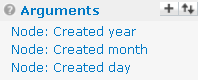
In order to get the functionality you want, the view options for Date CCK Fields would have to be modified to accept parts of dates. Then you could use 3 arguments to filter nodes in the manner you desire. For illustration, this is how the node created and node updated dates are handled in views.
Comment #2
wonder95 commentedWhat about using argument handling code to convert the arguments from YYYY/MM/DD to YYYY-MM-DD if the three arguments are there?
Also, what would be involved in modifying the Date CCK fields as you mentioned above? Modifying the views handler?
Thanks.
Comment #3
Cybergarou commentedMy understanding is that arguments don't see each other. You can put the three arguments in there, but the argument handler can only work with one at a time. I'll double check that just in case I remember incorrectly.
Yes, the modification I mentioned would involve the views handler. Specifically, I believe date_api_argument_handler.inc would have to be modified. Add some options to the UI and provide the functions to do all the work. The function would be similar to the existing granularity options, though if you can find were the node created argument code is in Views that would be almost exactly what you need.
Comment #4
wonder95 commentedThe arguments don't necessarily need to see each other, something like
$my_arg = $arg(0).'-'.$arg(1).'-'.$arg(2);
return $my_arg;
It's simplistic, but you get the idea.
Comment #5
wonder95 commentedThe arguments don't necessarily need to see each other, something like
It's simplistic, but you get the idea.
Comment #6
Cybergarou commentedThat works, but when you start assembling arguments you have to be careful that the result makes sense. One bad argument can wipe out the other two. At a minimum you would have to add checks for missing arguments.
Treating the arguments separately is a little more resilient because of the checks built into Views.
Comment #7
YK85 commentedI am also trying to achieve this style
example.com/events/2009
example.com/events/2009/09
example.com/events/2009/09/14
example.com/events/2009/09/14/event-title
I am currently only after to achieve with the date field argument
example.com/events/2010/2010-09/2010-09-14
Can anyone please help?
Comment #8
zenGruv commentedI'm with YK85. I'm working to do exactly the same thing. It's a bit discouraging that there hasn't been a response since August 2010.
Comment #9
karens commentedCan't be done. To Views, the '/' is a separator between arguments. If you do 2010/02 Views will treat that as two different arguments, one with the value '2010' and one with the value '02'. If there is any way to get that to work right (which I'm not sure there is) it would take nothing less than a complete rewrite of the module.
Comment #10
stborchertThis is very easy to solve.
Create a custom module and add the following method:
Now set your argument validation to "PHP-Code" and call this method. Done.
Comment #11
oriolroger commentedHi, I'm very interested in this custom module, but I don't know how to call this method from view's argument validation.
Must be something like this?
Thank you very much.
Comment #12
asb commentedI'm trying to accomplish somtheing similar like 'wonder95' initially requested; my approach was to use three arguments with different granularit: arg(1) = YYYY, arg(2) = MM, arg(3) = DD; this works partially, but not really as expected (especially summaries don't work). Additionally, date field claims to be able to work across multiple date fields ("…one or more dates to filter with the argument…") which would exactly match what I'd need. However, I couldn't get usable results with this, either.
Basically, what works like a charm with node creation dates doesn't work with any kind of date field. If I'm wrong I'd be really interested in an how-to guide or an exported view. Date fields and views are really frustrating :-(