

Closed (fixed)
Project:
AdaptiveTheme
Version:
6.x-1.x-dev
Component:
CSS/HTML
Priority:
Normal
Category:
Bug report
Assigned:
Reporter:
Created:
28 Sep 2009 at 12:36 UTC
Updated:
20 Apr 2020 at 18:58 UTC
Jump to comment: Most recent, Most recent file

Comments
Comment #1
Jeff Burnz commentedVery hard to say without seeing the actual site.
Do you have any of the theme settings turned on?
What browser are you using?
Have you edited any template HTML?
Link to the site will tell me lots:)
Comment #2
david1409 commentedHi Jeff,
I am seeing very similar behaviour as tnlone.
It seems to be a general problem that when the page is enlarged after being opened, any regions below the main content do not move down and the container or columns do not expand to accomodate any enlargement of the main content.
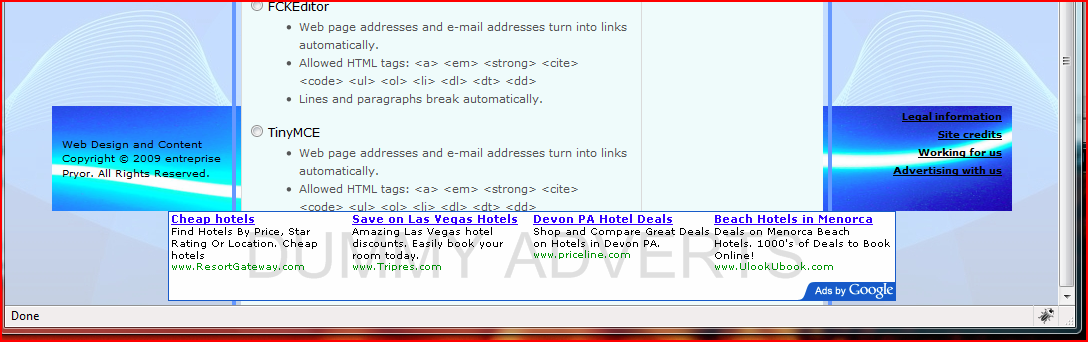
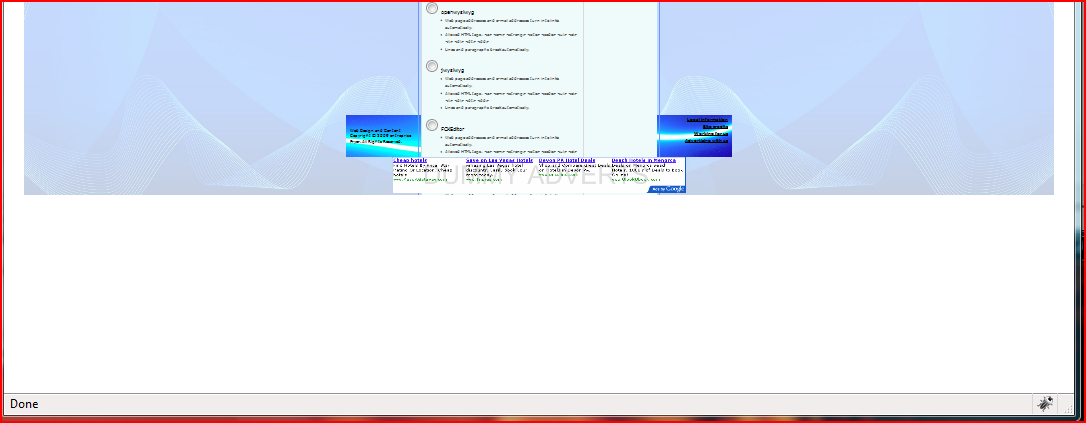
I am attaching two picture which show the error. In both cases it is showing the same thing one is at normal size the other I have zoomed the browser out.
You are seeing a node, as it happens it is the only one promoted to the front page but this isn't material to the problem, I have been adding a number of 'input formats' to test different editors, so that when I expand the 'input format' section of the edit view, instead of the default three I have at least seven, the content itself grows to accomodate the expanded section but it is contained within something, maybe the "container" or "coloum" div's. Whatever is containing the content doesn't grow to accomodate the expanded content. As you can also see the 'tertiary_content' region and the 'footer' region are not doing as I would expect, surley they should move down with the content, so it appears that they are also constrained in some way.
I have tested this behaviour on several different practice sites, all more or less the same, some have extra regions added below the 'footer' region and some have had the 'attribution' region removed but whatever I do the results are the same with the lowest region (dummy google advert in my examples) appearing above the content and the others appearing under the content (blue area in the 'tertiary_content' region in my example).
This site is on a private server so I cannot give you access to it but if you really need it since I have got to move it into the outside world someday I will, just ask.
The problem is showing on both IE and Firefox. I have turned off admin theme for editing but it happens when they are turned on as well. The pale blue background is set on the HTML area and the cut off happens just at the bottom of the body area, but I have tried enlarging this and it made no difference.
Dave
Comment #3
Jeff Burnz commentedHey, you guys need to take a long hard look at your own CSS, both the footer region and tertiary region by default are full width DIV's that clear the columns DIV; none of these are floated or have any positioning on them at all. The only way that sort of thing can happen is 1) there is broken HTML or 2) you are using something like position absolute (incorrectly).
Validate your pages and see what that says for a starter.
I cant tell either way without seeing the code (and i mean a live site, not pasted here).
We use this theme every day for building our commercial themes for clients, I can assure you this far from the norm.
Comment #4
david1409 commentedThanks for the suggestions Jeff, I can't find any absolute positioning on a quick look but will keep looking. I'll also get the site into the outside world, I need to anyway to get it validated, so if this shows nothing useful, at least you can have a look if the offer is still open. I'll let you know about the validation either way.
Thanks for the reassurance that it's not normal at least that gives me some suggestions where to concentrate my search.
Dave
Comment #5
Jeff Burnz commentedyeah, let me know, I'm sure i can figure it out reasonably quickly, its probably something quite simple but one of those needle/haystack affairs.
Comment #6
david1409 commentedHi folks,
Think I have found the cause, it is an effect of having " Equal Height Sidebars" turned on.
I have disabled this setting on the site I was having problems with and it now does as I would expect it to, if the various sections are opened for editing everything moves down to accomodate the expanded section.
Can somebody please check this to make sure it wasn't just me that was affected in this way.
I'm afraid that my coding skills are not up to any greater examination of the how and why this happens and I'm a very long way from being able to offer any kind of a fix, if indeed I'm right in the first place.
Dave
Comment #7
Jeff Burnz commentedAlright, now you're talking, this is bug man.
I'll tell you how to fix it and commit the changes to head so they'll be in the next release, and provide a patch below:
Open up js/core/jquery.equalizeheights.js
On the last line of code (line 106), change 'height' to 'min-height', so it matches this:
Don't change anything else, just that one reference of height to min-height.
Sorry man, my bad, something I forgot to change back after some testing.
Comment #8
david1409 commentedGreat stuff Jeff, the fix works for me.
Can't test the patch itself I'm afraid, I don't use CVS.
Thanks for all the hard work.
Dave
Comment #9
Jeff Burnz commentedCertainly fixed in all later versions.
Comment #12
avpaderno