There is a problem in the to_do.module. When I click on the user role to assign a user I get:
user warning: Unknown column 'n.language' in 'where clause' query: SELECT u.uid, u.name FROM users as u JOIN users_roles as r ON u.uid = r.uid INNER JOIN node_access na ON na.nid = n.nid WHERE (na.grant_view >= 1 AND ((na.gid = 0 AND na.realm = 'all') OR (na.gid = 13 AND na.realm = 'content_access_author') OR (na.gid = 2 AND na.realm = 'content_access_rid') OR (na.gid = 4 AND na.realm = 'content_access_rid'))) AND (n.language ='fr' OR n.language ='' OR n.language IS NULL) AND ( r.rid = 4 AND u.status = 1) in /Applications/MAMP/htdocs/ehfrance/sites/all/modules/to_do/to_do.module on line 1586.
If I only check 'Assign to self' and validate I get:
user warning: Unknown column 'n.language' in 'where clause' query: SELECT tdr.rid, r.name FROM to_do_roles as tdr JOIN role as r ON tdr.rid = r.rid INNER JOIN node_access na ON na.nid = n.nid WHERE (na.grant_view >= 1 AND ((na.gid = 0 AND na.realm = 'all') OR (na.gid = 13 AND na.realm = 'content_access_author') OR (na.gid = 2 AND na.realm = 'content_access_rid') OR (na.gid = 4 AND na.realm = 'content_access_rid'))) AND (n.language ='fr' OR n.language ='' OR n.language IS NULL) AND ( tdr.vid = 47) in /Applications/MAMP/htdocs/ehfrance/sites/all/modules/to_do/to_do.module on line 846.
user warning: Unknown column 'n.language' in 'where clause' query: SELECT tdau.uid, u.name FROM to_do_assigned_users as tdau JOIN users as u ON tdau.uid = u.uid INNER JOIN node_access na ON na.nid = n.nid WHERE (na.grant_view >= 1 AND ((na.gid = 0 AND na.realm = 'all') OR (na.gid = 13 AND na.realm = 'content_access_author') OR (na.gid = 2 AND na.realm = 'content_access_rid') OR (na.gid = 4 AND na.realm = 'content_access_rid'))) AND (n.language ='fr' OR n.language ='' OR n.language IS NULL) AND ( tdau.vid = 47) in /Applications/MAMP/htdocs/ehfrance/sites/all/modules/to_do/to_do.module on line 863.
user warning: Unknown column 'n.language' in 'where clause' query: SELECT tdr.rid, r.name FROM to_do_roles as tdr JOIN role as r ON tdr.rid = r.rid INNER JOIN node_access na ON na.nid = n.nid WHERE (na.grant_view >= 1 AND ((na.gid = 0 AND na.realm = 'all') OR (na.gid = 13 AND na.realm = 'content_access_author') OR (na.gid = 2 AND na.realm = 'content_access_rid') OR (na.gid = 4 AND na.realm = 'content_access_rid'))) AND (n.language ='fr' OR n.language ='' OR n.language IS NULL) AND ( tdr.vid = 47) in /Applications/MAMP/htdocs/ehfrance/sites/all/modules/to_do/to_do.module on line 846.
user warning: Unknown column 'n.language' in 'where clause' query: SELECT tdau.uid, u.name FROM to_do_assigned_users as tdau JOIN users as u ON tdau.uid = u.uid INNER JOIN node_access na ON na.nid = n.nid WHERE (na.grant_view >= 1 AND ((na.gid = 0 AND na.realm = 'all') OR (na.gid = 13 AND na.realm = 'content_access_author') OR (na.gid = 2 AND na.realm = 'content_access_rid') OR (na.gid = 4 AND na.realm = 'content_access_rid'))) AND (n.language ='fr' OR n.language ='' OR n.language IS NULL) AND ( tdau.vid = 47) in /Applications/MAMP/htdocs/ehfrance/sites/all/modules/to_do/to_do.module on line 863.





Comments
Comment #1
jaypanI believe I have fixed this for the next release, due out today or tomorrow. Please let me know if this is still happening.
Comment #2
jaypanComment #3
brulain commentedThanks Jay,
I'll get the new release and test it soon !
Bye.
Comment #4
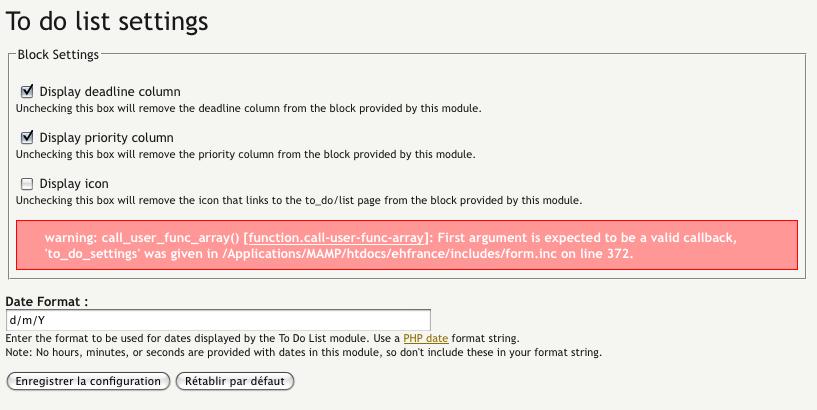
brulain commentedI have just tested this new release. After patching Ahah_helper.module, all seems to be OK, except an error message in 'To do list settings' when I uncheck 'Display tabs' case (see attach file). After validation, only the title appears.
Comment #5
jaypanSorry, my mistake.
To fix that, open the file to_do_pages.inc. Scroll down to line 249, and add this line in at the top of the function:
ahah_helper_register($form, $form_state);This will be in the next commit. Probably in the next day or two.
Comment #6
jaypanFixed in 6x-1.1-RC6
Comment #7
brulain commentedThanks a lot for your reactivity!
The module works fine, but there are some little bugs to fix :
- In admin/settings/to_do, the case 'Display priority column' is in fact 'Display status column'.
- When displaying an item, in 'Details', the terms 'Status', 'Priority', 'Deadline' and 'Assigned to' can't be translated, because they are hardcoded in templates/to_do_info.tpl.php (not wrapped in t function).
- When displaying an item, the attachments do not appear.
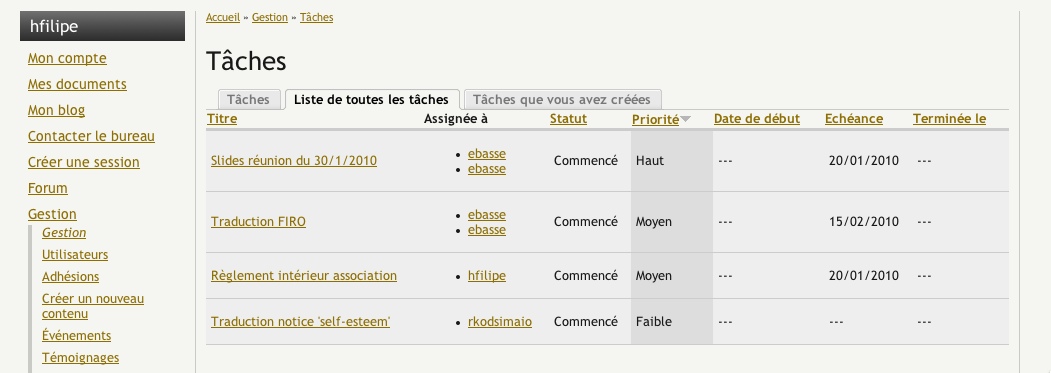
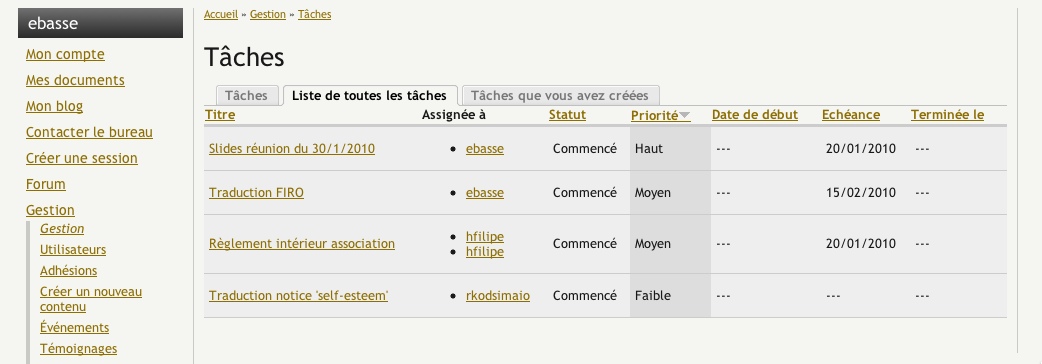
- In to_do/all, when a user have at least an item assigned, the user names appear twice in the 'Assigned To' column.
- In the To Do block, quotes are remplaced by the corresponding html entity.
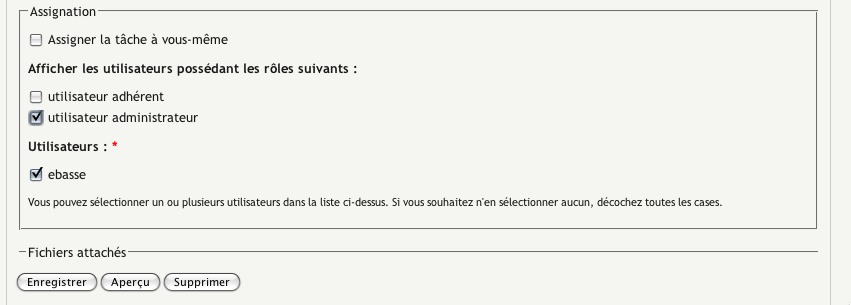
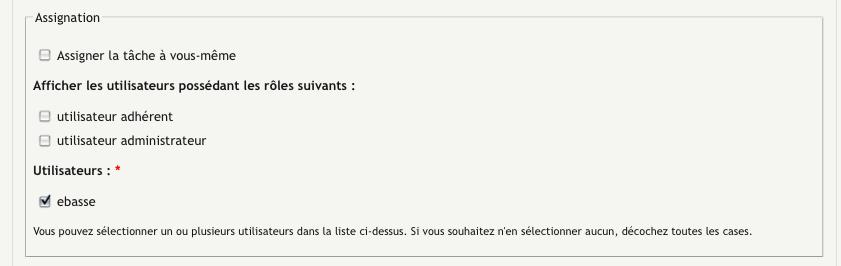
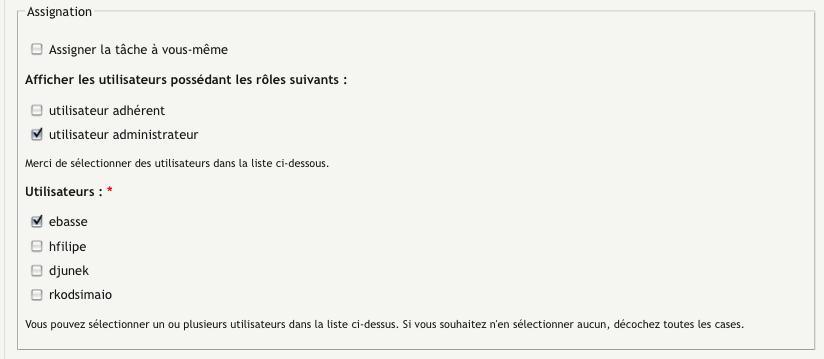
- When editing an item, modifying description and validating, there is the following error message : 'You must assign this listing to either yourself, another user, or both'. We must click on a role before saving : see attached files 1 (before first saving and error message) and 2 (before second saving).
Tell me for precisions if needed.
Bye.
Comment #8
jaypanThanks mate, that's a good little bug list. I'll work through that when I get to work tomorrow.
Comment #9
jaypanHi Brulein
I have a few questions on your posts:
What did you mean by this one? Do you mean uploaded files (using the upload module)? If so, I can't replicate this - they appear for me.
Can you give me more info on this? I cannot replicate the problem.
I either couldn't understand what you meant by this, or I couldn't replicate it.
With this module, the to do listing must be assigned to at least one user. That user can be either the creator of the listing, or another user. But the error message I was providing was a little confusing, so I have changed it to this:
By the way, after we get this cleaned up, it would be nice if you could provide your French translations for the translation file. I'll understand if you don't want to, but if you do, I would appreciate it and add it to the translation files.
Comment #10
jaypanThe following were fixed for RC7:
And the error message was changed for the following in order to be a little more descriptive:
Comment #11
brulain commentedHi Jay,
First, I am OK for the french translation, with pleasure. Perhaps I'll need your help to do it.
In edit mode, the fieldset 'Attachment files' is available for uploading files (see 'Attachment files 1.jpg'). Then, in view mode, if some files have been uploaded, those files can be dowloaded by users. Here, we can't download because there is no link (see 'Attachment files 2.jpg').
I have joined 2 examples with 2 different users who have assigned an item each other. The first, hfilipe (see 'User twice 1-1.jpg'), assigned 2 items to the second, ebasse. The second, ebasse (see 'User twice 2-1.jpg'), assigned 1 item to the first, hfilipe.
I the third tab, the same problem occurs (see respectively 'User twice 1-2.jpg' and 'User twice 2-2.jpg').
For information, I use Content Profile module from which I generate 2 content types per user, 'Ahesion' and 'Profil'.
For example, the user hfilipe visualize an item he have created (see 'Error message 1.jpg') : no roles are checked, but the user whom the item is assigned to (ebasse), yes. If hfilipe only clicks on the save button, the error message appears (see 'Error message 2.jpg'). He must reselect the right role before saving (see 'Error message 3.jpg').
I hope these informations will help you !
Have a nice day,
Bye.
Comment #12
brulain commentedFor the french translation, can you send me a .po file for your module, with all the 'msgstr' items empty ?
My e-mail address is : b.pelvillain@free.fr
Thanks,
Bye.
Comment #13
jaypanBrulain - thank you for taking the time to get back to me on these points. I appreciate the detail you have gone into as well as the screenshots. I have just released RC9.
I will address your points:
I didn't do anything, however the attachments are appearing for me! This was the last thing I checked, so either I fixed this problem while fixing something else, or the problem is still there, or the problem is on your end. I'm not sure, so let me know if you are still having this problem after upgrading to the newest version of the module.
I had a hard time replicating this, but I managed to do it. Thank you for your screenshots, they were very helpful for me to determine the problem. I ended up finding it, it was a node grants error. This problem should be fixed in RC9, so if it's not, please let me know.
This was a leftover error from version 1.0. I believe this is fixed in RC9. Please let me know if it isn't.
I will email you a copy of the .po file for the translations. Thank you for that, I appreciate it!
Jay
Comment #14
jaypanBrulain - thank you very much for the translation file. Much appreciated. I fixed the problem that was coming up for the plural function error (this has to be manually set per language file) and tested the file by importing it, and it worked fine. Merci! I have added the translation to RC10, just released.
Comment #15
brulain commentedHi Jay,
I'll test the last rc version next week.
Bye!
Comment #16
brulain commentedHi Jay,
Here are the results of my tests :
Works fine !
Now, this issue only appears in the third tab (to do lists you have created).
Works fine !
Have a nice day.
Comment #17
jaypanAlmost there! I'll figure out that last error, then put up a new version over the next few days.
Comment #18
jaypanComment #19
jaypanOk, I think I have fixed this bug as well in RC 12. Let me know if you are still having any troubles. But I believe this is the last bug to take care of, so we may be getting towards a full release at some point in the near future!
Comment #20
jaypanComment #21
brulain commentedHi Jay,
The rc12 is OK for me : félicitations !
Bye
Comment #22
jaypanNice! Glad to hear it. It's been a lot of work, but it's finally going somewhere.
Hopefully I can put out a full release soon. Let me know if you find any other problems.