Closed (fixed)
Project:
Project
Version:
x.y.z
Component:
User interface
Priority:
Normal
Category:
Bug report
Assigned:
Reporter:
Created:
6 May 2006 at 01:34 UTC
Updated:
30 May 2006 at 08:45 UTC
Jump to comment: Most recent file


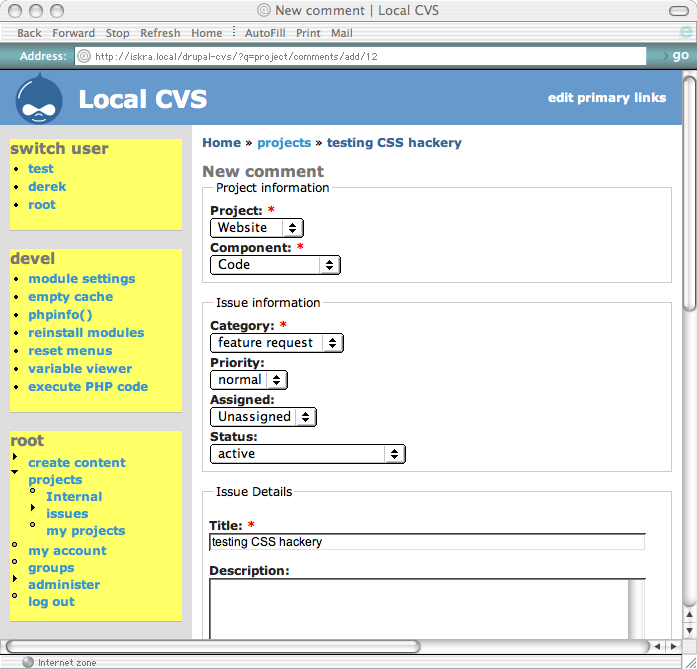
a UI problem that's been bothering me about project issues for a while now is the fact that you basically get a whole page of very narrow drop-down boxes (project, version, component, category, priority, assigned and status) which are all stacked up vertically on top of each other. this wastes a ton of screen space, and basically requires you to scroll up and down to actually enter in an issue, in all but the most enormous browser windows.
with some help from unconed in IRC, i managed to mostly get this solved at the theme layer by adding the following to my theme's style.css:
.node-form .options fieldset .form-item {
  float: left;
  padding-right: 0.8em;
  margin: 0.05em 0.1em;
}
however, this uncovered a few bugs, 1 in project's css-related code, and one in the safari browser. ;) unconed suggested a change to the markup we produce to work around the safari bug. apparently, they use this trick in core, too, so even if it's not considered ideal, it's acceptable practice.
the bug in project is that in project_comment_form(), when we're trying to set the #prefix and #suffix on the project_issue_form subtree of the $form, we do so *before* we populate that subtree by calling project_issue_form(). so, we clobber the #prefix and #suffix, which has the effect of removing the "node-form" div class, which screws up theming when doing followups to issues.
the bug in safari is that if you have elements that are being told to "float", they will float right out of their fieldset unless you go out of your way to catch them with some kind of "clear" element. unconed's solution to this problem is to manually insert a <br class="clear" /> at the bottom of your fieldset. you can't use the fieldset's own #suffix, since that gets output after the closing </fieldset> tag. :(
here, i'm attaching a screen-shot of the new-improved look when creating (or replying) to issues, using these fixes and the CSS posted above. i'll post the patches in followups in a moment.
| Comment | File | Size | Author |
|---|---|---|---|
| #21 | project_62129_css.patch | 2.84 KB | dww |
| #19 | project_issue_62129_full_2.patch | 2.75 KB | dww |
| #18 | project-css-safari_2_0_3-screenshot.png | 122.62 KB | dww |
| #17 | project-css-ff_1_0_6-screenshot.png | 106.75 KB | dww |
| #16 | project-css-ie_5-screenshot_2.png | 64.88 KB | dww |



Comments
Comment #1
dwwhere's a patch that fixes the straight-up bug in project's div output that makes consistent themeing of issues and followups impossible.
Comment #2
dwwand here's the patch that provides the work-around for safari so that if you use the CSS in the original post, all the elements stay inside their appropriate fieldsets.
Comment #3
dwwi was thinking that it'd be safer to wrap the whole project_issue form in a div, so that the float CSS magic doesn't accidentally touch anything other than this form. here's a patch that accomplishes this. i'm not sure if this is the best way to do it, but the following didn't appear to work:
therefore, the attached patch rips out a commented-out version of something similar, since it appears to be a failed attempt from the past. if there's a more elegant, better way to accomplish this, please let me know. with this patch, the sort of CSS you'd want to add to your theme's style.css would be like this:
Comment #4
dwwtee hee, i just noticed project.css exists. ;) so, we can make this change without even having to tell people to modifiy their own themes. cool.
Comment #5
dwwnow that i've gotten this all figured out (sort of), here's 1 giant patch that includes the 4 patches i've previous posted... hopefully this will make it easier for folks to review and test this issue.
thanks!
-derek
Comment #6
dries commentedLooks great!
I think you might be able to reuse the 'container' class, rather than using br's. Have you considered that?
Comment #7
dwwi'm a total novice when it comes to CSS -- i'm just doing what steven (unconed) told me to do. ;) if there's a better solution, i'm all ears. however, if it involves CSS/theming, just speak slowly, and use small words, so i'll be sure to understand. ;)
Comment #8
traemccombs commented+1 I like the results... I'm not sure how valid or invalid the code or hacks are. Someone like Steven or Ted would be best to decide that.
Comment #9
dwwi tried changing this:
'#value' => '<br class="clear" />'to this:
'#value' => '<div class="container-inline clear"></div>',and it didn't work. :( the form elements still float all the way out of the fieldset in this case.
dries, sorry if i'm not understanding what you're proposing.
Comment #10
dries commentedI was proposing exactly what you tried.
I think you might need to use the container stuff on a parent item that encapsulates all the child elements. Is that what you tried? Did the generated HTML look OK?
That or you might have to write a theme_ function which does (take a look at the watchdog module):
If you can't get it to work, feel free to proceed with the current solution. I don't think it will break anything on drupal.org.
Comment #11
dwwugh, so far, no luck. :( i tried wrapping the fieldset definitions with the container-inline (and clear) div, like so:
i tried manually stuffing the
<div>inside the fieldset by using form elements:all 4 combinations (both code blocks, with and without the "clear" in there) generated the expected HTML. the upper approach had the
<div>outside the fieldset, the lower one had it inside the fieldset. however, none of them prevented the form elements from floating outside of the fieldset. :( i think we're stuck with the<br/>solution, unless someone more CSS clueful than i can come up with a better approach. given that this was steven's suggestion originally, and that we already do this in core (see node.module and help.module), i'm guessing this really is the only way. i don't think the theme_ function approach will work, since we need these clear elements *inside* each fieldset.i'm not going to commit just yet. i'll wait for more input from the CSS gods among us. if i can, i'll get steven to take another look at this and enlighten us. ;)
Comment #12
dwwm3avrck has saved the day with a new approach that requires no markup in project.module at all, only additional CSS:
with that (and a clear cache), everything works fine, even in safari. 3 cheers for m3avrck! i'll make a new patch to clean this all up and post a new screenshot for further review. stay tuned...
Comment #13
m3avrck commentedJust a note to all. This code is based on code from Positioniseverything.net and is the best clearing technique out there.
I would like to get this actually into core, as part of my CSS rehash. We could get rid of all of those <br>s too.
Comment #14
dwwsteven wrote in email to me:
i tried in IE5 (not that anyone on earth should actually care about that browswer anymore *grin*), and it appears to "degrade" nicely. basically, none of the float stuff seems to work, and everything looks much like it does without the patch at all. in old firefox (1.0.6), the floating stuff works, but the 2nd part of the CSS to get the fieldset to wrap more closely around the form elements doesn't work. in safari 2.0.3, everything works perfectly. i'll attach screenshots of each as separate followups in a few moments. meanwhile, here's the updated patch that doesn't require any new markup in project's code. i think this is RTBC. can i get an 'amen'? ;)
Comment #15
dwwIE 5.2 screenshot
Comment #16
dwwwhoops, screenshot malfunction. try again: IE 5.2 screenshot, take 2.
Comment #17
dwwfirefox 1.0.6
Comment #18
dwwand finally, a modern browser: safari 2.0.3.
Comment #19
dwwfurther simplications to the div generation (and CSS) code. for consistency with the rest of project.css, i just added a class "project" around the issue-related forms (and cleaned up the #prefix #suffix stuff in the process). then, i can use ".node-form .project .options fieldset", everything works fine, and there's no extra special cases. the issue forms are the only ones that use class="options", so this behavior still only effects these forms. now, the CSS can just be like this: ".node-form .project .options fieldset". dries said in email he was ok with this new CSS approach, and that i should "feel free to commit". so i'll apply this simplified patch on monday unless anyone objects.
Comment #20
m3avrck commentedDerek, you need to make sure the display:inline part of the CSS comes after the :after part, necessary for proper CSS overriding.
Should be in this order:
Comment #21
dwwthanks, m3avrck. new patch.
Comment #22
dwwDries confirmed in email i should commit. applied to HEAD. patch doesn't apply cleanly against 4.6, so i probably won't try to backport this. changing the title of the issue to be a little more descriptive. ;)
Comment #23
(not verified) commented