

Closed (fixed)
Project:
Feeds
Version:
6.x-1.x-dev
Component:
Code
Priority:
Critical
Category:
Bug report
Assigned:
Unassigned
Reporter:
Created:
12 Nov 2009 at 19:37 UTC
Updated:
25 Jul 2010 at 16:10 UTC
Jump to comment: Most recent file


Comments
Comment #1
velosol commentedWhen I've used this functionality, clicking 'import' will cause the file to be uploaded and then imported. Perhaps clarify the dual-action nature of the "Import" button?
Comment #2
alex_b commentedhttp://skitch.com/alexbarth/n8jkd/node-import-localhost
The description is actually pretty explicit.
("local computer" sounds funny, though)
Is this a non-issue?
Comment #3
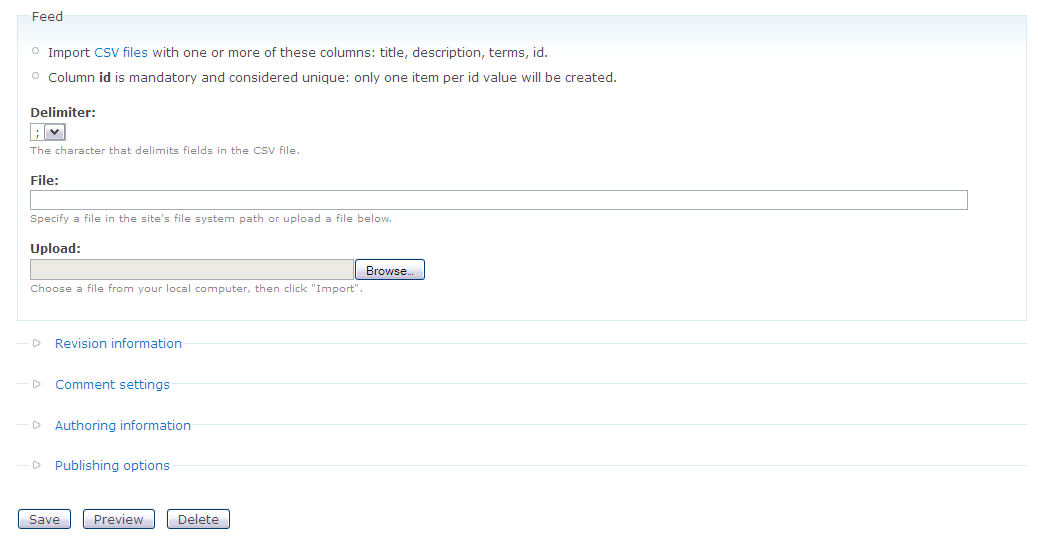
David Lesieur commentedThe problem is that I don't see any "Import" button in the node form...
Comment #4
alex_b commentedOk, this is clear now. Sorry, I overlooked the "node form" in your initial post. I think we should fix this with a better description.
Comment #5
David Lesieur commentedHere's a snapshot of what I get in the node form. However, this discussion made me discover the "standalone form" option, which I had not noticed before.
Comment #6
jarea commentedI was having the same problem with a new form creation. There is no "Import" button on the initial form. When I save the node and then edit it, an import button is at the top of the page (View Edit Import Delete Items). Selecting the file to upload does not appear to do anything.
Comment #7
WoozyDuck commentedI was having the same problem, there is no "import" button?
Comment #8
tomcatuk commentedEr, I must be really dumb. Where exactly is the import button?
Also really confused by the local file option (which I would prefer to use) - where is the file, if the file is in domain.com/feeds/filetoimport.csv. That isn't where it is apparently - nor is it in /feeds/filetoimport.csv which is kinda what I thought I would be using given that's where the .csv is located.
Comment #9
alex_b commentedOn a node, there is none [edit: the file is being uploaded when the node is submitted]. The file is being uploaded in the Drupal site's files directory.
Comment #10
tomcatuk commentedSorry to pester you Alex - I'm still confused. Having not changed anything, all the documentation for Feeds and Drupal itself indicates I'd upload a .csv to:
sites/default/files
(I haven't changed thjis from the default Drupal install). But it doesn't seem to pick it up from there: "File needs to point to a file in your Drupal file system path.". Any idea what I'm doing wrong here? The Drupal site is on a sub domain, and my hosting is on a shared hosting package if that's got anything to do with it (can't see why it would though).
Comment #11
dafreak commentedYa there's no import button when I'm trying to upload a .csv file and import terms to a taxonomy. What up with that?
And what is the "standalone form" option?
Comment #12
dafreak commentedOk the file does show up in the sites/default/files/feeds/ directory, so the "Import" button must be the "Save" button in this case. So what I did was then, manually, put the name of the .csv file in the "File:" textbox, and it seems to almost be working. Now, first I got an error because I didn't enter the "Title:". So I made a title. Now I just get: "warning: Invalid argument supplied for foreach() in .../sites/all/modules/feeds/plugins/FeedsCSVParser.inc on line 34" Also: "Could not retrieve title from feed."
What does this mean? Anyone? Help?
Cheers,
DaFreak
Comment #13
dafreak commentedWell I found those errors were alleviated when I finally entered the full path to the uploaded file, manually. And the "Could not retrieve title from feed." was alleviated by entering the feed title, manually. So finally I got a message "Vocabulary Created" which I thought was a positive indication. However no vocabulary was created, and no terms were added! It seems CSV import to Taxonomy is highly underdeveloped and non functional. In my humble opinion there should be no jump to an import page. The importing should take place right on the step configuration page. The import button should be right there in the File Upload plugin configuration. It should immediately import the file, and automatically populate the filename textbox. Then you move to mapping, which appears to work, then you move to Parser and Processor settings and there should be a button right there "Process" and boom its done.
This module is a nice idea, and maybe it works for feeds or nodes or something, but its not working for taxonomy vocabularies. Needs work. Also I don't think it should be called "Feeds". Its misleading unless you are using it to import newsfeeds. It should be called something like "Content Import" or "Data Import". Maybe right now you could call it "Sucks". (Just kidding, I know its a lot of work and a little confusing to get this functionality working.)
I like what I see of this module and it could be an extremely powerful tool for the website builder. Keep up the effort. I will try to help as much as I can.
Cheers
duhFreak
Comment #14
dafreak commentedWell I'll be damned, it worked! I had to make sure "Import on Create" was checked. The import page created a node, with the Title from the textbox. I'm not sure if the terms were imported at this time. I clicked the import tab and then there was an import button. I clicked that, and then checked the taxonomy, and voila, the terms were there!!
I take back what I said about "Sucks". I'm happy now. You can call it "Works" ! But dang that was complicated. I will try with my next data set and pay more attention when the term import actually occurs.
Again, keep up the good efforts. Hope my trials and tribulations will help anyone else who's trying to get it going. The main problem seems to be having to put in the full path from server root to the files directory. Some people may not know what exactly that is on a shared host. On mine it was /home/sitename/public_html/sites/default/files/feeds. If that could be autopopulated it would save a lot of strife. After all, the module knew where to save the file, it should know where to find it.
Cheers and thanks,
DohFreak
Comment #15
alex_b commentedBumping this to critical to make sure a fix goes into next release.
Comment #16
rsoden commentedI encountered this issue as well and can confirm that although files to get uploaded, I am unable to parse them until I manually enter the filepath into the "File" textfield.
I did a little debugging and it *seems* that the sourceFormValidate method in FeedsFileFetcher.inc is not saving the location of the uploaded file properly to the source object. I'm not sure why this is happening.
Comment #17
alex_b commentedOriginal issue fixed with http://drupalcode.org/viewvc/drupal/contributions/modules/feeds/plugins/...
Closing.
Comment #18
alex_b commentedFYI, further improvements on file upload are posted here: #850998: Clean up file upload form