

Closed (fixed)
Project:
Read More Link (Drupal 6 and earlier)
Version:
6.x-5.0-rc7
Component:
Code
Priority:
Normal
Category:
Support request
Assigned:
Reporter:
Created:
20 Nov 2009 at 22:13 UTC
Updated:
25 May 2010 at 19:30 UTC
Jump to comment: Most recent file


Comments
Comment #1
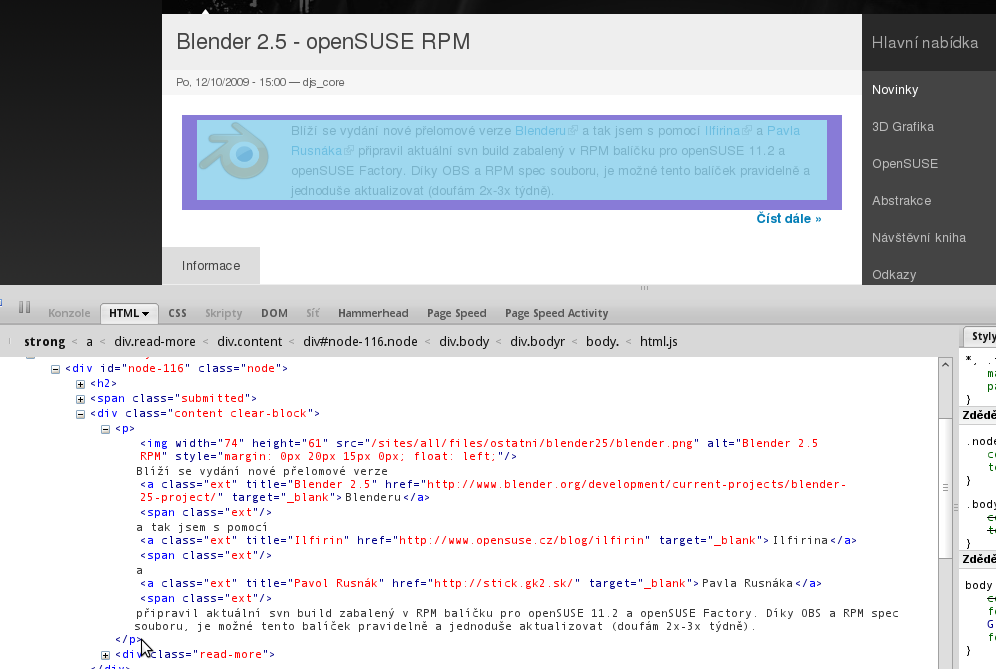
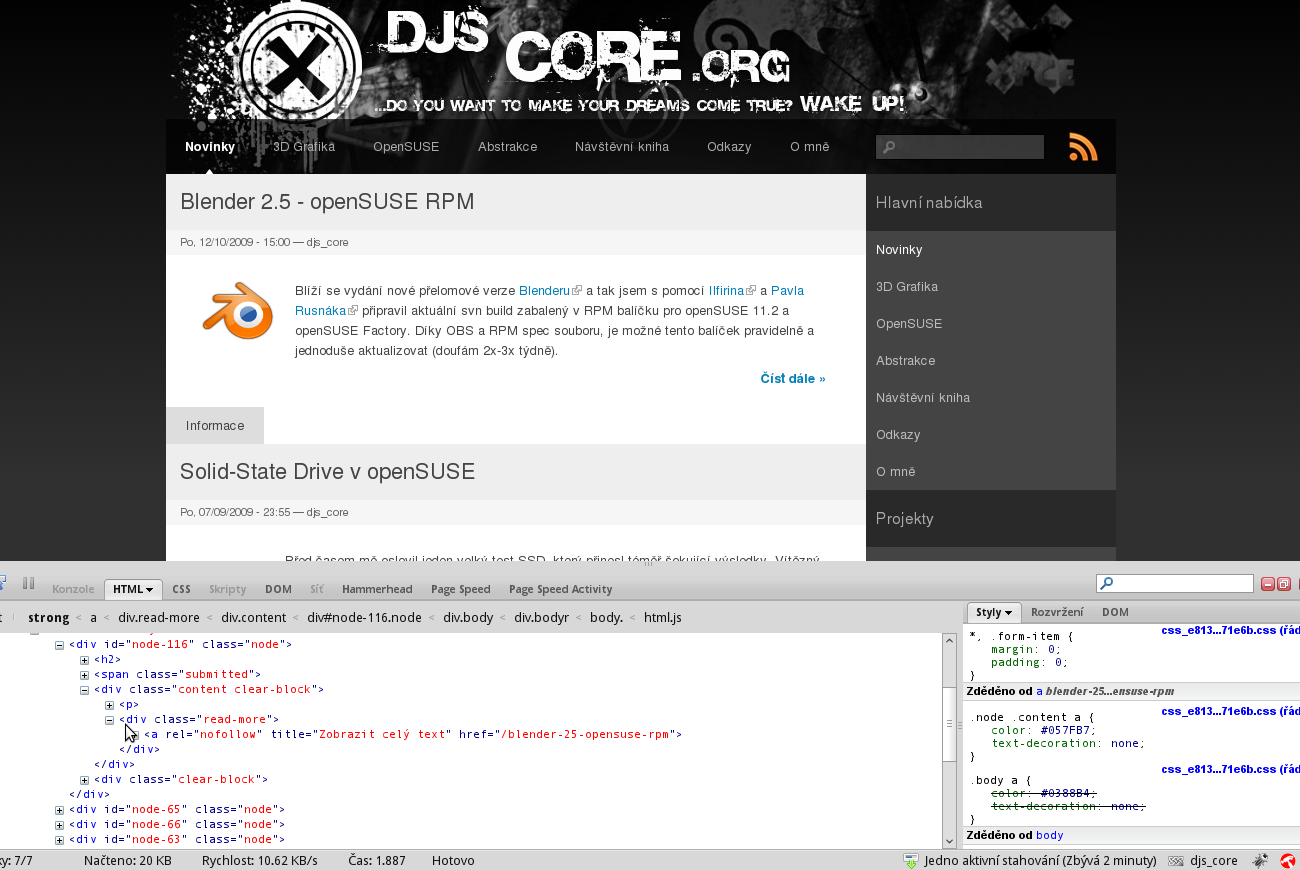
todd nienkerk commenteddjs_core: Can you verify that you're using RC5 and that you have selected the "Inline" option and have saved the settings page?
Comment #2
gregarios commentedI'm not seeing a closing
</p>in your screenshot of the code in your site. Could that have a bearing on it?Comment #3
djs_core commentedTodd Nienkerk: Answer -> Yes. Please see new screenshots screen1 and screen2. (for better clarity I have now turned off the module Fivestar).
gregarios: Please see new screenshots screen3 (here you can see that the tag is closed)
Comment #4
gregarios commentedYes. I see your tag closed, now how can this be explained...
My settings are the same as yours, but my read-more link falls between the two
<p>tags.I'll see your 3 screenshots and raise you one of my own, lol:
Comment #5
todd nienkerk commenteddjs_core: Regarding the inline setting, you're sure you have saved the settings page? It's possible you are seeing a default value populating a settings form without it actually being saved to the database.
Also, have you run update.php since upgrading the module?
Comment #6
djs_core commentedYes! I have saved the seleceted settings and i have run update.php since upgrading the module ... See next screen ;)
Comment #7
djs_core commentedTodd Nienkerk: You still need from me some information ? Now I have no idea ...
Comment #8
todd nienkerk commenteddjs_core: This is a difficult problem to diagnose, as several modules could be altering the teaser by the time it reaches this one. Can you post a list of modules you have enabled?
Comment #9
djs_core commentedTodd Nienkerk: Here is ;)
Comment #10
todd nienkerk commenteddjs_core: That's a long list! :)
Do you have a development instance of your site that you could use to diagnose this problem? The only thing we can try is disabling all non-core modules (except Read More link), seeing if the problem is fixed, and re-enabling each module until the problem reappears.
Comment #11
djs_core commentedTodd Nienkerk: Ok. I try ;)
Comment #12
djs_core commentedTodd Nienkerk: Good news! We have found the problem ;) Read More link conflicts with module Smileys (when I turned off, Read More link module works!)
But now the question. How to solve this conflict?
Comment #13
todd nienkerk commenteddjs_core: Thank you for looking into this! When I have some spare time this week, I'll try to replicate the problem.
Comment #14
todd nienkerk commentedChanging the issue title to reflect recent findings.
Comment #15
djs_core commentedTodd Nienkerk: Ok. I also thank you ;)
Comment #16
bkat commentedI think I am having the same problem with rc7 and the inline module. If I attach an image to a node and display it with [inline:file.jpg] the read more link is not where it should be. Like the referenced bug report, it seems to calculate the position before the inline filter is run but substitutes the text after the inline filter expands into a much longer string.
Comment #17
bkat commentedI did some investigating into my issue. What's happening is that the module is calling preg_match() against the body to calculate the insertion point but then modifying the teaser at that point. These don't necessarily match if some other module or filter has modified the teaser but not the body.
Comment #18
todd nienkerk commentedbkat: We're calculating the insertion point using but applying it to the teaser in order to support the display of CCK fields. (If we calculate the insertion point using the full teaser, the link gets added after the CCK fields instead of the end of the node body.)
I realize the logic seems a bit twisted, but it's the best way we've found so far to support the display of CCK fields in the teaser. This is a work in progress, though, so this may change in a later release.
Comment #19
bkat commentedCouldn't you add a callback to the $node->content['#pre_render'] array that modifies the $node->content['body'] ? (called in drupal_render()) Since the $teaser isn't passed into the callback, perhaps you could set the callback in node's view callback if $teaser is true in the view callback?
I'm not super versed in the drupal API so please pardon any glaring holes I may have missed.
Comment #20
todd nienkerk commentedbkat: If you're still experiencing problems with the Inline module, can you open a separate issue for it? I want to stick to the Smileys issue in this thread. (It'll save me a headache! :)
Comment #21
todd nienkerk commenteddjs_core: I was not able to duplicate this problem using 6.x-5.0-RC7.
However, when I first enabled Smileys, it caused the Read More link to move to a new line (i.e., it got wrapped in a
<div>instead of a<span>). I was able to fix this by rearranging my input filters so that the Smileys filter was run before "Line break converter" and "HTML corrector."Can you try rearranging your input filters to find something that solves it?
Comment #22
djs_core commentedTodd Nienkerk:
Yes, this solution works ;) But I have "Line break converter" and "HTML corrector" on my site disabled ...
Comment #23
todd nienkerk commenteddjs_core: Does this mean you'd consider this issue fixed?
Comment #24
djs_core commentedTodd Nienkerk: It depends on how it takes ;) If the two filters are active, this solution works, but when are not active, this solution not works...
Comment #25
todd nienkerk commentedAfter further testing, it's clear this is an input filter ordering issue. We've been able to solve all problems by rearranging filters and making sure the HTML filter allows
<p>,<br>, and<img>tags.Comment #26
-e-train commentedI am having an issue with the Read More module using and
I have checked "inline" and checked
and tags.
I have even reset to defaults and it still usus different tags at different times.
But on my blog view listing page, I see teasers that sometimes have the read more link in a tag and some have it in a
I am using the teaser break via wysiwyg module (using ckeditor).
I have attached images of settings. I have no cck fields in my blog posts.
picture 1.png - shows the output on my view page. You can see some inline and some not.
picture 2.png - shows the read more settings
picture 3.png - shows my input filters for full html... none should conflict...
If you need more info, please let me know.
-e-train
Comment #27
-e-train commentedI have solved my issue of the
<span> vs. <div>problem.If you enable HTML corrector in the input filter, the issue seems to go away.
I still had to go back and insert the
<!--break-->tag via the wysiwyg editor, butthey all seemed to be placed in
<span>'snow.Final settings:
Read More: - inline
<p> and <span>tag acceptableInput Filter: HTML full - enabled filters are only HTML corrector and URL filter.