

 The 2026 Drupal Business Survey is open. Your response will help shape the future of the Drupal business ecosystem.
By dankohn on
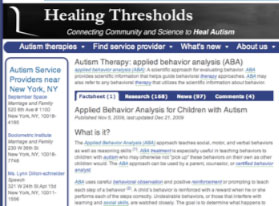 Healing Thresholds Autism Therapy provides comprehensive therapy fact sheets, daily updates of research and news, and a global directory of autism therapists. The site has become a standard and definitive source for autism treatment information. In particular, the site provides layperson-accessible summaries of essentially all child-focused research from the last 3 years, in addition to earlier seminal papers.
The two biggest challenges of the site have been to expose all of the deep content we've authored and to monetize it. We have over 2000 carefully-written research and news summaries and user-generated content. We also have over 1000 taxonomy terms, and we've authored detailed definitions for nearly half.
Our redesign last month upgraded the three-year-old Drupal 4.7-based site to Drupal 6. More importantly, we used the flexibility of Drupal to completely re-architect how users find and interact with our content. Where previously we had separate sections of research and news, our new tabbed interface displays -- in a search engine friendly fashion -- all of the relevant content for each of over 1000 different therapy topics.
Prioritizing taxonomy-based pages over nodes
On the old site, we had a lot of traffic as search engines brought users to a specific article, but a high bounce rate because it was not easy to find all of the related content we have available. Also, clicking on an underlined term brought you to our glossary, which was a dead end, instead of showing you all of the great content we have on that topic.
Our solution was to re-architect the site around the taxonomy. On each topic page (or landing page, in search engine optimization parlance), we show our carefully written fact sheets (when available), and then the first several research summaries, news articles, and user-generated content. Thus, our topic pages have a large quantity of relevant content, which makes them more effective "nets" for capturing organic search traffic. This also means that the same article can be generating search engine traffic (and answering users questions) on multiple pages simultaneously.
We constructed these landing pages using Panels 3 and Views 2, which are spectacularly versatile tools. By overriding the taxonomy pages with Panels, we can display 7 different views, pulling all the relevant information on to the page. We also made use of quicktabs to nicely format the information, but in a way that was completely transparent for SEO. Finally, we used some jQuery trickery to add in the number of articles of each type into the tabs. For an example, see our Applied Behavior Analysis (ABA) page. Our new theme is based on Minnelli, with some adjustments to provide space for 5 different ad blocks.
We originally chose Drupal over Ruby on Rails because of the head start that the rich ecosystem of Drupal modules provides. Our ability to completely re-architect the site during this upgrade, all with existing Drupal modules, confirmed the wisdom of our selection. The new site includes all of the information from the old one, but displayed in a far more accessible and SEO-friendly manner. The use of the modules described here would easily have cost us more than $100,000 if we had needed to reimplement the functionality from scratch.
The other key to our taxonomy-based architecture is our use of the glossary module. Not only do the hover definitions make the site much clearer to non-expert users, but each of those dotted underlined words is also a link to that taxonomy page. So, the entire site becomes richly interlinked automatically.
We also decided to use Google site search with google_cse. This is helpful because it correctly sees our site as a 1000+ therapy topics, and indexes the full contents of those taxonomy pages, rather than just indexing the individual articles (nodes).
GeoIP-enabled directory
 The other major change to the site is adding a 50,000 listing directory of service providers for the autism community. Here, the gmap and location modules were invaluable. Gmap provides an incredible level of functionality out of the box, in particular, the gmap taxonomy markers you can see in this zoom-in of New York. Location was able to geocode all of our service providers and integrates seamlessly with views. We also made use of lm_paypal to support self-serve upgrading from free to enhanced listings. Although some development was needed to match our model (since when you cancel, your enhanced listing just turns back into a free one, rather than disappearing like an ad does), the PayPal 2-way notification works great. We wanted to use PayPal so we didn't have to handle the credit cards ourselves.
Finally, we set ourselves the challenge of using GeoIP technology to automatically show relevant directory entries on every page. When you enter our directory, you are redirected to the city page closest to you, based on where GeoIP says you are. We used the ad_geoip module, although some significant new development was necessary to support displaying relevant listings at all times. One of the features we're particularly pleased with is "tag matching", where we've associated a hundred or so of our most popular topic pages (taxonomy tags) with a relevant autism service provider (therapist category). So, if you go the drugs page, the therapists shown are pediatric psychiatrists near you.
Cleaning up taxonomies and autotagging
Another big challenge of the redesign was that we had been supporting a free-tagging vocabulary for the last 3 years, but decided to standardize it so as to make each landing page as useful as possible. That meant laboriously going through every listing and merging similar ones together, using the taxonomy synonym feature. Taxonomy_manager was a huge help through this process. We decided that we wanted all of our content autotagged based on the glossary terms used. That way, if a news article or user comment mentions several autism therapy topics, the comment will show up in each of them. After looking at 5 options, we settled on autotag (but running in tag-on-save automatic mode, rather than using the jQuery drag-and-drop mode). The magic came in combing autotag with views_bulk_operations, which is an incredibly powerful module, particularly with its use of the Batch API to avoid timeouts. VBO enables us to select specific content and resave it, which gets it autotagged in the process. And, all new content is autotagged automatically.
Ads
Another change was to add capability to our advertising system, particularly in our use of affiliate advertising targeting the specific topic of the page. We settled on Google Admanager to serve and track our ads, since it's capable and free. The google_admanager module allowed us to create 100 different advertising blocks for our 50 key pages. By setting each block to only appear on one or a few pages, we're able to do targeted ads across the most heavily trafficked pages on our site. We also liked using views_block to keep track of the ad blocks and their visibility rules.
Community
The original version of our site three years ago had a number of community features, including user blogs, forums, a wiki, and private messaging. They were not heavily used. We have, however, built up an email list nearing 20,000 members, as well as a large number of Facebook and Twitter followers. For the redesign, we decided to focus on user-generated content with the ubiquitous comments sections, rather than community. Instead, we prominently feature Add This buttons at the top and bottom of every page to enable viewers to use off-site community and social networking applications to communicate about Healing Thresholds.
Performance
The unoptimized performance of our site is not fantastic. Running seven views on our main topic pages can slow things down. Our solution is to use boost to serve out the vast majority of our pages statically. That way, the site is only a little slow for those who log in, and for those who view a specific page for the first time. For everyone else, they receive a static copy of the page, which loads almost instantly. The main downside is that new comments are not immediately visible unless you're logged in. There's a lot of further performance tweaking to be done. For example, we recently found that adding indexes on our location tables decreased the page generation time an order of magnitude, from 30 seconds to 3. Of course, with boost cache, the second page load becomes nearly instantaneous. devel query log has been essential for tracking down our issues.
Development
The two developers (Dan Kohn and Kent Parker) are based in New York and New Zealand. We mainly use Google Spreadsheets to track current tasks. We've had good success setting up three separate instances of the site, one for production and one for each of us to develop on. These are three full installations of Drupal (rather than using multisite) so that we can test new versions of modules and core before deploying to the production site. We use backup_and_migrate to automatically back up the database of the main site, and then regularly restore it to the development servers using this trick of shared directories. Two other essential tools for dealing with staging environments are keys, which automatically sets the correct Google Maps API key based on the domain, and environment_indicator, which shows a stripe on non-production sites to remind you where you're working. Of course, admin_menu is great for quickly accessing everything you need via the browser, and drush is a ludicrously helpful tool for command line updates.
Other important modules:
biblio: We use this module to hold our layperson summaries, as it provides great indexing functionality.
Editors: WYISWYG and TinyMCE for the fancy rich text editor, IMCE for the integrated image uploading, and imagefield_crop for the amazing picture cropping functionality, which we use for our directory listings.
SEO: seo_checklist, pathauto (rewrites the URLs to enable our taxonomy pages to be a first class citizen on the site), global_redirect, nodewords, page_title, search404, XML sitemap (which thankfully already included the capability to rank taxonomy pages higher than node pages), and google_analytics
General: login_taboggan, mollom, nice_menus, prepopulate, rotor (for our lovely rotating banners and pictures), scheduler, term_node_count
Conclusion
We'd like to give our enormous thanks to Kent Parker of Passing Phase Web Development, who has been a fantastic partner in the redesign.
If you have comments, questions, or thoughts, please contact us.

Comments
nice write up!
Thanks for providing us the valuable write up!
-- Sree --
IRC Nick: sreeveturi
im looking at your menu with
im looking at your menu with firefox 3.5.7 on windows and doesnt look very good. just hover them and ull see
Menus
The menus look right to me on Firefox 3.5.7 on a Mac. Could you please include a screenshot to show what problem you're seeing? Thanks.
can't find errors here in
can't find errors here in Firefox 3.5.x on WinVista.
Menus with Windows XP
Site works fine with my browser also FF 3.5.7 and Windows XP
it looks gone now but when i
it looks gone now
but when i hovered the menu and slowly move the mouse down to the new menu would disapear
ANYWAY I FOUND NEW BUG
place ur mouse at the autism therapies menu AND you will see that on the left block (at the Autism Service Providers near Chicago, IL) there is a line just check the image and zoom in http://bayimg.com/NAjfGAACM
and looks like it is a seperator...
and after reading all the comments i see that my issue was right and my mission is complete
Separator
Yep, that is a separator. Specifically, it's special_menu_items, which I didn't mention in the writeup. We'll fix the CSS so that the separator is center justified, instead of hard left justified as it is now. Thanks for the bug report.
Nice Write UP
Very nice write up. Not to start a flame war or anything, but why did you choose Drupal for this project, instead of something "easier?"
Why not use an easier content management system?
Thanks for the question. I think Healing Thresholds is a great illustration of why Drupal is often a better choice for content management systems than simpler ones like Wordpress.
For the original version of our site 3 years ago, Wordpress may have provided most of the functionality we needed. We could have displayed all of our content, themed it however we wanted, and there appear to be equivalents of the glossary functionality, that provides hover definitions and automatic links.
However, in would have been incredibly difficult to get Wordpress to expand to what we're doing now with our redesign. We have 50,000 nodes representing our directory listings. We used panels and views with taxonomy to change the way you interact with our site. There's no Wordpress equivalent. The URL alias functionality of pathauto is critical to our redesign, and there doesn't appear to be an equivalent to that either.
At the end of the day, both content management systems are PHP on top of MySQL. But data structures matter. Drupal (with modules like CCK) supports far more then just article-type content. Our reason for going with Drupal is the capabilities of the Drupal API, and the incredible richness of the module ecosystem that has built up around it.
Thanks
Thanks for the explanation. I'm getting ready to launch a couple of new projects that would be easier on WordPress, but I don't want to hit a wall. My current main site is on WP and it does everything I want, but the one thing I don't like is how the display is so tied to whatever theme you are using and most of the more complex themes are broken in my site so the only way to really get the new design I want is to hire someone to do it custom. But with Drupal to get the look that I would want all I'd need to do is configure some blocks. My problem with drupal is doing Complex things are easy, but doing easy things are unnecessarily "complex"
Learning curve
Yes, the learning curve on Drupal is still much steeper than Wordpress. Hopefully, Drupal 7 will help some, as will being able to deploy packages of core and recommended modules for different kinds of sites. My reason for writing this post is that I found these kinds of write-ups helpful in our site redesign to figure what modules will get me the functionality we need. Hopefully, others can get some value from our approach.
Upgrading
I'm just wondering, how exactly did you the upgrade from 4.7 to 6? Did you follow drupal upgrade paths or did you just export/import data at the mysql level?
Upgrade path
I did the upgrade within Drupal. I upgrade from 4.7.5 to 4.7.11, then to 5.21, and then to latest 6.x. I switched to a default theme and disabled the modules I wouldn't need. But it was critical to keep modules like CCK and biblio enabled in order to get the correct database updates applied. Here's one issue I overcame.
Menu issue noted above is real
If you hover on the menu and slowly move down, the menu can disappear before you've reached an entry. I had to consciously mouse fast after hovering. Not good for casual users and/or computer-challenged parents.
MacOSX 10.6.2, FF 3.5.7
Excellent site otherwise, exemplary use of modules and Drupal functionality to organize and present your content.
Christoph Weber - Pronovix
There must have still been a
There must have still been a small gap between the top li and the dropdown ul. I've closed that gap and it appears to be working better in FF.
Boost and comments
We use boost also and its not true that comments will not be immediately visible unless you're logged in. You should be able to configure boost in such a way that the cache for a particular node is expired immediately when someone tries to post a comment on it. The boost cache will be regenerated instantaneously.
Thanks,
Sidharth
Thanks
sidharth_k, thanks for catching my error. You're correct that boost automatically expires the node entry for any updated content, like comments. Even better, boost also expires the cache for all of the affected taxonomy pages. So, since the primary pages on my site are taxonomy pages (that have been gussied up with panels and views), those are expired every time content changes.
However, my taxonomy pages only show four comments on each, and then use a pager to display more. I would need to modify boost with additional logic to get it to reliably expire the additional pages of my taxonomy term pages. And, I would need a lot more logic to expire all of the nearby views-generated pages when a listing is updated.
Anyway, boost is an incredibly capable module and you're correct that it does immediately show most new content.
Similar subject web page developed with Drupal
Nice to see this page.
My own web page is devoted to autism (much more modest since we are only two people behind and we are not too technical).
We do also have Geo IP. We allow the use of filters to distinguish between different type of relationships with autism (parents, doctors, psychologist, etc):
http://autismoaba.org/location/users
We also use maps for events or certain autism centers, or other placements.
I like too the use of Geo Search Engine:
http://autismoaba.org/search/location/
users can see how far they are from other members or find content or other users in a certain distance (advanced proxymity search).
Other things we use: Text To Speech for articles, Twitter, a decent taxonomy....
The web is developed mainly in Spanish (there is a google translator gadget on the left side).
We are proud of it and thankful to the Drupal people (all of you) who allow us to create such type of functionalities.
Best regards
Good looking site overall but
Good looking site overall but the menu is def. a bit buggy
Can you elaborate on what you
Can you elaborate on what you mean by buggy? What browser and what behaviour?
Thanks.
I'm not one who believes in
I'm not one who believes in being politically correct so I'll just say it straight. I honestly can't believe this site made it to the front page of Drupal. It's not what you know it's who you know I suppose. Use a grid css stylesheet instead of the ugly old panels module.
Webmasters issue queue
Frontpage promotion is decided in the "Drupal.org webmasters" issue queue. Promotion should (IMO) be based on case study quality and site quality.
The issue #667870: Please promote "Healing Thresholds redesign" to front page dealt with this "autism therapy" site promotion.
If you'd like to get involved, you can always leave comments on proposals.
Your complaints
For the record, I think panels is one of the most impressive modules available for Drupal. Not everyone wants to be rewriting a PHP template every time they want to change a layout. The combination of panels and views gives you enormous flexibility not just in layout, but in the use of context and node overrides to display different things for different users. If our site is ugly, it's because we didn't do a good enough job on our Minnelli-derived theme. But I've yet to hear a convincing argument of why Panels CSS creates a bad user experience.
I apologize for my comments.
I apologize for my comments. Your site has great functionallity and I'm sure lots of love went into designing it. I just thought the rounded corners look a bit like un-themed panel panes.
Nice write up
Nice write up. Thanks.
Btw, site works nice, but (IMHO) the theme is a bit "outdated".
Is there a plugin for the
Is there a plugin for the Geo-IP feature?
GeoIP
Most of the GeoIP functionality we use is from ad_geoip. We have some custom code creating the Targeted Listings block at the top left, which shows the 3 therapists closest to you. That contains a lot of our own business logic, which is not particularly transferrable.
geoip class
The ad_geoip module uses a third party class: geoip. We are not actually using the module at all except as an access to the geoip class where we use three ad_geoip functions to get the user's current geoip:
$city = ad_geoip_city_code();
$state = ad_geoip_region_code();
$country = ad_geoip_country_code();
If this is a definition of plug-in then there you have it.
All the other location searches use location module functions and datasets (eg zipcodes table, which has all the cities in the US with zipcodes and lat lon)
IE 5.5 & 6 Issues
Hi,
Just so you know. Your site has problems displaying the menu rounded corners on my machine at work which runs XP and IE6. IE6 is very bad to try and design with but it is possible to cater for it with various techniques that are well documented for all its little foibles.
The corners are offset (which might be image transparency issues) IE6 will not display transparent backgrounds. Also the RH border to the menu boxes is out of line. Probably IE messing with pading settings in a containing div. (another well known glitch)
I've run the site through IE5.5 at home for you too and the same problem.
I have taken a screen print but I can't upload it here. Try it yourself though. I use a cracking application to test my sites across all versions of IE - IETester. http://www.my-debugbar.com/wiki/IETester/HomePage
Nice clear site though.
Cheers
IE6
Thanks for the comments. We decided not to invest in making our site look good in IE6, although we do want all of the functionality to be available.