

 The 2026 Drupal Business Survey is open. Your response will help shape the future of the Drupal business ecosystem.
By NEO Ness on
Hello Drupal Community!
I'm here to present a problem that I have been trying to figure out for a few weeks now. I have tried to search for others with similar problems, but they seem to come up empty handed. Or maybe I'm just not looking in the right places.
I'll give a brief summary of my situation= I'm a Senior in High School who is working on a website for a school project in a Web-page Design Class. I'm the first here in my school to try and use Drupal for a project, even my teacher would like me to learn all I can and help him understand the way Drupal works. Given that, I am still new to Web-page Design, so my question I'm about to ask might seem silly to me in a few weeks anyways. So far, a lot of my questions I have asked seem silly later, I suppose that's the joy of Web-page Design!
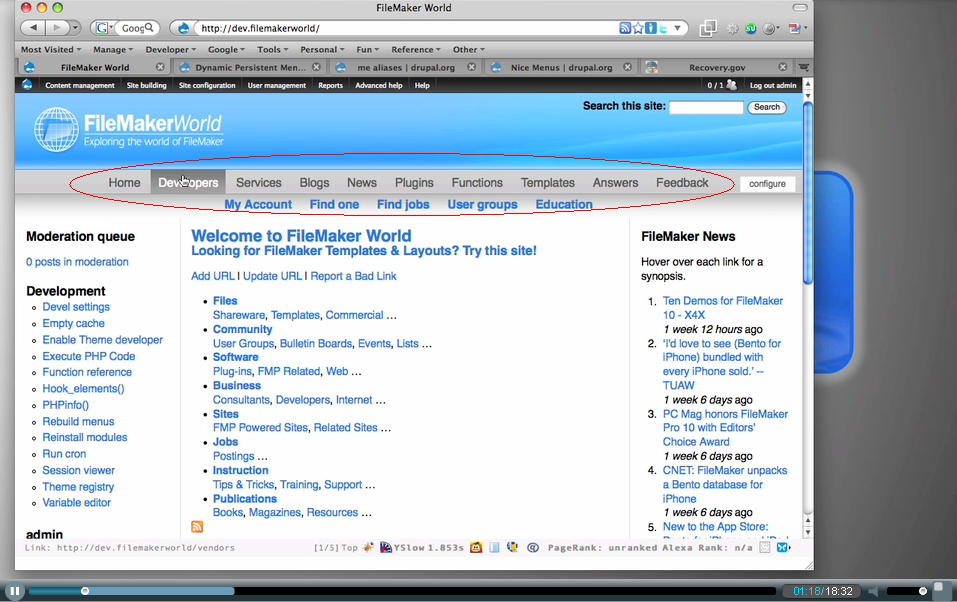
I am trying to have my Primary Link menu be below the header and have it pop down when scrolled over. A better description would be a image, I suppose=
http://i56.photobucket.com/albums/g175/neorockman/Example.png
(Screen Cap of a website with the type of links I want provided through a example video at = http://gotdrupal.com/videos/drupal-menu-navigation-enhanced)
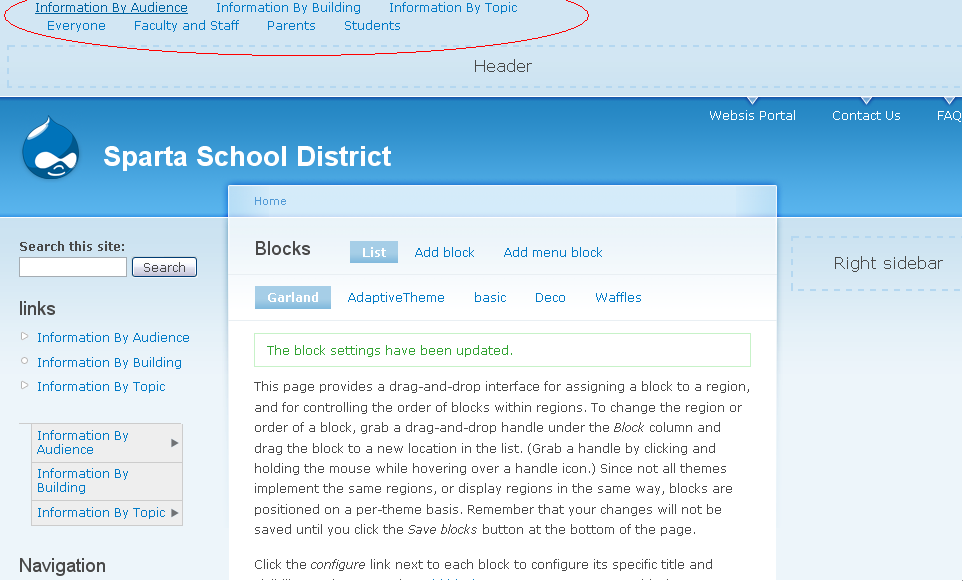
Though, this website example helped me a lot= Showing me that I needed the "Dynamic Persistent Menu" Module. I still cant find a place to edit or change the way it looks. Mine still looks like this=
http://i56.photobucket.com/albums/g175/neorockman/Example2.png
I thought maybe I needed to have something to edit the .CSS of the style.CSS of my theme that I am using, so I then downloaded the "Theme Editor" Module. So far, the Theme Editor seems to just edit color, font, and various other things; but not quite what I want to do.
Maybe I haven't found the right Module, or found the correct type of theme, or maybe I just need to learn how to edit it the old fashioned way= with tags in the HTML or CSS format.
Regardless, my searches are just leading me in circles, and have been for days. Any help would be much appreciated. I don't mind if its just a link to a site to get me started heading in the right direction, I'm sure others have had this type of problem before.
If its any help, I'll list what type of Modules I have installed after I created Drupal=
-'Me' Aliases
-Dynamic Persistent Menu
-Menu Block
-Nice Menu
-Theme Editor

Comments
There's more than one way to
There's more than one way to do this, but your fastest route there is see how other people have done it. There are several themes that integrate dropdown menus right into the theme. You might search for Suckerfish or Superfish along with Drupal and Theme.
A good place to start is the Aquia Prosper theme. (http://drupal.org/project/acquia_prosper) It's got SuperFish dropdown menus built into the primary menu. They can be enabled by selecting "Expanded" next to the parent menu item in your menu configuration.
Aquia Prosper is a sub-theme of the Fusion theme, a very nice grid-based base theme that uses the skinr module. This gives you all kinds of control without touching the CSS. (Check out the demo video on the aquia prosper project page)
Thanks, but
Thank you Dave, but the Acquia Prosper has drop down menus similar to the "Nice Menu" Module. I was thinking something more on the lines of the "Dynamic Persistent Menu" look, which is they pop down in a row and disappear when they are not hovered over by the mouse.
If I understand your first
If I understand your first post, you're asking how to change the look of the menu, correct? If so, you need to theme or style the menu using CSS. I'm not familiar with the particular menu module you're using (I've used Nice Menu), but editing the style would allow you to change the look of it.
Hacking Garland theme to work with Dynamic Persistent Menus
If you're planning to use the Dynamic Persistent Menu module you might want to choose a theme other than Garland that has a navigation bar region. The Framework theme is an example: http://drupal.org/project/framework
If you do what to use Garland you'll need to add a region to the theme for the Dynamic Persistent Menu. I've uploaded a working example and screenshot of the changes described below here:
http://drupal.org/node/660236
Here's what I did to create the garlanddpm theme:
1. Copy the garland theme to /sites/default/all/themes/garlanddpm.
2. Rename garland.info to garlanddpm.info.
3. Edit the name and description in the info file
4. Add the following to garlanddpm.info
The above adds a new region -- dpmnavbar -- to the theme.
5. Add code to page.tpl.php that will output the new region:
Using FireFox and Firebug to figure out the CSS and edit styles.css:
1. Edit line 494 to move the absolutely positioned breadcrumb div down.
2. Add a chunk of css to then end of the file to position and style the Dynamic Persistent Menu:
Install garlanddpm in /sites/all/themes as you would any other theme. Follow the instructions in the dpm module INSTALL.txt file and drop the Dynamic Persistent Menu block in the new dpmnavbar region.
This should get you started.