

Closed (fixed)
Project:
Support Timer
Version:
6.x-1.x-dev
Component:
Code
Priority:
Normal
Category:
Feature request
Assigned:
Reporter:
Created:
10 Dec 2009 at 21:48 UTC
Updated:
23 Apr 2010 at 05:29 UTC
Jump to comment: Most recent file

Comments
Comment #1
jeremy commentedFeature committed:
http://drupal.org/cvs?commit=300434
Can be administratively disabled, but is enabled by default.
Comment #3
NToronto commented"Can be administratively disabled, but is enabled by default."
Where in the admin can this be enabled/disabled? I am running 6.x-1.0 and can't find it?
Secondly, how can this be enabled/disabled in code?
Comment #4
jeremy commentedYou can disable the feature by going to Administer >> Support ticketing system >> Settings >> Timer. You have to have "administer support" permissions to access this page.
You could also disable it by adding the following line to settings.php:
Comment #5
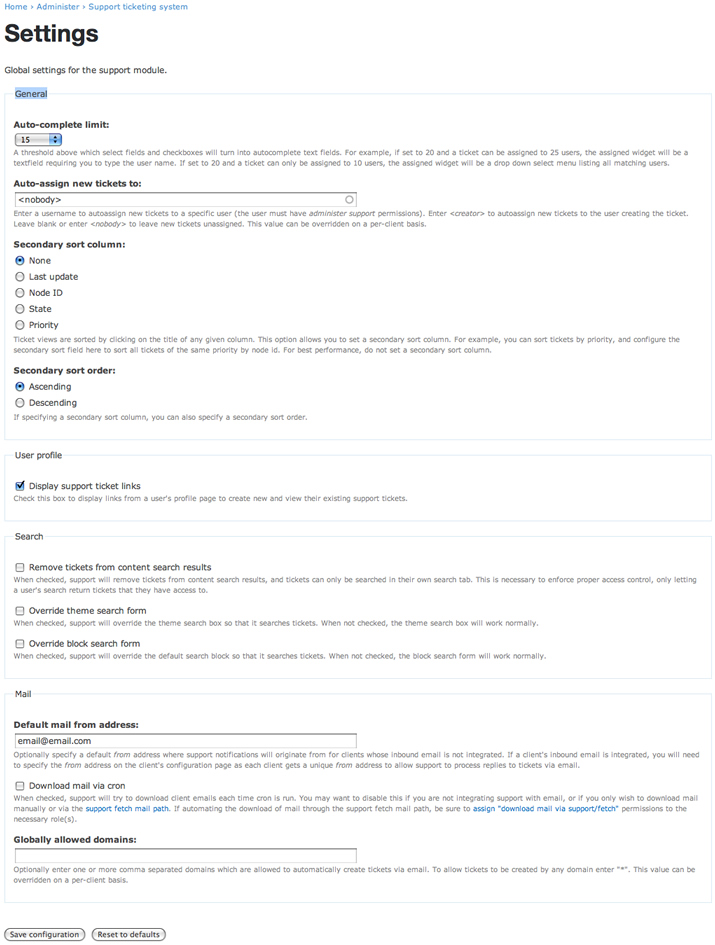
NToronto commentedIn the Settings page I do not see the "Timer" section. Screenshot is attached.
I am logged in as admin using the Garland theme and running Support Timer 6.x-1.0.
Comment #6
jeremy commentedA few things to try:
Comment #7
NToronto commentedI previously tried flushing the cache but it didn't solve the missing Timer menu item.
In Admin >> Site building >> Menus >> Navigation I simply edited the Timer menu item (but did not save any changes) and the Timer menu item now displays correctly. Perhaps editing a menu item forces a menu rebuild.... weird.
Thanks Jeremy!