

 The 2026 Drupal Business Survey is open. Your response will help shape the future of the Drupal business ecosystem.
I was using ckeditor and everything was working just fine. I installed the footnotes module, and it worked, but then after a few test nodes I started noticing that when I edited or previewed my node, the spacing between paragraphs was being doubled. Now after removing the footnotes module I am still facing the same problem. When I edit/preview a node's content <p> </p> is placed between each paragraph. Below is some more code examples.
Initial Input
<p>
	This is test line 1</p>
<p>
	This is test line 2</p>
First Edit
<p>
This is test line 1</p>
<p>
</p>
<p>
This is test line 2</p>
Second Edit
<p>
This is test line 1</p>
<p>
</p>
<p>
</p>
<p>
</p>
<p>
This is test line 2</p>
Live example of the above output http://ivawbeta.org/webmaster/test
| Comment | File | Size | Author |
|---|---|---|---|
| #93 | custom_enterwysiwig.zip | 959 bytes | summit |
| #43 | Filter_Settings.PNG | 41.83 KB | woodp |
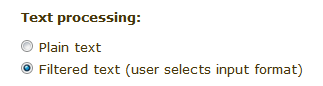
| #43 | Text_Processing.PNG | 3.36 KB | woodp |


Comments
Comment #1
bryancasler commentedI was able to resolve this by turning off "AutoParagraph". Not sure why it started being a problem out of the blue like this, but atleast everything seems to be working now. Will keep this thread updated if any new developments sprout up.
Comment #2
solutiondrop commentedCorrect me if I'm wrong, but I remember this happens via the HTMLpurifier module when AutoParagraph is set to Yes and the "Security filters" on the CKEditor config pages uses HTMLPurifier.
Comment #3
bryancasler commentedA little update. I am running HTMLPurifier. After disabling "AutoParagraph" the problem resolved itself for a little while, then about an hour later it started cropping up again. I had been clearing my browser cache in firefox and site cache through the Admin Menu module, but to no resolve. I had noticed in my configuration settings for my filter (admin/settings/filters/1/configure) that HTMLPurifier had a button to clear it's cache. After clicking this button and clearing HTMLPurifiers cache, everything is working again! I will keep this post updated if anymore quirks regarding this pop up.
Thanks for you comment droplits, it made me go and look through all the setting again, otherwise I may have missed that button for who knows how long.
Comment #4
wwalc commentedThanks for explaining what was the problem, I have added it to troubleshooting -> http://drupal.ckeditor.com/troubleshooting#11
Comment #6
arnieswap commentedThe same thing is happening to my site. I was using FCKeditor and move to CKEditor seems lethal as it ads these extra quotes....
Comment #7
arnieswap commentedComment #8
jcisio commentedThe solution was given.
Comment #9
TomJoad commentedCan anyone explain how I disable the "AutoParagraph" feature. I have tried looking for it in the ckeditor.js file but I am just not sure how you do it. I am looking for some hand holding here since I can't seem to find anything helpful on the CKEditor forum either.
It would be nice to have the instructions in the Troubleshooting link as well (http://drupal.ckeditor.com/troubleshooting#11) since right now it offers a solution but no information on how to implement it.
My Google powers have failed me.
Thanks,
Comment #10
bryancasler commentedGo to "Input Formats" /admin/settings/filters
then choose your filter of choice and click its "configure" link
now click on the configure tab
Now you can find "AutoParagraph" under the "AutoFormat" section, which is the second section from the top.
Comment #11
socialnicheguru commentedWhen I goto admin/settings/filter and click on config for "full html" for example, there is no "Auto Format" option.
Comment #12
bryancasler commentedSocialNicheGuru I wish I could tell you why that is, but I think someone more intimate with the project is going to have to explain why you might not be seeing it.
Comment #13
larowlanHi
I can confirm this behaviour occurs without the htmlpurifier module, that is why SocialNicheGuru can't see the filter, they don't have it installed (neither do I).
I have the same behaviour.
Steps to replicate:
1) Open a node for editing
2) Hit save
3) Edit node again
4) Hit save
so on
Each edit adds additional
tags.
I believe this is purely Javascript related because if you click repeatedly toggle the 'Source' button in the editor, you get the same behaviour.
My config has the Enter = new p and Shift Enter = new br.
Php version 5.2.11
I don't have htmlpurifier installed.
I have tried with and without the security settings.
I have tried with and without the line break converter input filter.
I have tried with and without the core html cleanup filter.
I have tried multiple toolbar layouts.
I have tried multiple themes.
The sad thing is, I have another Drupal install on a dev server (php version 5.3) with same config for Ckeditor, same permissions, similar spread of modules but it does not have this issue with either version 6-x.1.0 or 6.x.1-1.
Any clues?
Comment #14
larowlanHi
Found the issue
Bad xhtml to begin with, p's inside ul's with no parent li, other missing closing tags etc.
What is scary is that the xhtml was created by CKEditor.
Is it possible for the user to foo up the xhtml using CKEditor?
By pressing the delete key?
Is there a way to purify the output before saving the node?
Comment #15
DrupT commentedHi,
I can confirm this behaviour occurs without the htmlpurifier module, too.
Any solutions?
Thanks
Comment #16
DrupT commentedComment #17
bryancasler commentedOddly enough this has now become a problem again on my site. If I click in the text area a
<p> </p>is created, even if nothing is typed.Comment #18
jcisio commentedanimelion, do you have the original issue, which was caused by the autoparagraph filter? If not, you should open a new issue.
From the recent voice, I see that this is a new one:
#13: repeatedly toggle the Source button keeps adding
<p> </p>#17: click in an empty textarea generates
<p> </p>In two cases, this evidently is a clientside problem. Thus, it could be useful to give more detail: OS, browser, other scripts in that page, and maybe, add-ons used in browser. And all that worths creating a new issue.
Comment #19
dczepierga commentedI try to reproduce this in few browsers, with installed plugins which was written in this node without any result. Everything work good in DEV version from CVS and CKEditor 3.4.
In this week should be new release of CKEditor plugin.
Jcisio thx for the support, u make a really good job.
Comment #20
troyfandango commentedI have a similar problem: there is always a BR tag in the MENU ITEM DESCRIPTION which I cannot remove. Its always there even when I delete and save it. It keeps putting it back in!
The only filters I have enabled for FULL HTML are:
Internal Path filter
URL Filter
I am not using htmlpurifier module either. Using drupal 6-19.
Comment #21
jcisio commentedI revert the status because you have a different problem. Nobody mentioned about BR tag in this issue. Hint: you problem was reported in another issue.
Comment #22
wer0ckz commentedsame problem please help..
I created a new story or article using CKeditor full HTML or filtered. I pasted the body of this content http://www.clclax.org.au/newsitem/?newsid=185 to my drupal CKeditor, before i hit saved, i can see the spaces between paragraphs, but when i hit saved and viewed the node here is what is can see http://vorlage.net.au/clclax.org.au-new/news/doug-fox-awarded-oam
how to fix?
thanks
Comment #23
jcisio commentedwer0ckz, if space is converted into
, that's another problem.Comment #24
Anonymous (not verified) commentedThis can also be caused by Firebug. When you are editing content, be sure to have Firebug disabled. You don't have to uninstall, just click the little red "power" button on the top right of the Firebug window that says, "Deactivate Firebug For this website."
I'm not using html purifier.
Comment #25
daveX99 commentedI'm having this problem too. Subscribing. Can confirm it happens eventhough firebug is off. I don't have htmlpurifier, and can't find an 'auto paragraph' setting.
Running Drupal 6.19 & CKEditor 3.4.1
-dave.
Comment #26
bryancasler commentedI found this recently, might be worth looking into http://drupal.org/project/emptyparagraphkiller
Comment #27
jdvc commentedI think animelion is on the right track. The empty paragraph killer module is a good solution since I've found this issue usually results from a user hitting enter twice in the wysiwyg and unknowingly causing a
<p> </p>to be inserted. Usually when a user hits enter once in the CKEditor wysiwyg, it is not really apparent that they have created another paragraph, so they'll hit it twice.Comment #28
adraskoy commentedsubscribe
Comment #29
newcitypro commentedI'm having the same problem as daveX99 ...no HTMLpurifier, can't find "auto paragraph" and running Drupal 6.20 and CKeditor 6.x-1.2. Any additional thoughts?
Comment #30
SlayJay commentedSame issue here... subscribing.
Comment #31
jjma commentedProblem same on D7 without the htmlpurifier module running. I do use firebug alot in the development of the website which might be causing this conflict although I've not seen this behaviour on other drupal sites.
Using the http://drupal.org/project/emptyparagraphkiller module to stop the pesky
tags....
Jon
Comment #32
Anonymous (not verified) commentedI am also having this issue on both D7 and D6 CKEditor, latest version of the editor and module. If I paste something from Word, toggle source on and off, the empty p tags show up before the content. Annoying. The paragraph killer fixes it in the presentation view but the editor keeps the empty p tags when you go back to edit.
Comment #33
Anonymous (not verified) commentedIt looks like the issue is happening to me in Chrome but not in IE or Firefox. I am not using Firebug on that page.
Comment #34
carlos.macao commentedsubscribing..,
Comment #35
tinokreutzer commentedSubscribing.
Not exactly the same problem here, but might be useful for illustration. For me
<p> </p>is only added before pasted text if this text already had formatting such as H1. Seems like the<p> </p>part in the first line of the empty text box is not being replaced by<h1>some pasted text</h1>as it should.So copy-pasting
becomes
(This happens to virgin new documents, auto line breaks disabled, no html filters applied. Using D7 and CKeditor 3.6)
Comment #36
delykj commentedsubscribing
Comment #37
vreddy4 commentedI am using ckeditor and everything was working just fine. I installed the footnotes module, and it worked, but then after a few test nodes I started noticing that when I edited or previewed my node, the spacing between paragraphs was being doubled. Now after removing the footnotes module I am still facing the same problem. When I edit/preview a node's content
Sample Tesr
is placed between each paragraph.
EXample:
Sample Tesr
Sample Tesr
Sample Tesr
Comment #38
Anonymous (not verified) commentedWe had this problem today as well. Our template is feed from a JSON object so before outputting the content, I added this simpled line of Javascript:
No more problems.
Comment #39
johnpitcairn commentedsub
Comment #40
Anonymous (not verified) commentedsubscribing, this is a very annoying problem that always happens in every Drupal 7 + CKeditor I do.
Comment #41
socialnicheguru commented@mpoplin where did you add the line?
Comment #42
mkocev commentedI changed settings for "Cleanup and output" on CKeditor.
Enter mode =
<br>Shift + Enter mode =
<p>Just a temporary solution :)
Comment #43
woodp commentedI observed this problem as well in CCK-created text fields. The default "Text Area" widget "Text Processing" value is Plain Text. Changing it to "Filtered Text" solved my problem.
/admin/content/node-type/{CCK element}/fields/{CCK field}
Comment #44
jefbak2 commentedIt appears the choosing "filtered text" for the cck field means the user can select the input format. What does that mean?
Comment #45
dsellers commented#43 worked for me.
I had to go back and delete the field from my content type and recreate it selecting "filtered text" in the widget type.
Comment #46
blakedesign commented#42 worked for me. Not sure how or why but it worked like a charm.
Comment #47
cangeceiro commentedalso experiencing this on a d7 site, no html purifier, no extra ckeditor plugins
Comment #48
bryancasler commentedSince originally posting this bug report I've moved my development to D7. I'm also using the WYSIWYG modules support for Ckeditor. I'm still experiencing the same problems though, so this is obviously not a Drupal issue, but a ckeditor one. That doesn't mean we shouldn't try and find a way to fix the experience.
I've also noticed that after returning to edit a node, sometimes a ckeditor adds
<p> </p>to the top of the post, anyone else experience this?So far the current suggestions are to use the empty paragraph module, play around with Ckeditor's "Cleanup and output" settings, and per #38 add some custom code to an unknown location. Are there any others I'm missing? How can we move forward with resolving this? Lets hear some ideas and suggestions.
Comment #49
Anonymous (not verified) commentedIs there somewhere we can report this to CKeditor folks?
This still only happens to me in Chrome. FF seems to be fine.
Comment #50
johnpitcairn commentedThe problem appears to be Webkit generally, I get this in Safari (mac) and it seems to be somewhat worse in CKEditor 3.6.x than 3.5.x.
Comment #51
mkesicki commented@vilepickle on CKEditor tracker there are already 2 known issues about adding extra
<p> </p>to content. Here are links to it: http://dev.ckeditor.com/ticket/1026 & http://dev.ckeditor.com/ticket/5241Comment #52
bryancasler commentedCross referencing this from the WYSIWYG module #550428: Tags like " " or "<p> </p>" or "<br />" added to empty textareas.
Comment #53
tahiticlic commentedHi,
I've experienced it on D7.10 + last version of CKeditor. And the solution was to remove "convert line break to HTML" in filter settings : admin/config/content/formats
Comment #54
bryancasler commented@tahiticlic I've had that disabled, but the problem persist. I believe it's a webkit issue.
Comment #55
chiappa commentedFor me the extra line brake is added by the rich text editor when there's divs inside a div.
So if I have for example
<div>hello</div>it wont add anything below that, but if I would have<div><div>hello</div></div>it will add an extra line brake to the bottom. I tired Firefox, Opera, Chrome & Safari all with the same results.I am using the CKEditor module and the only "fix" I found is to Edit the CKEditor profiles "EDITOR APPEARANCE" to Default state: Disabled.
If I go to the rich text editor it will continue to add the extra line brake, but when you go back to the plain text editor and remove the added line brake, it will be able to save the document as it is. The hunt for a real fix continues....
Comment #56
mkesicki commented@chiappa can you check if the same happens when you change
"Enter mode " option to "div" in "Cleanup and output" section in CKEditor profile configuration.
Comment #57
chiappa commentedI have tried that already and now double checked that it has no effect. Also I really don't fancy using divs as a line break.
Comment #58
lalit774 commentedstep 1 you should search following keys in /sites/all/libraries/ckeditor/ckeditor.js and update following values
enterMode:2, forceEnterMode:true, shiftEnterMode:1
step 2. clear cache
Result:
in Firefox working fine.
in Chrome add <div> as place of <br>. but working fine.Comment #59
bryancasler commentedlalit774, what's that about chrome?
Comment #60
lalit774 commentedhi dear,
Comment #61
tcowin commentedI've got D 7.0 and CKEditor 3.4.2, and while #58 had no discernible affect, #53 did prove to solve the problem described in #37.
Comment #62
westbywest commentedThis resolved the issue with me, although I am using CKEditor 3.6.x with the WYSIWYG module. Do note that CKEditor provides the file config.js to set options like these, so you don't have to edit ckeditor.js directly. Also the WYSIWYG module lets you override CKEditor settings in a custom module with hook_wysiwyg_editor_settings_alter(). So, I moved these config options to a module ...
Comment #63
batigolixconfirm that the solution in #62 works for CKEditor 3.6.2.7275 & Wysywig 6.x-2
Comment #64
Boss C commentedI've searched for two weeks trying to find a solution to this problem. Just updated to CKeditor 7.x-1.7, and still has a source outcome like this:
<p>What is it I am doing wrong With This I will not</p>Not using WYSIWYG module, or HTMLpurifier. Has anyone found a solution to the editor inserting (#58, #62, doesn't work)
Comment #65
TarKHaoS commented#62 works for me!
Thanks!
Using Wysiwyg 7.x-2.1, with CKEditor library version 3.6.2.7275 .
Comment #66
jvieille commentedSame problem apparently in D6. Please backport when solved
Comment #67
lsolesen commentedSetting to active as there is no patch to work on.
Comment #68
summit commentedHi, dd anyone try this: http://stackoverflow.com/questions/7268859/ckeditor-adds-empty-paragraph...
EDIT: I tried http://drupal.org/node/1188198 and I think it works!
EDIT 2: No this is not working either...
No solution yet to get the annoying
<p> </p>greetings, Martijn
Comment #69
modestmoes commentedIf you want to avoid nasty formatting, here is a possible solution.
paste this in 'custom javascript configuration'
config.autoParagraph = true;
config.forcePasteAsPlainText = true;
The reasoning behind this is: avoid any nasty formatting coming in and force user to use ckeditor to format their bullet lists, blockquotes, whatever.
Comment #70
summit commentedHi,
Could you tell me where I can input this please? What is the admin url?
Thanks a lot in advance for your reply!
Greetings, Martijn
Comment #71
dczepierga commented@Summit, go to CKEditor profile -> "Advanced options" section -> Custom JavaScript configuration...
Try to paste it there ;)
Comment #72
summit commentedHi, Thanks did that. Now on travels, so can't tell if it is working or not within a month.
Greetings, Martijn
Comment #73
rinasek commented#69 works just fine
Comment #74
akki123 commentedProblem still appears with latest version of Wysiwyg and CKEditor. No fix resolved this issue.
I switched to TinyMCE and problem disappeared.
Comment #75
summit commentedHi, I do not think that switching to TinyMCE is the solution.
Could anybody may be post a solution for latest version?
Thanks a lot in advance for your reply!
greetings, Martijn
Comment #76
Dentorat commented#62 works for me, but I wasn't a fan of switching the behaviour of the enter key, instead of setting enterMode, I set just the one below and it worked like a charm
$settings['autoParagraph'] = false;Comment #77
Shademan commented#69 worked fine for me, just put these two lines in ckeditor.config.js on the end of the editorConfig function:
config.fillEmptyBlocks = false;
config.IgnoreEmptyParagraphValue = true;
It will still generate an empty
<p></p>though.Comment #79
pipicom commentedAnyone solved this?
Comment #80
jjma commentedenterMode:2, forceEnterMode:true, shiftEnterMode:1This has an effect that you can not use shift and enter to make a line break so you gain by losing the extra
tag but lose the line break?
Update:
My mistake re code. I put in the wrong formatting but I'm now getting
's instead of paragraphs...
Jon
Comment #81
mdecooman commentedThe following solved the issue for me:
PS: using CKEditor Module 7.x-1.12, CKEditor 4.0.1
Maxime
Comment #82
ben833 commentedWorkaround for extra spaces when switching from source to WYSWYG worked for me in Drupal7:
<br>Note: this may change the way people interact with the CMS
Comment #83
_paul_meta commentedI just installed latest stable versions of drupal's ckeditor module (7.x-1.12) and ckeditor (4.02)
all is fine but for one bug .. first time i create and save a node all is ok. then if i edit it, an extra
<p></p>tag is inserted to the html source.this seems to happen as ckeditor loads. that is to say - when i click edit on a node, the page loads, i can see the correct source code in the text area as html, then ckeditor loads and there is an extra blank line before my content starts, and when i switch to source mode, i see the extra
<p></p>.. so it seems the extra tag has been inserted by ckeditor after it loads.if i save the node then click edit again, there is now two extra empty p tags and so on.
i have tried various combinations of these configs .. to no avail.
config.fillEmptyBlocks = true;
config.IgnoreEmptyParagraphValue = true;
config.autoParagraph = true;
i am not using html purifier, though i did install it and try some of the suggested fixed and its no help.
has anyone else seen this issue? i'm guessing it might be a ckeditor issue but any thoughts appreciated.
I should mention that i am on a mac and have noticed this issue on Firefox, Chrome and Safari. I don't think its a browser issue but it does seem to happen at a javascript level, during the loading of the ckeditor tool.
thanks !
Comment #84
_paul_meta commentedAlso i should mention - clicking the ckeditor source mode repeatedly does not affect this problem, but toggling the 'Switch to plain text editor" and 'Switch to rich text editor' makes it continually add the extra p tag at the top of the content.
Comment #85
_paul_meta commentedi found a solution to the above - it seems that a contrib module was causing some byte order marks to be added to the page's HTML. (described here - http://drupal.org/node/327794)
this became noticeable when i used firebug or chrome inspector to look at the rendered HTML - the head tags were appearing in the body section. This would happen regardless of theme choice. When i isolated and disabled the module causing this (views selective filter) .. the issue with the extra p tag went away. mysterious .. but might be worth noting that if stray markup appears in ckeditor it could be related to byte order marks appearing in your rendered HTML
Comment #86
keiichito commentedHi,
I can confirm this behaviour still occurs.
Core 7.23
CkEditor 7.x-1.13
Any solutions?
Thanks
Comment #87
gabyyy commentedI have a similar error with drupal 7.23, CKEditor 7.x-1.13.
Steps to reproduce on clean drupal install:
1 - Install CKEditor 7.x-1.13.
2 - Copy CKEditor library files
3 - Create new content (rich text editor) with 2 paragraphs
4 - Add teaser break after 1st paragraph
5 - Switch to plain text editor
6 - Switch to rich text editor
Result: Each time you switch between plain-text and rich-text editor,
<p> </p>is added.N.B: This bug only happens in IE8, not in Firefox.
Comment #88
bburgI get something similar, but with an integration of the Asset module. Asset tokens get wrapped in redundant p elements every time the editor is loaded, via page load, or switching between source view and markup views.
I don't get the
entities because I've setin my config. (which does prevent these from being noticeable).
ckeditor (module) 7.x-1.13,
ckeditor (library) 4.4.2
asset 7.x-1.0-beta4
drupal 7.25
*Happens in chrome (32.0.1700.77), but not in ff or safari.
Comment #89
MRJWO commentedHello everyone,
I'm not saying "I figured out the problem here" but I figured out what was wrong with my problem.
I had this issue with any wysiwyg library i tried (TinyMCE and CKEditor) and my paragraphs not spacing properly.
In the end it turned out I had overlooked some sloppy CSS I added which fixed my problem of paragraphs not showing properly I had added the following CSS to my custom theme's style.css file:
p {
padding:0px;
}
Simply deleting this CSS entry solved my problem, give it a shot, I hope it helps!
Comment #90
tajdar commentedEmpty paragraph killer module worked for me.
Empty paragraph killer
Comment #91
albertski commentedCheckout CKEditor Paragraph Paste Fix. This fixes the issue of
<p> </p>being added when pasting in content.Comment #92
mrprasa commentedI am using the Wysiwg module with CKEditor (not the CKEditor module), so the CKEditor Paragraph Paste fix was not applicable. A combination of the custom module below to alter the ckeditor configuration and the Emptyparagraph Killer Module worked for me. The Emptypagraph killer didn't work on it's own since CKEditor was inserting an " " into the
tags.
<?php
/**
* Implements hook_wysiwyg_editor_settings_alter().
*/
function custom_module_wysiwyg_editor_settings_alter(&$settings, $context) {
if($context['profile']->editor == 'ckeditor') {
$settings['ignoreEmptyParagraph']=false;
$settings['fillEmptyBlocks']=false;
$settings['autoParagraph']=false;
}
}
Comment #93
summit commentedHi,
I made this custom module in a .zip file.
I named it custom_enterwysiwig , thanks for making it Monica!
Greetings, Martijn
Comment #94
arun ak commentedI think the issue is with CKEditor. It is working fine with CKEditor 3.6.2.7275.
Comment #95
Revathi Manohar commentedHi All,
I am also facing the same issue with the wysiwyg editor.Thank You.
Comment #96
bburgHi Revathi,
Several solutions have been proposed in this thread, give some of those a try.
I think this issue is a bit nebulous, in that many people are observing the same symptom, which may have multiple causes. Since this issue has been lingering for nearly seven years now, we may consider closing this, or perhaps adding some documentation on best practices for configuring CKEditor.
Comment #97
Revathi Manohar commentedHi bburg,
In my case I have the empty Paragraph tag added at every time when I am editing the content.So the next content which is rendering have the space at the top because of the Paragraph tag in certain content type only.
so what i decide is for this issue
so I referred the comment #92.I followed it.It is great.If we are mistakenly enter enter-key it does not allow the "p" tag.
And it removes the space.
Comment #98
bryancasler commentedAs the original poster of this issue, I'm glad to see it has gotten so much attention over the last seven years. bburg's comment does a great job of summarizing all the conversation and suggestions collected. And since my original issue was resolved with the release of CKEditor 4, I'm closing this one out!
There are a number of related or similar bugs that have been reported in this thread. Before someone simply re-opens this one, please consider the merits of filing a separate issue that can be more focused on resolving that specific use case.
Comment #99
vchen commentedFor me the opposite solved the problem.
admin/config/content/ckeditor/
I set this to false under Advanced Options > Custom Javascript configuration:
config.autoParagraph = false;
Comment #100
drupalbabaji commented#99 solved my problem. Thanks vchen
Comment #101
augustoccl commentedI know this is outdated, but something really similar to this happened to me and it drove me crazy after a couple of days. I had these mysterious blank lines before the text and I realized that CKEDITOR is adding strange characters at initialization, like '\ufeff' and then converting them to blank lines. My solution was to get rid of them just after initilization:
at sites/all//modules/ckeditor/ckeditor/ckeditor.config.js:
CKEDITOR.on('instanceReady', function (ev) {
ev.editor.setData(ev.editor.getData().replace(/\ufeff.*\ufeff/g,''))
});
This is definitely not a good solution but it was the only thing that solved my problem after trying everything on this thread.
Maybe it will also help someone. Just forgive me for not having a better place to put it, but since this thread is most viewed for people looking for this topic, maybe it will arrive at someone who is gonna bring the final solution. Perhaps it will have something to do with CKEDITOR core, I don't know.
Comment #102
avpadernoI am removing issue tags used from one to four issues. I apologize for bumping the issue.