

Closed (fixed)
Project:
Drupal core
Version:
7.x-dev
Component:
Seven theme
Priority:
Normal
Category:
Bug report
Assigned:
Unassigned
Reporter:
Created:
4 Jan 2010 at 19:53 UTC
Updated:
7 Dec 2010 at 02:00 UTC
Jump to comment: Most recent file



Comments
Comment #1
aspilicious commentedI confirm this
Comment #2
avpadernoI can confirm it also in the block settings page.
Comment #3
avpadernoThe problem is present in different tables. I see the problem on Safari 4 for Mac OS 10.6.
Comment #5
nvanhove commentedComment #6
cosmicdreams commentedPossibly relative to this issue #746678: Markup issue with tables (admin/appearance/update)
Check to see if the call to theme_table is properly implemented. That was the cause of the issue linked above.
Comment #7
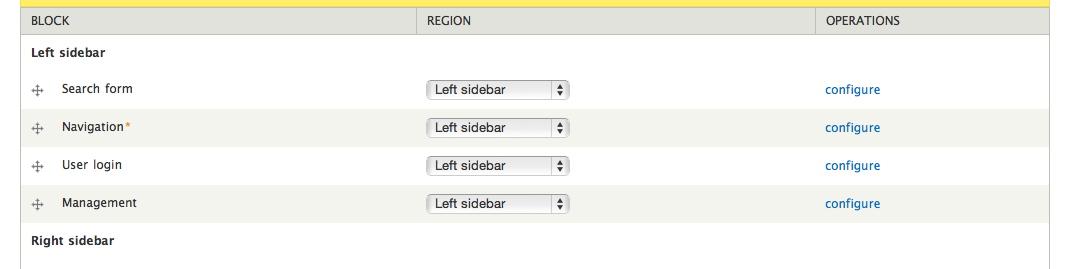
rickvug commentedNote that the problem here only effects Webkit based browsers and does not effect all table rows. On the blocks listing page only draggable rows display the bug. To debug I've tried very specific CSS selectors targeting specific table rows and have not been able to style the righthand side of the table or rows contained within it.
Comment #8
eliza411 commentedComment #9
eliza411 commentedComment #10
seutje commentedthis just pisses me off
I'll write some more info on what and why, but I gotta run right now
Comment #11
seutje commentedheh, just realized, since this is a webkit only bug, we can use :last-child and we don't need to jump through hoops to slip a class in there
Comment #12
jcarrig commentedI just applied this patch in comment #11 and tested in the following:
on Mac OS 10.5.8
It fixes the issue. See attached png.
Comment #13
nvanhove commentedLet's get it in :)
Comment #14
cosmicdreams commentedstill applies, still works for Chrome. I tested the rest of the browsers I have and found it works in : Chrome 5 beta, Firefox 3.5, IE 6, IE 7, Safari 4, Opera 10
However, with this patch there is an issue with IE8 not being able to correctly render the right border of the tables.
Comment #15
cosmicdreams commentedWhen the borders collapse the right border of these rows is clobbered. Perhaps if applied a "lastcell" or "endrow" class to the last cell of a row we can support this formatting better.
Comment #16
cosmicdreams commentedThis looks to be the result of IE8 table rendering bugs. The bug is demonstrated here: http://www.gtalbot.org/BrowserBugsSection/MSIE8Bugs/TableRulesAll-BCSepa...
Comment #17
seutje commentedpatch in #10 illustrates the craziness required to add a class
does that fix it for IE8?
Comment #18
cosmicdreams commentedI'll give it a try
Comment #19
Jeff Burnz commented#11: 674082-seven-table-webkit-11.patch queued for re-testing.
Comment #20
Jeff Burnz commentedLooks like this is RTBC but I'm not to sure about using the phrase "weird bug" in a core comment :)
Powered by Dreditor.
Comment #21
adrinux commentedConfirmed to fix the issue in Safari 5.0.2
So. I changed comment text to 'bug' instead of 'weird bug'.
Comment #22
avpadernoI can confirm the issue on Google Chrome too; applying the patch resolved the issue for me (Windows 7).
I applied the patch manually, because in the last Drupal 7 beta there is a style more before the
Fieldsetscomment; I am not sure if the patch applies to the latest developed code for Drupal 7.I am changing the status to allow the test bot to test the patch.
Comment #23
avpadernoAs the bot is happy, I am changing the status to RTBTC.
Comment #24
webchickHm. While I certainly want to see this fixed, are we supportive of these kind of browser-specific hacks in core CSS? What exactly is triggering the webkit bug?
Pinged Jacine about this.
Comment #25
mark trappHere is the list of bug reports regarding border-collapse causing weird issues with borders in WebKit: https://bugs.webkit.org/buglist.cgi?quicksearch=border-collapse. Bug 8914 seems to have a test case reduction similar to the problem in this issue, but it hasn't been touched since 2006.
As of right now, it's mostly unconfirmed, but enough people are experiencing it to consider it to be a real issue, I think. Really odd that it hasn't been caught before, and really sad that we have to resort to WebKit-specific hacks.
Comment #26
adrinux commented@webchick @Mark Trapp referring to it as a "browser specific hack" is a bit OTT. Firstly :last-child is a perfectly valid pseudo class in CSS3, and secondly it's not browser specific so much as browser rendering engine specific, Safari and Chrome are listed in this thread, and no doubt other webkit based browsers like Konqueror are also afflicted.
And whilst the extra ruleset is redundant for other CSS3 supporting browsers re-declaring a border is hardly likely to cause problems.
I think seutje's teeny patch is an elegant solution and in keeping with http://drupal.org/node/769692
"This means that layouts must not break, and obvious differences/bugs should be worked out."
Comment #27
mark trappStandards-compliant browsers are referred as that because they all render the same markup/CSS in roughly the same way: it allows us to use the same markup and styling without modification and have the final result look the same regardless of the browser one uses.
Special casing (i.e. so-called "hacks") is something that is reserved for when a browser doesn't render the way all other browsers do: either because the feature is experimental (i.e. using prefixed attributes) or the browser's rendering is noncompliant due to a bug (e.g. IE). It's not supposed to be the normal action: it's meant to compensate for problems with how the browser renders things by exploiting its quirks.
In this case, it's a WebKit bug: it's the only browser that messes the current markup/CSS up, and the patch is introducing a "hack" to fix it. Whether other browsers ignore the "hack" is beside the point: compliant browsers ignore all the hacks we use for IE6, too.
The patch might be the only way to get it to render correctly in WebKit, but if there's a way to accomplish the same result without the use of special-casing for WebKit, that'd definitely be preferable.
Comment #28
adrinux commented@Mark Trapp
1. There is nothing 'hackish' about the CSS in this patch, it's a perfectly valid CSS3 selector and a border rule. A CSS hack implies something quite different, taking advantage of parsing errors etc, those we avoid for good reasons. This is a workaround, not a hack.
2. Webkit is NOT a browser*. It's a browser rendering engine. This rendering bug is present in one engine but multiple browsers.
3. The only 'hack' I use for IE6 is conditional comments, and being an IE specific feature of course they only target IE6.
4. Of course it's preferable if it can be achieved without adding what should be a superflous ruleset. If you have a better workaround lets hear it.
* Well, ok you can download nightly builds of safari called webkit http://nightly.webkit.org/ but that's not what we're talking about.
And if you still say it's a hack affecting one browser we'll have to agree to disagree. :)
@everyone
- Poking about on the manage display tabs for taxonomy admin/structure/taxonomy/to/display the right border definitely goes missing when tabledrag.js runs. And the border reappears when you 'show row weights'.
- On the image styles table, at admin/config/media/image-styles if you change the colspan on the operations th tag from 3 to 2 in the webkit inspector:
The border reappears.
It really does seem like a bug in webkit as per previous comments. And it does seem to involve unnecessary colspans.
Then again looking at admin/structure/block and the missing right borders it looks like the table rows are 1px too short and playing with colspan has no effect.
Where are the colspans being added to the tables? Too late for me to hunt today...
Comment #29
mark trapp@adrinux: change "browser" to "rendering engine" and my point still stands. And a quick check points to a dozen instances of use of the star HTML hack—meant to target only IE6's engine—in core.
But all that is beside the point: we're arguing over semantics here. I think we can all agree that, if theres a way to get the end result without special-casing, hacks, or quirks for specific browsers, browser engines, or versions of browser engines, we should explore that before introducing what the patch provides into core.
Comment #30
jacineI've been dealing with this really annoying issue for what seems like forever. The patch in #21 is what I do to fix it, and I'm pretty sure it's a bug. A good place to see it in action is on
admin/config/regional/date-time/formatswith JavaScript disabled just so you can see that there's no scripts affecting it.That's a perfectly good table, and the bug appears like clockwork. If you open up the inspector and screw around with the td colspan value, i.e. change it to 2, and then back to 3, you'll see the border is redrawn properly.
Since the patch is how I've been fixing it for the last ~2 years, I'm totally fine with it in Seven.
Comment #31
jacineOh, and I forgot to mark it RTBC.
Comment #32
webchickOk, cool. That works for me.
Committed to HEAD. Thanks!