I can't install D7 on a standard shared hosting. I'm hosted with Siteground.com
Linux OS / Apache 1.3.41
PHP: 5.2.9
MySQL: 5.0.67
Drupal: 7.0-alpha1
Going through the install process, everything works fine and all database tables are added. Once the process has happened, I get the following when trying to access my site (root):
Fatal error: Class 'DrupalQueue' not found in /home/adshill1/public_html/modules/update/update.install on line 74
I deleted the database tables and retried and now get the following error:
Fatal error: Class 'MergeQuery' not found in /home/adshill1/public_html/includes/database/database.inc on line 740
I then retried again 3 times and get the error above, and the install process goes to a "Failed to open page" error - the php logs showing the same error as above.
Unfortunately I am not a php coder and so I'm not sure of the best way to de-bug this. I will re-upload the files again now but as this was a completely new, clean install I thought I better report it.
I searched for this before posting and set the priority as critical due to the fact it prevents install, which at alpha release is a bit worrying - hoping this is something to do with the server config or an error in the ftp upload. Please correct this if I'm wrong to do so.
I'll report any further findings. Thanks a lot,
Adam





Comments
Comment #1
dave reidMoving to update.module since it happens in update.install.
Comment #2
adshill commentedUPDATE
I removed all files, re-uploaded them, followed the install procedure and now it just goes to a page not found. The php error logs now show:
[15-Jan-2010 17:52:18] PHP Fatal error: Call to undefined function drupal_exit() in /home/adshill1/public_html/includes/install.inc on line 884
I've checked and this line was actually the first line of errors the first time around too.
I've then removed all database tables, deleted setting.php and recreated from default.settings.php and then tried re-install. Same error each time.
The page the error arrives is the following: /install.php?profile=standard&locale=en
Something very strange going on! Realise there may not be enough here to diagnose but with guidance I'm happy to de-bug.
Thanks,
Adam
Comment #3
adshill commentedSide note: I was really looking forward to contributing to finding bugs in the alpha version - pretty suprised it came this soon! :) As I say - look forward to helping to work out if this is a hosting/user error or a bug since it doesn't seem anyone else is having this problem.
Comment #4
adshill commentedSorry... final point.
Once going through the install process and getting the page not found, if I then go to the side root, then I still get the error:
Fatal error: Class 'MergeQuery' not found in /home/adshill1/public_html/includes/database/database.inc on line 740
So this is totally related to the initial problem. It looks like error is actually in the install.inc file with the drupal_exit function and that is causing issues with other files. But I don't know much about these things! Perhaps this needs to be moved back to the install system?
Thanks again,
Adam
Comment #10
adshill commentedJust to confirm, I always deleted settings.php and created a new one as a duplicate of default.settings.php allowing the install process to do the work. Therefore this fix is not the problem.
Any tips from anyone on de-bugging? It seems a bit strange that I can't install. Thanks,
Adam
Comment #11
adshill commentedOriginal problem still active.
Comment #12
adshill commentedMoving this back to install... I did 3 more attempts from scratch and the source of the problem is definitely coming from this error message:
[18-Jan-2010 12:33:26] PHP Fatal error: Call to undefined function drupal_exit() in /home/adshill1/public_html/includes/install.inc on line 884
This has happened every time. Then when I refresh, it takes me to the site configuration page and on entering the information I get the error:
Fatal error: Class 'DrupalQueue' not found in /home/adshill1/public_html/modules/update/update.install on line 74
Then when I try to access the website address I get:
Fatal error: Class 'MergeQuery' not found in /home/adshill1/public_html/includes/database/database.inc on line 740
There is no way to install. Any help would be very very greatly appreciated as not being able to install at alpha release worries me! I really hope its a hosting setup problem but I have no way of telling right now.
Thanks,
Adam
Comment #13
carlos8f commentedI'm fairly sure this is a duplicate of #637146: HEAD install redirect fails because common.inc not loaded in _db_check_install_needed().
Comment #14
adshill commentedNo mention of those specific errors and neither of the patches seem to make any difference so I think its something else.
This post has the same errors and sounds just like this problem but is entirely related to sqlite: http://drupal.org/node/684138
And the patch is already inside alpha1.
Comment #15
m4oliveiHi,
I'm having this same issue. Just installed Drupal from HEAD on my local machine. I'm running the following:
Windows Vista
Apache 2.2.11
MySQL Community Server 5.1
PHP 5.2.8
After the installation step where you input your DB credentials, I get the white screen of death with the error message:
Fatal error: Class 'MergeQuery' not found in C:\inetpub\wwwroot\drupal_7_dev\includes\database\database.inc on line 740
Thanks,
~Matt
Comment #16
adshill commentedPretty sure this is not a duplicate. Matt could you apply the patch in the link in #13 and see if it makes a difference?
Comment #17
carlos8f commented@adshill, the 'class not found' errors result anytime the code registry can't build. That's a start, but it doesn't pinpoint anything in particular. It seems that this is environment-specific, since the registry builds reliably for the rest of us using MySQL. Please verify that you have the same problem with 7.x-dev.
Moving the issue out of alpha since @m4olivei can reproduce it in HEAD.
BTW, D7 can use MySQL >= 5.0, so ignore #7.
Comment #18
adshill commentedHi carlos8f,
Thanks for the info - I'm uploading the dev version now. Just to point out again as its not in my original post, the first error I get is the Call to undefined function drupal_exit() error, rather than the class not found errors - not sure if that is relevant.
I also already ignored #7 :)
It seems that m4olivei has a different version of every sever service and OS, but agreed its very weird that we're getting this and no one else! Thanks for your help.
Adam
Comment #19
carlos8f commented@adshill, the drupal_exit() problem is related to #637146: HEAD install redirect fails because common.inc not loaded in _db_check_install_needed(). If you apply the patch there to 7.x-dev (we refer to as HEAD) and still receive the error, we can narrow this down to a problem building the registry, which causes 'class not found' errors.
Comment #20
Crell commentedJust a clarifying note, Drupal 7 requires PHP 5.2, MySQL 5.0. I don't think there is a MySQL 5.2. :-)
There are a few web hosts that still ship PHP 5.1. They're cheap crap by definition. If they won't upgrade your server for you, get a better web host. :-) (And make sure they know that's the reason why.)
Comment #21
adshill commentedThanks for clarification Crell. My setup is compatible so I think there's no problem there in terms of minimum requirements.
@carlos8f - I uploaded HEAD and applied the patch in the link you provided. This appears to get rid of the drupal_exit error in the logs, so now I am just getting the two class not found errors which you specify as registry building errors.
Can you guide me a bit in some way to further debug this? I saw some debug output in other threads but not sure how to get it :) I'm purely looking to play with D7 to try and contribute to bug fixing so if anyone can point me in the direction I'm more than happy to do whats needed. Just a bit dissapointed that I've not even been able to install yet on a very up-to-date hosting! (granted it is shared!)
I could install locally, however I would like to fix this problem first, specially now I see I'm not the only one.
Thanks a lot for your help!
Adam
Comment #22
carlos8f commentedI'm not an expert on the registry, so perhaps someone else can chime in. I think one thing we can do is write a patch that makes the installer output a log file, so we can debug obscure install issues like this. If I get time hopefully I'll be able to get that started.
Comment #23
adshill commentedThanks carlos, I tried this on another siteground account and it was the same. They are a pretty big hosting company and have very up-to-date systems so I'm suprised there is a problem but being a reseller its pretty much stopping me from installing and more importantly from helping with the cause! :)
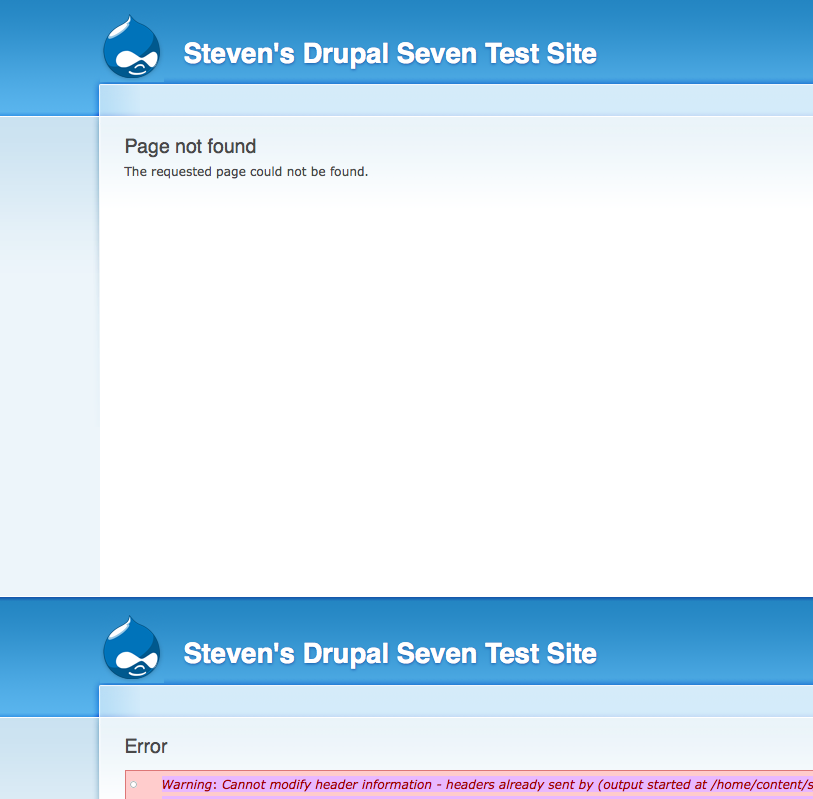
Happy to help in anyway I can if anyone out there can give more guidelines on what to do.
Comment #24
heine commentedA log file for install / batch api is a very good idea as it is a lot of work to debug these issues atm.
Comment #25
Anonymous (not verified) commentedHi i am having the same issue on Godaddy hosting i first got the same error as above then refreshed it and got:
Fatal error: Class 'DrupalQueue' not found in /blah/modules/update/update.install on line 74
Comment #26
adshill commentedI'm prepared to give someone access to a Siteground hosting account with full cPanel access if someone can help with it? Being a novice I have no idea where to start and I would really like to give D7 a go!! :)
Please let me know either here or via my profile. Many thanks.
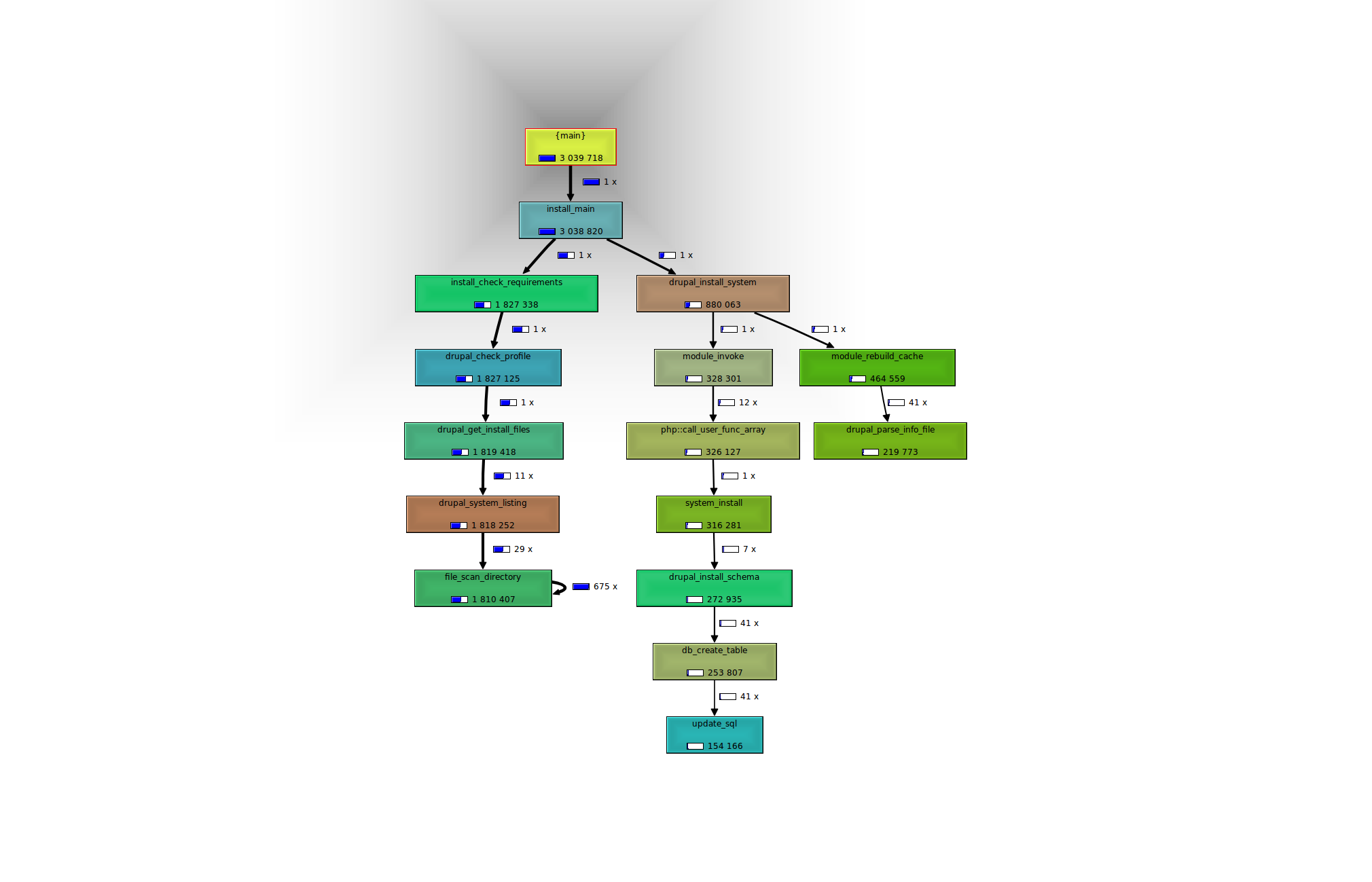
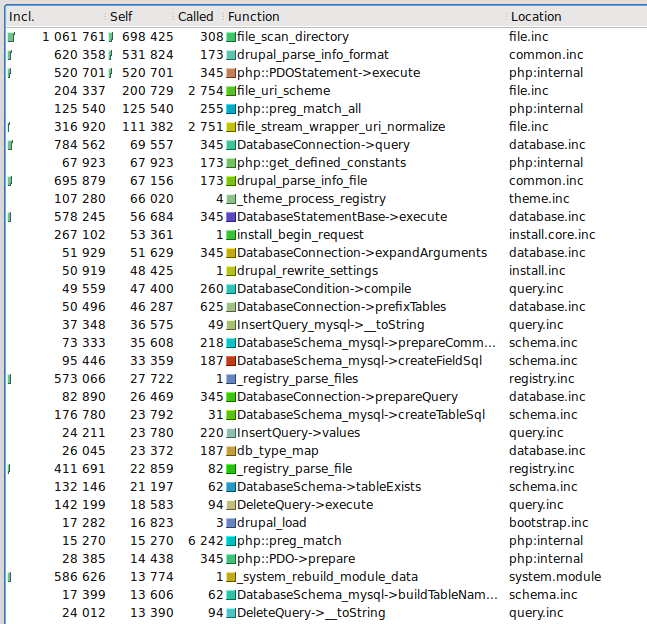
Adam
Comment #27
smontano commentedHi everybody,
I'm a siteground customer and encountering the same issue as well. Really hoping a fix can be found as I would love to install Drupal 7. As a side note, on siteground about six months back they made some kind of hosting change which required me to disable the update module in Drupal 6. Otherwise Drupal's admin interface would have white screens all over the place. Once the update module was disabled, everything worked great in Drupal 6. Not sure if that provides any clues.
Best,
Steve
Comment #28
smontano commentedFor any Siteground customers out there who are facing this problem, I just worked with Siteground's support team to try to install Drupal 7 (nightly release from February 4, 2010). While their support was very willing to assist and troubleshoot they were unable to get it to install. In the spirit of fairness and transparency, below is their response to the support ticket.
Any other suggested fixes from the group?
----
Hello Steve,
Thank you for the update.
I have tried to install the application, but to no avail. It is timing out no matter what option I choose.
Still as far as I can see the as far as I can see this is a development version of the application. What I can advise you is to await and allow Drupal to release the stable version of the application.
Otherwise we can not guarantee how exactly it will work on the server. They might be gathering statistics information during the installation thus the page to be timing out.
The discussion page that you provided us with seems to be suggesting that the issue occurs and with other customers, but not only ours.
It is possible that higher timeout limit might solve the issue, but I am afraid that we can not raise this limit for our shared hosting servers upon customer's request.
I hope that Drupal's development team will update the installation process so that it can be completed flawlessly. If the new stable version is released we will be glad to test its installation procedure for you.
If you have further questions, you are more than welcome to contact us by opening a ticket.
Comment #29
adshill commentedWow... well you got a better response than I did as they wouldn't even look at it when I asked them to debug. Good on them.
Siteground in my experience of basic hosts have a pretty good and high-level set-up for a shared host, its one of the reasons I use them, so I'm confused that this is an issue of server resources. But more importantly if it is, then Drupal 7 is going to have usage issues if it requires more resources than a basic hosting service provides. It puts it way beyond the basic blogger or website owner. Not sure what to do here except change server providers which is a big decision for our company.
Comment #30
carlos8f commentedWhile I still don't have a lead on the exact problem, I did a little research into the registry. I found something that really surprised me:
Autoloading is accomplished by spl_autoload_register() which ends up calling _registry_check_code() when any class is referenced in any way, INCLUDING when you call
class_exists('foo'). That results in weird things happening, such as when the db layer calls class_exists('UpdateQuery_mysql') to see if a specific implementation exists, and then _registry_check_code() tries to check the registry for it, which to work correctly must issue a database query to the {registry} table. There's some funky circular logic there.In this patch I have two additions:
Special logic in _registry_check_code() for database implementations, such as UpdateQuery_mysql. It avoids circular logic of trying to use the database to find database driver implementations. There's also no real reason to use the registry for finding these classes, since they're all in the database/includes/$driver folder.
I added logic to automatically rebuild the registry in _registry_check_code() if it is found to be empty. This should normally never happen, but in case it does, this is a fallback mechanism.
I have no idea if this will actually address the problem at hand, but I think these are some good improvements nonetheless.
After applying the patch, if the 'class not found' errors are still present during install, check the database to see if the {registry} table is empty. If it is, we have a problem with populating that table.
Comment #31
adshill commentedFantastic Carlos! Thanks for this... I'll start testing it tonight and let you know what I come up with.
Comment #32
adshill commentedOK so... same WSOD during install with the same error in phplog:
[04-Feb-2010 19:46:47] PHP Fatal error: Class 'MergeQuery' not found in /home/xxxx/public_html/includes/database/database.inc on line 740
Then enter the site information after a refresh and then go to the site, I get a different error now:
Fatal error: Class name must be a valid object or a string in /home/xxxx/public_html/includes/common.inc on line 6539
The registry table has 115 rows in it, so its not empty.
Thanks,
Adam
Comment #33
adshill commentedSorry correction of the above, the error:
Fatal error: Class name must be a valid object or a string in /home/xxxx/public_html/includes/common.inc on line 6539
Comes on the URL: install.php?profile=standard&locale=en
After entering configuration details. If I go to my domain root I get another different error:
Fatal error: Call to undefined function user_access() in /home/xxxx/public_html/includes/theme.inc on line 2224
Comment #34
carlos8f commentedNow I'm pretty confused, so many various errors! :-/
Make sure between install attempts you are:
1. copying sites/default/default.settings.php to sites/default/settings.php
2. dropping all the old database tables, or dropping the database and re-creating it
If you don't do these two things, the install process doesn't have a clean slate and could get tripped up.
@adshill, I can try to debug this on your environment, most likely this weekend, if you email me at carlos [at] s8f dot org. I'd like to get to the bottom of it for my own sanity :P
Comment #35
carlos8f commentedchanging status and title to reflect our findings
Comment #36
catch@carlos8sf - do you want to open a new issue for that registry patch? Seems sensible by itself.
Comment #37
adshill commented@carlos8sf I'm doing all those things each time.
I'd be happy to send you the details over - will do that now(ish)! The patch you sent me definitely seems to make the error change so I guess in some ways its in the right direction! :)
Thanks for all your help, it would be great to get to the bottom of this.
Best,
Adam
Comment #38
Crell commentedThere's an open issue to make the DB layer not rely on the registry to help with stability early in the bootstrap process: #688704: Give DB its own autoload function I need to get back to it at some point; it was working for me offline, but I don't know why the bot was having a hard time. If someone can help figure that out, it should eliminate that weird circular logic and *may* help out here as well.
Comment #39
carlos8f commentedThanks Crell, I'll review that patch when I get a chance.
Update: I wiped the files in adshill.co.uk and uploaded a clean HEAD, and was able to reproduce the install failure. After selecting the standard profile and putting in the database credentials, I received a download dialog from Firefox to download install.php (?!) which was an empty file, then after refreshing I got the form to create user #1, but wasn't able to submit it since pressing the button dies with "Fatal error: Class name must be a valid object or a string in /home/adshill1/public_html/includes/common.inc on line 6519". Hitting index.php after this resulted in "Fatal error: Class 'MergeQuery' not found in /home/adshill1/public_html/includes/database/database.inc on line 740". Verified that the environment has PHP 5.2.9 with safe mode off, in CGI mode under Apache/1.3.41 (Unix).
Looking at the database after the failure, the list of tables is incomplete (38 tables instead of 73 for the standard profile), indicating that Drupal only partially installed. The {queue} table still contains all 28 rows to install the standard profile modules. The {registry} is empty. Looks like that's a start :)
Comment #40
webchickThanks very much for the sleuting here so far, folks.
Adding to the alpha hit list.
Comment #41
carlos8f commentedOK, after spending a day debugging I have some interesting findings:
With much trial and error I was able to partially locate the point of failure. Somewhere during the installation of system.module (which runs after you enter the database credentials), the HTTP request inexplicably cuts off, appearing as a download dialog of index.php in Firefox. In Safari it informs you that the server unexpectedly closed the connection, and depending on your browser you might get a WSOD instead. I watched the database in phpMyAdmin as this was happening, and PHP continues to run and install the tables for system.module. No PHP or Apache error is triggered (in fact, Apache listed the request as having a 200 OK response!). Here's the table list I captured at *approximately* the time when the request broke off:
As you can see, the tables have only started to install, and the request might've actually cut off before any tables were created.
Interestingly, system.module installs fully, but when the task is finished, the drupal_goto() that normally redirects to the batch (to install the rest of Drupal) has no effect, since the request has already ended.
After I received the download dialog, I could actually reliably resume the installation by waiting for the tables to install, then adding
&op=start&id=1to the install.php URL. The batch then starts correctly and installs Drupal as you would expect.After I got a fully functioning Drupal, I installed SimpleTest and attempted to run some unit tests. Fail! Any test that was descended from DrupalWebTestCase (which installs Drupal as a sandbox) just registered one failure, "The test did not complete due to a fatal error." I'm familiar with that because I wrote that part of SimpleTest ;) This probably means DWTC->setUp() is failing: apparently the installation failure happens during SimpleTest as well, which uses a very different procedure from install.php, but the common point of failure is probably related to drupal_install_system().
Looks like the picture is clearer now, but I'm still hazy on how the request could cut off in the middle of installation. Does anyone know of any peculiar PHP/Apache bugs that would cause the connection to close unexpectedly?
Comment #42
carlos8f commentedAfter going over this again something really stupid occurred to me: what if the connection is dropping purely because the installation is taking too long and reaching a timeout? The PHP max_execution_time is definitely 45 seconds as phpinfo() shows, but I don't think we're hitting that limit. As a test, I wrote:
And I got.... you guessed it, a download dialog! Tweaking the sleep time, I was able to get a reliable connection drop with
sleep(12);, but not with 11. After the disconnect, connection_aborted() returned 0, which means PHP still thinks it's connected. Something's definitely wrong with the PHP/Apache installation on Siteground, and there's nothing Drupal can do to overcome this, as far as I can tell. 12 seconds isn't a realistic time limit for the installation to work with, especially with an underpowered shared hosting account.I will mark this issue as won't fix unless we can come up with a good reason why PHP is cutting out at 12 seconds.
Comment #43
cpc commentedHi guys, you should try adding this to the beginning of a drupal file like install.php so it won't time out:
set_time_out(0);
Maybe your host won't allow it though.
Also, how much memory does your server have? Maybe you're running out of memory while it's trying to install.
Can anyone post a link to a script on your server containing a phpinfo() call so we can see some more information to help with debugging?
Comment #44
geerlingguy commentedSubscribe - I've had problems getting this to run on my VPS account through Hot Drupal (although it installs on MAMP on my Mac).
Comment #45
berdirAs a hint, there are hosters that limit the time a process can live/be active. They do this outside of Apache/PHP and simply kill a process in such a case. That could lead to the download dialog.
Comment #46
carlos8f commentedI've narrowed down the issue to an Apache/CGI write timeout on Siteground's server. It seems that Siteground has the TimeOut directive set to 12 seconds (?!)
This script completes normally. Commenting out the first print statement though, Apache aborts the connection after 12 seconds, before second print can write to it. Reading around a bit, the default TimeOut value should be 300, which is reasonable, but 12 seconds is absurdly short.
PHP apparently has a function for extending the write timeout, apache_reset_timeout(). The problem is, that function is undefined in this case.
A workaround using "print chr(0)" all over the place wouldn't quite work either, since any output sent during the install process would make HTTP redirection impossible (replace the second print statement with a
header('http://google.com/'), and you get nothing). The install process needs to use HTTP redirects.I don't see any viable workaround for this, other than asking Siteground to increase their Apache TimeOut setting.
Comment #47
webchickEr. What possible reason could there be to set a twelve second timeout? php.ini ships with 30. If you're going to go less, why not 20? or 15? 12??!
carlos8f: How's their customer support? Do you think if you asked them to raise the timeout, they'd do it for all customers? Better yet, if you could get someone from there to chime in on this issue, that'd not only be great PR for them, but could help us track this down.
Comment #48
webchickOh, duh. TimeOut, not max_execution_time. Still. :)
Comment #49
carlos8f commentedQuoting #28,
Sounds like a good reason not to use Siteground :)
It might be possible to provide a patch for the installer that constantly outputs "chr(0)" during system.module install to avoid the timeout, and then instead of an HTTP redirect, display "Please click here to continue" or possibly trigger a javascript redirect, but then again that would be asking customers of crappy shared hosts to apply patches, which is an ordeal in itself.
To my knowledge there's no way you can get the value of Apache's TimeOut directive from PHP, so I don't think we can include it in the install requirement check either.
This is really looking like a "won't fix" that is out of Drupal's control. Another host might set TimeOut to 6 seconds, what then? Refactor our installer to work in 6 seconds?? :)
Comment #50
adshill commentedCarlos, thanks so much for your work on this and glad giving access to the hosting helped! Sorry also that this is a hosting issue - its strange because Siteground tend to have pretty good config setup for drupal up until now. They also consider themselves a Drupal "Specialist" - which will of course not be possible if this setting prevents them from hosting D7. I'll get on to them and see how they approach it, in most cases they do try to help but whether they can change settings server-wide is another question.
Thanks again, I'll let you know how the request goes with them. Best,
Adam
Comment #51
adshill commentedBy the way - while I completely agree with the wont fix status - maybe we should be adding either a requirement or a note in the install documentation somewhere of the need for a TimeOut setting over a certain time to prevent people having to search on the site? Maybe a troubleshooting point?
What do you think?
Comment #52
adshill commentedHere is the response from Siteground:
Hello Adam,
For your information Drupal is available for installation on our shared hosting service via CPanel -> Fantastico. When the developers of Fantstico include Drupal 7 in the list of the applications installable via that tool, Drupal 7 will be available for installation on our servers.
Meanwhile, you can still install Drupal 7 remotely with apache timeout increased, and after that to transfer the installation on our servers.
As to the apache's timeout setting - I am afraid we cannot change it on the shared environment.
If you have other questions or comments, feel free to contact us.
Best Regards,
Yavor I.
Technical Support Team
So... Their solution is install locally and then upload to the server. Hmm. Not hugely impressed, but then I guess you get what you pay for :)
I guess for now the lesson is, don't use Siteground for D7 development!
Comment #53
cpc commentedYeah, the bottom line is Siteground has an unrealistic setup. 12 seconds is unreasonable and I can see it causing all kinds of other problems (ie. cron.php).
Comment #54
Anonymous (not verified) commentedhi guys i am trying to install D7 on Godaddy Grid hosting timeout is 30 and i get the same error. :( If anyone wants to test on their enviroment i could give the access...
Comment #55
Anonymous (not verified) commentedHi uploaded php info file @ postnonstop.com/info.php and also attached a pdf version of the result.
Comment #56
David_Rothstein commentedI think we should reopen this if 30 second timeouts are causing a problem too - that doesn't sound good. In addition to the above report, someone posted at #708832: Fatal error: Class 'DrupalQueue' not found a similar problem that they needed to set max_execution_time to 300 in order to fix... I'm asking them to move that here.
Comment #57
Crell commentedQuestion. Is what's timing out the entire Drupal install process, or an individual stage in the batch? The whole point of the batch API (and jobqueue and friends) is to break up long tasks to separate requests to avoid these time outs.
Do we have any that are particularly long? Could we break some of them up to be more granular?
Incidentally, fantastic detective work carlos8f!
Comment #58
carlos8f commentedFixing this could get pretty interesting... it seems that one of the major bottlenecks on shared hosting is drupal_install_schema('system'), since I watched the database during the install on Siteground and it seemed to take 20+ seconds just to create all the tables for system.module.
The best solution I can think of right now is to install system.module in an ajax request, setting ignore_user_abort(TRUE) to make sure PHP doesn't die from a TimeOut. The installer could periodically check for a flag in the database, which would indicate that the base install finished and it can move on to install the profile modules in a batch. That would all be dependent on Javascript though, I'm not sure how viable that is.
Comment #59
carlos8f commented@Crell, in the example on Siteground, the install task that was timing out was 'install_system_module', which installs all the base tables. Running interactive batches isn't even possible yet without those tables :)
Making the installer more granular would be nice, but might mean a complete overhaul of drupal_install_system(). An alternative would be using an ajax request that is HTTP TimeOut-able (as I proposed above) to install the base system and have the status be communicated back to the installer page via another ajax callback that checks the database.
Comment #60
carlos8f commentedAnd to emphasize, the offending timeout in Siteground's case is NOT PHP's max_execution_time, but Apache's TimeOut, which if lower than max_execution_time will abruptly terminate the HTTP response. PHP may continue though, depending on the value of 'ignore_user_abort'. As far as I can tell, the Apache setting cannot be reliably gotten or set from PHP (apache_reset_timeout() was undefined on Siteground).
Comment #61
Crell commentedCould this be justification for breaking up system_schema() instead of putting every frickin' core module's tables in the system module where they don't make a damned bit of sense? :-) We only need the really core tables and batch tables in order to then batch the rest.
Although 20 seconds just to create tables is kinda scary to begin with. I've never seen that before. What else are we doing in that function besides creating tables?
Comment #62
carlos8f commentedYeah, system_schema() is quite large. Just breaking it up and moving the bulk of it to a batch triggered by install.php might require an API change though, because drupal_install_system() is used in other places like SimpleTest, which expect that function to install everything in one programmatic call. I'm also not sure if breaking up the schema would be enough; it could take some research to isolate exactly what the biggest bottlenecks are and appropriately batch-ify those tasks.
Comment #63
Crell commentedWell drupal_get_schema_versions() is already known to be crazy slow (#521838: Clean up drupal_get_schema_versions()). It wouldn't surprise me if system_rebuild_module_data() is slow, too, given some of the stuff it calls, but I've not tested that.
Comment #64
uptil4music commented@David_Rothstein asked me to repost here from #708832: Fatal error: Class 'DrupalQueue' not found
Fatal error: Class 'DrupalQueue' not found in /modules/update/update.install on line 74
GoDaddy Linux shared hosting
PHP Version 5.2.8
Server API CGI/FastCGI
MySQL 5.0.67.d7-ourdelta-log
Tried several times with standard profile, kept timing out (max_execution_time=30, max_input_time=60). Dropped all db tables after each. Tried minimal profile when I received the above fatal error.
If I go to the base url I get:
Fatal error: Class 'SelectQueryExtender' not found in /includes/pager.inc on line 16 Fatal error: Class 'MergeQuery' not found in /includes/database/database.inc on line 740
Tried going to install.php, got the 'Drupal already installed page' as expected. Tried update.php, access denied, changed $update_free_access, got 'No pending updates.' Tried ?q=admin, same errors as base url.
I did not verify the download with the hash.
Hope this helps, keep up the great work.
I plan to dump everything and try again fresh, just because some things still make me go "Hmmm." :-)
~~~~~~~~~~~~~~~~~~~~~~~~~~~~~~~~~~~~~~~~~~
I guess not being able to install warrants critical.
Since posting, I retried several times to install without success. Finally succeeded after increasing max_execution_time to 300, max_input_time to 150 and memory_limit to 64M with php5.ini. Not sure if the memory limit was necessary, as I added it on the final change to php5.ini.
I'm afraid you'll lose people with requirements this high for installation. Maybe a new list of 7.0 friendly hosts is in order. http://sf2010.drupal.org/conference/sessions/choosing-drupal-hosting-ser...
I know this release represents a ton of work so far, and I'm sure there's still a ton to go before 1.0. Would it be possible in the midst of all the work to improve the performance? I can't really make any useful contribution except testing and pleading the case of the simple end user living in the world of average shared hosting.
And I really do appreciate all the hard work.
Comment #65
catchJust a note that #521838: Clean up drupal_get_schema_versions() is now just about fixing bugs and edge cases in the more performant code, it's only about 1-2% of page execution time now compared to around 30% beforehand. Unless I've completely missed something that shouldn't be the problem here.
It looks to me like the issue is less system_schema() (not that it wouldn't nice to break that up), and more system_install() - this is installing system, user, node and filter modules all at the same time then doing a bunch of other stuff like rebuilding all the theme data. http://api.drupal.org/api/function/system_install/7
It looks like:
# Filter module could just be removed from there, because we enable filters and formats in the profile now.
# node_access stuff could be moved to node_install() and that hunk removed.
# If for some reason we need user module to be installed, this could be moved to a separate batch in the installer itself - so do system, then user, then all the rest, but seems like it's probably not needed, so could just move that stuff to user.instal as well and let things run normally.
# The theme registry rebuild could be done somewhere else.
That'd take four module installations down to one.
Comment #66
adshill commentedHey everyone... I can't really say much more than has been said already, however I'd be happy to test anything, and should you need a siteground account in order to test etc. Carlos has the access and I'm happy to give it to others. I'll just change the password when you're done.
Thanks for looking at this, I do somewhat have to agree with uptil4music - I think some people will be lost on basic hosts if this is the case and clearly the hosts don't appear to want to budge. However there is a workaround (installing locally then uploading) so I suppose its not impossible to use.
Comment #67
catchOK turns out user has to be installed either within system.install(), or perhaps via it's own special casing in a separate http request.
So here's all the easy changes - we no longer install node and filter modules within system_install(), and no longer rebuild the theme registry there. Running an install through the UI worked for me.
Comment #68
carlos8f commentedI think it would be interesting to solve this problem by creating an API designed to avoid timeouts of tasks that aren't easily made granular, such as drupal_install_system(). Basically the task would run in an ajax request while the user receives a psuedo progress bar, with set_time_limit(0) and ignore_user_abort(TRUE) to allow PHP to do its thing. Progress/completion could be communicated back via the database (or even the session if the database isn't connected yet), not HTTP which is subject to disconnects. With the installer running drupal_install_system() through this API, we would avoid any chance of a timeout.
Comment #70
catchI can't reproduce test failures either via the simpletest web interface or via the command line runner.
Comment #71
webchick#67: faster_install.patch queued for re-testing.
Comment #73
uptil4music commentedFYI
Ran a test install on my virtual dedicated server (also with GoDaddy) with no problems.
max_execution_time=60, max_input_time=90, memory_limit=128M
Another difference between the environments - on shared hosting the DB is not localhost, so there is a DB server thrown into the mix.
Comment #74
adshill commentedUpTil4Music - can you check the apache TimeOut time on both those environments? Carlos found that was the problem on my hosting, not the php settings. It could be that they are much lower on the shared hosting, which would cause the issue.
Comment #75
uptil4music commented@adshill - Is this something I can find using phpinfo()? If so, what is it labeled? If not, a quick walk-thru to find it would be appreciated.
Comment #76
carlos8f commented@UpTil4Music, as far as I know the Apache TimeOut value can't be queried from php, the only way to see if this is the culprit is to write a file like:
If the server disconnects before you see "Hello world!", the TimeOut value is less than 60 seconds. I used this technique to deduce that Siteground has TimeOut set to 12 seconds, since when I did sleep(12) I reliably got a disconnect.
Comment #77
yoroy commented"Fatal error: Class 'DrupalQueue' not found in /modules/update/update.install on line 74"
Running into this on my local XAMPP installation (which is not the newest because that won't let me use it for D6 afaik)
PHP 5.2.9, MySQL client version: 5.1.33, Apache/2.2.11.
Subscribing. Most of the discussion is a bit too technical for me but let me know what to test/check if needed.
Comment #78
catchDid anyone try the patch in #67? The tests blow up, but it worked fine for me actually running the installer.
Comment #79
adshill commented@catch... totally swamped with work - I'll test it as soon as I can in the next few days and get back to you. Thanks. Adam.
Comment #80
nil_von_9wo commentedDear all,
I've been instructed (re ticket #721884) that I should join this thread as your issues are considered "similar".
I'm not entirely sure my issue is truly the same, but here goes.
My environment presently consists of:
OS: Microsoft Windows XP Professional Version 2002 Service Pack 3
Web Server: Apache2.2-Zend
PHP: PHP 5.3.0 (cli) (built: Jul 28 2009 19:03:01)
Database: MySQL Ver 14.12 Distrib 5.0.51a, for Win32 (ia32)
Drupal: drupal-7.x-dev.tar (downloaded 22 February 2010)
I am presently trying to install Drupal for the first time with the intention of working through the tutorials in Sams Teach Yourself Drupal in 24 Hours.
Since I am new to Drupal and this book seems like it will include some coverage of version 7, I thought I would start with the "latest", rather than learn on an older version and need to retrain.
I dumped Drupal into a directory at:
D:\education\php\drupalI configured a virtual server on Apache 2.2 to work with this directory:
I created a database and configured the settings.php to find it:
with
I ran the install.php.
I had a bunch of errors on the page to configure the database the first few times I saw it, but after tweaking the settings.php file and the database and going back to the start of install.php a few times, something seemed to click and I was able to "complete" the process, at least in the sense that if I try to run install.php, eventually I reach a page headed "Drupal already installed".
The install process evidently modified settings.php such that:
and it also added tables to the drupal schemata.
However, if I go to index.php, instead of anything useful, I see an error which states:
Fatal error: Class 'MergeQuery' not found in D:\education\php\drupal\includes\database\database.inc on line 718and I have no idea how to get past this.
Any/all help will be appreciated.
Best regards,
-Brian.
Comment #81
yoroy commentedThanks for the report. Setting title back to the one we've been getting used to :)
Comment #82
carlos8f commentedHi Brian,
Thanks for the input. The main thing we're working out here involves time-outs of either PHP or Apache, so I would check your PHP configuration for max_execution_time, and check Apache for the TimeOut value. Also check your PHP error log.
What happens is that the installer crashes due to a timeout or other reason, but even though you see "Drupal already installed" it's only partially installed. To retry the installation, you'll have to drop the MySQL tables that the installer created, and to be safe, copy sites/default/default.settings.php to sites/default/settings.php. Then go to /install.php and follow the directions again.
*However* I would definitely not recommend starting to learn Drupal with 7.x-dev. D6 and D7 have serious differences, which won't be covered by a book yet. Not to mention there are plenty of critical bugs left to work out before D7 is released :)
Comment #83
nil_von_9wo commentedAfter reading this thread more carefully, I decided to give a quick try to playing with my resource limits.
Upon setting them ridiculously high (max_execution_time = 300, max_input_time = 600, memory_limit = 512M) I was able to get Drupal 7 to install. :-)
(It probably wasn't necessary to go that high: I just wanted to get it to work and was not looking for the minimum.... under the present circumstances I have the resources to waste.)
Comment #84
nil_von_9wo commentedComment #85
nil_von_9wo commentedSorry for screwing up your title (twice).
Anyway, I'll take your recommendation not to starting learning Drupal with D7 under advisement as I see how the book progresses.
Unfortunately, I seem to be having issues getting D6 to work in my environment as well (PHP 5.3 doesn't like it, and [strangely] Apache is mixing up the virtual server I created for it with the one I created for D7) ... but that's for another thread.)
-Brian.
Comment #86
webchicknil_von_9wo: If you by any chance have an evening to kill sometime, it would be *so* awesome to try playing with those settings a bit more and see if you can discover the actual threshold required to get it to install. This would help us hone in on some kind of rogue process or similar that is causing issues.
But at any rate, welcome to the Drupal community. :) It's always refreshing to see a new user who discovers a problem and tries to help us fix it.
Comment #87
carlos8f commentedOne thing I think is kind of silly, is that Drupal assumes itself to be installed
if (!empty($GLOBALS['db_url'])). It would make much more sense to set a db flag at the beginning, so Drupal can detect whether the installer crashed, and offer some kind of recovery or at least an error message. Right? :)I still think our best bet might be to install the base system in an ajax request, communicating the status back with the database rather than HTTP. That would eliminate the possibility of a timeout by using set_time_limit(0) and ignore_user_abort(TRUE) inside that request. The installer would then be able to survive HTTP disconnects from server limits that we (or our end users on shared hosting) can't control.
Comment #88
stevendshelton commentedI can confirm this error on Godaddy,
with both alpha and dev (I've done two clean installs on both and get the same results)
much as others have described -
Setup gets to screen where you name the site, admin name, password, etc. After submitting that page -
get this error:
Fatal error: Class 'DrupalQueue' not found in {yadayada}/drupal/modules/update/update.install on line 74
Going directly to the site, gives this error:
Fatal error: Class 'SelectQueryExtender' not found in {yadayada}/drupal/includes/pager.inc on line 16 Fatal error: Class 'MergeQuery' not found in {yadayada}/drupal/includes/database/database.inc on line 718
I also did the timeout test in post #76
and it works - ie. I see Hello World.
Comment #89
catch@stevendshelton - please try with sleep(30) and sleep(15) etc. - and if possible work your way back up once it starts failing - then post back again. That'd help us track down if it's the same issue, and at what point it fails at.
Comment #90
jeff124578 commentedI was getting this error too, until I realized that I had not allowed cookies in my browser. Allowing cookies, install works fine, even with PHP's low resource limits (well, 40M memory). Could the others encountering this also just have disabled cookies? And in either case, apparently cookies are one potential block of installation, so should the "Verify Requirements" installation page also be checking that we can set and read a cookie?
FWIW, when I had been getting this error, it came with a call stack that I don't see posted above yet:
Comment #91
catchDifferent issue, but we currently have nowarning for cookies being disabled anywhere in core see #2946: Login fails and no warning is issued if cookies are not enabled. Putting it as an install check seems reasonable.
Comment #92
carlos8f commentedThe Godaddy issue could be just a max_execution_time problem, i.e. drupal_install_system() is taking longer than the standard execution time of 30 seconds (or whatever Godaddy has it set to). In that case, why aren't we doing something like drupal_set_time_limit(240) in the installer?
@stevendshelton, what do you get for:
and does the installer seem to take that long at any point for the page to load? And please check your PHP error log, if you have access to it.
Comment #93
David_Rothstein commentedNote that I have a patch at #728820: Clean up installation of required modules which (for unrelated reasons) is able to take a fair amount of stuff out of the drupal_install_system() step. It might not be enough to fix this, but it's worth a shot.
It's still not quite clear to me why this step is for some people so much slower in Drupal 7 than it was in Drupal 6... Is it really true that after you hit the submit button on the database settings form, it is taking an extremely long time before it redirects you to the batch progress bar? If so, do people who experience this see anything like the same delay when trying to install Drupal 6 in the same environment?
Comment #94
catch#728820: Clean up installation of required modules was just committed. Any better for those experiencing problems?
Comment #95
uptil4music commented@carlos8f
Sorry it's taken so long to get back to you on this.
Here's the results of my testing the Apache TimeOut value:
120 error
90 error
75 error
65 error
64 error
63 error
62 'open with' dialog box or error
61 Hello world!
60 Hello world!
For reference, my environment:
GoDaddy Linux shared hosting
PHP Version 5.2.8
Server API CGI/FastCGI
MySQL 5.0.67.d7-ourdelta-log
max_execution_time=30
max_input_time=60
Comment #96
stevendshelton commented@carlos8f - RE: #92
and does the installer seem to take that long at any point for the page to load? And please check your PHP error log, if you have access to it.
I get 30 as a result for this. Yes, the install takes a long time after entering the database information.
My timeout results are consistent with @UpTil4Music #95
Comment #97
stevendshelton commentedJust tried again with today's latest build - get Internal 500 error after database config page.
But, if I type in install.php again I get to the Configure Site page.
Then...
When I go to the site I get "Page not found" see attachment.
I also see these errors in a second window:
* Warning: Cannot modify header information - headers already sent by (output started at /home/{yadayada}/drupal/includes/common.inc:2435) in drupal_send_headers() (line 1010 of home/{yadayada}/drupal/drupal/includes/bootstrap.inc).
* PDOException: SQLSTATE[42S02]: Base table or view not found: 1146 Table 'some_database_name.cache_filter' doesn't exist: DELETE FROM {cache_filter} WHERE (expire <> :db_condition_placeholder_0) AND (expire < :db_condition_placeholder_1) ; Array ( [:db_condition_placeholder_0] => 0 [:db_condition_placeholder_1] => 1267479099 ) in cache_clear_all() (line 172 of /home/{yadayada}/drupal/drupal/includes/cache.inc).
Comment #98
stevendshelton commentedRE: #93
@David_Rothstein
Just confirmed an install of 6.15 on the same host and sailed through the install. Yes, the install for 7 takes a very long time after the database config screen.
Comment #99
webchickCould you also try with the 'minimal' install profile, rather than default, and see if you have the same delays?
If the timing is similar, I'm wondering if it's some sort of issue with loading PEAR libraries such as PDO?
Comment #100
carlos8f commented@webchick, PDO is a PHP extension, not a PEAR library :) But yes, it could be slowing us down. Although it would be bizarre if using PDO made the installer 10 or 20 seconds slower.
If D6 installs smoothly but D7 times out, it doesn't sound like a good sign. In other words, the slowness can be blamed on the software, not on hardware/network delays. However, I timed a couple installs with HEAD on an average virtual Linux box, and the base system installed in 0-1 seconds and the total install time was under 10 seconds, comparable to a D6 install in my experience. Curious.
Folks having to set max_execution_time to complete the install seems strange, but we might as well account for those setups. Setting max_execution_time seems to be the right thing to do at least until we can figure out why the installer is so slow in these environments.
Can anyone at Godaddy apply this patch and still get installation failures?
Comment #101
stevendshelton commentedRE: #99
@webchick
Yes, confirm the same issue with the minimal install.
Comment #102
Crell commentedPDO, if enabled, is already loaded and in memory by the time Drupal is executing. It's a PHP C-level extension. So there should be no load time there at all; the connection time for PDO shouldn't be that different than the ext/mysql driver; certainly not 10 seconds worth. (If that were the case, all pages would be slower by that amount. We benchmarked PDO when it first went in and the performance difference on HEAD at the time was marginal.)
Comment #103
David_Rothstein commentedWas any benchmarking done on CREATE TABLE and the like? That's presumably the main difference between the installer and a normal page request, PDO-wise...
Comment #104
pwolanin commentedA big change in D7 to D6 is that we are using innodb on mysql as the default engine - that could make install slower perhaps?
Comment #105
carlos8f commentedThat's a good point, pwolanin. Actually, there's already a patch for testing that: http://drupal.org/node/615822#comment-2658040
Can anyone w/ installation problems apply the patch linked above and report the result? Also please try the one I posted in #100.
Comment #106
catch@David: no benchmarking was done on anything apart from SELECT, and I'm not aware of microbenchmarking of d6 db_query() vs. d7 db_query() (or comparisons for insert/update either). SELECT queries showed in the region of a 5% hit out of the box on a standard page iirc.
On my laptop, counting 1 hippopotamus, 2 hippopotamus running the installer via the UI, it takes in the region of 5-8 seconds after hitting the continue button for the batch to show up. I can see how that'd be 12 seconds on shared hosting, so figured it's enough to reproduce the issue.
So I profiled it, my xdebug setup saves a file per $_GET request, so I added an exit; at the end of drupal_install_system()
This gave me three cachegrind files:
-rw-r--r-- 1 www-data www-data 335271 2010-03-03 11:33 cachegrind.out._install_php
-rw-r--r-- 1 www-data www-data 338995 2010-03-03 11:33 cachegrind.out._install_php_q=install_php_profile=standard
-rw-r--r-- 1 www-data www-data 3932685 2010-03-03 11:33 cachegrind.out._install_php_q=install_php_profile=standard_locale=en
Attached a screenshot from kcachegrind of the last one, which is where drupal_install_system() gets called.
Note this is without batch installation of modules. Total time for that request was 5.5 seconds, there are 102 calls to PDOStatement->execute() and that's the single worst offender at a total of over 2 seconds. Then c. 400 calls to file_scan_directory(), 185 calls to drupal_parse_info_format() and 3600 calls to two different stream wrappers. Between them the top 10 or so functions take around 4/5ths of the time.
Comment #107
carlos8f commentedHere are my cachegrind results for the drupal_install_system() step.
Very interesting how much simpler D6 looks. There is a very clear split in the callgraph between the install_check_requirements() branch and the drupal_install_system() branch, with no crossover or duplication. Clean.
In D7, apparently chaos breaks out :) Main areas that could be improved are:
drupal_system_listing() gets called by four logic branches and has no static caching.
drupal_parse_info_file() does double duty from the install_load_profile() branch and the install_system_module() branch. No caching on that either.
We might as well make issues for the two things above if they're not already made. Then the next thing on my hitlist will probably be creating a zipped version of D7 (so people don't have to apply patches) that includes a built-in logger/debugger. That would hopefully make it easier to debug timeouts and see what is actually timing out.
Comment #108
jensimmons commentedIt seems like one major reason for install failures will always be having a wrong version of PHP. We can't, of course, change D7 to work with old PHP, but we can change it so that it tells people what is going on, and prevents them from installing, rather than just letting the install run, fail, and display ugly PHP errors. I opened an issue to discuss the possibilities of creating a helpful message about PHP.
#732500: Display helpful message when attempting to install on a server with php 4, php 5.1
Please join and discuss this idea over there.
Comment #109
uptil4music commented@carlos8f - tried a clean minimal install with #100 and #105 patches, error. BTW, I'm patching by hand, and the #100 patch lists 'includes/install.core.inc' which I don't find in alpha1. Found the function 'install_begin_request' in 'install.php' though, which is where I made the changes. Was this patch for alpha2?
Comment #110
carlos8f commented@UpTil4Music: all patches are on HEAD, unless otherwise noted. Lots of stuff has changed since alpha1, and fixes will go into HEAD so I'd encourage you to use the dev snapshot, which is usually only slightly behind HEAD: http://ftp.drupal.org/files/projects/drupal-7.x-dev.tar.gz
If max_execution_time and InnoDB are not culprits here, I am getting worried. What else could it be? If anyone would let me use their Godaddy FTP for debugging purposes, I could do that this weekend, or I may have to get my own account.
Comment #111
catchOpened #733306: Add static caching for drupal_parse_info_file() and #733308: Add static caching for drupal_system_listing().
Comment #112
uptil4music commentedJust did a successful minimal installation of 7.x-dev
Dropped everything, tried standard install, failed. DB shows following 31 InnoDB tables:
`actions`, `authmap`, `batch`, `blocked_ips`, `cache`, `cache_bootstrap`, `cache_form`, `cache_menu`, `cache_page`, `cache_path`, `date_formats`, `date_format_locale`, `date_format_type`, `file`, `flood`, `history`, `menu_links`, `menu_router`, `queue`, `registry`, `registry_file`, `role`, `role_permission`, `semaphore`, `sequences`, `sessions`, `system`, `url_alias`, `users`, `users_roles`, `variable`
Dropped everything, applied #105 patch (MyISAM), got 'Configure site' page twice after a very short 'Install profile' page (1 or 2 items, went by real quick), then this:
Fatal error: Call to undefined function field_attach_load() in /includes/entity.inc on line 241
Went to drop the tables, all but one of 32 still InnoDB (cache_update):
`actions`, `authmap`, `batch`, `blocked_ips`, `cache`, `cache_bootstrap`, `cache_form`, `cache_menu`, `cache_page`, `cache_path`, `cache_update`, `date_formats`, `date_format_locale`, `date_format_type`, `file`, `flood`, `history`, `menu_links`, `menu_router`, `queue`, `registry`, `registry_file`, `role`, `role_permission`, `semaphore`, `sequences`, `sessions`, `system`, `url_alias`, `users`, `users_roles`, `variable`
Dropped everything again, retried with MyISAM, successful install. All tables now MyISAM.
There are now 74 tables:
`actions`, `authmap`, `batch`, `block`, `blocked_ips`, `block_custom`, `block_node_type`, `block_role`, `cache`, `cache_block`, `cache_bootstrap`, `cache_field`, `cache_filter`, `cache_form`, `cache_image`, `cache_menu`, `cache_page`, `cache_path`, `cache_update`, `comment`, `date_formats`, `date_format_locale`, `date_format_type`, `field_config`, `field_config_entity_type`, `field_config_instance`, `field_data_body`, `field_data_comment_body`, `field_data_field_image`, `field_data_taxonomy_tags`, `field_revision_body`, `field_revision_comment_body`, `field_revision_field_image`, `field_revision_taxonomy_tags`, `file`, `filter`, `filter_format`, `flood`, `history`, `image_effects`, `image_styles`, `menu_custom`, `menu_links`, `menu_router`, `node`, `node_access`, `node_comment_statistics`, `node_revision`, `node_type`, `queue`, `rdf_mapping`, `registry`, `registry_file`, `role`, `role_permission`, `search_dataset`, `search_index`, `search_node_links`, `search_total`, `semaphore`, `sequences`, `sessions`, `shortcut_set`, `shortcut_set_users`, `system`, `taxonomy_index`, `taxonomy_term_data`, `taxonomy_term_hierarchy`, `taxonomy_vocabulary`, `url_alias`, `users`, `users_roles`, `variable`, `watchdog`
Don't know if there may have been a caching issue, I used the hosting control panel to delete all the files between attempts as it's way faster than ftp. Timestamp of the remote 'includes/database/mysql/schema.inc' file was the same as the modified local version on the failed attempt, but the InnoDB tables tell a different story.
I'm going to drop everything again and try the max_execution_time patch with InnoDB to see if it will go. Results forthcoming.
Comment #113
uptil4music commentedUPDATE: Error on install with max_execution_time patch. Server doesn't seem to be respecting the new time limit, I counted 1 one thousand, 2 one thousand ... to 51, so it's probably still 60. Tried it all twice just in case there was a possible caching issues like in #112. There are 27 tables in the DB, and some have records (see attached).
I was doing some reading while waiting for ftp - just wondering if all tables need to be InnoDB for transactional/locking purposes? Seems MyISAM was working fairly well for D6, but I can definitely see there being a need for InnoDB for large, multi-concurrent sites. Is it too late in the cycle to diagnose which tables don't need to be InnoDB, or is multiple engines just a Pandora's Box?
Comment #114
heine commented@Uptil4Music, how is the InnoDB storage engine configured? If it is badly configured, it could explain the extremely slow install; I've experienced such issues with badly configured storage engines before.
Comment #115
uptil4music commented@Heine Doesn't mean much to me, but here's the config
Comment #116
smontano commentedFor everybody here who is a Siteground customer, I just brought this to their attention again and reinforced the financial and support ramifications if they don't provide Drupal 7 support. Their response was encouraging.
----
Hello,
Thank you for contacting our Support Team.
I completely understand your point of view. I have consulted with our supervisors. They have confirmed that once Drupal release the official version 7 of the application we will support it. If needed we will create custom installer so we can bypass the time out issues. Once again once the application is releases officially we will support it.
----
Comment #117
adshill commented@carlos8f - you can continue to use my Siteground account if it helps, I've been over-run with work and haven't had a chance to do any further bug testing on this. I haven't changed any details since the last time you used it so delete/change/ do what you want there!
@smontano - while its nice to see siteground's response, its also important that drupal 7 is able to install on shared hosting environments if it is going to have the kind of mass impact we hope! But thanks for the info.
Comment #118
tstoecklerI've got an account with the German Shared hoster: Alfahosting. It's 2,99 / month, still I've been able to run multiple D6 sites on it.
Similarly to descriptions above the installer fails for the Default profile. They only let me choose between max_execution_time = 30sec and 45 sec but it fails for both. Minimal profile works fine. I've attached the InnoDB config.
Also, I don't know if it is related (sorry I didn't read the whole issue) but I never get to see the Drupal progress bar. As soon as I choose the language (or for Minimal as soon as I choose the profile) the simply takes forever to load the next page which is the Site configuration page (I have configured my DB credentials in a previous run, but same there: no progress bar).
Comment #119
tstoecklerOh, here is that innodb file.
Although I have absolutely no clue what any of that means, some of the values were markes red, so there has to be something wrong I guess.
Also:
Slow_queries 640 The number of queries that have taken more than long_query_time seconds.[]Comment #120
rfayIf I'm reading this issue correctly, then solving the slow Innodb install problem would also make a huge difference to simpletest performance. Hmm. That would be fantastic. I think they're exactly the same problem. (As I wait for a single test to complete on a very fast computer.)
Comment #121
catch#119 looks to be a report for the innodb install serving other sites on the same server, so I don't think we can get too much helpful information from that.
Is there anything in drupal_install_system() we could wrap in a transaction if it's not already - that means only one disk write/flush at the end of the transaction instead of one per write afaik.
Comment #122
Crell commentedAt least on MySQL, any DDL (schema) operations force a transaction flush. So there's not much we could do there. Anything else, like the initial DB population, should go in a transaction.
Comment #123
plnolan commentedI am new to Drupal Thought I would try to contribute. I installed drupal-7.0-alpha2 on a Godaddy shared hosting account yesterday 03/16/2010 on an aliased domain and had no problem on the install and the site is up and running.
Comment #124
Curi commentedAll right. So, just to look at this issue, I opened a GoDaddy hosting account. With the code from this morning (the dev build from March 19), and the prior two dev builds from the past week, I kept encountering the duplicate issue with the variable table when trying to do the variable_set for install_system_module because it was reentrant since the drupal_goto at the end of the first successful install_system_module failed to actually do anything since the request had already timed out (GoDaddy's setting for my site is 60 seconds).
Now, with that background information, I started profiling the DB calls taking place during install_system_module. The actual create query (using the MySQL implementation, in my case) took only 0.22 seconds (on average) to execute. So, why is the entire thing taking so long? Because tableExists() takes about 0.7 seconds on average...and it gets called twice per table: once in db_create_table and the second time in the schema's createTable() before it creates the array of createTableSql statements. Now, I didn't want to alter the schema's createTable() because I can see why you wouldn't want to leave it in an inconsistent state when there is more than one statement being executed. So, what I did to get around my installation problem was modify includes/database.inc's db_create_table() to simply not call db_table_exists($name) at all and catch the exception, instead. Now, for my quick test to make sure the installation could finish, I did not bother looking at the exception. Of course, it'd have to be handled properly to ensure the error code is the one for failure to create a table. (Or "Error: 1005 SQLSTATE: HY000 (ER_CANT_CREATE_TABLE)" as the MySQL reference has it listed).
So, with my timeout at 60 seconds and with the removal of just one of the two tableExists calls, the installation completed just fine and I got no error about missing MergeQuery classes, and whatnot.
Addendum: the tableExists() took so long because the actual query, itself, took all that time. The condition building and compiling took no time at all to execute (practically)
Comment #125
carlos8f commented@Curi, wow, nice job! .7 seconds is absurdly expensive for tableExists()... That would definitely constitute a major bottleneck: 1.62 seconds for each table, would only allow 37 tables installed during a given page load before Godaddy pulls the plug.
Hopefully @Crell can chime in on how feasible the change to db_create_table() is. Catching the exception sounds like a better thing to do from a performance standpoint. Are there situations when db_create_table() is called but the table is likely to already exist?
Comment #126
carlos8f commented@Curi, can you try the query benchmarking w/ the patch in http://drupal.org/node/615822#comment-2658040 (MyISAM tables instead of InnoDB)? I wonder if MyISAM is any faster.
Comment #127
Curi commentedSorry, I meant to say catch the "DatabaseSchemaObjectExistsException" that gets thrown in schema's createTable(). This is my first look at Drupal source since version 1.0 so I'm going to leave the rest of the discussion to you guys.
EDIT: okay, hold on, I'll get MyISAM values in a second.
Comment #128
Curi commentedMyISAM CREATE queries seem to range from 0.03 to 0.3 seconds (just the query, itself) with an average of 0.15932 seconds
InnoDB's queries take 0.2 to 0.5 seconds (just the query itself) with an average of 0.40568 seconds
(Note, when I say the 'query itself' I mean the query() call. I'm not trying to go on the database server and time queries)
MyISAM's db_create_table takes on average 0.7-1.0 second-ish with the average of 0.96161 seconds
InnoDB's db_create_table takes on average 0.9-1.5 seconds with the average of 1.29042 seconds
(Forgot to clarify...this is not including the preceding call to the db_table_exists)
Note: tableExists takes the same amount of time for either. (okay, the average is more like 0.77 seconds, I can get the exact number later, if you want)
Comment #129
Crell commentedThe db_table_exists() in db_create_table() is a bug and should be removed. I think we just forgot to remove that when the rest of the schema operations were cleaned up recently. #582948-13: Improve safety of schema manipulation and following.
Exceptions are non-cheap to create in PHP because they include a full debug backtrace. Most of the time of throwing an exception is, I suspect, in its constructor down in C code generating that sort of data. If there's reason to believe that a table you're trying to create already exists, then either you have a bug in your own code, or you should do a db_table_exists() check yourself and skip that step, or you should catch the exception and handle it however makes sense. (The latter is arguably the more modern approach, which is why we have an exception there.) That calling code would be in the installer, though, not the DB layer itself.
Comment #130
David_Rothstein commented@Crell beat me to it, but I was just in the process of mentioning that and posting a patch at #582948-35: Improve safety of schema manipulation which should remove it. (We couldn't do it before because there was some required cleanup that needed to happen first, but that cleanup is now in, so it should be possible.) Let's handle that over there.
However, even if we get rid of the duplicate call, that only cuts the problem in half, right? Why is tableExists() so expensive? If that can't be improved, it sounds like to get this down to a reasonable number, we might have to change createTable() as well so that it only calls tableExists() when it hits a problem, rather than every single time?
Overall, nice find!
Comment #131
Curi commentedNod. This is why I just wanted to point out that the select out of the information_schema db was taking a long time. I haven't SSH'ed in to run the client, directly, on the GoDaddy server yet. phpMyAdmin also says the query for the simple browse (select * from information_schema.tables limit 0,30) takes ~0.7ish seconds). So, I guess it has less to do with the WHERE. I'm a bit busy tonight, so I hope someone else can get the timing on the select with the mysqlclient, itself.
Comment #132
catchCuri - would you mind doing a SELECT COUNT(*) FROM information_schema.tables - I'm wondering how many are actually on that godaddy server.
Comment #133
Curi commentedcatch: 95 rows. The 73 from my (finally complete) installation of Drupal 7 dev from this morning, and the normal 22
CHARACTER_SETS CLIENT_STATISTICS COLLATIONS COLLATION_CHARACTER_SET_APPLICABILITY COLUMNS COLUMN_PRIVILEGES INNODB_BUFFER_POOL_CONTENT INDEX_STATISTICS KEY_COLUMN_USAGE PROFILING ROUTINES SCHEMATA SCHEMA_PRIVILEGES STATISTICS TABLES TABLE_CONSTRAINTS TABLE_PRIVILEGES TABLE_STATISTICS TRIGGERS USER_PRIVILEGES USER_STATISTICS VIEWS
I don't see any other rows. I haven't admin'ed MySQL since v3.xx and very early v4 days. I will be unable to give insight into that (like if they are restricting my view)
Comment #134
catchedit: I just ran that locally on my laptop:
Yes, 35 seconds.
Second time was 17.14 seconds. Running it repeatedly takes about another second off each time. I got bored running it when it got down to 6s and was shaving 100ms off each time.
SELECT 1 FROM information_schema.tables LIMIT 0, 1also comes out at about 5-6 seconds.After a MySQL restart they started off ridiculously slow, then got down to 1.5s pretty quick.
MySQL docs say that queries without table_schema (i.e the database name) can be very poor, so I added "WHERE table_schema = 'd7'" to the query. Still bad:
That query takes about 0.6s on my laptop which seems equivalent to the results you're getting.
Looks like at least 5.1 has some optimizations for this, but doesn't look like there's an easy fix otherwise:
http://dev.mysql.com/doc/refman/5.1/en/information-schema-optimization.html
Comment #135
catchWhich means I think we should do DavidRothstein's suggstion: "If that can't be improved, it sounds like to get this down to a reasonable number, we might have to change createTable() as well so that it only calls tableExists() when it hits a problem, rather than every single time?"
Comment #136
David_Rothstein commentedOK, let's try that. The followup patch at #582948: Improve safety of schema manipulation was already committed, so that should have cut the time roughly in half already... but 0.7 seconds multiplied by the number of tables that need to be created is still really bad.
I'm not sure this patch is right at all, since I don't really know how reliable the SQLSTATE error codes are supposed to be. If not correct, then we need to look at catching the exception and checking tableExists() afterwards, but the problem there is that createTable() might be issuing multiple queries in order to create the table, so I guess we would have to be careful to only check tableExists() when the first query fails in that case?
Anyway, it would be useful to see if this patch applied against the latest D7 HEAD gets installation times down to a reasonable value.
Comment #137
catchOK let's do this here, marked #748340: MySQL-optimized tableExists() implementation as duplicate. I'd decided to do the tableExists() if the exception was thrown in that issue, seems more reliable to me.
However whatever we do - this is testable on shared hosting, so would love to see it tested as quickly as possible on siteground and similar to see if that's actually our problem.
Comment #138
tstoecklerStill with Alfahosting.de, but it works for me! I can install the default install profile with no problems!!!
Now, I don't know if that is obvious, but contrary to previous tries I could actually see the progress bar. Also the whole thing definitely took longer than my PHP max_exexution_time.
I didn't try it without the patch (as it has been said, that an intermediate fix has been committed meanwhile) but I could do that if it is requested.
Comment #139
damien tournoud commentedI doubt that PDO returns consistent error codes for table creation errors across drivers.
Comment #140
tstoecklerI'm not completely sure it's related, but hey:
After the install went fine (see above) I got high on Drupal 7 and tried to install a ton of modules at once and got following error:
Comment #141
webchicktstoeckler: Let's keep this issue strictly to install-time issues, since it's already 140 replies of twisting and turning and trying to come up with theories. But it would be wonderful for you to play around with enabling multiple modules at once under various conditions, and see if you can narrow that down to being either a Views bug or a core bug, and file a separate issue for it (if one doesn't already exist).
Comment #142
David_Rothstein commented(I'm pretty sure that's a Views bug...)
As for the patch here, assuming we can't trust that the error codes are consistent across drivers... can we trust that the first statement returned by $this->createTableSql() is always the one that actually creates the table? If so, then it's possible to know when to do the tableExists() call - we could just do it only when we catch an exception on the first statement. If not, then it's not clear when we should check it without risking mistaken information.
Comment #143
catchThe PDO Exception itself gives information about the double create table - at least from my testing. So why not just throw that and skip the specific exception?
Comment #144
459dan commented#67: faster_install.patch queued for re-testing.
Comment #145
catchHere it is with just throwing the PDO Exception.
Before patch:
After patch:
This is on MySQL 5.0.12 - I make that almost twice as fast for the initial install step, ~9s down to ~5s.
Given we already removed half the issue in another patch, then it looks like the information_schema queries were responsible for around 10 out of 15 seconds (-ish at least from this quick test on my system) out of the baseline install time. And the siteground report from above was a 12s timeout. We should then have quite a bit of headroom. MySQL query time isn't counted in php max_execution_time, so it's not surprising this only showed up on hosts with very restrictive apache settings.
Comment #146
David_Rothstein commentedIf we do it that way, I don't think we need to catch/throw the PDOException at all - shouldn't it automatically bubble up to the caller?
However, the reason I tried to preserve what was there is that the other database API functions are now consistently throwing defined DatabaseSchemaObjectExistsExceptions in this kind of situation (rather than generic PDOExceptions) - as a result of #582948: Improve safety of schema manipulation. Your patch would make this function deviate from that behavior...
Comment #147
catchThis is the reason I originally posted that patch on a separate issue...
To be frank, I don't personally care if we throw a PDOException or a DatabaseSchemaObjectExistsException when the table already exists, all I care about is that the error message has sufficient information to diagnose the problem and correct it, and that the installer isn't slow as molasses. It seems to me that simply throwing the PDOException does this perfectly well, whether we catch it here or let it bubble up.
Comment #148
Crell commentedFor consistency's sake, if we want to skip the exists check I'd rather catch the PDO exception and rethrow the Drupal exception. That way there's no API/interface change here, but we still get the benefit of not actually checking each create statement before hand.
My only concern is open transactions, but MySQL doesn't support transactions for DDL statements anyway so I don't think it's going to break anything in practice.
Given how long this thread is, I'd rather fork that off to a separate issue to work on.
Comment #149
catchRe-opened #748340: MySQL-optimized tableExists() implementation.
Comment #150
catchSince #149 went in, I'm marking this down to normal. This issue needs a lot more testing by people with shared hosting accounts though. If you run into issues, please bump it.
Comment #151
rfayHas anybody been tracking install time over the last several weeks? It seems to me like the test slaves have doubled the time it takes to test a full D7 suite, but I'm sure the assertions haven't doubled.
Comment #152
David_Rothstein commentedI'm not sure about the last couple of weeks, but a patch committed in the past day or two seems to have done exactly what you're describing. I just commented there and reopened that issue: #797024: Moving a class between files can cause SQL errors on registry rebuild
I'm not sure if it's relevant for the issue here or not, though; it looks to me like the increase in installation time mostly occurs later on in the process, after the point in the installation at which the people here had reported problems.
Comment #153
adshill commentedHappy to announce that Siteground now installs Drupal 7 perfectly. Takes a little while compared to 6 but from what I understand thats normal. Thanks for all the work everyone - I guess this could still be left open as bringing down install time/process is always a good thing but in terms of the original "bug" I posted, this one is FIXED.
Thanks.
Adam
Comment #154
webchickAwesome, thanks for reporting back adshill!
Since this is the only activity on this issue in a few months, I've marked this fixed. If someone comes across another instance of Drupal 7 not installing, either re-open this issue, or a separate one with specific details.
Comment #155
adshill commentedGreat! I know its not a critical issue anymore but... they all make a difference I hope! :)