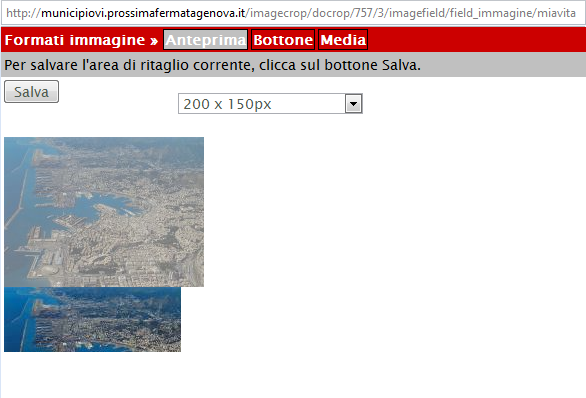
Sometimes the cropping area (i.e. the non-opaque rectangular part of the image) is displayed under the opaque image itself (see attached image).
When this happens I can see with Firebug that the inline styles associated to the "resizeMe" div are not correctly updated while moving the cropping area (they are when this problem does not occur).
In particular the "background-position" property is not updated at all, while the "top" and "left" properties are.
<div id="resizeMe" class="ui-draggable" style="background-image: url("http://mywebsite/sites/default/files/imagecache/_imagecrop_temp/associazione/image.jpg?time=1264669195"); width: 743px; height: 190px; top: -429px; position: relative; background-position: 0px -131px; left: 0px; opacity: 1;"/>
This behaviour only happens with Firefox on every images and randomly (when I refresh the page the problem usually disappears).


Comments
Comment #1
samchok commentedThis problem was due to errors in the ImageAPI module. Those errors were reported in the 'recent log' page but I didn't noticed it until now... :-/
Comment #2
samchok commentedSorry. I'm here again to complain. I thought that my problems were gone, but as soon as I uploaded the website on the production server, it appears again. I'll give you some more details.
I totally confirm the description in post #1. Attached you can find a screenshot of the issue.
I'm using:
This error appears in Firefox 3.6.3, Chrome 4.1.249.1064 and Safari 4.0.5. It doesn't seem to appear in Opera 10.51, IE 8 and IE 7.
The strange thing is that when tested locally (on a XAMPP webserver) it works like a charm, the issue appears on the production webserver only. The two installations are exactly the same (same files, same db, tests done with same image): could it be a problem related to webserver configuration?!
In Drupal Recent Log page I'm always getting this warning: "Cached image file sites/default/files/imagecache/_imagecrop_temp/storia/genova_aerea.jpg already exists but is being regenerated. There may be an issue with your rewrite configuration." But I suppose it is a normal behaviour of the Javascript crop module.
I can give an account to test this behaviour on request.
Thank you.
Comment #3
mrfelton commentedI logged into your site and have been able to see the problem in action. I don't think the imagecache error is related. That is probably due to the fact that this module appends a timestamp to the imagecache URL to ensure that the browser cache doesn't interfere and also forces the Imagecache image to be regenerated.
Thing is, I can't replicate this locally, which makes it next to impossible for me to work on.
However, I think I can see the problem, but I don't know what is causing it:
When the page loads, #resizeMe should have the following css:
However, if you inspect it with firebug on your site, you should see that it actually has
position: relative;. This seems to have been applied through some JavaScript, as it comes under theelement.stylecss declaration. I'm not sure where it is getting this style from. If you reload your page, and then remove position:relative using firebug, it suddenly starts to work. So the question is, what is causing position:relative to get applied to #resizeMe? The answer is, I don't know - but I'm guessing it is something in jQuery UI. What version of jQuery.ui do you have installed? Do you have a different version on your development server? Can you try with 1.2.6 - the version that I have.Comment #4
samchok commentedThank you for your reply mrfelton!
You were right: some other modules is changing the "position" value.
I added the following line to the page-imagecrop.tpl.php template file:
<script type="text/javascript">$(function(){ $('#resizeMe').css('position','absolute') });</script>and now it always works as expected! :-)
jQuery UI 1.7.2 on both development and production server. As I said, the two drupal installations are exactly the same (same db, same files, same jquery libraries...). The very strange thing is that this issue only happens on the production server...
Sorry, but I can't try it right now, because other modules require 1.7.2, and I can't test it on production server!
Anyway, I tried to manually remove the javascript from contributed modules (editing the page-imagecrop.tpl.php) and I find out that without this two modules it works just fine:
Thank you so much again for your help!
If you need more infos about this issue, just let me know.
Comment #5
gooddesignusa commentedThis happens to me sometimes but not always. Its so random and if i refresh the page it fixes it. I do have External Links installed as well. I'll try to look into this more and see if I can figure out whats going on.
Thanks for your insight mrfelton & samchok
Comment #6
spelcheck commented#4 worked for me like a charm. thanks!
Comment #7
nils.destoop commentedFix for jquery ui 1.7.2 was committed today.
Just tested it with both lightbox2 6.x-1.x-dev and external links 6.x-1.11. No problems anymore here.
Problem fixed for you?
Comment #8
robertjd commentedI also have the problem mentioned in #1, with jquery 1.3.2 and jquery ui 1.7.3
I tried using jquery 1.2.6 but still had the same problem.
The fix in #4 works for me.
Comment #9
nils.destoop commentedTried one final thing. I force the resizeMe to absolute after the binding of resizable / draggable.
If this doesn't work. The other module maintainers need to fix it, because they overwrite my css.