

 Come together with the global Drupal community in Rotterdam, 28 Sept – 1 Oct 2026. Sessions, contribution, connection, and Early Bird savings until 8 June.
I have an issue with a flexible panel with 5 columns (fixed with: 4@150px; 1@360px).
The columns display as intended in Firefox and IE6, though not in Safari. In Safari, the columns are stacked on top of each other. I noted a similar issue was raised with alpha 2, though closed — http://drupal.org/node/370202
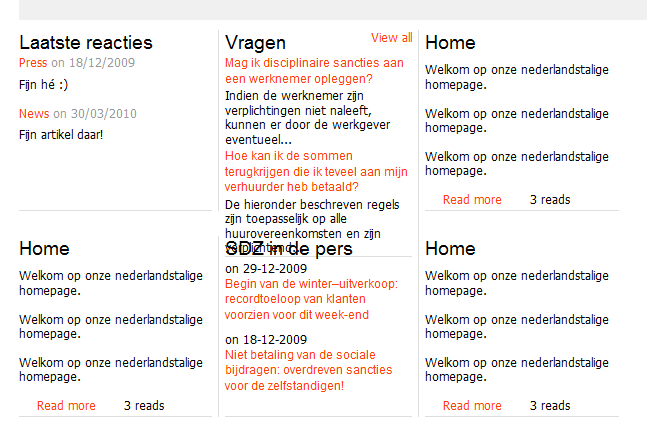
I have attached screenshots from Firefox 3.5.7 and Safari 4.0.4. I have added a 1px red border to the mini panel ID and 1px green borders to the inside class for each region (result is same with and without border)
The screenshots are from the mini panel with five columns, each with one row and one region. I also recreated the mini panel with one column, one row and five regions. The result is the same.
Anyone else noted this/have a workaround?
thx
| Comment | File | Size | Author |
|---|---|---|---|
| #1 | Firefox 3.6.2 | 33.42 KB | nightlife2008 |
| #1 | Safari 4.0.5 | 27.31 KB | nightlife2008 |


Comments
Comment #1
nightlife2008 commentedI got the same problem :( Haven't found a workaround, or the solution to this problem, as Safari doesn't allow me to do some "debugging" like Firebug in Firefox...
Will report back if and when I find the problem..
Comment #2
buttonwillowsix commentedI have the same problem with my flexible panel. It is fine in Firefox and a wide variety of flavors of IE, but is no go in Safari. I have followed some of the other layout problem threads and tried the posted solutions, to no avail.
I am going to try to use CSS to use a three column stacked panel instead, but would love to get my flexible panel rendering properly. I am going to try to isolate the problem, will post back if I find anything.
Comment #3
kristi wachter commentedI think this is more of a bug than a support request.
Merlin, do you have any suggestions of things we could try to help get this fixed?
Thanks!
Comment #4
henkit commentedSame problem here in safari 4.0.5 on mac
Henk
Comment #5
merlinofchaos commentedThe best I can suggest is to try playing around with the percentages. I don't know why Safari would be pushing the boxes around. I've not had that happen.
The first thing to test is the theme; if the layout works in garland but not your theme, that indicates your theme is somehow squeezing the content area a bit.
Comment #6
vigoncas commentedHi,
I have the same problem with flexible panel. In my case the row where is the problem, the second column is displayed below the first, haven't a defined width. In the other rows, which works ok, width was setting to 99'9%.
I fixed the row width to XXpx value and the problem be solved.
Santi
Comment #7
vm commentedno follow up from the OP (or others) as to whether the issue can be reproduced in a core theme. I couldn't reproduce in garland.
Marking as fixed.