

Closed (cannot reproduce)
Project:
Hierarchical Select
Version:
6.x-3.1
Component:
Code - Content Taxonomy
Priority:
Normal
Category:
Bug report
Assigned:
Unassigned
Reporter:
Created:
9 Feb 2010 at 19:41 UTC
Updated:
25 Aug 2010 at 20:29 UTC
Jump to comment: Most recent file

Comments
Comment #1
hinikato commentedA have created the patch.
Comment #2
wim leersI can't reproduce this problem. Assigning a low priority because it seems to be just you who's getting this problem …
Can you reproduce this on a vanilla Drupal site with just HS, HS Taxonomy and HS Content Taxonomy? If you cannot, keep on adding modules that you're using on your actual site until the problem is reproduced.
When you're able to reproduce this (on a vanilla Drupal site with the minimum number of modules to reproduce it), then please make a screencast of:
That makes it easier for me to reproduce the problem. Thanks!
Comment #3
wim leersComment #4
wim leersClosing due to lack of response.
Comment #5
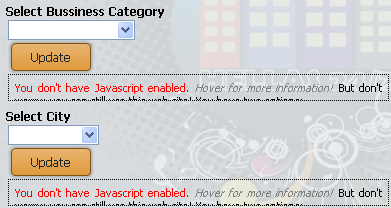
klonosI can actually reproduce this in both firefox 3.6.x & 3.7.x and also in IE8, so it is an actual issue. It only appears for just a second before page reload finishes and then it goes away. It doesn't happen on the initial page first load.
I've tried taking a screenshot of the issue, but it either goes away too fast, or I don't know what(?). I'll try with a screencast video and get back at you...
Comment #6
klonos... nailed that screenshot after all (it is in IE8)
switching to a default theme and testing...
Comment #7
klonosDoesn't happen with Garland core theme!
Is this enough to prove that it is theme related(?) or should I switch back to the custom theme and try disabling all modules and re-enabling them one at a time?
Comment #8
wim leersDefinitely sounds like it's theme related … But can't say for sure.
Comment #9
klonosok, let me find some time in my life and I will test this in a vanilla setup. Will report back as soon as I have findings.
Comment #10
klonos@Wim Leers: did you have a look at hinikato's patch in #1? What does it do?
@hiniKato: can you please temporarily remove your patch from your setup and verify if the issue happens when the core Garland theme is used or not? This will help us be a bit more certain that the issue is theme related. Thank you in advance.
Comment #11
daboo commentedGreat Module! It's saving me a lot of trouble creating a fully dynamic menu for an online catalog. Very intuitive and easy to use for my client.
I did notice that the issue is not showing for my taxonomy selection for the menu which is what I exclusively used this for before today.
It's only showing up on a newly created filter that I added to a view.
I just updated to HS 6.x-3.1 revision to see if that would do the trick and still get the warning. I did not install the above patch as I'm not certain it would be compatible with the latest rev.
I'm using the Aquia Prosper theme and have been for a couple weeks.
I'm not terribly concerned with the warning, as it shows and then quickly conceals on this theme after clicking the "Apply" button for the filter. I'm only using HS for site administration, so visitors will not be exposed to the message.
Comment #12
wim leersThere's no patch yet, that's just a screenshot.
I'm fairly sure the problem is just another AHAH/AJAX module that is causing this problem. Try reproducing this problem on a vanilla Drupal site or disabling modules to find the culprit.
Comment #13
wim leersClosing due to lack of response.