

Closed (fixed)
Project:
Flickr Attach
Version:
6.x-1.1
Component:
Code
Priority:
Minor
Category:
Bug report
Assigned:
Unassigned
Reporter:
Created:
19 Feb 2010 at 15:25 UTC
Updated:
23 Jul 2010 at 17:00 UTC
Jump to comment: Most recent, Most recent file

Comments
Comment #1
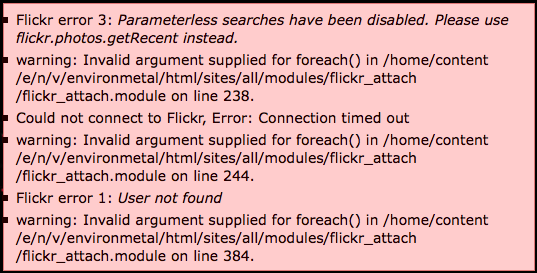
juropel commentedHello, I am getting a similar set of errors:
* Flickr error 3: Parameterless searches have been disabled. Please use flickr.photos.getRecent instead.
* warning: Invalid argument supplied for foreach() in /home/content/e/n/v/environmetal/html/sites/all/modules/flickr_attach/flickr_attach.module on line 238.
* Flickr error 1: User not found
* warning: Invalid argument supplied for foreach() in /home/content/e/n/v/environmetal/html/sites/all/modules/flickr_attach/flickr_attach.module on line 244.
* Flickr error 1: User not found
* warning: Invalid argument supplied for foreach() in /home/content/e/n/v/environmetal/html/sites/all/modules/flickr_attach/flickr_attach.module on line 384.
Please see the attached screenshot.
Thanks!
Comment #2
juropel commentedOkay, so I got past this set of errors when I realized I had to add in the Flickr ID (not screen name) to the Flickr module settings in order for Flickr Attach to work (which it isn't quite…).
So for me this issue is fixed, but I cannot speak for the first poster.
Comment #3
Anonymous (not verified) commentedIt sounds as though this is a problem with flickr_attach , so updating the project choice for this
issue accordingly .
However i have bookmarked this issue in my browser and will have a look a little later to see if i
can help out.
Best,
Paul Booker
Appcoast
Comment #4
jbomb commentedHello Paul:
Flickr Attach relies entirely on the flickr module for all flickr api transactions, but the issue is relevant to both modules.
I think this is a user input issue that is generally resolved by entering the proper Flickr Id in the flickr module settings. The issue and suggested solution are similarly described in #2, #375646: Errors after installation and enabling, and #251673: "Flickr error 2: Unknown user": please specify *what* user_id to input.
Users can easily retrieve their Flickr ID here.
Comment #5
aaronbaumanChanging this to a bug report, since flickr_attach should check its parameters before invoking a flickr request.
The root issue here probably relates to an administrator not configuring flickr settings properly.
The symptom reported by the OP is an error generated by flickr api when flickr_attach makes an invalid flickr request.
Downgrading to minor since this doesn't affect functionality.
This patch makes sufficient checks to ensure that a flickr user id has been entered before making any such requests, as well as other various checks to avoid invoking invalid flickr requests (paramaterless searches, set requests with no set id, foreach loops on non-arrays, etc.).
Comment #6
gwilym.eades commentedI'm hoping this helps me out too, but I'm not exactly sure what to do with the patch file. Do I put it in the module folder?
Comment #7
aaronbaumanUntil this patch is applied to a release, you should apply it manually.
http://drupal.org/patch/apply
Please keep in mind, however, that the patch merely hides this error message, the symptom. It does not address the root issue, that your credentials are wrong, or you have no accessible photos.
Comment #8
gwilym.eades commentedThanks, I figured out how to apply patches using NetBeans. But Flickr is not working, despite having the creds and the photos in sets!
Comment #9
jbomb commented@gwilym.eades
Did you use the id utility referenced in #4?
Comment #10
tiyberius commentedI'm having the EXACT same problem as nellsworth, I installed the "Flickr Attach" module, triple checked my API Key, Secret, and used the "idGettr" to get my ID. The error messages ("Photoset not found" and "User not found") only shows up when I'm logged in. I could ignore the error, but NO PHOTOS show up when I create a node with a "flickr field" set to "photo set". I'm running PHP 5.2, Drupal 6.16. Any help would be MASSIVELY appreciated!
Comment #11
aaronbaumanDo you have any public flickr photos at flickr.com?
Comment #12
tiyberius commentedFigured out that I had to make my photos "public" on flickr.com. Duh!
Comment #13
patrickroma commenteddoesn't work also for me :-(
Comment #14
aaronbaumanThe original issue here was addressed in #5.
Updating the title to reflect the issue.
If you are experiencing these issues, please review the documentation at http://drupal.org/node/849674 before submitting a new issue.