

 Come together with the global Drupal community in Rotterdam, 28 Sept – 1 Oct 2026. Sessions, contribution, connection, and Early Bird savings until 8 June.
Hi all,
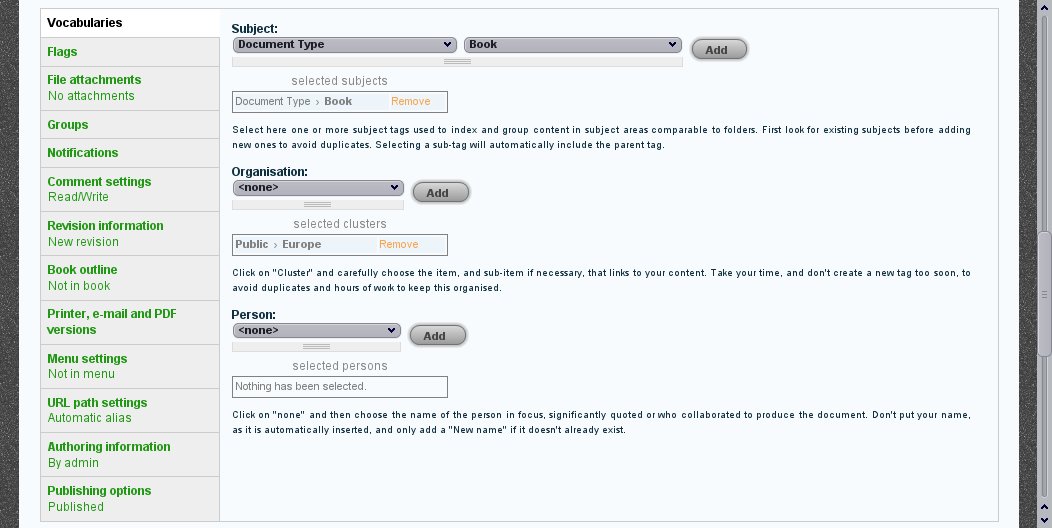
I've noticed that, using Vertical Tabs module, a "null" word appear before the selected item.
Please see image in attachment that show the issue
Thank you
MXT
| Comment | File | Size | Author |
|---|---|---|---|
| #26 | hs-vertical-tab.gif | 10.15 KB | alexpott |
| #24 | hs732748.jpeg | 90.2 KB | ñull |
| #23 | screenshot_004.png | 53.85 KB | betz |
| #20 | 732748_hierarchical_select_5.patch | 7.93 KB | alexpott |
| #18 | 732748_hierarchical_select_4.patch | 6.45 KB | alexpott |




Comments
Comment #1
wim leersHm … It seems Vertical Tabs is somehow retrieving the current value using JS. Their JS seems unable to handle HS. Moving to the Vertical Tabs issue queue, so they can pinpoint the code that does this. Then they can move it back to the HS issue queue and I'll work on a patch.
Comment #2
dave reidVertical tabs only supports the core taxonomy forms and widgets. If a module (like HS) changes the fields/inputs, it can override the summary JavaScript. This is what Pathauto currently does:
Comment #3
wim leersSo Vertical Tabs does *not* use JS magic for this at all then?
Comment #4
dave reidThe only JS magic it uses is JS that will pull data from the core taxonomy module form elements. Again, if modules like HS change or modify the way taxonomy data is input, then the modules are responsible for overriding the vertical tabs JS.
Comment #5
wim leersOh, I had misread the code, it's actually adding *JS*, and not setting a hardcoded value. My bad. Thanks Dave! :)
Back to the Hierarchical Select issue queue now.
Comment #6
Nick Robillard commentedSubscribing...
Comment #7
wim leersSomebody who wants this should roll a patch! :)
Comment #8
Renee S commentedI've rolled a quick and dirty patch for this, an addition to the core/taxonomy.js file already in Vertical Tabs. I did it that way rather than adding a whole other kludge in HS for simplicity's sake if nothing else - it's on the same fieldset form and it's taking care of looping through the taxonomy terms as they're set, already.
Basically, if the label is null, it checks up a level to see if there's a label there instead - because the only difference between the forms is that HS adds an extra DIV.
Comment #9
Renee S commentedComment #10
alexpottHere's a patch to fix this issue in the way suggested by #2 i.e in the hierarchical select module and not vertical tabs.
It uses the same js modification as #8 but also checks if the hierarchical select value is none and will ignore the label if this is so.
Comment #11
Renee S commented[Edited] Ok, #10 works in some circumstances, but not all.
* It works perfectly if the HS vocab being used has "save term lineage" checked, and "Reset selection" is disabled.
* For vocabs with "save only deepest term" and "reset selection" enabled, it seems to work when you click on an item initially, but then the label on the Vertical Tab disappears entirely as soon as you click Add and it doesn't come back.
* For vocabs with "save only deepest term" and "reset selection" disabled, it seems to work when you click on an item initially, but then the label on the Vertical Tab only represents the last selected item and each new selection clears the list and puts itself on it alone.
Comment #12
wim leersAs per #11, marking as needs work.
Thanks for the review, renee! :) And thank you for the work, alexpott!
Comment #13
alexpottAnd thank you for the amazing module, Wim!
Comment #14
wim leersI don't have time to work on this patch, but if you can, please fix the remaining problems with it, I'd love to commit this!
Comment #15
alexpottHere's a effort at tackling the issues brought up in #11
Basically the change event is not firing when hierarchical select taxonomy is reset (the highest level is set to none). This patch uses the change-hierarchical-select trigger which is fired when this occurs to reset the vertical tabs summary text when the value is set to "none".
Comment #16
alexpott... and now the patch copes with label levels...
Comment #17
alexpottAnd now to work on what happens when hierarchical select's dropbox is enabled... needs to work in a completely different way :)
Comment #18
alexpottAnd now with dropbox support... just need to tidy up the code and add a few comments to explain.
Comment #19
wim leersGreat progress, Alex! :) Thank you very much for your efforts! Looking forward to reviewing this patch!
Comment #20
alexpottPatch with added comment goodness!
I've also moved the binding of a function to the change-hierarchical-select event from document.ready to a behaviour so if hierarchical select forms in vertical tabs are added through ajax this all should still work.
Comment #21
betz commentedI can confirm this patch works.
Thanks alexpott!
Comment #22
ñull commentedI am using hs for core taxonomy (no cck). Before null and other undesired information was appearing in the summary. After applying the patch nothing is appearing. Please correct me if I am wrong, but from the other comments here I guess that this was not the intended function of this patch.
Comment #23
betz commented@ñull have a look at the screenshot (attachment)
Are you sure you selected some terms?
Comment #24
ñull commentedSee attached screen shot. I tried to go back to Garland theme, but that did not make a difference.
Comment #25
betz commentedi also enabled the dropbox feature like on your screenshot, same result.
Can't reproduce your issue.
What version of vertical tabs are your running?
Comment #26
alexpottI thought this might be because of the multiple dropboxes as I hadn't tested it under that scenario. However for me it works just fine too... see attached screenshot. @ñull are you getting any javascript errors?
Comment #27
ñull commentedI will try it on a clean Drupal. Must be some influence of the multiple modules I have installed on this site.
Comment #28
bartezz commentedsubscribe...
Comment #29
wim leersThanks, #26! :)
Comment #30
alexpottHi Wim,
Did this ever get committed?
Comment #31
ayalon commentedI think not?
Comment #32
vlooivlerke commentedHi this patch works if you have more than one taxonomy in your node form, but if you only have one taxonomy it does not work.
Comment #33
bartezz commented@vlooivlerke; a single taxonomy isn't put into a vertical tab by default anyway since a single taxonomy doesn't have a surrounding fieldset. I solve this in my case via a custom module;
You'll need to do this via a custom module, if you don't know how to create one, please check; http://drupal.org/node/231276
Cheers
Comment #34
vlooivlerke commentedThanks :) #33
That's great.
Comment #35
dyke it commentedpatch in #20 works perfectly! thanks a lot alexpott!!!
Comment #36
summit commentedHi,
I think this patch #20 is ok to set to RTBC, right?
Greetings, Martijn
Comment #37
stefan.r commented