

 Come together with the global Drupal community in Rotterdam, 28 Sept – 1 Oct 2026. Sessions, contribution, connection, and Early Bird savings until 8 June.
I have a view with Editablefields which, until now, worked well using the Insert View module to place it within the body of a node. Insert View is no longer supported and Viewfield is the recommended solution. Viewfield works fine as a replacement for Insert View except when the view contains Editablefields. In this case all browsers report a javascript error and the editable fields become uneditable.
| Comment | File | Size | Author |
|---|---|---|---|
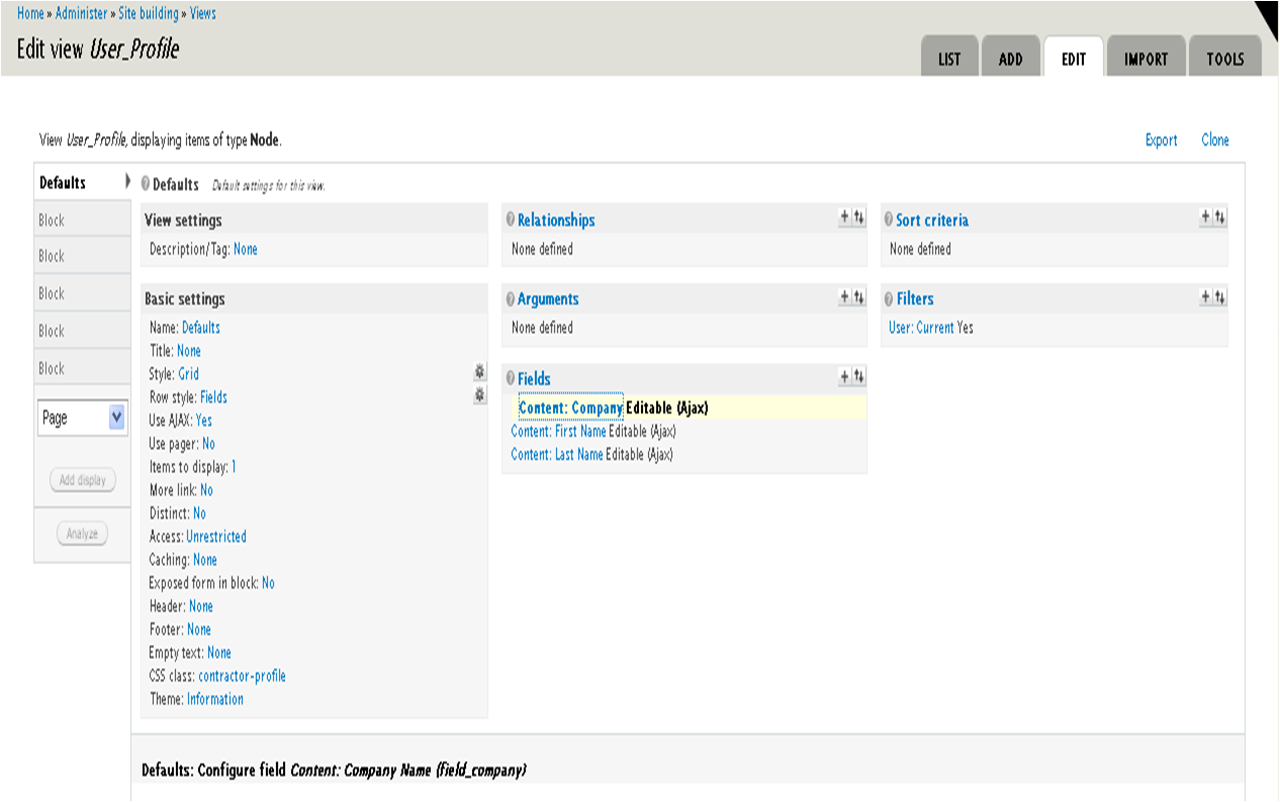
| #22 | Picture1.png | 153.18 KB | delliman33 |
| #22 | Picture2.png | 173.63 KB | delliman33 |
| #22 | Picture3.png | 307.24 KB | delliman33 |



Comments
Comment #1
grahamshepherd commentedIn order to sidestep this problem I tried using the Insert Block Module. The results were exactly the same as for Viewfield.
Comment #2
grahamshepherd commentedWell now it is not at all clear that this issue is related to Viewfield. I experience the same problem with a block in normal block region and also in a page view.
The view is of user profiles with editable content fields.
As I mentioned above the view was working fine until 5 March at which point I did two things.
1. Updated Drupal core to 6.16 (following this update Insert View was condemned as evil and Viewfield was reconmended in its place)
2. Installed Viewfield (to which I attributed this problem, probably too hastily)
I have also suddenly experienced problems with Views Bulk Operations on the same set of editable fields. I have uninstalled Insert View (obviously), Viewfield, Insert Block and VBO but the problem still exists with editable fields in a page or any other view.
Perhaps the problem is Drupal 6.16 inconjunction with Ajax Load or Jquery update.
Any clues would be appreciated.
Comment #3
grahamshepherd commentedChanged title from "Does not work in viewfield" to "Does not work in View"
I have checked my Drupal 6.16 update with a rules based comparison of all files on the server. I have deleted the data, data fields, content type and views. I have cleared all caches. I have reconstructed the whole scenario from the ground up, created a few nodes, populated some data fields and recreated a page view. The view is a content profile as before with click to edit fields.
The symptoms are still there except that a javascript error is not reported. This may be because I am now dealing with only six nodes not 200 plus. When the page first loads the [Edit] shows up in the editable fields but progressively disappears field by field in a few seconds. If [Edit] is clicked while it is visible the field can be successfully edited. Once it has disappeared it is not accessible.
Is anyone else experiencing this problem?
Can anyone help?
Comment #4
grahamshepherd commentedThis is obviously related to #699954 and #703988
In addition, my experience is:
1. Javascript errors are reported when there is a large number of nodes in a View as [Edit] is progressively faded.
2. Cannot edit multiline text views at all: cursor cannot enter the text area.
To elaborate on this second point:
If the field is empty it cannot be edited. If it has data in it, the text area opens but any attempt to place the cursor in the field closes the field. If editablefields.js is modified as Undoit proposes in his first comment on #699954 then empty fields can be opened and edited. Including multiline text fields. However once it has data in it it can't be changed within the view.
These bugs make the module unusable for me and so I am upgrading the priority to critical.
This is an extraordinarily useful module and my hearty congratulations to the developers. However, this sure needs to be fixed.
Comment #5
vannus commentedfwiw, its working fine for me in panels, both when the content is a node field, and when the content is a view with node field.
Comment #6
markfoodyburton commentedHi, I've just tried to reproduce your problems
I took a working site, upgraded to 6.16, updated, added viewfields, created a node type with a view field, with the default view set to a previously working editable table, added a node of that type, saved, viewed the node, edited the table....
In short - I couldn't break it.
I have not tried with more than a few 10's of elements in the view table - so I can't comment on problems relating to scale.....
If you could debug the issue, and submit a patch, that would be great ;-)
Cheers
Mark.
Comment #7
grahamshepherd commentedThanks.
Unfortunately I am very much an amateur and I can't suggest a patch in what, to my little mind, is a complex script with big changes from 6.x-1.2.
Apart from the problem with multiline text areas I can achieve my requirements by disabling the fading out of [Edit] as per #699954: Disable Hiding of Click to Edit So I have done that to get by to some extent.
Addressing the multiline text area using Firebug there are three cases:
1. The field is empty.
Click on [Edit].
Click in the text area.
Cursor appears.
Type entry.
Click outside the text area.
Data POSTed and text area closes.
Good!
2. Field is not empty.
Click on [Edit].
Click in text area.
POST is called prematurely.
Text area closes.
Unable to edit.
Not good.
3. Field is not empty.
Can't see cursor but assume it is there and use Ctrl A to select text.
Text appears selected within the text area. (Although using Ctrl X has no effect.)
Delete selected text using Del key.
Text disappears.
Click in text area.
Cursor appears.
Edit text area.
(Other key stroke sequences may make the text area editable but I haven't found any yet. In most cases as soon as the cursor is clicked in the text area POST is called prematurely and the text area closes without changing the field contents.)
Click outside the text area. (Or try anything else.)
POST cannot be called.
Text area remains open until page refreshed.
Data not edited.
Not good.
Comment #8
grahamshepherd commentedComment #9
markfoodyburton commentedHi, can you check the latest dev version, I've made a change to the handling of empty fields, maybe it helps?
For me, it's working, but I can't reproduce your problems anyway ;-(
Cheers
Mark.
Comment #10
grahamshepherd commentedMark. As I noted in #699954: Disable Hiding of Click to Edit , your fix solved the editing of empty fields, the javascript errors and the client CPU load. Fixed for 200 nodes in a view all empty and all full. Great!!!
However, I still have the problem that I can't edit multi-line text areas as I have described above.
Single line text fields and select from a list work fine.
Having stared endlessly at the javascript (not having too many other tools at my disposal) I can only deduce that, like check boxes, multi-line text fields need a special case to ensure that focus, blur and post methods are reliably called. As an example the current approach of click outside the text area to call post is potentially unreliable, I suspect. If focus is not effected when the text area is opened, clicking in the text area will do exactly what I described, ie, call post prematurely.
Comment #11
markfoodyburton commentedI've tested with the multi-lines and all seems to work OK
The pain is that it is a 'on change' event - not an unfocus event, so, you effectively have to change the text box and then click outside it to make the thing go away again - but -- what were you doing in the first place clicking to edit if you didn't want to edit....
I also agree it woudl be nice for multi-lines especially if there was a 'submit' button, rather than clicking outside the box.... but....
So, +- those limitations, for me, it's working.
So, before doing anything else, I'd like to understand whats broken for you.
What browser are you using?
Cheers
Mark.
Comment #12
grahamshepherd commentedWell, I was about to say that I have experienced this in this Firefox, IE8, Chrome and Opera. However, just to be sure, I went back and tested each browser in turn trying to edit a field with data in it. Chrome, and to my surprise, IE8 and Opera all worked OK, ie, edited the fields correctly. In Firefox, my default browser, the problem recurred as I described, ie I couldn't enter the text box to edit. I had previously emptied all server and browser caches and, in the case of FF done a complete restart. And prior to that I had reconstructed everything from the ground up including deleting views and content fields and types, deactivating and uninstalling all the concerned modules and reinstalling them. Then I recreated the content types, cck fields, views and reimported the data.
So, in summary, the problem remains in FF, but nowhere else. There is obviously something wrong with what I am doing, but surely only one small step from resolving it.
Comment #13
markfoodyburton commentedat some level "Phew"
at another "Oh darn"
I'm using Firefox too - and it works for me.....
err - which version of firefox? Is there any chance this is some sort of theme issue? Like the textbox is somehow under another element or something?
Cheers
Mark.
Comment #14
grahamshepherd commentedI was using FF3.5 and everything I described occurred with that version.
However, after your question I checked for updates and installed 3.6.
I then tested again using FF and Chrome.
This time something different but the same behaviour in each browser.
In FF3.6 I am now able to edit both an empty and a occupied multi-line text field. Clicking in the text box immediately puts the cursor in place, I can change the contents and save by clicking outside the box. "Wow", I thought. The same in Chrome.
I then tried to edit a field but leave it unchanged. Whether it had contents or none. In both FF and Chrome I can't leave a field unchanged. Clicking outside the box does not close the box.
This doesn't seem to me to be ideal but it is bearable. By refreshing the browser the boxes close and the data remains the same.
I haven't the faintest idea why the change from FF3.5 to 3.6. I have repeatedly cleared the browser cache and closed and reopened it and rebooted my pc but I haven't experienced changes in behaviour like this.
On the web site, the theme I am using is Roople Tapestry. I can't see any css styles inherited by the surrounding elements from the theme which could make any difference. I might not be looking in the right places of course.
Thanks for your patience in helping me get through this.
Regards, Graham
Comment #15
grahamshepherd commentedIn fact you make this point yourself in #11 above: it is an on change event not an unfocus. I can live with that.
Comment #16
markfoodyburton commentedMMm, I can't believe that this was a bug in firefox 3.6 - but - good :-) it's working as it should.
I suggest we leave this issue open for now, as postponed - sometime Id like to re-visit and do something nicer with multi-line boxes. but - ok for now, at least it's doing what it's designed to do :-)
Cheers
Mark.
Comment #17
grahamshepherd commentedI really appreciate the help and effort. Thanks, Mark.
Comment #18
andreiashu commentedI think it's ok to close this issue as I can't reproduce the remaining problem regarding textareas in 6-2 nor 6-3 branch.
Comment #19
break9 commentedI have the same issue. I have an editable field in a view and when i click to edit the field it is highlighted and expands to edit then, all of the sudden the cursor is removed from the field and I can only edit one row from the field before it breaks.
I have tied the issue back to way the editable fields is reloading every javascript file on the page on click to edit. In my case this includes reloading the superfish javascript menus, which is causing the erratic behavior in editable fields since the menu is prepared each time you click on an editable field in the view.
Is it possible to have editable fields only call the editablefields.js, or does every .js file need to be loaded each time a field is selected? This would definitely solve my problem.
Any help is appreciated
-Trevor
Comment #20
break9 commentedComment #21
break9 commentedso this is what I did to fix the issue
on or about line #257 I commented out the drupal_alter function and rewrote it so that only the editablefields functions will affect it.
in looking at the API for drupal_alter() I didn't even know you could pass it 4 values? Anyways, this worked for me. Maybe it will help someone else.
-Trevor
Comment #22
delliman33 commentedI have been using the editable fields module without issue to edit a node. When I pull up an edit form of the node itself, I can edit in place without any problems. However, when I try to pull the content fields into a view display, the option to edit disappears. I attached a few screenshots of my view as well as a screenshot of the output of that view. As you can see, the fields are not editable in the output for some reason. Any suggestions?
Comment #23
mroswell commentedJust a note that I'm experiencing the same issue as #22. Even though I covered this module in my book on Views 1, I can't seem to figure out how to get editable fields in Views 2. Similar to delliman33's experience, editableviews works as intended on individual nodes.
UPDATE: When I choose "Editable (HTML)" I get an edit box in the view. "Editable (AJAX)" yields none. A little odd. I'm still not sure how to "save" in the view... but I'm getting warmer.
UPDATE: Field saves via AJAX upon mouse exit from the field (even when "Editable (HTML)" is selected.
Comment #24
mroswell commentedComment #25
socialnicheguru commentedI don't have the group as fieldset to enable editablefields in a view. how did you activate that fieldset to enable editable in a view field?
Found it- "format" is not available in all fields.