We first wrote about this problem in a wrong issue (it was an issue for 5.x) so I create this new one following dereine advice.
The problem :
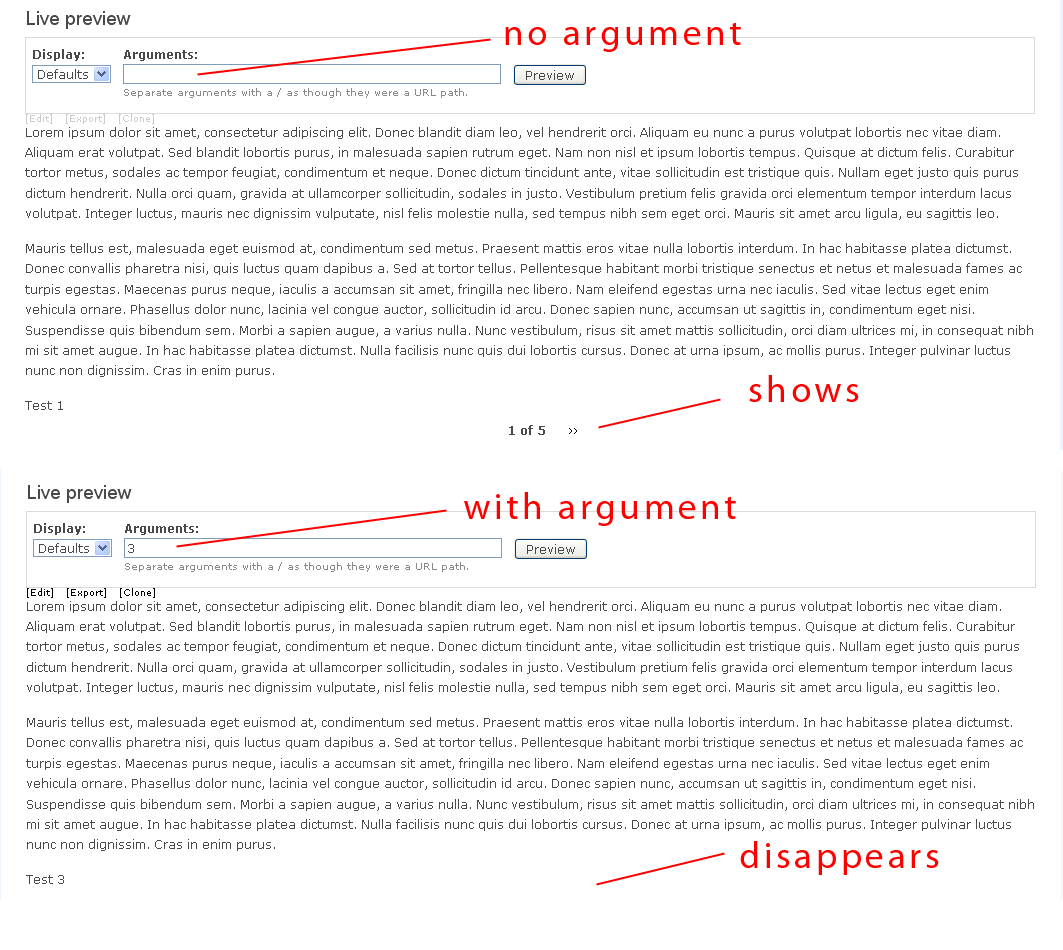
The pager shows when not using the argument but disappear when using a node id as argument.
Here was my view :
http://dl.dropbox.com/u/5523867/my-view-argument-problem-pager.txt
(was because I shipped the project without that view so I'm not sure I'll be able to help with testing now).
It was first reported by egarias : (his view is in the old issue)
I have strange behaviour with pager.
This all happens in the views UI.
I have a view with node.id as argument
When i don't pass the argument, the pager is ok. When i pass the argument with a node id:
The pager dissapears, and if i increase the "items per page" from 4 to 8 for example, i can see the 8 elements so i don't understand why the pager is not present when "items per page" = 4.
Please help, i have been checking almost everything i know with no success.
here is the code of my view:
RickB added :
Same here ethnovode. I thought I was going crazy and tried many things, but there is indeed a huge bug with this.
If I use node ID as an argument or as a filter, the pager disappears, Ive narrowed it down to that. Is there anyway to quickly fix this?


Comments
Comment #1
dawehnerFor me this makes sense. If there is just a single node, because you use the argument.... you cannot have an argument.
Comment #2
ethnovode commentedOk I see. I thought it would work because when I choose "Items per page: 1" the pager shows.
The situation :
A views-block showing a list of nodes, each linking to a page-view. If I understand correctly I can't link to a node in this page-view using argument *and* have the pager showing because that argument cripples the whole display.
So is there a way I can link to one specific node in views and have the pager showing ?
Comment #3
egarias commentedI want to use this functionality "pager with node id as argument" because my view will show the cck images for the related node in a customized node.tpl.php.
Here is the example page: http://solomoto.es/articulo/triumph-rocket-iii-roadster.
where the small images are in fact more than 4 then the need of pager.
Is this considered a bug to be fixed or do i have to find a workarround?
Many Thanks
Enrique
Comment #4
merlinofchaos commented#3: You're viewing a node page. Boy that's an important piece of information that you left out.
The node page has comments (Yes no comments currently appear, but they ahve comments). The comment query uses the pager with element id of 0, and you can't change this. It is overriding your pager.
Also, please avoid value judgements like "There is indeed a giant bug with this". It does not make me inclined to help you. Given the amount of issues this queue receives vs the amount of time I have, I am going to focus my time on people who are being pleasant. I find comments like that unpleasant. Unless you've looked at the code and identified a bug, please hold with criticisms like that until you understand all of the interactions on a page. In a distributed system like Drupal, where you've got many pieces doing things in the same place, there are places where these items can conflict. Those conflicts are not bugs.
#1: It is likely that your problem is similar.
In the original issue, I told people to change the element ID, because there could be element ID conflicts. Please take my advice before you declare that this software has giant bugs. See http://drupal.org/node/318270#comment-1048155 -- reading and acting on that comment would've prevented this entire discussion.
Comment #5
ethnovode commentedI'm sorry if you feel offended, I have great respect for your work and I think Views is an amazing software and probably the reason number one I use Drupal today. I created this issue just because I thought it could be a bug and it could help you, not wasting your time.
I tried with an argument as the title of the node and the pager still doesn't appears (but the "comment" module is disabled on tis site).
I still don't really understand if it is bug or not (my english is far from perfect). Is it considered bad practice to use views to show just one node ?
Thank you for your time.
Comment #6
merlinofchaos commentedThe problem you are experiencing has nothing to do with the argument.
It has everything to do with the element ID on the pager. Check the 'use pager' setting. There is a pager / element ID there. Change that to 1.
Comment #7
ethnovode commentedOh I see, I thought the Element ID you wrote about was another type of argument. Sorry about that.
I tried to change the pager element ID with 1 and then some other values but it didn't change anything.
I just updated to the latest dev of views 6.2, ran update.php and still no pager.
And I don't know if it has something to do with this but while the display has an argument, the live preview shows correctly but the real view on the site (hxxp://mysite.com/actus) shows a 404 except when I put the argument (hxxp://mysite.com/actus/20). I set "Display all values" when the argument is not present in the argument options.Edit : I was using "actus/%" instead of "actus" as url
Thank you again.
Comment #8
merlinofchaos commentedThat's because your path should be 'actus', not 'actus/%'. The % makes the argument required. 'actus' does not match 'actus/%' and therefore does not trigger the view.
The fact that the pager works in the live preview only strengthens my suggestion that the pager element ID is the issue, or that something else on the page is somehow interfering with the pager.
Comment #9
ethnovode commentedNo sorry I wasn't clear, the pager doesn't show in live preview. The live preview was showing my nodes when I used "actus/%" as a path with no arguments as input.
Comment #10
egarias commentedI am very sorry if i offended, i do respect the big job everyone does. Just i am not english this should be one reason, i dont see where i put "giant.." but anyway i ask sorry.
I ask your help, you mentioned i view a node page, what i want to do is see the images related to this node and with pager, can you give me some indications on whether i can do it?
I was trying to see the impact of comments but i can't see, i think i don't use the node comments on this view.
I do know that i cannot do it because of my limitations i only ask if possible some help. I use Views and Panels both from you and they are a excelent modules. I am sorry.
this is the code of the view.
Comment #11
egarias commentedI just use this comment to reopen, My question is in the previous comment.
Thanks
Comment #12
RikiB commentedThanks for your help merlinofchaos.
I am also having a similar problem and I have tried every solution suggested in the old thread and many others. As soon as I use nid as an argument, the pager no longer works, even if I give it a different ID.
Comment #13
danielhonrade commentedI am also trying make this work, need to use argument to show specific node on view at the same time showing the pager,
my observation is that if you use argument such as node id which will result to 1 node, then it will stop showing the pager because the result of the query is only 1, am I correct? How do we overcome this?
Comment #14
egarias commentedThanks for help.
Will it be a good aproach to use php filter and then pass a special argument (?special=nid) to this php filter?
Comment #15
danielhonrade commentedI think it worth to try to look for that says if($result==1) { $pager[use_pager] = FALSE;}, change this to if($result==1) { $pager[use_pager] = TRUE;}, I am trying, no luck yet, I hope merlinofchaos is listening, how I wish this is as simple as this.
Comment #16
RikiB commentedyeah Im desperately looking for a solution to this problem also. Please, there must be some way.
Comment #17
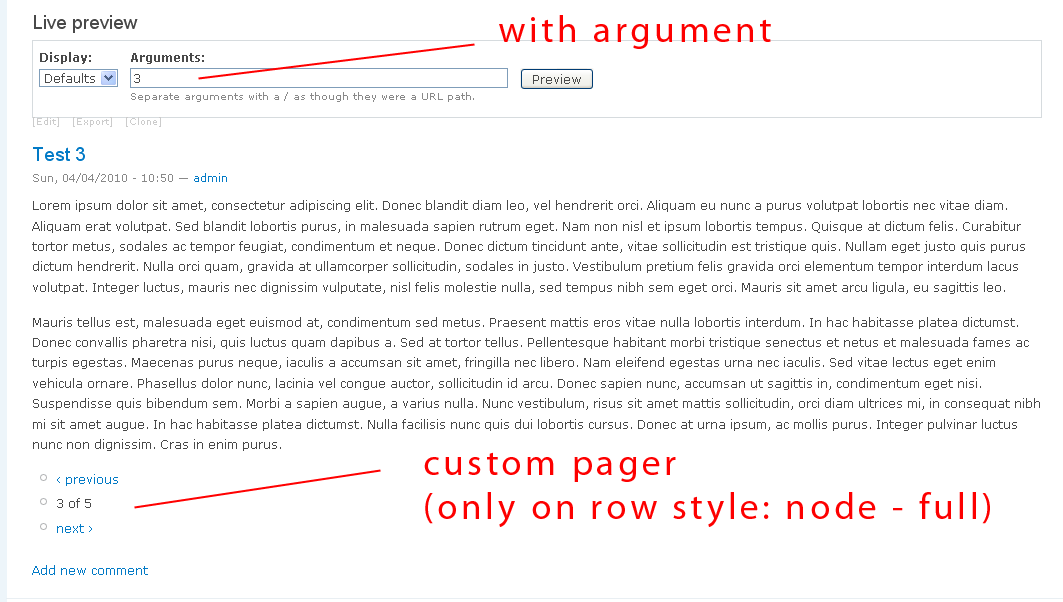
danielhonrade commentedcustom_pager is able to do this with the nodes, showing previous and next, hope custom_pager can be used as fields in views, that's cool.
Comment #18
danielhonrade commented#14 - I was able to do something using slideshow and start the slideshow with a specific node using something like ?artist=5 depending on the link from other nodes but this will obviously download everything because it's a slideshow which is not good.
Comment #19
RikiB commentedI installed a fresh copy of drupal to test this and with the default install and views the pager shows up when using NID as an argument/filter.
I then started adding modules until it broke, and as soon as I added ACL with Forum Access the pager no longer will show up in the view. Can anyone else verify this?
Comment #20
danielhonrade commented#19 - nope, it wasn't with me, I tried node and fields, are you using all new releases? try custom_pager but it only works for row style: node and not fields
Comment #21
RikiB commentedYes I am. I cant use node as the view because Im calling CCK fields. Here are the exact steps that I was able to reproduce to find the problem:
1. Installed a fresh copy of Drupal 6.16
2. Install views module
3. create a node and add 5 comments.
4. Create a view and add Comment: Body into the Fields and Node: Nid as a filter or argument. Also set use pager to Mini and Items per page to 2. Preview the view and notice a pager is at the bottom (works as expected).
5. Install ACL and Rebuild Permissions
6. Preview the view again and notice the pager is gone.
Installing ACL by itself wont cause the pager to disappear, but as soon as you rebuild permissions it will disappear. Does anyone have any any ideas on how to solve this?
Comment #22
danielhonrade commented#21 - I also need this to work, I followed your steps, guess what
4. the pager shows in the preview, but as soon as I put the nid argument like 3 on the preview argument input, it already stops showing
I really think that if the result is only 1 on the query, it will not show the pager, I even created 5 nodes, pls. see 1st snapshot
unlike custom_pager but only works on row style: node - full and not on fields or node - teaser, pls. see 2nd snapshot
Comment #23
RikiB commentedInteresting. I hope someone can help us solve this while using fields on a single node, its very frustrating :(
Comment #24
RikiB commentedI brought this up with the ACL people and they of course said its a problem with Views or Core. Its frustrating when everyone just keeps pointing to someone else when its clearly an issue somewhere. http://drupal.org/node/367761
Comment #25
RikiB commentedJust updated to Views 2.9 and the problem is still there.
Comment #26
merlinofchaos commentedThinking about this, my guess is that with ACL (or any node_access module enabled), core adds a DISTINCT to the query, so that it lists each node only once.
But you're trying to get multiple items from the same node. There's no way to prevent core from adding this DISTINCT keyword, either. So it's not that the pager is disappearing, it's that the query is in fact returning only one result.
It might seem to work in preview mode if you're running as UID #1 because uid 1's queries are not rewritten.
I cannot think of a way to fix this, if that is indeed what is wrong.
Comment #27
RikiB commentedThanks for the reply.
It doesnt work in preview mode as UID #1 unfortunately.
Also it will display more than 1 item, it will display as many items as the pager will let it. So if I have 5 items it will show all 5 if the limit is above 5. If however I set the limit to 2 it will only show 2 and that is where we expect the pager to be displayed to view the other 3.
Comment #28
merlinofchaos commentedOk, look, I'm getting tired of this issue.
The pager always works in all of my tests. You tell me what happens but it doesn't do me any good. You're just going to have to debug the issue. I am not clairvoyant, I cannot go into the code on your system and look at variables and see what's going on.
If I can't duplicate the issue then I can't help you.
Comment #29
RikiB commentedI understand your frustration and I would be too if what you said was true. But if you look at my post #21 Its VERY easy to reproduce using a fresh drupal install and the few relevant modules. For convenience I will repost the steps here.
1. Installed a fresh copy of Drupal 6.16
2. Install views module
3. create a node and add 5 comments.
4. Create a view and add Comment: Body into the Fields and Node: Nid as a filter or argument. Also set use pager to Mini and Items per page to 2. Preview the view and notice a pager is at the bottom (works as expected).
5. Install ACL and Rebuild Permissions
6. Preview the view again and notice the pager is gone.
Installing ACL by itself wont cause the pager to disappear, but as soon as you rebuild permissions it will disappear. Does anyone have any any ideas on how to solve this?
Comment #30
RikiB commentedI was just bounced back to you. Can you confirm this is a problem with core so I can close this issue and only bother the core people? I would like to get some progress made on this easily reproducible bug.
Here is the core issue that was told that I come back here to the views issue: http://drupal.org/node/761520
Comment #31
Exploratus commentedSame thing here. no pagination when I use Nid as an argument.
Comment #32
gábor hojtsy@RikiB considers this a core issue so recategorizing on his behalf as such.
Comment #33
RikiB commentedahh yes, sorry I didn't do this myself, I'm still learning the ropes. This is indeed still an issue with the latest versions of views, drupal, etc.
Comment #34
danielhonrade commented#26
Hi, is it possible for the pager not to include nid argument, since it's a pager it is suppose to navigate to the previous and next node id, it's just more useful that way I think. Or, if you have no time to do this, can you point to me what code I should override in making another plugin just for it?
Many thanks, Merlin
Comment #35
Exploratus commentedHas anybody been able to add a pager to a node view while using the Nid argument? Anybody figure out how to bypass this flaw -- or how to achieve something similar without using the Nid argument? Would love to paginate some content at the bottom of the node.
Cheers
Comment #36
Exploratus commentedThis also happens when I use Term ID as argument...
Comment #37
johnpitcairn commentedI'm having pretty much the same problem, and it appears that the issue for me is enabling the simple_access module followed by a (necessary) permission rebuild. Boom, pager is gone in a view with nid argument and a nodereference relationship.
Drupal 6.16
Views 6.x-2.10
Simple Access 6.x-2.0-rc1
Comment #38
egarias commentedI wanted to use wien with nodeid as argument to show the images and videos using some nice efect available in views.
I ended up using jcarousel and customizing the node template.
Comment #39
Leeteq commentedClosed by mistake?
Comment #40
iamjon commentedSubscribing. I'm having the same issues with a vanilla install, and tac lite.
Comment #41
egarias commentedSorry yes closed by mistake
Comment #42
Exploratus commentedThis is most definetely a bug. I tried with a clean install and still had the problem.
Comment #43
barckhoff commentedsubscribe
Comment #44
damien tournoud commentedWe are not clairvoyant. Reopen this only with a detailed report of the count queries before and after rewriting.
Comment #45
iamjon commentedHi Damien,
Thank you for taking the time to answer. When you say a detailed report of the count queries, do mean the query that show's up at the bottom of the view when previewing? Let me know where to get the information from and will gladly provide it.
Thank you very much.
Comment #46
iamjon commentedHi Damien,
I'm attaching the results of the devel query log for my view. Hopefully it can help. I'm also attaching an export of the view and screenshots. Please let me know if this is what you were looking for.
Best regards
Comment #47
iamjon commentedI'm reopening this,
Hopefully the information provided is beneficial
Comment #48
iamjon commentedResults of grep from Conversation on IRC with Kellanved
myserver :/var/www/drupal6/sites/all/modules# -R "pager_page_array" *
views/includes/view.inc: global $pager_page_array, $pager_total, $pag er_total_items;
views/includes/view.inc: $pager_page_array = isset($_GET['page']) ? e xplode(',', $_GET['page']) : array();
views/includes/view.inc: if (!empty($pager_page_array[$this->pager['e lement']])) {
views/includes/view.inc: $page = intval($pager_page_array[$this->pa ger['element']]);
views/includes/view.inc: $pager_page_array[$this->pager['element']] = $this->pager['current_page'];
views/theme/theme.inc: global $pager_page_array, $pager_total;
views/theme/theme.inc: $pager_current = $pager_page_array[$element] + 1;
Comment #49
iamjon commented@Damien
Devel Results from the actual node view
Comment #50
iamjon commentedI found the actual view query in my views settings for d.17 attaching it as well
Comment #51
iamjon commentedNow that I got the actual devel info from both queries I can confirm comment #26 that Distinct was added. I'm using tac lite, and others here reported that it was happening with ACL.
http://drupal.org/node/754906#comment-2821756
Hope this helps.
Comment #52
iamjon commentedIf this is in fact an issue with the distinct could a custom hook_db_rewrite_sql() work to fix it as a workaround?
I tried this in a custom module the dpm worked...but I couldn't find the problematic query.
I also tried using views hook, I have a module that can hook into them but I couldn't find the hook to alter it.
Any advice?
Comment #53
iamjon commentedI talked with Damien on IRC and confirmed that my results were from user 1...which means that node acess may not be the culprit after all.
imjon: that would be weird, because node access mechanisms only kick in for user <> 1
imjon: so you shouldn't have the problem under user 1 if node access was the problem
Does this mean this is views issue again?
I dpmed the query using hook views alter and couldn't find any mention of distinct.
Can anyone suggest a way to track who is hooking into the query? I don't have xdebug available on this server, but do have devel a custom module for hooking.
Thanks
Comment #54
jon nunan commentedI have this problem too after upgrading from Drupal 6.15.
It looks like the problem is $count_query in views.inc is being rewritten to be distinct by db_rewrite_sql or more precisely node_db_rewrite_sql. The hook will always return 'distinct=1' on any query that has the base table and base field set to 'node' and 'nid'. Adding distinct to this query leads to the COUNT being equal to the number of nid's passed by the argument (so usually just 1).
This faulty count means the pager is not used as views then thinks the # of results its going to be dealing with is less than the number of items per page.
I'd do up a patch but was looking for some input first. Should the count query include more than the base field in the field list, then 'distinct' shouldn't be a problem right? Or should I be looking for a way to disable the 'distinct' in the count query?
Comment #55
RikiB commentedI cant give any technical advice but I would be greatly appreciative to a patch that fixes this.
Comment #56
sf_wind commentedI hit the same problem. Once I removed "$return['distinct'] = 1;" from node_db_rewrite_sql, the pager reappeared. I know I shouldn't hack drupal core and I don't really fully understand the consequence of doing it. Any other method is greatly appreciated. I think if we can remove the "distinct" from the count query, it will be perfect. It directly addresses the problem. If not, changing the count query so that the condition to add "distinct" do not apply is also good... I'd appreciate if someone understand the code more can give some insights. Thanks.
Comment #57
damien tournoud commentedSo, this is not a core bug per se. Drupal 6 implements rewrite queries in a way that is broken by design (regular expressions) and cannot work in all cases, especially when subqueries are used.
Here, Views is calling db_rewrite_sql() on the count query:
db_rewrite_sql("SELECT COUNT(*) FROM (SELECT nid FROM {node})")This doesn't make a lot of sense conceptually, and just cannot work. You need:
"SELECT COUNT(*) FROM (" . db_rewrite_sql("SELECT nid FROM {node}") . ")"Comment #58
dawehnerIs it just me? This is views code from v2 and v3.
Comment #59
ice5nake commentedI was having this same problem. I found that the "Organic groups access control" module was the culprit in my case.
I looked over the code to this module and couldn't find anything that would cause this. Although my expertise is limited. I imagine the code causing the problem is in the main OG module and it just checks to see if OG access control is enabled.
Comment #60
digibeetle commentedI'm also experiencing this issue. What i've found so far:
- i'm using content_access module. When it's disabled the pager re-appears. If i enable it and rebuild permissions it dissapears again. (all as UID 1)
- pagers re-appear immediately when #56 is performed (commenting out "$return['distinct'] = 1;" from node_db_rewrite_sql)
- it is still happening with a fully up-to-date site (6.19, views 2.11)
Then i don't fully understand what is meant with #57 and #58 but it seems these post are pointing to a possible solution?
Thanks for anyone taking a look at this! (if you need more info let me know)
Comment #61
RikiB commented#56 Works. Finally a solution!! Please someone tell me if its crazy to do this, but it seems to work perfect. Any comment from a professional would be appreciated please.
Edit: To explain what works. Open modules/node.module and comment out line # 2187
Like this:
Comment #62
iamjon commentedFollowing Heine's advice I'm adding a summary to the issue.
Somewhere between drupal 9.15 and 9.17+ When using node_access() or access modules (tac, tac-lite, content_access etct) the pager in views node results that rely node id as argument disappear.
In comment #26 Merlinofchaos suggested ...
that with ACL (or any node_access module enabled), core adds a DISTINCT to the query, so that it lists each node only once.
But you're trying to get multiple items from the same node. There's no way to prevent core from adding this DISTINCT keyword, either. So it's not that the pager is disappearing, it's that the query is in fact returning only one result. (http://drupal.org/comment/reply/754906#comment-2821756)
(In my case I was using an argument to narrow down a single node, that had several images attached. I was showing one image with an ajax pager to see the rest)
To Replicate:
Please see comments 46-51 for screenshots db queries etc (http://drupal.org/node/754906#comment-3153510)
Or follow comments (21-22: http://drupal.org/node/754906#comment-2803884)
Damien and Dereine looked over the code to see if it is a drupal core thing, or a views thing and were not able to conclusively provide an answer
Please see comments 57-58 (http://drupal.org/comment/reply/754906#comment-3246462)
There was also a core hack that seems to fix this (#56 http://drupal.org/node/754906#comment-3245158), but I've always been against cruelty to kittens
Comment #63
dpatte commentedi've started seeing this after about a year of my site being online. And it happens for some pagers but not others. Lately I added 'Coherent access'. which rebuilt permissions. Seems like a common theme.
Comment #64
dpatte commentedI can confirm that # 56 (#61) works, though not sure if it breaks anything else. If I see any side effects, I'll report them here.
Comment #65
digibeetle commentedWell, if #56 is working, wouldn't it be possible to create a small module which overrides that problematic function and removes the distinct=1. This would off course only be run when views is accessing this function. This way core doesn't need to be hacked (and kittens won't be killed!) and we solve the problem for views only without possibly affecting other code/modules by removing distinct=1 for everything.
Seems like a good idea to me (but i'm a Drupal newbie code-wise).
Comment #66
dpatte commentedI notice now that with #65, some custom views of mine are returning nodes twice when I don't think they did before. In particluar, nodes that have been modified since I added 'consistant access'.
Comment #67
iamjon commentedAfter my conversation with merlinofchaos and deriene I think there are two possible solutions:
1) The functionality to bypass node-access is implemented in the latest version of views 3 dev. If you chose to go that route remember not every contrib module is views 3 ready. (You will definitely have to update filefield/imagefield and to CCK 2.x-dev.)
2) If Views 3 doesn't work, another possibility, maybe the only real solution, could be to hack query.inc and specifically skip db_rewrite_sql when you need to. (I'm sorry kittens)
In either case seeing as how this is solved in views 3, and it's only a matter time till views 3 moves from dev to recommened so I am marking this as postponed.
Comment #68
dawehnerSee for the issue: http://drupal.org/node/621142
You have an extra settings "query settings" where you can disable the node access.
Comment #69
iamjon commentedmarking this as closed
Comment #70
cindyr commentedHere's a solution that seems to work for me, without having to hack core:
Create the single node "page" view that you want, and give it a path. Mine is "archives".
Create the gallery view that links to each individual node page view, being sure to use Fields, not Node.
Select your fields, and as your first field (and exclude it from the view), Global: View result counter.
Now on your node title field (or image, or whatever field you are using to link to the page view), output the field as a link, using this as your link path: archives?page=0,[counter] (remember to replace "archives" with your path).
I'm not exactly sure, but I'm guessing the 0 is probably a reference to the page number you're on. Seeing as I have a small view and can keep it all on one page, I can safely leave this at 0, without needing to know what page I'm on. The [counter] links to the correct page view, with the pager.
Comment #71
iamjon commentedMarked [925200] as a duplicate
Comment #72
rajmataj commentedPart of the problem may be that when a paged view is landed on, the first piece of content is consider page=0 in the url and the next page is page=1, when you're actually viewing page 2.
A slight alternative to cindyr's post...
could also try:
In other words, the sending link was always one number ahead of the receiving page's pager. Setting the sending link back one number synchronized them. The number displayed in a mini pager (for example, 3 of 12) is unfortunately off but for my uses, I've simply hidden it while keeping the arrows functioning.
Comment #73
LarsKramer commentedHere is another workaround, in case you need an image with pager below:
http://drupal.org/node/759426#comment-4171644
Comment #74
good_man commentedI have the same issue, however the latest views dev version fixed this.
Comment #75
shaneonabike commented+1 subscribe
Comment #76
leelooch commentedsubscribe
Comment #77
ionmedia commentedviews works right, but... you don't understand what mean argument and how it works.
if you need a solution for node reference field to display all nodes from this field use http://drupal.org/project/reverse_node_reference and all be fine