

The short story: I created a video channel in Drupal tightly embedded in and integrated with a homemade CMS. In other words I used a complete Drupal installation to create a subsite on another web site. I used different techniques to integrate the two systems. The development and implementation was quick and effortless and might serve as an inspiration and help to others who want to do something similar – or simply want to create a video channel in Drupal.
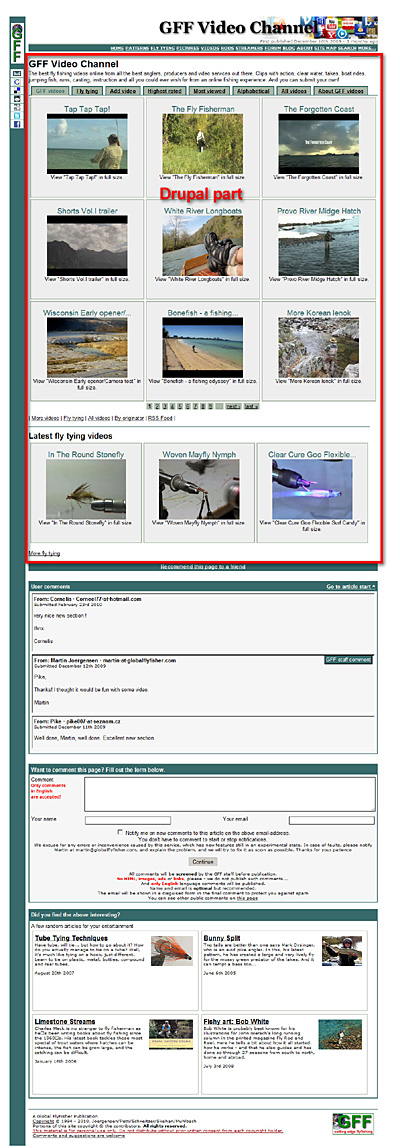
Fly fishing videos
I run a non-commercial fly fishing web site with a 15 years plus history. It was actually established back when dynamic pages, databases and things like ASP and PHP were (almost) unavailable.
Since then it has grown to a large, dynamic site run by a CMS with all kinds of automation, all developed from scratch in PHP and extended as we went – and it has of course developed into a Medusa as it often goes with such projects. Suffice to say that it has its idiosyncrasies and quite a few facilities that I would like to redo, but never did. The other editors and I prefer to work with content rather than code, and if it ain't broke...
The main site is The Global Flyfisher and the video channel is here.
The site is an international fishing web site in English with 4-6,000 unique visitors a day and about 1.2-1.5 million page views a month.
Videos and Drupal
But having developed professionally in Drupal during the last many years, I turned to Drupal when I wanted to create a video channel for the site during the Christmas holiday 2009.
Video on the site had gone from locally hosted and “hand embedded” video files to YouTube and Vimeo Flash-embeds over a period of a couple of years. The use of video on the site – as on many other sites using these methods – was limited due to the trouble of handling conversion, uploading, HTML-code and whatnot.
We don't do many videos ourselves, but I wanted to be able to show the best videos offered online through existing services.
From my work I knew the hardship of creating a complete video channel. We have made several in-house video solutions juggling with on-site conversion, custom made Flash players and all that comes with bit rates, encoding and aspect ratios. I was sure that I didn't want to go that way!
Emfield to the rescue
I had already noticed the module Emfield (Embedded Media field), downloaded it and fooled around with it on my local server.
Emfield is a CCK-field that enables you to easily and consistently embed and integrate videos from a large number of online video services such as YouTube, Vimeo, Blib.TV, MetaCafe and many more. Currently about 20 different services are supported. More can be added since the support is done in the form of plugins. Emfield also supports image and audio formats from sources like Odeo, Podcast Alley, PhotoBucket and Flickr.
The neat thing about Emfield is that you enter the URL or embed code for a given video (or other media) and Emfield then locates the ID of the source, finds the thumbprint, creates embed code for your site and a number of possible local representations of that media – static thumbprints, playable thumbs, fullsize video, pure text and much more. Being a CCK-field it easily integrates with any node type, supports Views and all the facilities you expect from a proper CCK-field.
Drupal as a plugin
Since my site runs a custom CMS, I could not use the modules as extensions for my own site unless I wanted to do a lot of programming, which I didn't.
So I took the radical decision of implementing a full Drupal installation as an “extension” to my own CMS! I was going to create a video channel, so I simply installed a complete Drupal in the subdirectory /video on my site. The index-file of that directory would be Drupal's index.php and when going to that directory I wanted the video channel to appear as a seamlessly integrated part of the main site.
My installation consisted of a standard Drupal 6 with a fairly simple selection of modules
- CCK – to enable building my own video content type
- Views – to make neat displays of content
- Emfield – the video field itself
- Scheduler – to be able to have a publishing queue
- Voting – for users to vote on videos - consists of the voting API and FiveStar
- a few odds and ends
I created a separate database for Drupal, but with the same access credentials as the main database. That would enable my custom CMS to peek into Drupal's data and let Drupal look into the tables of my CMS's database with a simple database switch. More about that decision below.
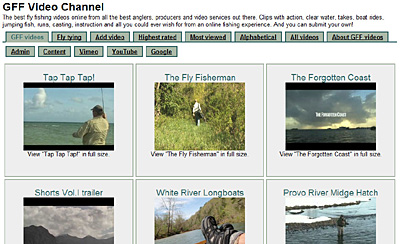
Design and templates
The biggest challenge was the design integration. The current CMS does not use templates but a simple system of include files, table based layout and other types of devil worship... yes, I know, but a 15 year history, remember?
The include files actually made it quite easy to create a Drupal page template that packs the whole Drupal site in my current design and allows me to still maintain the central design and structure in one place – namely in my old CMS.
I have removed Drupal's top and bottom (html-, head-, title- and body-tags) from an existing theme's page.tpl and included the standard initialization and closure code from the old CMS. The rest is intact Drupal code.
I have the Drupal user menu as tabs inside my existing design and the admin menu is a similar row of tabs only visible to editors. The tab layout doesn't do any harm to the layout, which is not fancy or arty in any way as it is.
I had to do a bit of work with Drupal's stylesheet to get some consistency in colors, fonts and layout, but actually did very little compared to many other design jobs.
So far so good. Now I have a complete Drupal site running inside my existing site, and the difference between the two is not easy too see.
Time for some video fun!
Setting up and handling a video node type
I have added a node type called video, and that has the following extra fields:
- Video – the Embedded Media field
- Submitter info – for user submitted videos
- Originator info – name and web site
- plus a few more
I have added a taxonomy for the new node type and imported the tags from the existing site with Taxonomy CSV import/export. I now have to maintain the keywords in two places, but they rarely change.
I have enabled voting for the node type, but disabled comments. The main site has its own comment system in the footer simply based on the URL of the page, which works fine across the two systems.
Anonymous users can add a video in a simple node form, but it will not be published before I have looked at it.
Showing a video
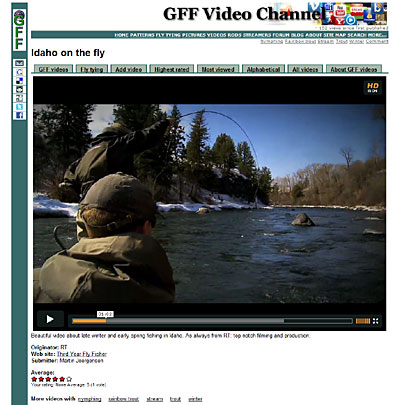
Emfield offers a number of different ways to show a video, and as with all node types you can control the teaser as well as the full node in details. I have the teaser set to show as a thumb that brings you to the node page and the node page to show the playable video in a fairly large size.
You control this in the Manage Fields and Display Fields sections for the node type, and Emfield creates the necessary code for embedding the videos.
I also messed a bit with node.tpl to get some custom facilities, the most important one being a link from the full Drupal node to the review section on the site. So now, whenever a video is a trailer for a DVD we have reviewed, there's a cover image and a link to the review. If the review is in the pipeline, that is also announced.
The two entities are tied together by a Drupal node ID, which I added as a field to the reviews in the current CMS, and which I have to enter manually whenever I add a review that matches a video.
Switching databases
The cross referencing between the two system requires some database switching, meaning that Drupal of course needs access to its own database, but also to the central CMS-database to get information like the above review status.
This is simply done by doing a mysql_select_db('cms_database') in the beginning of the CMS-access code and a mysql_select_db('drupal_database') when it's done. I do this once for each time a node is shown and haven't felt any performance problems.
In my own CMS I have also need to add some cross pollination with the Drupal database. I read different information regarding the videos when showing a keyword page and also check for the availability of a video trailer when showing a DVD review.
I could have avoided the switching completely by mixing the two databases and just having Drupal name all its tables drupal_something, but at the time I preferred two smaller databases and an easy option to be able to handle the two separately. I required a bit of extra code, but not much.
Views
All important pages in the video system are done with Views. The default front page has been replaced by a view, which shows the most recently published videos in a grid followed by a pager and links to other parts of the video section. Each video is simply represented by a title, a thumb and a short description. This view also provides a feed for the video channel, which is announced on the site's front page together with the other feeds.
A supplementary block, which only shows on the video front page, displays the latest videos in the fly tying category (there's a fishing and a tying category – an important separation for fly fishing nerds!). That block also provides a link to a separate page with fly tying videos only – you guessed it: a view too!
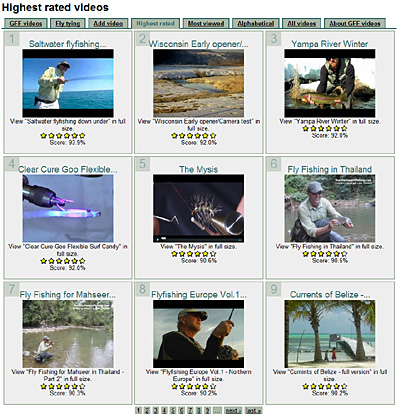
Other views are the top rated, most viewed and alphabetical views, which are structured like the front page in a grid. Clicking on a term also brings you to a view, which uses the term as an argument and displays a similar grid of tagged videos.
There is a complete list of all videos in a text table – honestly mostly to enable me to find any video, but probably also good for the search engines.
And lastly I have created a small block with three random videos, that's shown under any video node being displayed.
On the front page
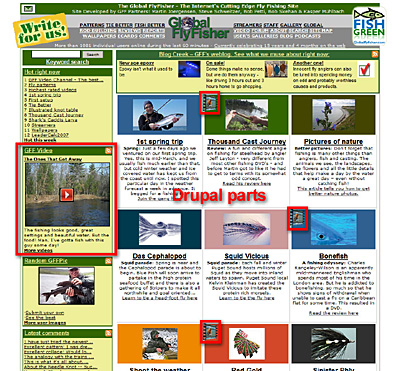
I wanted a video displayed on the front page of the main site, following the same principle as I already had for user submitted pictures: show the latest for a while, and after that show a random entry selected amongst the latest submissions.
I could have done that by poking into the database, but wound up using the video RSS-feed that I had created. This feed provides the latest videos, and with the use of the PHP-function xml_parse_into_struct() I parse the contents of the feed into an array, and select my video from there. It requires a little manipulation before displaying it, but has worked very fine.
I also have a custom Google Sitemap generator, and that was already built to parse the many different parts of the site in different tables in the database. Adding a step to run through the Drupal videos was easy, and now these also appear in the Google sitemap as well as the site's public sitemap.
A quick job
The majority of this work was done at a very leisurely speed within a couple of days between Christmas and New Year. There were no big issues or anything that didn't work. The whole setup went very smoothly and the video section immediately rose to become the most visited part of the site!
In order to fill it I rely on user submissions and my own entries. I take a trip around the video sites and gather the best ones and queue them for publishing using Scheduler.
In other words: I managed to create a very substantial and popular section with surprisingly little effort.

Comments
_
very nice presentation - and cool site --- thnx for the effort
Terrific Case Study
This is a wonderfully helpful case study that addresses two major issues I (being new with Drupal) am wrestling with - media embedding and integrating two separate websites (in my case both Drupal sites). I was thinking of using an Iframe, but will try to think through your techniques and see if they suggest a better template-integration approach I am knowledgeable enough to implement. The result you got was outstanding both aesthetically and functionally, and I truly appreciate your generosity in sharing. Thanks and continued success.
Well recently I tried out
Well recently I tried out Embedded Media Field and learned two very good things like
If you make a video private in Youtube but permit embedding, EMF will embed the video and it is accessible, while remaining private ad i got some of the better tips in the http://www.twitter.com/dozenvideo
If Youtube includes a [HD] button in the video the same button is included in the embedded player and the video will display in HD if clicked.
embedding the embedded
Only one question
I use emfield and views and I noticed on views that you can show the code to embed your already embedded video to nother website. I tried and it works. I would like to know how to create a block containing the embed code only when a video is loaded. I tried with args but it doesn't work. Its a simple if-then but cannot figure out how to solve this simple problem.
thanks
Fluido, I don't see a simple
Fluido,
I don't see a simple way of making such a block. Programming it as a block in a module would be one way, but somewhat cumbersome. I tried looking at a quick hack in node.tpl or templates.php but found no immediate solution.
Many of the services will embed their own Share or Embed link in the flash player. That will deliver the original embed code from the video provider, but of course differ from provider to provider.
Martin
Johnmichele123, You can
Johnmichele123,
You can actually force YouTube to deliver the HD video right away by ticking "Use YouTube high quality content" in the embedded video player options for the YouTube videos in emfield. This will make the embedded video play in the best possible quality.
This seems to be a YouTube only feature, though, but the other services will typically embed the option in their Flash player if the video is available in HD.
Martin
not working?
This feature actually is not working for me. I have that box checked and the videos still come in low-quality, despite the fact that they are available in higher quality on YouTube.
site: http://crew.princeton.edu/content/youtube_videos
channel: http://www.youtube.com/princetoncrew
EDIT: maybe it is the higher-quality, but I don't see how to automatically embed the larger size video to show off the high quality. I don't see any settings for player size. I'm using JW FLV player, if that helps.
DOUBLE EDIT: I'm willing to hack some code if necessary and supply it back as a patch if there's no other way.
thanks,
John