I tried to create a calendar of nodes which will be published in future.

Basically, there is a content type "video". Videos will be published later. I want to show a calendar of upcoming videos.

I thought it would be easy, but I couldn't get that to work. I have attached a screenshot of view calendar.

Comments

eric-alexander schaefer’s picture

I have no idea what you are talking about. Please explain what you want to do and where you see problems.

codycraven’s picture

StatusFileSize
new1.51 KB

Eric,

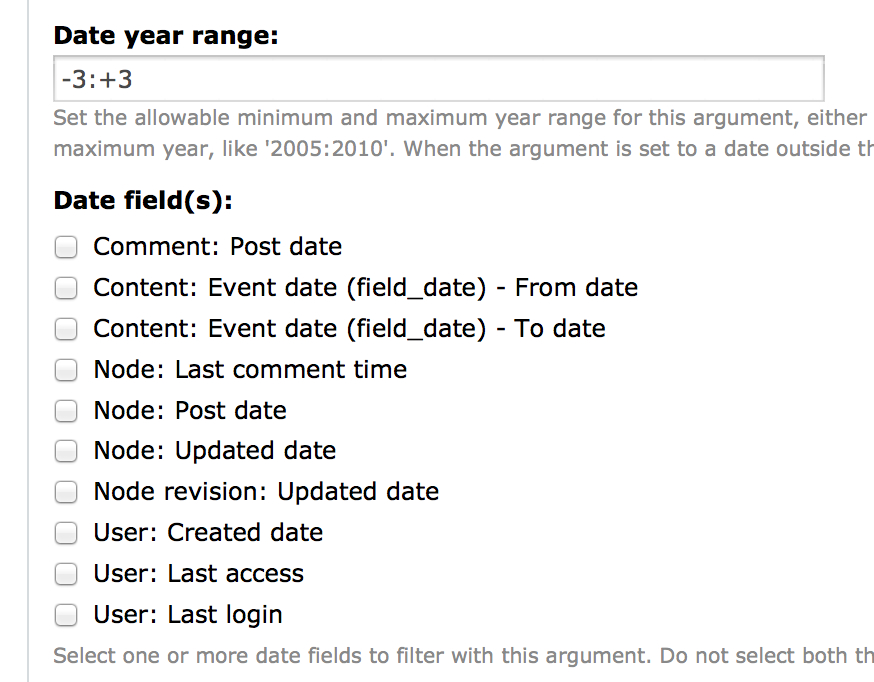
prabhakarsun wants to display a calendar of nodes with publish on dates in the current, month, week, day, etc. The problem is that the calendar requires a date argument. This argument then forces the user to select a date field to filter on, which Publish on or Unpublish on are not one of.

The module already lays the groundwork for this with the Views integration. The only thing needed is to implement hook_date_api_fields() - patch attached.

This will add Publish on and Unpublish on as options for the argument to filter on.

codycraven’s picture

Status: Active » Needs review
codycraven’s picture

I just noticed an issue with Scheduler and Calendar integration, the issue does not impact the patch supplied in #2 in any way. It does however affect the usefulness of the patch.

Currently when scheduler is run in cron it removes scheduled events when it (un)publishes them. This causes an issue when attempting to use the (un)publish date for filtering in a calendar view because the calendar will only be able to show upcoming dates and not a historical reference.

I'm toying with the idea of creating an add-on module that would permanently store scheduled dates to circumvent this issue without requiring the user creating the nodes from entering identical data twice.

eric-alexander schaefer’s picture

How about an option for keeping the schedule dates for this purpose?

codycraven’s picture

Eric,

That's basically what I'm developing for use in my work. I'm creating a module scheduler_permanent which creates a separate table (identical to scheduler's table) but does not remove the dates upon cron running (and intercepts form errors for past dates). When done I will post the module to this thread so it can then be either dissected and integrated in Scheduler or added on as an additional module packaged with Scheduler (I'd prefer integrated myself).

eric-alexander schaefer’s picture

In scheduler_cron() there are two lines where entries in the scheduler table are deleted:

    db_query('DELETE FROM {scheduler} WHERE nid = %d', $n->nid);

All that is needed is a checkbox in the config area and two if's around the two DELETE queries.

codycraven’s picture

It's slightly more complex than that. If we maintain dates then cron will need to know which (un)publish events have already been fired, so that not every (un)publish from the past is performed on every cron call.

The way I'm seeing it is that there are two options:

  1. Store cron (un)schedule events in one table and all events ever scheduled in another. Leaving the cron table small and efficient but having some redundancy.
  2. Modify the current scheduler table to include a flag of whether the action has been taken or not, cron would only act upon those events in the past that have not been enacted.

Aside from those two options, some additional work will need to be added to scheduler_nodeapi() to not flag errors when dates in the past are submitted - if the option is enabled.

If you can give me your preference on the two options quickly I can write a patch to address the functionality needed at work, as it is needed in a current task.

eric-alexander schaefer’s picture

I would prefer option 2.

codycraven’s picture

StatusFileSize
new14.1 KB

Attached is a patch against Scheduler which allows to users to specify dates in the past and keeps dates in the db after their scheduled operation has been performed, IF the new option Allow scheduled dates in the past is selected for the content-type under the Workflow menu.

I've tested the patch quite thoroughly and have only one remaining issue that I have discovered. When publish_on and unpublish_on have both passed without cron having been ran and the Allow scheduled dates in the past option is not enabled for a content-type, then the record is not removed form the scheduler table and the unpublish_on field is set for a new timestamp in the future, when cron is ran. However the node does correctly remain unpublished. This is an issue I am working to correct, but i wanted to post my efforts so far.

*Note this patch does not contain the patch posted in #2 that allows the calendar integration.

codycraven’s picture

StatusFileSize
new16.63 KB

Patch attached which fixes issue mentioned in #10. Also adds a warning instead of notice when the publishing period of a node is missed - occurs when a node is set with a publish and unpublish date but cron is not ran during the time between, causing the node to be unpubished the entire period.

[Edit]
Again this does not contain the patch from #2 above, which I believe should also be committed. This patch is ready for review, and if suitable, commit.

eric-alexander schaefer’s picture

Whoa. That's a lot of code. Could you please explain briefly what the patches are doing and why?

codycraven’s picture

Certainly,

First there are two patches. The first is the patch from #2 which is a brief patch to simply add Date API support to Views. This allows using Scheduler dates in certain places of Views that they were previously not available in, specifically added for within the Date argument that is required when using Calendar (it is a date selection that must be made in the View's argument).

Now on to the fun stuff.

The second patch is from #11. This patch adds support for storing past scheduled dates and setting dates in the past.

scheduler.install

           'not null' => TRUE,
           'default' => 0,
         ),
+        'perform_publish' => array(
+          'description' => t('Flag indicating publish required'),
+          'type' => 'int',
+          'size' => 'tiny',
+          'unsigned' => TRUE,
+          'not null' => TRUE,
+          'default' => 0,
+        ),
+        'perform_unpublish' => array(
+          'description' => t('Flag indicating unpublish required'),
+          'type' => 'int',
+          'size' => 'tiny',
+          'unsigned' => TRUE,
+          'not null' => TRUE,
+          'default' => 0,
+        )
       ),
       'indexes' => array(
         'scheduler_publish_on' => array('publish_on'),
         'scheduler_unpublish_on' => array('unpublish_on'),
+        'scheduler_perform_publish' => array('publish_on', 'perform_publish'),
+        'scheduler_perform_unpublish' => array('unpublish_on', 'perform_unpublish'),
       ),
       'primary key' => array('nid'),
     ),

This adds two fields that indicate whether the publish_on, unpublish_on fields need to be performed. For example if a user sets an unpublish date in the future when that future timestamp is inserted in to unpublish_on then perform_unpublish is set to 1. Once cron runs and performs the unpublish then perform_unpublish is set to 0.

   }
   return $ret;
 }
+
+/**
+ * Add fields and indexes indicating whether (un)publish needs to be performed.
+ *
+ * Added to support history of scheduled actions and in turn entering dates in
+ * the past.
+ */
+function scheduler_update_6101() {
+  $ret = array();
+
+  // Field added to indicate publish needs to be performed.
+  $new_field = array(
+    'description' => t('Flag indicating publish required'),
+    'type' => 'int',
+    'size' => 'tiny',
+    'unsigned' => TRUE,
+    'not null' => TRUE,
+    'default' => 0,
+  );
+  // Index added to speed querying in scheduler_cron().
+  $new_index = array('indexes' => array(
+    'scheduler_perform_publish' => array('publish_on', 'perform_publish'),
+  ));
+  db_add_field($ret, 'scheduler', 'perform_publish', $new_field, $new_index);
+
+  // Field added to indicate publish needs to be performed.
+  $new_field = array(
+    'description' => t('Flag indicating unpublish required'),
+    'type' => 'int',
+    'size' => 'tiny',
+    'unsigned' => TRUE,
+    'not null' => TRUE,
+    'default' => 0,
+  );
+  $new_index = array('indexes' => array(
+    'scheduler_perform_ubpublish' => array('unpublish_on', 'perform_unpublish'),
+  ));
+  db_add_field($ret, 'scheduler', 'perform_unpublish', $new_field, $new_index);
+
+  // Set perform flag 1 to any non-zero values as they will not get fixed
+  // by Cron - db_query() used since drupal_write_record() is not available in
+  // hook_update() as it does not know about the schema change.
+  db_query('UPDATE {scheduler} SET perform_publish = %d WHERE publish_on > %d', 1, 0);
+  db_query('UPDATE {scheduler} SET perform_unpublish = %d WHERE unpublish_on > %d', 1, 0);
+
+  return $ret;
+}

This is the hook_update_N() which updates the schema to match the new hook_schema() for existing users of the module.


scheduler.module

       '#default_value' => variable_get('scheduler_touch_'. $form['#node_type']->type, 0),
       '#description' => t('Check this box to alter the published on time to match the scheduled time ("touch feature").')
     );
+    $form['workflow']['scheduler_history'] = array(
+      '#type' => 'checkbox',
+      '#title' => t('Allow scheduled dates in the past'),
+      '#default_value' => variable_get('scheduler_history_'. $form['#node_type']->type, 0),
+      '#description' => t('Check this box to allow setting scheduled dates in the past.')
+    );
   }
 
   // is this a node form?

This adds a checkbox to the content-type configuration under the workflow fieldset which allows keeping dates in the past and adding dates in the past to the content-type. This is the option you requested in #5 "How about an option for keeping the schedule dates for this purpose?".

         // because DRUPAL6 removed 'submit' and added 'presave'
         // and all this happens at different times.
 
+        // Init $now to provide consistent logic throughout case
+        $now = time();
         $date_format = variable_get('scheduler_date_format', SCHEDULER_DATE_FORMAT);
+        // Initialize perform_publish and perform_unpublish to 0
+        $node->perform_publish = $node->perform_unpublish = 0;
 
+        // Set publish values
         if (isset($node->publish_on) && $node->publish_on && !is_numeric($node->publish_on)) {
           $publishtime = _scheduler_strtotime($node->publish_on);
+          // If bad time format provided
           if ($publishtime === FALSE) {
             form_set_error('publish_on', t("The 'publish on' value does not match the expected format of %time", array('%time' => format_date(time(), 'custom', $date_format))));
           }
-          elseif ($publishtime && $publishtime < time()) {
+          // Else if publish time is in the past and history is not enabled
+          elseif (!variable_get('scheduler_history_' . $node->type, 0)
+                  && $publishtime < $now) {
             form_set_error('publish_on', t("The 'publish on' date must be in the future"));
           }
+          // Else publish time is acceptable
           else {
             $node->publish_on = $publishtime;
+            if ($node->publish_on >= $now) {
+              $node->perform_publish = 1;
+            }
           }
         }
 
+        // Set unpublish values
         if (isset($node->unpublish_on) && $node->unpublish_on && !is_numeric($node->unpublish_on)) {
           $unpublishtime = _scheduler_strtotime($node->unpublish_on);
+          // If bad time format provided
           if ($unpublishtime === FALSE) {
             form_set_error('unpublish_on', t("The 'unpublish on' value does not match the expected format of %time", array('%time' => format_date(time(), 'custom', $date_format))));
           }
-          elseif ($unpublishtime && $unpublishtime < time()) {
+          // Else if unpublish time is in the past and history is not enabled
+          elseif (!variable_get('scheduler_history_' . $node->type, 0)
+                  && $unpublishtime < $now) {
             form_set_error('unpublish_on', t("The 'unpublish on' date must be in the future"));
           }
+          // Else unpublish time is acceptable
           else {
             $node->unpublish_on = $unpublishtime;
+            if ($node->unpublish_on >= $now) {
+              $node->perform_unpublish = 1;
+            }
           }
         }
 
+        // Ensure publish time is greater than unpublish time if both are set.
         if (isset($publishtime) && isset($unpublishtime) && $unpublishtime < $publishtime) {
           form_set_error('unpublish_on', t("The 'unpublish on' date must be later than the 'publish on' date."));
         }
 
-        // Right before we save the node, we need to check if a "publish on" value has been set.
-        // If it has been set, we want to make sure the node is unpublished since it will be published at a later date
-        if (isset($node->publish_on) && $node->publish_on != '' && is_numeric($node->publish_on) && $node->publish_on > time()) {
+        // If publish is scheduled
+        if ($node->perform_publish) {
+          // Then unpublish as the publish date is not yet reached
           $node->status = 0;
         }
+        // Elseif unpublish is scheduled
+        elseif ($node->perform_unpublish) {
+          // Then publish as publish_on was not set or occurred in the past
+          $node->status = 1;
+        }
+        // Elseif unpublish has been set
+        elseif (isset($node->unpublish_on) && !empty($node->unpublish_on)
+                && is_numeric($node->unpublish_on)) {
+          // Then unpublish occurred in the past, so unpublish
+          $node->status = 0;
+        }
+        // Elseif publish has been set
+        elseif (isset($node->publish_on) && !empty($node->publish_on)
+                && is_numeric($node->publish_on)) {
+          // Then publish as it occurred in the past and unpublish not scheduled
+          $node->status = 1;
+        }
+        // Else nothing done to publish status
         break;
       case 'insert':
-        // only insert into database if we need to (un)publish this node at some date
+        // Insert into database if we need to (un)publish this node at some date
         if (isset($node->nid) && $node->nid && (isset($node->publish_on) && $node->publish_on != NULL) || (isset($node->unpublish_on) && $node->unpublish_on != NULL)) {
-          db_query('INSERT INTO {scheduler} (nid, publish_on, unpublish_on) VALUES (%d, %d, %d)', $node->nid, $node->publish_on, $node->unpublish_on);
+          drupal_write_record('scheduler', $node);
         }
         break;
       case 'update':
         if (isset($node->nid) && $node->nid) {
           $exists = db_result(db_query('SELECT nid FROM {scheduler} WHERE nid = %d', $node->nid));
 
-          // if this node has already been scheduled, update its record
+          // If this node has already been scheduled, update its record
           if ($exists) {
-            // only update database if we need to (un)publish this node at some date
-            // otherwise the user probably cleared out the (un)publish dates so we should remove the record
-            if (($node->status == 0 && isset($node->publish_on) && $node->publish_on != NULL) || (isset($node->unpublish_on) && $node->unpublish_on != NULL)) {
-              db_query('UPDATE {scheduler} SET publish_on = %d, unpublish_on = %d WHERE nid = %d', $node->publish_on, $node->unpublish_on, $node->nid);
+            // If (un)publish not set then set to 0, fixes problem where if the
+            // user manually clears a previously set (un)publish_on the
+            // scheduled field is not cleared in drupal_write_record().
+            if (!isset($node->publish_on)) {
+              $node->publish_on = 0;
             }
+            if (!isset($node->unpublish_on)) {
+              $node->unpublish_on = 0;
+            }
+
+            // If (un)publish needed at some date in the future
+            if ($node->perform_publish || $node->perform_unpublish) {
+              drupal_write_record('scheduler', $node, 'nid');
+            }
+            // Else if history is enabled and (un)publish is set
+            elseif (variable_get('scheduler_history_' . $node->type, 0) &&
+                    $node->publish_on || $node->unpublish_on) {
+              drupal_write_record('scheduler', $node, 'nid');
+            }
+            // Else remove record, if any to be removed
             else {
               db_query('DELETE FROM {scheduler} WHERE nid = %d', $node->nid);
             }
           }
-          // node doesn't exist, create a record only if the (un)publish fields are blank
+          // Else if node not scheduled create a record if (un)publish set
           elseif ((isset($node->publish_on) && $node->publish_on != NULL) || (isset($node->unpublish_on) && $node->unpublish_on != NULL)) {
-            db_query('INSERT INTO {scheduler} (nid, publish_on, unpublish_on) VALUES (%d, %d, %d)', $node->nid, $node->publish_on, $node->unpublish_on);
+            drupal_write_record('scheduler', $node);
           }
         }
         break;

This adds support for entering dates in the past, only if the history option is enabled for the content-type. The reason there is so much code to this is that dates in the past should only be accepted if the history option is enabled, otherwise we want past dates to be rejected. When history is enabled we need quite a bit of logic checking to ensure the perform_publish and perform_unpublish flags are appropriately set based on the dates selected.

To simplify the amount of code that would be needed and to better meet standards I replaced the UPDATE and INSERT SQL statements with drupal_write_record().

 function scheduler_cron() {
   $clear_cache = FALSE;
 
-  // if the time now is greater than the time to publish a node, publish it
-  $nodes = db_query('SELECT * FROM {scheduler} s LEFT JOIN {node} n ON s.nid = n.nid WHERE n.status = 0 AND s.publish_on > 0 AND s.publish_on < %d ', time());
+  // Select records where the time now is greater than the time to unpublish a
+  // node and is flagged to be unpublished
+  $scheduled = db_query('
+    SELECT *
+    FROM {scheduler} s
+    LEFT JOIN {node} n ON s.nid = n.nid
+    WHERE s.unpublish_on > 0
+      AND s.unpublish_on < %d
+      AND s.perform_unpublish = 1
+  ', time());
 
-  while ($node = db_fetch_object($nodes)) {
-    $n = node_load($node->nid);
-    $n->changed = $node->publish_on;
-    if (variable_get('scheduler_touch_'. $n->type, 0) == 1) {
-      $n->created = $node->publish_on;
+  while ($scheduler = db_fetch_object($scheduled)) {
+    // if this node is to be unpublished, we can update the node and remove the record since it can't be republished
+    $node = node_load($scheduler->nid);
+    $node->changed = $scheduler->unpublish_on;
+
+    // If the node was never published because Cron had not run between the
+    // publish and unpublish dates
+    if ($scheduler->publish_on) {
+      // Set perform_publish to 0 for update below.
+      $scheduler->perform_publish = 0;
+      // Report a warning that the node missed it's published period.
+      watchdog('scheduler', '@type: missed scheduled publishing period of %title due to cron not being performed until after unpublish date.', array('@type' => $node->type, '%title' => $node->title), WATCHDOG_WARNING, l(t('view'), 'node/'. $node->nid));
     }
+    // Else unpublish node
+    else {
+      // Use the actions system to unpublish the node.
+      watchdog('scheduler', '@type: scheduled unpublishing of %title.', array('@type' => $node->type, '%title' => $node->title), WATCHDOG_NOTICE, l(t('view'), 'node/'. $node->nid));
+      $actions = array('node_unpublish_action', 'node_save_action');
+      $context['node'] = $node;
+      actions_do($actions, $node, $context, NULL, NULL);
+    }
 
-    // Use the actions system to publish the node.
-    watchdog('scheduler', '@type: scheduled publishing of %title.', array('@type' => $n->type, '%title' => $n->title), WATCHDOG_NOTICE, l(t('view'), 'node/'. $n->nid));
-    $actions = array('node_publish_action', 'node_save_action');
-    $context['node'] = $n;
-    actions_do($actions, $n, $context, NULL, NULL);
-
-    // if this node is not to be unpublished, then we can delete the record
-    if (isset($n->unpublish_on) && $n->unpublish_on == 0) {
-      db_query('DELETE FROM {scheduler} WHERE nid = %d', $n->nid);
+    // If the node's type has the history option enabled
+    if (variable_get('scheduler_history_' . $node->type, 0)) {
+      $scheduler->perform_unpublish = 0;
+      drupal_write_record('scheduler', $scheduler, 'nid');
     }
-    // we need to unpublish this node at some time so clear the publish on since it's been published
+    // Else remove the record
     else {
-      db_query('UPDATE {scheduler} SET publish_on = 0 WHERE nid = %d', $n->nid);
+      db_query('DELETE FROM {scheduler} WHERE nid = %d', $node->nid);
     }
 
     // invoke scheduler API
-    _scheduler_scheduler_api($n, 'publish');
+    _scheduler_scheduler_api($node, 'unpublish');
 
     $clear_cache = TRUE;
   }
 
-  // if the time is greater than the time to unpublish a node, unpublish it
-  $nodes = db_query('SELECT * FROM {scheduler} s LEFT JOIN {node} n ON s.nid = n.nid WHERE n.status = 1 AND s.unpublish_on > 0 AND s.unpublish_on < %d', time());
+  // If the time now is greater than the time to publish a node and is
+  // flagged to be published
+  $scheduled = db_query('
+    SELECT *
+    FROM {scheduler} s
+    WHERE s.publish_on > 0
+      AND s.publish_on < %d
+      AND s.perform_publish = 1
+  ', time());
 
-  while ($node = db_fetch_object($nodes)) {
-    // if this node is to be unpublished, we can update the node and remove the record since it can't be republished
-    $n = node_load($node->nid);
-    $n->changed = $node->unpublish_on;
+  while ($scheduler = db_fetch_object($scheduled)) {
+    $node = node_load($scheduler->nid);
+    $node->changed = $scheduler->publish_on;
+    if (variable_get('scheduler_touch_'. $node->type, 0) == 1) {
+      $node->created = $scheduler->publish_on;
+    }
 
-    // Use the actions system to unpublish the node.
-    watchdog('scheduler', '@type: scheduled unpublishing of %title.', array('@type' => $n->type, '%title' => $n->title), WATCHDOG_NOTICE, l(t('view'), 'node/'. $n->nid));
-    $actions = array('node_unpublish_action', 'node_save_action');
-    $context['node'] = $n;
-    actions_do($actions, $n, $context, NULL, NULL);
-    db_query('DELETE FROM {scheduler} WHERE nid = %d', $n->nid);
+    // Use the actions system to publish the node.
+    watchdog('scheduler', '@type: scheduled publishing of %title.', array('@type' => $node->type, '%title' => $node->title), WATCHDOG_NOTICE, l(t('view'), 'node/'. $node->nid));
+    $actions = array('node_publish_action', 'node_save_action');
+    $context['node'] = $node;
+    actions_do($actions, $node, $context, NULL, NULL);
 
+    // If the node's type has the history option enabled
+    if (variable_get('scheduler_history_' . $node->type, 0)) {
+      $scheduler->perform_publish = 0;
+      drupal_write_record('scheduler', $scheduler, 'nid');
+    }
+    // Elseif this node is not to be unpublished, then we can delete the record
+    elseif (isset($node->unpublish_on) && $node->unpublish_on == 0) {
+      db_query('DELETE FROM {scheduler} WHERE nid = %d', $node->nid);
+    }
+    // Else we need to unpublish this node at some time
+    else {
+      db_query('UPDATE {scheduler} SET publish_on = 0 WHERE nid = %d', $node->nid);
+    }
+
     // invoke scheduler API
-    _scheduler_scheduler_api($n, 'unpublish');
+    _scheduler_scheduler_api($node, 'publish');
 
     $clear_cache = TRUE;
   }

In hook_cron() the first major change is that I reversed the order of publish/unpublish. The reason being is that we want to check for scheduled dates that never occurred, ie the publish_on and unpublish_on values were both set to be performed but never did because Cron was not ran during any point in between them. This creates a WATCHDOG_WARNING to notify the admin that something may be wrong with their Cron or the frequency of their Cron. The reason I added this is to circumvent an issue with the added history support and because it provides better information to the administrator.

Other than that the only change hook_cron() makes is to add support for maintaining the unpublish_on and publish_on timestamps for content-types which have the history option enabled, instead of clearing them out. It also only queries dates that have perform_publish or perform_unpublish set to 1 to prevent Cron from re-running already processed Scheduler dates when history is enabled for a content-type.


Please let me know if you need any further clarification for any of the patches' code.

codycraven’s picture

StatusFileSize
new16.64 KB

There is one error I found with the patch from #11. In hook_cron() there is a condition that is wrong, I used if ($scheduler->publish_on) { when I should have done if ($scheduler->perform_publish) {.

Fixed patch attached

codycraven’s picture

Still needing review

eric-alexander schaefer’s picture

Status: Needs review » Postponed

Cody, I have a problem with your patch. I do not even know how to setup a test environment for it since I do not know the calender module at all. I also do not have the time to do it. Sometimes I include posted patches for use cases that I have no use for myself, but those are usually one or two liners that I can understand. Your patch is far too large. It introduces changes all over the place. Thats why I am not able to include it. See, I know every line of scheduler. I know what it does and why it is there because almost every bit of it is used in my projects. But I don't even know where to start with your code. Also if I would include your patch and would need to change scheduler later I would have to know if I introduced bugs into your code. This is a real problem. Your patch is actually a module of its own. It's almost as long as scheduler itself. Maybe it would really be a good idea to create a add-on module if that is possible (I doubt it, actually).

I thought about keeping scheduler history myself, because it could be useful in many ways (e.g. recurring schedules). But it was just a thought. I do not currently have the time to implement something like that.

Maybe this would work: I will look at the original patch in #2, which would solve the original problem sans the history. Your other patches contain some changes that are not really related to the history problem (e.g. drupal_write_record), but are useful refactorings. Maybe you could find and extract those changes and post them as separate issues to improve the code quality of scheduler. I still want scheduler to become more generic (e.g. schedule all kinds of actions), but that will be a gradual process. In this process scheduler will get a (optional) history. But this history will have a use case I do understand and use. Thats why I do not reject this issue but postpone it.

codycraven’s picture

Certainly Eric I can appreciate and understand that, as I get time I'll post patches for the specific general modifications I made.

sirkitree’s picture

Title: Views Calendar integration » Scheduler history: retaining un/publish_on data
Component: User interface » Code
Status: Postponed » Needs work

Subscribing. I have a use case with auto_nodetitle that would benefit from scheduler history. I should be able to review this soon. Changing title to be more accurate. I think this is a bit more general than just Views Calendar usage. I'll also try to rework the patch to only be pertinent to the issue at hand.

sirkitree’s picture

Title: Scheduler history: retaining un/publish_on data » Views Calendar integration
Status: Needs work » Needs review

Ok, sorry to be messing around like this, but I realize now that this issue is really two issues. The original issue for Views Calendar, and a secondary issue for Scheduler history.

So, I'm going to set this back to the original and note that the patch to review is #2, then I'm going to include the second patch for scheduler history into it's own issue #198137: Scheduler history: retaining un/publish_on data which is an older thread that talks about keeping scheduler history.

Again, sorry for any confusion I've caused :(

eric-alexander schaefer’s picture

Status: Needs review » Postponed

Postponing this. We need to change the db schema for this feature (and other features). The will be a new task for changing the schema.

jonathan1055’s picture

Status: Postponed » Needs review

All the discussions about storing the history of scheduler dates has clouded the original issue. Reading #19 from sirkitree, the original patch implemented hook_date_api_fields() to tell Views how to treat the two scheduler fields. This was written for Drupal 6 before we had any D7 views integration. This hook function does not exist in Date 7.x-2.6 but I am not sure we need it anyway in D7. I have just created a Views Calendar view from scratch for the publish_on field and it works fine, (once you have figured out the settings). All the scheduler fields are available for selection in the required places [fields, filter criteria, contextual filters].

So unless I am mistaken this patch is not required for scheduler in 7.x but I would like others to confirm this.

A related issue is #1926128: Improve support for calendar view templates which contains some screen shots and instructions on using the views calendar templates as a starter for Scheduler calendars.

I'll give the patch in #2 a test in D6 and see how it works.

jonathan1055’s picture

Status: Needs review » Reviewed & tested by the community
StatusFileSize
new420.72 KB
new367.09 KB

Tested the patch in #2 again 6.x-1.9+4, and it does exactly what is required. The scheduler dates can now be selected as date arguments.

Before:
After
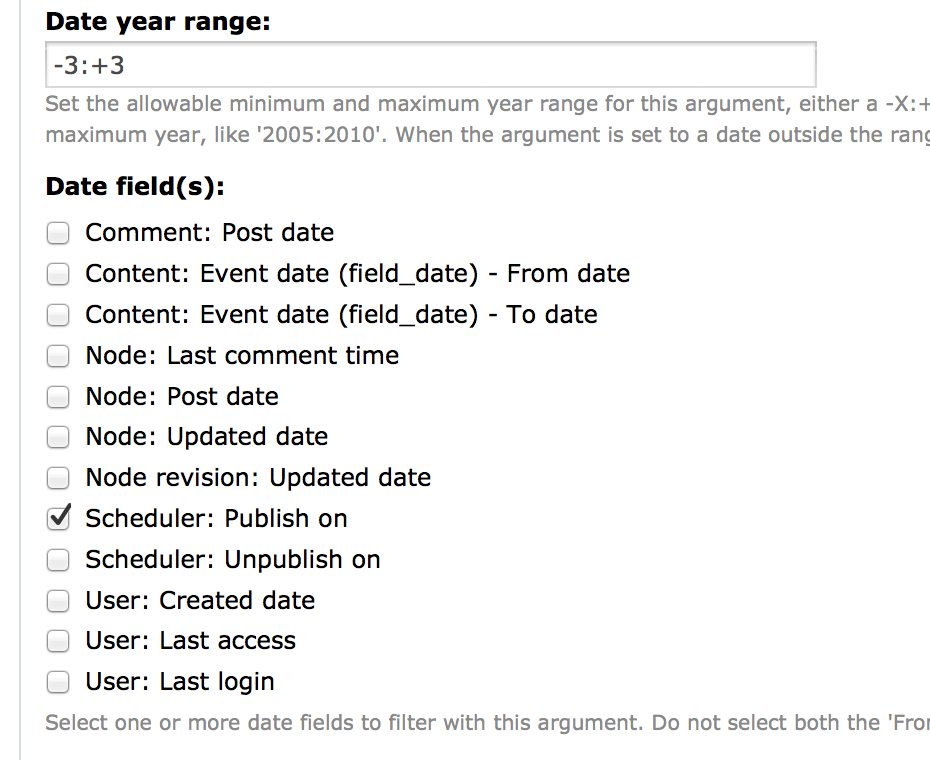
I have used this to build a calendar view of nodes with the content placed by 'publish on' date. Unless we find any reason why the D7 code needs to be changed first, this is ready to be comitted.

Jonathan

pfrenssen’s picture

Status: Reviewed & tested by the community » Fixed

Thanks! Committed at c900aca.

Status: Fixed » Closed (fixed)

Automatically closed -- issue fixed for 2 weeks with no activity.