Drupal 6.15
Internationalization 6.x-1.4
PHP5.3.2
Quite remarkable, everything works as admin (including per-language primary menus),
get page not found for other authenticated or anonymous,
can still access as via node/nid (except per-language primary menus broken).
Try it live:
http://www.aur.no/kontakt (works as admin only)
Is aliased to:
http://www.aur.no/node/11 (Norwegian, can access direct, with menu errors)
The default language is Norwegian Bokmal (nb), with path prefix '' (empty).
English has path prefix 'en', and all English pages work fine, such as:
http://www.aur.no/en/contact
Have emptied all caches, tried different browsers, even tried getting o/s people to access site.
(Am serving timestamp so know not cached, and all Drupal page caching is off.)
URL alias admin table looks fine:
Very, very glad for help, this has now wasted days of time (that I can't bill) for a very simple site.



Comments
Comment #1
webel commentedClosely related: #774274: Choosing language-dependent source for primary links not taking at menu admin settings for different languages
Comment #2
webel commentedbumping.
Comment #3
webel commentedI now have the following strange situation, without having changed anything on the site:
The URL aliases work fine and as expected for both languages for the following browsers (web agents):
- Safari (which was the one I was logging in as admin on): example: http://www.aur.no/om = http://www.aur.no/node/7
- Wget (command line agent)
It is failing (despite clearing browsing data and cookies) for:
- Firefox
- Chrome
- Remote Megaproxy: Example: https://free.megaproxy.com/go/_mp_framed?http://www.aur.no/om
This may then not be specifically a Drupal or Internationalization problem, I would nevertheless be very grateful for any tips for how to further diagnose this strange problem.
Comment #4
webel commentedThis definitely only afflicts URL aliases when the default language is not English.
All of the following work fine in all browsers and all web agents:
- http://www.aur.no/en/about
- http://www.aur.no/en/services
- http://www.aur.no/en/contact
The following default language (Norwegian Bokmål) aliases fail in some (only) web browsers I am using, incl. Firefox, Opera, and Chrome, and Megasurf Proxy:
- http://www.aur.no/om
- http://www.aur.no/tjenester
- http://www.aur.no/kontakt
It seems therefore to be related (indirectly?) to: #347265: URL aliases not working for content not in default language
Comment #5
webel commentedI deleted the alias for http://www.aur.no/om (=http://www.aur.no/node/7) and then recreated it. Same problem.
I can access the page fine using wget on the command line immediately after recreating the alias, but not in Firefox. Very strange.
Comment #6
webel commentedTitle changed
From: URL path alias for translated (non-English) pages only working when logged in as admin
To: URL path alias for non-English default language pages only working for some web agents
Comment #7
webel commentedIf I introduce an explicit path prefix 'nb' for the _default_ language Norwegian Bokmål all works fine in all browsers and all web agents (except these are not the desired URLs for the the site). Example: http://www.aur.no/nb/om (will only be temporarily accessible).
If I then set the path prefix back to empty for the _default_ language Norwegian Bokmål, so that the URL example above becomes http://www.aur.no/om, I can only access that URL in some web browsers and web agents again: Safari and Wget command line work, Opera and Safari and Chrome fail.
Comment #8
webel commentedFor the moment I have reset the path prefix for the _default_ language Norwegian Bokmål back to 'nb', so at least the URL aliases work with language prefix, however then the front page http://www.aur.no falls back to English, instead of the to the default language.
Comment #9
webel commentedupgraded core Drupal 6.15 -> Drupal 6.16 and performed db update.php. Did not help.
Comment #10
jose reyero commentedI guess you have some mess with language options, user's languages and browser default languages.
Anyway, this is not i18n, paths and languages are handled by Drupal core. I suggest you try with a clean Drupal core install.
Comment #11
webel commented@jose
>I guess you have some mess with language options, user's languages and browser default languages.
Some more diagnostics from my side, after resetting the path prefix for the default language Norwegian Bokmal to empty, and clearing all caches (including Drupal caches and all browser caches).
I examined at length the core
path.incandpath.module, and also the tableurl_alias(see first attached image), which has alanguagecolumn, but nothing to do with the path prefix setting for a language. There is nothing inpath.incandpath.modulethat makes any reference to or consideration of the path prefix (as opposed to the language).I tried hacking the
url_alias(see 1st attachment); I removed thelanguagecolumn entry for every instance of a an 'nb' (Norwegian Bokmal) URL alias (see 2nd attached image), to match an empty path prefix setting for the non-English default language (Norwegian Bokmal). (This is interpreted in the/admin/build/pathtable as language 'All', see 3rd attached image.)Then the URL aliases are recognised in all browsers (however there are other problems, see below):
http://www.aur.no/om
http://www.aur.no/kontakt
http://www.aur.no/tjenester
However, there are now 2 more i18n problems, in some browsers:
- the front page http://www.aur.no/ now defaults to English, not Norwegian Bokmal, even though Norwegian Bokmal is the default language (yet with empty path prefix).
- the menu for Norwegian Bokmal is now broken in (only) Firefox, Chrome, and Opera (only), whereas it works in Safari and using command-line Wget agent; it had a dedicated Norwegian Bokmal menu (all with references to node/nid nodes in Norwegian), and for some browsers this no longer shows, except for the Home, which point to http://www.aur.no/en (English) from Norwegian pages like http://www.aur.no/om !
I will leave the site with Norwegian Bokmal as default language and path prefix empty for the time being.
Comment #12
webel commentedRelevant references:
W3C: Internationalization: Setting language preferences in a browser
Apache HTTP Server Version 1.3: Content Negotiation
Wikipedia: Content negotiation
Also interesting:
Eionet: Language negotiation
Comment #13
webel commentedThe following examples are for Mac OS X 10.5.8 and Firefox3.0.19
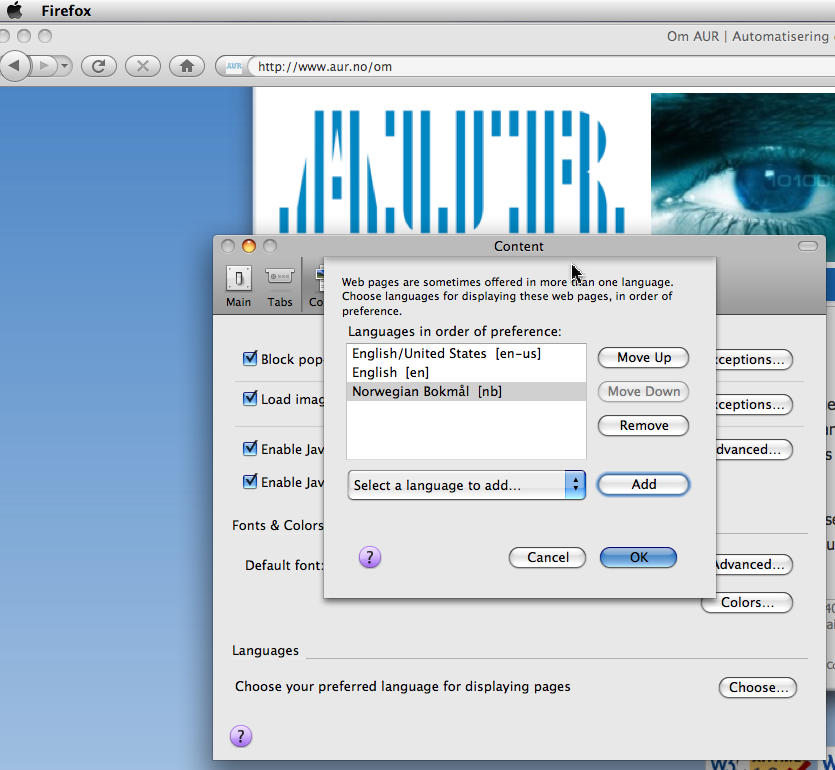
Firefox3: merely adding Norwegian Bokmal to the (end of) the list of languages in the Mac Firefox preferences did not alter the served page behavior when Norwegian Bokmal was set as Drupal i18n default language with empty path prefix. See 1st attached image.
Firefox3: adding Norwegian Bokmal at top of list of languages in the Mac Firefox preferences did not alter the served page behavior when Norwegian Bokmal was set as Drupal i18n default language with empty path prefix. See 2nd attached image. All behavior restored:
- home page http://www.aur.no served as Norwegian Bokmal.
- All Norwegian pages served with correct alias (under HACKED
url_aliastable with 'nb' language removed and set to null).- Norwegian menu served with all Norwegian pages.
Comment #14
webel commentedI reset the
url_aliaslanguage column to 'nb' for all Norwegian Bokmal pages, and with (and only with) Norwegian Bokmal set as the preferred language in selected browsers all works fine: home page, url aliases for (non-English) default language Norwegian Bokmal pages, and Norwegian Bokmal menu served ok with Norwegian Bokmal pages, in Firefox3 iff Norwegian set as the preferred language.So i18n path prefix does "play nice" with Drupal code
path.moduleandpath.inciff the browser and/or language preferences are setup to prefer that language (at least in the case of Firefox).In Safari4 (Mac OS X), it relies on the system language preferences, however it works even if Norwegian is set 3rd in the language list (below English) !
Clearly the matter of language negotiation is very subtle.
Comment #15
webel commentedGoogle Chrome: 5.0.x on Mac OS X 10.5.8: I did not manage to find separate language settings, and it did not seem to respect Mac OS X language preferences. I did not get this browser to work correctly (perform successful language negotiation) with http://www.aur.no.
Comment #16
webel commentedOpera 9.6.x on Mac OS X: I did not find how easily how to set the preferred language for serving of web pages (not that it matters so much with the market share of Opera).
Comment #17
webel commentedConclusion: as far as I can tell, if one wants to ensure that Drupal i18n non-English default language pages (as negotiated and served) "play nice" with core URL aliases and language-specific primary menus, one has to use a path prefix; without a path prefix, the interaction between browser and web server and Drupal seems to rely on browser and/or system language preferences in an a highly idiosyncratic way (and one that is difficult to communicate conveniently to novice end users simply accessing a site).
Comment #18
webel commentedReopening as an issue: as far as I am concerned there is still a problem with the i18n module under empty path prefix operation for a chosen non-English default language.
[Certainly the explanations I have given concerning language settings in browsers and/or os settings belong here (and I am happy to create an info page for the i18n docs on this matter so others don't get caught out as I did).]
I wish to make the case that there is still and issue beyond core path handling and that it is an i18n matter. Consider the following URL:
http://www.aur.no/tjenester aliased to: http://www.aur.no/node/14
When a browser's language settings are not set to explicitly prefer the Drupal i18n default language (in this case Norwegian Bokmal), no matter what the language negotiation is, that URL should still resolve to http://www.aur.no/node/14, and a page should be served (not a Page not Found).
I have as I write 2 browsers (Safari in any case, and Firefox by explicit setting) and 1 web agent (Wget) that "see" http://www.aur.no/tjenester;
I have 2 browsers (Opera and Chrome) that don't, and they also don't "see" the Norwegian primary menu items served with http://www.aur.no/node/14
(but they "see" http://www.aur.no/node/14). It is not language negotiation between the browsers and the web server that are causing those menu items to vanish,
it is Drupal i18n and/or Drupal core path.
If the maintainers still think this is just a Drupal core path matter then do by all means allocated it again to that issue queue, however I am not convinced and would ask you to please reconsider before doing so.
Comment #19
jose reyero commentedYou are mixing two issues here. The language negotiation part (that is Drupal core) and menu items not showing up, that is i18n, here, #614548: i18n_init() not run early enough - frontpage primary menus in wrong language or dissapearing
Comment #20
rogeriodec commentedSame problem here: http://rogeriodec.com.br (default language: portuguese-brazilian: pt-br).
Firefox: ok
IE: ok
Chome: doesn't change to portuguese
Opera: doesn't change to portuguese
Any ideas?
Comment #21
vivianspencer commentedI was also having this issue, when I view www.example.com/about or www.example.com/es/about in a spanish browser setup I get a page not found error, but when I visit the same url (www.example.com/about or www.example.com/es/about) in an english browser setup it works fine.
I found that the reason these aliase were not working in browsers set in different languages other than the default was due to the url alias being translated.
It sounds simple but it is easily overlooked, all I did to fix this was to make that the url aliases for each translated version of a node were the same, e.g.
www.example.com/about
www.example.com/fr/about
www.example.com/es/about
Comment #22
vivianspencer commentedAnother thing I forgot to mention is that I'm using "path prefix only"
It does not work with language fallback, this causes all sorts of weird issues
Comment #23
Raf commentedGot the same problem. When logged in, $language is automatically set correctly. When visiting as anonymous, it works fine on all browsers, except on Firefox (for Mac, although I got to test again to make sure it works on Firefox Windows). There, it sets default language to English, even though it's set to Dutch in the language settings. If I go to the front page when logged in, or in another browser, it works fine.
I don't use path aliases, so I don't think that's the problem. I also don't get any errors from Firebug.
When going through core, I found that commenting away this line of code in language.inc solves the problem:
The problem with that is that we'd be hacking core to solve this. I don't feel like doing that for every update. Back to looking for a clean solution.
Comment #24
Raf commentedOk, found it.
It really is a browser issue. Maybe Drupal doesn't play nice with Firefox' language settings, maybe it's just Firefox itself, but this is how you can change it:
For some reason, it doesn't work properly if you don't delete all other languages...
Edit: What it seems to do, is it takes the language that comes first, alphabetically. For some reason, the code doesn't keep the weight given to each language in mind.
Edit: Found it! It does take weight into concideration. The problem that's occuring, though, is that if you need a French version of the site, you set it to French, and if you need a Dutch version, you set it to Dutch.
In Firefox, if you set that French to French-Belgium and Dutch to Dutch-Belgium, you end up with language code fr-be and nl-be. Drupal, however, has fr and nl set. That results in skipping those two languages, as it doesn't fit the comparisson. It keeps going until it finds a Drupal language code that matches the browser setting.
So, in short, you got to set the languages in your browser right, and got to make sure the language codes in there match the ones you set in Drupal. That or hack core to take that part out.
Comment #25
carvalhar commentedone year late i'm having similar issues with Chrome (win) and two languages (default pt-br / en).
As #23 points, core module searchs for languages acceptable by the browser. But shouldn't this client configuration be considered only as a suggestion?
Eg.: When i enter for the first time my site, the language is set for english. That's ok, but if i click the language switcher i keep getting english site.
rogeriodec pointed me a solution that worked for my case:
at /admin/settings/language/configure use Path prefix only.
I was using "Path prefix with language fallback", but this option ignore language switch. When i clicked the link for another language, the url was right, but i was always getting the site in english.
Comment #26
jose reyero commentedMultiple configuration issues messed up with browser language settings...
Comment #27
mayank-kamothi commentedClear cache and delete old alias and regenerate it again...
Comment #28
Raf commentedThis is in-code, not in-cache. If you look in the code, you'll see it pulling the browser language, not making cache calls.
Comment #29
carvalhar commented@Mayank it's not cache and all urls were right.
The problem, in my case, was that drupal never changed the language in Chrome, even clicking (a correct path) by the language switcher block. Everything worked fine in other browsers.
After the click, Chrome loaded (and exhibit) the correct url but the language didn't change.
So i was having everything in english for page "en/node/15" but also for "node/15" (pt-br was default language.)
I think it's related to browser language detection by Drupal. This feature helps at the first access by providing the right language as the browser says the user wanted (by its configuration). But if the user decides (by clicking at language switcher block) to change the language, this behavior should be respected. I think the language fallback shouldn't be "reigning" if the user intentionally changed the language.
Comment #30
helenj commentedI also was having this same problem. My website has a default language of English and has translations in Spanish. Visitors to the site who had their browser language set to Spanish were not able to see any of the English pages, and would receive a 404 Page Not Found error if trying to access the English version of the page via the language switcher block.
I followed the suggestion given by carvalhar in #25 to change the language negotiation settings to "Path Prefix Only", from the default setting of "Path prefix with language fallback", and this seems to have solved the problem without any other problems occurring.
The in-page help text says "Path prefix with language fallback: If a suitable prefix is not identified, the display language is determined by the user's language preferences from the My Account page, or by the browser's language settings", so presumably if your default language url does not include a prefix and is using clean urls, then anonymous visitors with a alternative language set in their browser will not be able to see those pages.