After completing installation and going to my site for the first time (and subsequently closing the dashboard on a virgin site), I get the warning message:
Page not found
The requested page could not be found.
Of course this is accurate, as I've created no pages. But it also looks like an error message, which might worry the first-time user.
It would be much better of there was a sample "Welcome" home page, together with a full colour image (it makes Drupal look good), and perhaps some quick navigation links to help the novice, eg, to (a) the dashboard (b) the Help page (c) the Online handbook (d) the Drupal website.



Comments
Comment #1
David_Rothstein commentedThis sounds like a bug - what were the exact steps you took to see this message, and what URL is your browser pointing to when it's there?
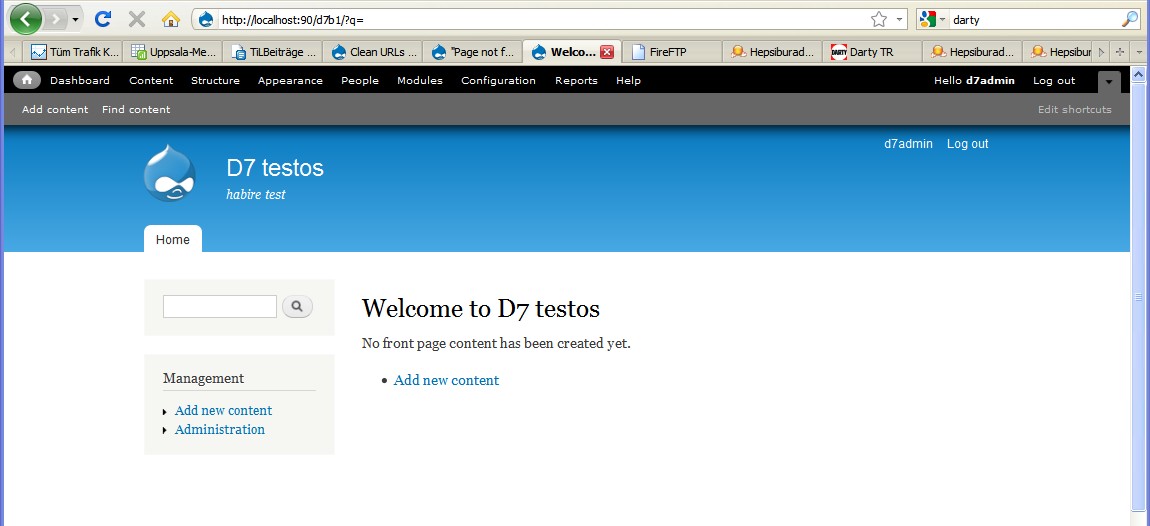
When I install Drupal and go to the site for the first time, I see this:
Which is a lot better.
In terms of a splashy welcome page, see #475596: [meta-issue] Fix the unholy abomination that is the welcome screen for discussion of this (and the removal of the not-so-splashy page from Drupal 6) - that issue does have the "revisit for release" tag though, and the D7 solution definitely needs some real-life testing.
Personally I think I like it, but I agree that a more prominent "Help" link would be useful.
Comment #2
Sahin commented* my configuration: MySql 5.4.1, Win-XP-Pro, IIS 5.1, PHP 5.3.1, D7 Beta 1 default install.
* http://localhost:90/d7b1/ is the install directory (d7b1 is a virtual directory).
* Install script ran without error. Then I set frontpage empty, default behaviour.
http://localhost:90/d7b1/ --gives "Page not found".
but interestingly if i type into browsers address bar
http://localhost:90/d7b1/?q= --default page called, "Welcome... No front page content has been created yet." with "Add new content" link as expected.
Also, any admin activity, e.g. trying to enable/disable a standard module drops to
http://localhost:90/d7b1/?q=index.php which also ends with a "Page not found"
I've read-and-tried nearly everything on "clean URL's", "installation on IIS", etc. But nix.
Comment #3
David_Rothstein commentedWow, that is very strange. I have no idea what could be causing this but it sounds likely this is some kind of general issue when using IIS, so I'm changing the component.
I'm very confused about how this displays the correct content:
But this gives "page not found":
You are sure that typing both of those into the browser manually gives different results?
A wild guess is that this had something to do with the change that went in at #437228: Remove hard-coded check for "Apache" for deciding whether to add "index.php" within url() but at first glance they don't seem related exactly.
Comment #4
Sahin commentedStrange, isn't it? I'm not a coder but a humble fan of Drupal, and all I could say, from earlier experiences, would be that one must be very carefull while depending on .htaccess and web.config at system level. And, it's always very tricky to deal with subdirectories and/or virtual folders. I know that's not too much help but anyway it makes me feel good to get a friendly and wise response from the community. Thanks David.
Comment #5
Sahin commentedToday tried with D7beta2. "Page not found" keeps coming at virtual or physical install directory, with or without $base_url setting. And still, path.../?q= displays the correct content!
Comment #6
Sahin commentedComment #7
dean clayton commentedApologies I just posted in the forum ( link: http://drupal.org/node/953234) , but i'm getting the same issue running on IIS6 and using a subdomain.
as above :
typing in the site url uxn.mergingminds.net redirects to the custom 404 page
typing in the url http://uxn.mergingminds.net/?q= redirects to the correct front page
I'm the same as Sahin, and a fan rather than a coder, however as my site is only for me to get to grips with drupal 7 and will eventually be deleted, I'm happy for my site to be used to help debug the issue
Comment #8
Sahin commentedChanging the title after Dean's comment.
Comment #9
sun.core commentedComment #10
Sahin commentedAs far as I understand from Priority levels of issues, this issue should be marked as major -if not critical- because Drupal is practically unusable under IIS at this moment. Redefining the requirements ("Drupal core will work using IIS 5, IIS 6, or IIS 7...") more frankly might be another option. (Please note that Clean URLs on IIS discussion has reached a kind of a dead end too.)
Comment #11
montesq commentedIs it in relation with #932636: Drupal *always* installs with clean URLs? I never successed to reproduce it (on Linux)...
Comment #12
Sahin commentedAs nobody objected in 2 weeks, changing the priority to major.
Drupal on IIS 5&6 is still not available.
Comment #13
dean clayton commentedI have done a fresh install of the final release of Drupal 7 and the issue still exists
Comment #14
montesq commentedCan you have a look at http://drupal.org/node/158043
There is a particular paragraph regarding IIS, maybe it applies in your case?
Comment #15
strick commentedI'm using Ionic Rewriter ISAPI and yeah, that's what causes the issue. Adding the following to the IIRF.ini file in your drupal directory will fix it:
RewriteCond %{REQUEST_FILENAME} !-f
RewriteCond %{REQUEST_URI} !=/favicon.ico
RewriteRule ^/(.*)$ /index.php/?q=$1 [L,QSA]
Comment #16
dean clayton commentedI'm not using the Ionic ISAPI rewrite tool on the server.
I do have the helicon ISAPI rewrite lite, but that's not being used with this domain.
I also have no problems at all during the installation of the site, everything goes through smoothly with no errors or white screens.
Although unable to reproduce, I did get a white screen of death on RC1, but only after not visiting the site in over a week ( and refreshing the browser solved it).
Comment #17
shanehendrix commentedI had the same issue. Drupal 7, IIS6. I could be wrong but isn't the function request_path() in bootstrap.inc assuming that if there isn't a querysting then the system is using clean URLs?
I am sure you could code this up to properly check if clean URLs is enabled, but I just removed the elseif portion since I am not using clean URLs and everything seems to be working fine.
request_path() in bootstrap.inc
Comment #18
dean clayton commentedYes that seems to have worked.
I edited out the lines as follows:
Comment #19
lapith commentedI stumbled upon this problem as well. To me the check for REQUEST_URI is not a very accurate detection of clean URLs. I created a quick patch to actually check if clean_urls is even turned on.
changed:
elseif (isset($_SERVER['REQUEST_URI'])) {
to
elseif (isset($_SERVER['REQUEST_URI']) && variable_get('clean_url', '0')) {
Comment #20
David_Rothstein commentedUnfortunately, that patch won't work. The variable system isn't initialized yet at that point, so it will always act like clean URLs are off.
The current code isn't assuming that REQUEST_URI is a detection of clean URLs; it's assuming that if REQUEST_URI is set and you are on the front page of the site, it is able to use the information in REQUEST_URI and SCRIPT_NAME to determine that you're on the front page. That's the part that seems to be failing.
Maybe someone who is experiencing this issue can check what $_SERVER['REQUEST_URI'] and $_SERVER['SCRIPT_NAME'] are actually set to when this happens, so we can see where the logic is failing?
Comment #21
lapith commentedAHhh, good point. I was having this problem and one of the comments suggested checking the variable. I was tired and just wanted to get it done so I didn't really check the bootstrap lifecycle.
Here are the values for requested:
REQUEST_URI: /Index.php
SCRIPT_NAME: /Index.php
Comment #22
David_Rothstein commentedThanks! OK, so it seems that on IIS "index.php" is winding up in those variables, whereas on Apache it's not. That's the difference. And in fact, if I explicitly put index.php in the URL, then on Apache I can get the page not found behavior also.
In which case, this issue sounds a lot like #711650: When index.php appears in the URL (or is automatically added by the server) users get a "page not found" message....
If someone can confirm that the latest patch in that issue fixes the bug on IIS, then we can probably just close this one as a duplicate.
Comment #24
nathandb commentedSame problem here, iis 6 , WHS, Mysql, drupal 7
any updates allready?
http://www.dbbi.nl --> page not found
http://www.dbbi.nl/index.php --> page not found
rest of the links / pages are loading good.
for example,
http://www.dbbi.nl/node --> works
as a work around i've set my error pages 403 & 404 to
http://www.dbbi.nl/node ...
Comment #25
tremor commentedI am having this issue as well on IIS 6. Subscribing and waiting patiently.
Comment #26
David_Rothstein commentedNo need to wait patiently :)
If you test the patch in #711650: When index.php appears in the URL (or is automatically added by the server) users get a "page not found" message (the issue I linked to above) and report back if that fixes this problem or not, then if it does we can close this as a duplicate and focus efforts on making sure the patch in that issue gets committed...
(And in the meantime, if you do find that that patch works for you, you'd be able to run it on your own server even before it gets committed.)
Comment #27
tremor commentedThis patch worked thank you. I normally host on LAMP but I simply wanted to test on Win 2003, IIS 6 - the company I work for has a ded server on this config.. and i've been pushing for a move to drupal for CMS needs.
Comment #28
AndrzejG commentedI have the same problem in Unix-like hosting server. My Drupal 7 sits in subdirectory of autoinstallator provided by the host - for this installation please refer to my previous issue http://drupal.org/node/1105440.
Attached please find a screenshot of my first attempt to get proper site. I also changed line in .htaccess to
RewriteRule ^(.*)$ index.php?q=$1 [L,QSA].
----------------------
Sorry, what a shame. My settings file was corrupted. Now all works OK.
Comment #29
ukbilleh commentedComment #30
bfroehle commentedBased on the response of @tremor, it seems that this is then a duplicate of #711650: When index.php appears in the URL (or is automatically added by the server) users get a "page not found" message.
Comment #31
David_Rothstein commentedOK, I'm marking this as a duplicate, and I'll leave a comment there cross-linking it (and up the priority). Thanks for testing the patch out, @tremor!