

 The 2026 Drupal Business Survey is open. Your response will help shape the future of the Drupal business ecosystem.
How do I set that up?
Also is it possible to place two fields next to each other, like in views?
| Comment | File | Size | Author |
|---|---|---|---|
| #15 | productsearchresult3.jpg | 55.87 KB | fehin |
| #9 | productsearchresult.jpg | 37.98 KB | fehin |


Comments
Comment #1
swentel commented1) #788548: Limiting output from pictures field?
2) You can place 2 fields next to eachother with css - you can add styles in the 'styles' screen en select the class in the fields overview screen.
Comment #2
fehin commentedI tried your Limit multiple field snippet (http://drupal.org/node/700056) and I got this error message:
Fatal error: Cannot redeclare imagecache_for_nd_contrib_field_formatter_info() (previously declared in sites/all/modules/custom_formatters/custom_formatters.module(360) : eval()'d code:9) in /sites/all/modules/custom_formatters/custom_formatters.module(360) : eval()'d code on line 15Comment #3
fehin commentedComment #4
swentel commentedThat code snippet is for using in a custom module, not pasting them into the custom formatters as a snippet, you'd only need this bit:
Comment #5
fehin commentedI tried your last code in custom formatter and multiple images are still returned.Thanks for the help.
Comment #6
fehin commentedAbout placing fields next to one another, I added two classes
mycol1
mycol2
When I tried to use these classes I got this error message "An illegal choice has been detected. Please contact the site administrator.".
Comment #7
swentel commentedThere is a fix and a patch for that at #794908: When not using friendly names in styles, you get an illegal choice message.
Comment #8
swentel commentedThis works fine when using custom_formatters module - Use the advanced editor, enter filefield as fieldtypes and toggle the 'handle' multiple values' checkbox.
Comment #9
fehin commentedThank you for that info.
I was able to fix the issue with multiple images by setting height of the image field and hide the overflow. The issue I'm having now are
1) find a way to truncate the titles
2) remove title paragraph. It leaves too much space between the fields
3) remove the "price" label from ucd_sell_price. Even though the label is set to hidden, it still shows.
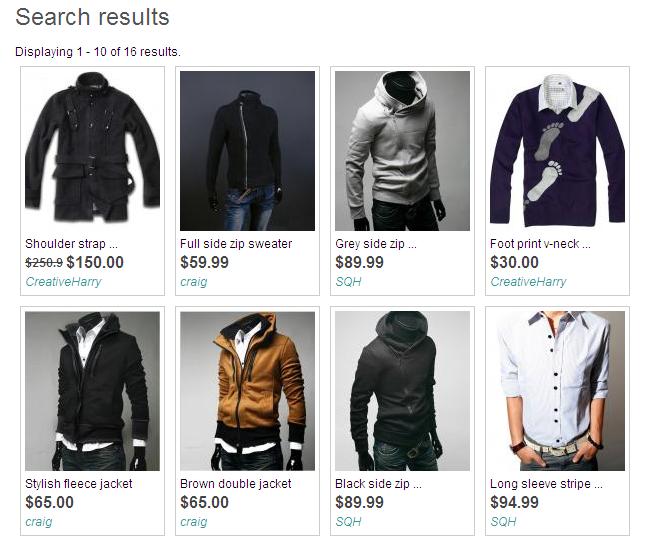
Please see my attached image. Thanks. I appreciate your help so far.
Comment #10
fehin commentedJust saw your #8 post. I will try that out. Thanks.
Comment #11
fehin commentedYay! The code worked. No need for the css. Thank you very much.
Now I just have to find the solution to my post in #9.
Comment #12
swentel commentedWell for #9 1 and 2: The title displays are theming functions from nd, so you can override them with phptemplate in your template.php of your theme - you can remove the paragraph titles there and use a truncate function - http://api.drupal.org/api/function/truncate_utf8/6
For 3 (label price): that's coming from ubercart from the theme_uc_product_price() function which is very complicated. I'm not an ubercart expert, but i'd almost think that there is an option in ubercart itself to remove that label.
Comment #13
fehin commentedI tried
and I got "Fatal error: Unsupported operand types in /includes/common.inc on line 1592"
The price label wasn't caused by ubercart but by my theme (acquia prosper). They have two options for displaying price. I chose the other option (ucd_display_price) and it doesn't have that label.
About displaying two fields on the same line. I applied the style but not sure what to do next.
Comment #14
swentel commentedYou were using a parameter to much:
As for displaying fields on two lines, those classes/styles should like define a 'float: left' (or something like that) in your CSS - I'm not *that* good in styling, I have themers for that at work :)
Comment #15
fehin commentedThank you very much. It worked. Is there a way to isolate this title setting to only product and product_kit node types'?
I didn't need the style class afterall. Floating
.buildmode-3 .node-type-product .field-sale-list-priceto left moved the next field (field-ucd-display-price) to the same line. Attached in my end result. I still need to figure out how to make my cck computed field (field-sale-list-price) display two decimal points but that's not this module issue. Thank you very much again for your help.Comment #16
swentel commentedYep, you can:
Comment #17
fehin commentedThank you.:)
Comment #18
razorback commentedDoes anyone have a summary of the steps to display a single image on the search page? I'm not clear on where to start. Thanks
Comment #19
bewhy commentedto ask an obvious question, so this is saying that this code depends on also using the custom-formatters module and to put this code in there?
There's no solution in creating a custom field from within ds/nd itself?
Comment #20
danny_joris commentedI just want to express my appreciation for the code snippet in #8.
Thanks! :)
Comment #21
bewhy commentedjust a couple further instructions for #8:
1. edit the 'IMAGECACHE_PRESET' from the code above on the line starting "$output" to correspond to the particular imagecache preset that you want show (othewise you'll get the broken image sign)
2. in the manage fields/build mode interface, click 'change settings' for the image and change the 'feild format' to 'Custom:your_named_field'
Comment #22
ycwjjjj commentedI follow the instruction from #8 and #21, however, I can't make the first image to be displayed in teaser view for custom_formatter 1.5 beta4. No picture was shown after the setting.
It can work with custom_formatter 1.4.
Can anyone give me some hints?!
Thanks!
Comment #23
danny_joris commented#22 Can you post your snippet?
Have you entered 'filefield' as fieldtypes and did you toggle the 'handle multiple values' checkbox?
It's also always helpful if you start out with looking into everything that's in the $element array, using
<?php print dsm($element); ?>(enable Devel for this)Comment #24
kclarkson commented@Swentel,
I apologize in advance for my lack of PHP skills so it could be something very simple in my code.
I have looked at your post and further instructions below and followed all steps regarding the Custom formatters module.
1. I used advanced editor mode
2. Selected the Handle multiple values
3. Pasted the code into the php area
4. Went back to the display suite build mode and selected the custom field type.
It looks like where I am messing something up is in the "imagecache preset name". I understand that I am supposed to change image cache preset to the name I am using. Am I supposed to put this somewhere else as well?
Comment #25
fehin commented@kclarkson
Your Field type(s): should be "filefield" and in this line
$output .= theme('imagecache', 'imagecache-node-image', $item['filepath'], $alt, $title);, your'imagecache-node-image'should be the name of the imagecache preset that you want to use, make sure this already exist.Comment #26
kclarkson commented@fehin
Thanks for the quick response. I did make the field type filefield and I do have a node-image for a imagecache preset. I guess where something is wrong is the naming of my imagecache in the pHP code.
In the imagecache preset listings it is actually named node-image. With that said are you familiar with how the PHP names differ as I have tried numerous variations?
Thanks
Comment #27
a_c_m commentedFor what its worth, i've just created a module to provide an imagecache preset for this situation : http://drupal.org/project/imagefield_single dev version should be released shortly.
Comment #28
fehin commented@kclarkson
Sorry, I'm just seeng your reply. If your preset name is called "node-image" then that is what you put there, not "imagecache-node-image". See mine below. My image preset name is called "product_list".
Comment #29
ball.in.th commentedI've found a quick workaround to show only the first value of any cck fields in teasers.
With Node displays contributions module:
Copy sites/all/modules/nd_contrib/nd_cck/nd_cck.tpl.php to your theme directory, if it doesn't already exist.
Without Node displays contributions module (plain CCK module):
Copy sites/all/modules/cck/theme/content-field.tpl.php to your theme directory, if it doesn't already exist.
Then edit the copied file in your theme directory, change from
to
And then flush the theme registry.
Comment #30
traviscarden commentedSee ImageField Single module for a drop-in solution. See Display Suite code snippets for custom formatters code.
Marked these issues as duplicates:
Changing title for findability.
Comment #31
fehin commentedAnyone else having problem with their code after Custom Formatters module upgrade? I'm looking for a solution. See the issue here #1147156: Code stopped working after upgrade.
Comment #32
aminalid commentedAnother quick (but not perfect) solution:
- go to admin/build/ds/nd/fields
- create a code field with the following code:
- replace "cck_field_name" and "imagecache_preset" above with the actual names from your setup
Comment #33
recidive commentedI just contributed a module for limiting images and other multiple values display in Drupal 7. I think it might be useful posting it here:
http://drupal.org/project/field_multiple_limit
Comment #34
swentel commentedAlso note, that the Drupal 7 version of Display Suite has this built in now, see http://realize.be/limit-number-fields-display-field-ui-display-suite
Comment #35
recidive commentedSweet, but bad timing.
Comment #36
swentel commenteddepends, not everyone uses DS and it would stupid to just install DS for limiting their images in the output. So, it's actually a win for everybody again I guess.
Comment #37
danny_joris commentedThis feature makes so much sense. Thanks for adding it! I'll check it out on Wednesday.