

Closed (fixed)
Project:
AdaptiveTheme
Version:
6.x-2.2
Component:
Documentation
Priority:
Normal
Category:
Support request
Assigned:
Unassigned
Reporter:
Created:
9 May 2010 at 04:35 UTC
Updated:
8 Dec 2010 at 07:19 UTC
Jump to comment: Most recent file

Comments
Comment #1
Jeff Burnz commentedActually this is not fully correct - there is no need to duplicate/add the templates if you just want to add back the normal classes provided by Views and CCK - just go to the theme settings page and under Advanced Theme Settings > Theme Development Settings you'll find two fieldsets for changing which classes get printed for both Views and Fields (amongst many others).
I'm not sure exactly what you mean by "View CSS Class field", normally I might use Skinr to add a special class to a View, in which case Adaptivetheme will print this in the View automatically without needed to adjust or change anything.
So unless you want to change the actual HTML provided by AT's template overrides, then you don't need to copy those templates into your subtheme - just set what classes you need in the theme settings.
Comment #2
ClaudiaB commentedThanks Jeff!
Comment #3
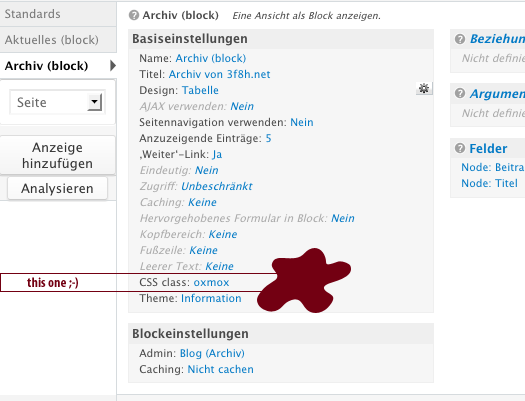
frank pfabigani think what claudiaB meant, is exactly what i am looking for. views itself offers a way to add css-classes to a view. see attached screenshot. enabling the advanced-features (theme development... > add or remove css classes > views classes > ...) isn't successful. the css-class set in views shows not up on the html-output of the page (tried flushing all caches, too - admin menu).
how to get this specific class into html-output?
Comment #4
Jeff Burnz commentedAh ok, now I see, I will check this, sounds like a bug.
Comment #5
Jeff Burnz commentedI've committed a fix to CVS, for now if you want to fix this yourself I suggest you copy the views-view.tpl.php file from Adaptivetheme core to your subtheme and make a change as per:
Comment #6
frank pfabiganwow, thanks, that was fast ^^
Comment #7
Jeff Burnz commentedCleaning up the issue queue.