

Closed (fixed)
Project:
PHPMailer
Version:
7.x-3.x-dev
Component:
Miscellaneous
Priority:
Normal
Category:
Support request
Assigned:
Unassigned
Reporter:
Created:
21 May 2010 at 18:06 UTC
Updated:
4 Feb 2017 at 14:56 UTC
Jump to comment: Most recent, Most recent file

Comments
Comment #1
smk-ka commentedConnection time-out means the mail server cannot be reached anymore. If the mail server is different from your web server (i.e. not localhost) I'd check with your hosting provider whether they enabled some sort of firewall that blocks connections on the SMTP port (port 25 usually).
Comment #2
Relia commentedHello I have the same problem.
I set up PHPMailer to send mails trought gmail:
Primary SMTP server:mail.gbt.tfo.upm.es
SMTP Port: 465
Use secure protocol: SSL
User: usergmail@gmail.com
password: gmailpassword
TEst configuration: mailtutest@domain.com
But when I submit clickin save configuration, the next error message appear:
A test e-mail has been sent to fjpeces@gfgf.es. You may want to check the logs for any error messages.
SMTP -> ERROR: Failed to connect to server: Connection timed out (110)
SMTP Error: Could not connect to SMTP host.
I'm using OpenSuSe 10.3, Server Apache2, php 5.2.5.
I think the problem is the ports are closed to outside, but before to communicate with the admin, i'd want read your opinions!
thanks!
Comment #3
LEternity commentedI contacted my provider and they fixed the problem. I.e. they screwed up...
Comment #4
Relia commentedi fixed the problem, I cotacted admin and the problem was the ports! They are closed!
Comment #5
smk-ka commentedThanks for your feedback, I've added a description for this error to README.txt, based on what I said in #1.
Comment #7
thirstysix commentedIn localhost SMTP work's fine, but , site it does not work SMTP.
I give same configuration in SMTP localhost and site.
but I get below error
I changed port number and name....etc..
but i get same error....
how can I slove this?
Thanks in advance..
Comment #8
smk-ka commented@satheeshkumarr Read comment #1. Contact your hosting provider to open specific firewall ports.
Comment #9
Mahadirz commentedI also got this same problem before...
Try checking all your files and directories permission. If all your files and folder permission is set to 777 they can't access to SMTP config.
So reset the permission of all the files to 644 while the folders to 755 .
cheers...
http://www.mahadirlab.com/en
Comment #10
zabalex commentedI had the same issue with my host. They told me to try every possible option, stated that it was a problem with my code, email server, application (drupal), etc.
I wasted 2 weeks, than hired a guy to develop firewall ports blocking detection application, and here it is. As soon as I was able to proove to hosting company that they blocked port 465, they did not admin problem. As soon as I showed them this tool, yes, they admitted that they have problem and opened the port.
Here is the tool: Port forwarding tester external server:
Let me know what you think
Comment #11
earth1 commented@smk-ka #1. I am using PHPMailer 6.x-2.2. Firewall is not the answer.
error -> SMTP error: could not connect to SMTP host.
The website is using godaddy with jangosmtp as it email system. It's Primary SMTP server: relay.jangostmp.net and SMTP port: 587. The godaddy representative said go to my MX (Mail Exchanger) and set relay.jangostmp.net. But this didn't work. I am running out of ideas. Can you help me?
Thanks in advance
Comment #12
zabalex commentedI spent so much time on issues like that, I might be able to help you Earth1 if the tool from my previous post doesn't show port as blocked.
Don't trust their advise on MX Exchanger. I prooved back to GoDaddy that over 50% of popular organizations don't set their relays, and their emails still go through fine.
What is your domain? Send me PM if you don't want to list it here.
Comment #13
keithm commentedThis problem may be a result of enabling IPv6 support in the operating system. I saw several sites with working PHPMailer configurations break when my host enabled IPv6. PHP has multiple known bugs in dealing with IPv6.
PHPMailer uses the PHP fsockopen() function that has this known bug.
The problem is that fsockopen() doesn't detect that a connection was actively refused and instead times out on it.
The problem scenario occurs when the host has both ipv4 and ipv6 addresses (e.g,, smtp.gmail.com), the service is only listening on ipv4 but ipv6 has precedence, which results in:
instead of:
If this is the problem, you can work around it by setting the IP address directly in the PHPMailer settings or in /etc/hosts. The problem still exists (at least) in PHP v5.3.2.
Comment #14
vvenk commentedHi:
I am on a Windows 7 machine and developing an application that has SendEmail as a function using VB.Net and MS Visual Studio 2010.
The code works fine on another Windows 7 machine. The only difference is that the laptop it does not work is a corporate laptop and I am part of the Administrators group on that laptop.
I used the tool and it says the port is open.
Any idea how to resolve the issue?
venki
Comment #15
ravi_dev commentedI have another mail server for my site then how can i connect '@fsockopen("www.google.com", 80, $errno, $errstr, 10)'?
Comment #16
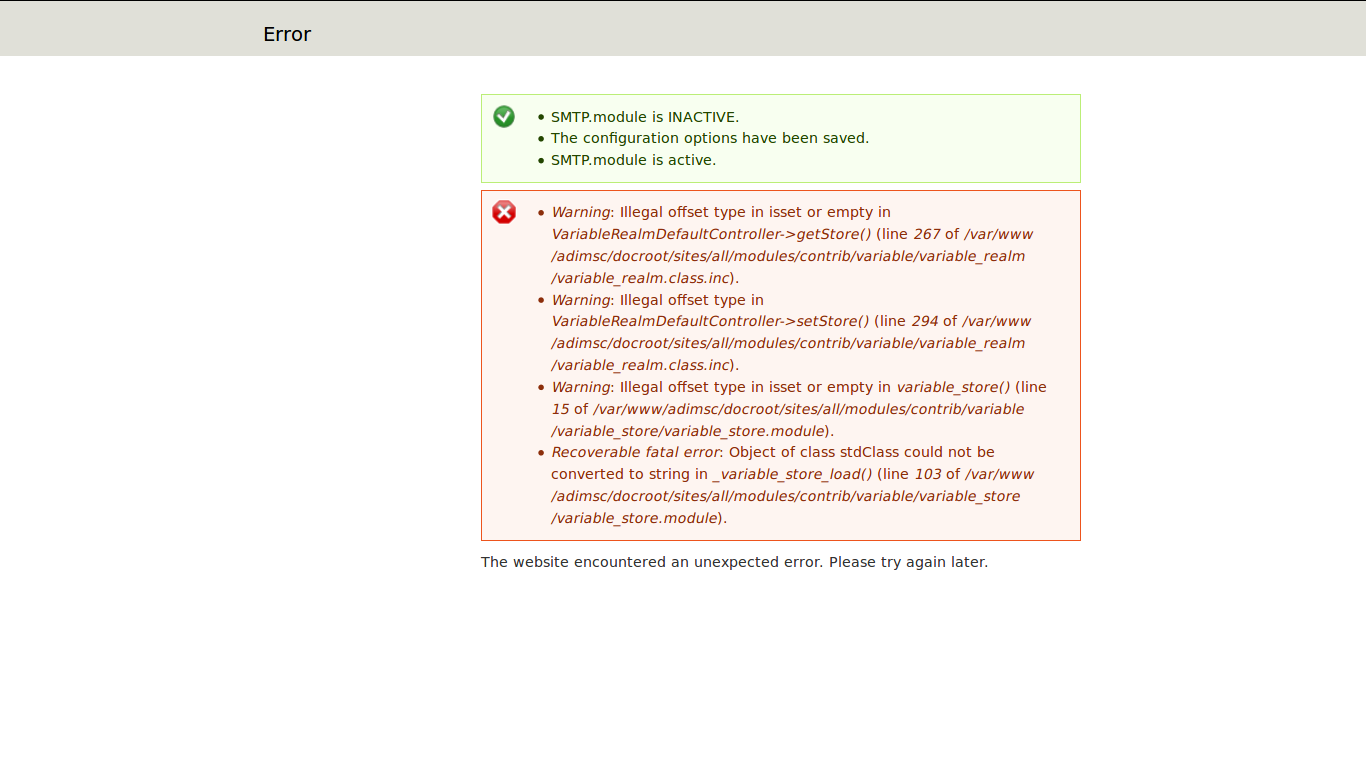
Anonymous (not verified) commentedThis error is not resolving check the image after saving smtp configuration this screen appears
Comment #17
oadaeh commented@saif-ur-rehman, that error is not from this module, but from the Variable module. You need to start there to resolve the problem. And next time, open a new issue, as this one you posted on is unrelated.
Comment #18
oadaeh commented@saif-ur-rehman, allow me to clarify what I said about starting a new issue. What you did in searching for an existing issue to post in was a good thing, but the issue you ended up posting in was unrelated to your problem, and so you should have just created a new issue.
Comment #19
oadaeh commentedI set the wrong status previously, so now I'm fixing that.
Comment #20
oadaeh commentedComment #21
thanhseouc commentedMy site is not a bug fix as above not overcome
Comment #22
oadaeh commented@thanhseouc This is a really old issue. I recommend you create a new issue, if you are having problems with this module.
Also, when posting a comment for a problem you are having, it is generally a good idea to provide some information about the problem. Here are some guidelines: