I would like to request that controls for two TinyMCE options be added to the profile administration interface. These options are remove_linebreaks and apply_source_formatting. Control over these options will be useful for administrators who want to give their users the ease of editing with TinyMCE, yet retain control over a legible HTML source for the edited nodes.
My monologue of a forum thread on these features is here:
http://drupal.org/node/80657
For my own use I have added them to the "cleanup and output" section of the administration form because it seemed to make sense there. The two code snippets that would need to be added to tinymce.module follow:
In tinymce_config() which begins on line 480:
  $init['remove_linebreaks'] = $settings['remove_linebreaks'] ? $settings['remove_linebreaks'] : 'true';
  $init['apply_source_formatting'] = $settings['apply_source_formatting'] ? $settings['apply_source_formatting'] : 'true';
In tinymce_profile_form() (begins around line 625):
  $form['output']['remove_linebreaks'] = array(
    '#type' => 'select',
    '#title' => t('Remove Linebreaks'),
    '#default_value' => $edit->settings['remove_linebreaks'],
    '#options' => array('true' => 'true', 'false' => 'false'),
    '#description' => t('Set this option to false to prevent TinyMCE from removing linebreaks from existing nodes.  True avoids conflicts with some filters.')
  );

  $form['output']['apply_source_formatting'] = array(
    '#type' => 'select',
    '#title' => t('Apply Source Formatting'),
    '#default_value' => $edit->settings['apply_source_formatting'],
    '#options' => array('true' => 'true', 'false' => 'false'),
    '#description' => t('This option makes TinyMCE apply source formatting.  Set this to true for a cleaner HTML source.  Choose false to avoid conflicts with some filters.')
  );


Comments
Comment #1
desm0n commentedI'm a little confused here on the term source formatting. Do you mean it will highlight tags etc (like here with the php tags filter) when you click html source ? If so this will be incredibly handy.
Also whats with the line breaks option ? Do you mean convert
<p>into<br/>as this would certainly mess up my w3c certification.A little more explaination is needed i guess as i'm just not getting it.
also in the
tinymce_profile_form()do we replace that area or add to it ?Comment #2
xjmSorry, I should have been more clear. I explained it better in the forum post. :)
By default the editor does this with the HTML it generates:
<h3>My Favorite Foods</h3><ul><li>cheese</li><li>chocolate</li><li>watercress</li></ul><p>Let me know if you have the same favorite foods!</p>It can get pretty unwieldy, especially in a long document! The
apply_source_formattingoption in TinyMCE makes it a lot easier to read:The only catch is that this can cause problems with the convert linebreaks filter. (I have a different "Rich Text" input format with the filters turned offm like it suggests in the readme.)
The snippets are just to go in the existing functions along with the other configurable options. I wasn't sure where would be best so I thought I would leave that for module's developers. I did put these snippets in my own copy of the module and it seems to work fine (since it's just adding two more options to existing arrays).
Comment #3
xjmWhoops, forgot that <code> doesn't preserve indentation on these forums. But
apply_source_formattingwill also indent nested block tags like the<li>in ordered lists.I definitely prefer this over the one-line output, so someone else might like to set the option too.
Comment #4
xjmFor reference, here are the two options I'm asking for as listed in the TinyMCE docs.
http://tinymce.moxiecode.com/tinymce/docs/option_remove_linebreaks.html
http://tinymce.moxiecode.com/tinymce/docs/option_apply_source_formatting...
Comment #5
yched commented+1 on the idea
TinyMCE-generated html is a soup when you want to edit it by hand
Comment #6
drurian commentedDidn't work for me.
Can you provide the path please?
Comment #7
xjmNatalie: what path is it that you need?
For the sake of clarity I've attached my copy of tinymce.module, which had controls for these two options added to the TinyMCE profile configuration. You can see the lines I've added (flagged with //LINES ADDED HERE) at line 499 and line 892.
Comment #8
desm0n commentedHi xjm
I applied the patch you posted and the options showed up in the TinyMCE profile but i can't quite figure out where i'm supposed to see the changes ?
I clicked edit HTML source but that didn't seem to format anything. What am i missing ?
Comment #9
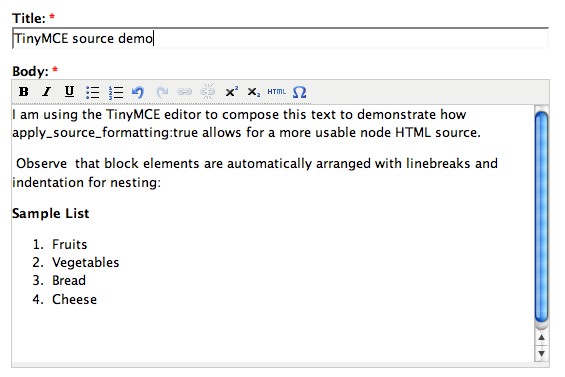
xjmHere's a screenshot of me entering text in TinyMCE...
Comment #10
xjm...and here is a screenshot of what the HTML it has generated looks like.
Comment #11
xjmIf I set the options back to their defaults (
apply_source_formatting:falseandremove_linebreaks:true) it changes the source to this screenshot (which has been the behavior of the module up to this point).Comment #12
drurian commentedThank you. What's shown on your pitctures works for me. But linebreaks are still removed when editing an existing text which was input without TinyMCE but using Drupal linebreaks. Maybe I should rearrange the filters somehow?
Comment #13
desm0n commentedAh although the option shows as YES in the TinyMCE admin panel i had to click submit for it to work.
Works perfectly now and is a worthy edition as trying to find start and end paragraph tags can be rather annoying. Great work and many thanks.
Comment #14
xjmAh-hah! I set the initial state incorrectly here:
Should be:
The only difference this makes is what desm0n has encountered--the drop box is set to true by default even though it's actually false by default, which can be confusing because you have to submit the form even though it seems you shouldn't need to. Corrected this in my own version as well.
I haven't tested much the interaction with other filters since I use a filterless input format whenever I edit with TinyMCE. The filter order is probably worth looking into.
Thanks everyone.
Comment #15
drurian commentedI updated the profile after I changed the settings but it still didn't help :(
Comment #16
whereisian commentedI applied the fix as described here. It worked like a charm. This bug has been plaguing me for a while.
+1 for feature vote.
Comment #17
thierry_gd commentedHi, could someone provide a patch and update the CVS
Comment #18
owen barton commentedHere is a patch for CVS. I have tested and it works great for me.
I think it is worth checking that the help text for the settings makes sense to people, as this could obviously be a source of confusion. Apart from that I think we are ready to go on this one - a much requested feature!
Comment #19
sillygwailoThe patch doesn't work (it breaks the module). Here's a patch using the code at the top against DRUPAL-4-7.
Comment #20
xjmThe file posted in #19 is incomplete (breaks in the middle of an array). Also, note that the default for
apply_source_formattingshould be false and not true, as above (I wish I could edit my original post to correct this).Comment #21
yched commented@xjm :
No, the patch in #19 does not look incomplete.
At least, it does not "break in the middle of an array".
It's a patch (a cvs diff file) - the important lines are the ones starting with + or -. The others are there for context.
Comment #22
owen barton commentedPatch updated for CVS head (and not botched, like my previous one).
Since no-one has raised any objections to this patch I am setting as RTBC...
Comment #23
Steve Dondley commented+1 This is awesome! Works great. Will save me much time and headaches.
Comment #24
andremolnar commentedAn absolute MUST HAVE. +1
Until this is committed, you can hard code these settings at line 114 of tinyMCE.module
andre
Comment #25
geodaniel commentedIt would be really nice to see this functionality in the module - it's annoying when switching between views to find TinyMCE hasn't preserved the line spacing.
Comment #26
owen barton commentedOK - let's bump this up to a critical feature (unless anyone can think of any reasons otherwise!).
There is lots of support for this patch, and it is pretty much essential for any site which does any manual html coding at all (even simple things like adding an extra attribute are very difficult without this patch).
Comment #27
Christefano-oldaccount commentedWowza! Thank you for this.
Comment #28
mlncn commented+1 I add my voice to the universal acclaim for this feature.
The need for a compatible filter should be documented, maybe link to a suitable filter in the form descriptions added by the patch.
ben :: Agaric Design Collective
Comment #29
mcurry commented+1 - any idea if/when this patch will be rolled into the official build?
Comment #30
daviding commentedI just trying applying these changes to Moxie ... without effect. I guess I should wait a few days more to see if source formatting shows up in the revised TinyMCE v5.1 or v5.2.
Comment #31
strips commentedIt would really be sweet to have this patch in the official build. For me this is the most important feature with tinymce.
I can't get this to work by editing the files manually. I'm using Drupal 5.1 and tinymce 5.x-1.x-dev. I don't get any config options in the module config. It doesn't work to hard code them in either.
Regards
stian h. larssen
Comment #32
strips commentedCorrection! I got it working! Awesome! This makes TinyMCE so much more usable!
Comment #33
luti commentedBut this has been in TinyMCE options already in the past, if I remember well (about more than a year ago - in 4.6, before 4.7 came out; but has been removed later). I wonder why it disappeared later...
By the way, I am hard coding it since than into TinyMCE (as above), including some other minor adjustments (resizable popup windows etc.), just to be sure that it will not mess my code. TinyMCE coders really seems to be some funny guys, with their weird defaults... ;-)
Comment #34
Southpaw commentedBookmarking. This feature definately needs to be implemented. It just makes so much more sense!
Comment #35
kreynen commentedIf I'm reading this correctly, this is solved with Nedjo's custom configuration patch. Any property you'd like to set can be done in the "Custom configuration" option this patch adds. Unfortunately this patch causes problems with other modules that enable textareas like Nodeteaser. The fix for that involves JQuery. I know there is a way to implement JQuery in 4.7, but since it's not included I don't think this approach will work for 4.7 users... as such I've changed the version of this issue to 5.x.
I think this is the documentation xjm referred to...
http://wiki.moxiecode.com/index.php/TinyMCE:Configuration/apply_source_f...
http://wiki.moxiecode.com/index.php/TinyMCE:Configuration/remove_linebreaks
The direction we're taking the module to do things the "TinyMCE way" as often as possible to take advantage of that development community for innovations and support. I don't know the logic behind the default TinyMCE configuration, but I have to believe that if this wasn't the way the majority of users wanted the settings, they'd be different.
So the good news is there is a patch that will allow you to fix this. That patch along with the JQuery patch is going to be included in the 5.2 release of the module. If you are comfortable configuring your tinyMCE.init settings, you will be able to change your remove_linebreaks and apply_source_formatting to suit your needs.
The less good news is I am more interested in keeping this module's TinyMCE implementation compatible with what Moxiecode is doing for ALL TinyMCE users, so I'm not going to change the default settings that the GUI button picker creates... nor am I going to add more settings options until the button picker is completely reworked. Users interested in changing these settings are going to have to learn to change their TinyMCE settings the TinyMCE way.
Comment #36
owen barton commentedHere is an updated patch for the latest DRUPAL-5 branch
As I mentioned on Nedjo's patch, I don't think that replacing GUI options with a code box is a good way forward. If we can keep the current flexibility and make it use the "Tinymce way" more elegantly, then great. However, this functionality is there for a reason and people wanted it enough to be bothered to code it, so stripping it out and putting a textbox there is not an answer (users have always been able to do configuration by overriding the theme anyway, so this is not really a new feature, just a convenience).
I agree that the current interface is complex, but I think adding an 'expert tinymce admin' permission/switch is the best way forward here.
Comment #37
leed commentedsubscribing
Comment #38
leed commentedGrugnog2, thank you for providing a patch.
I patched tinymce.module file for drupal-5.x with a patch(tinymce-source-formatting.patch_1.txt) submitted by Grugnog2.
Now I have tinyMCE that keeps nicely indented HTML!
Download tinymce.module.txt that I uploaded and rename is to tinymce.module, and update your tinymce.module for source code formatting.
Comment #39
leed commentedGrugnog2, thank you for providing a patch.
I patched tinymce.module file for drupal-5.x with a patch(tinymce-source-formatting.patch_1.txt) submitted by Grugnog2.
Now I have tinyMCE that keeps nicely indented HTML!
Download tinymce.module.txt that I uploaded and rename is to tinymce.module, and update your tinymce.module for source code formatting.
Comment #40
m3avrck commentedThanks guys, fixed!
Comment #41
seanr4.7 patch was never committed. I tested it and it does work.
Comment #42
seanrComment #43
cowboystyle commentedSo, is this patched for 4.7? If so, how do I install / where is the install located?
Comment #44
avangelist commentedIs there any info on some beefed up coding for V6?
Comment #45
sunThis feature has been added to 5.x.
Comment #46
Anonymous (not verified) commentedAutomatically closed -- issue fixed for two weeks with no activity.