

Closed (works as designed)
Project:
Sheetnode
Version:
7.x-1.x-dev
Component:
Core
Priority:
Normal
Category:
Bug report
Assigned:
Unassigned
Reporter:
Created:
1 Jun 2010 at 12:02 UTC
Updated:
26 Sep 2016 at 05:16 UTC
Jump to comment: Most recent, Most recent file

Comments
Comment #1
infojunkieThe "Format" tab allows you to change number formatting. If you can't find a preset format that works for you, you should be able to specify your own, using a syntax similar to Excel. Can you please try it and let me know?
Comment #2
grn commentedHi infojunkie. Thanks for the reply. Sorry for the late answer, but the mail notifications aren't working periodically.
I should have mentioned that this is only an issue when importing from Excel.
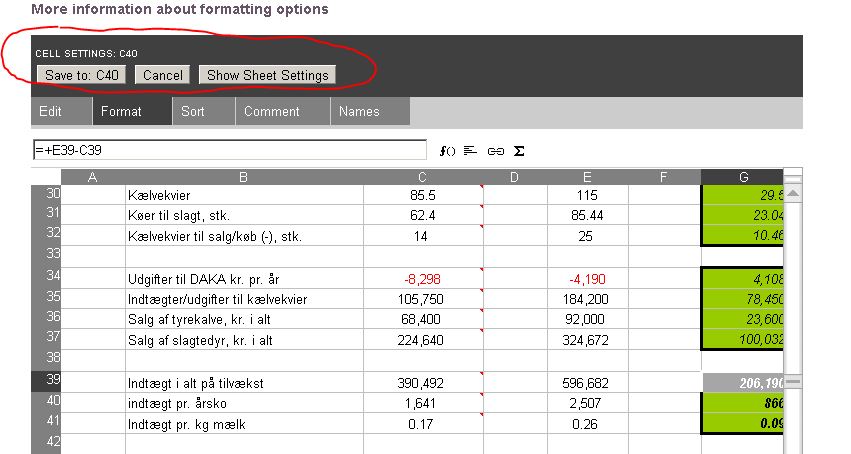
I can't change the format in some cells. Don't know if it's an WikiCalc or Sheetnode issue.
Try for example cell "G39" at this demo: http://grn.dk/demo/drupalsheet/node/6/edit
I also attached a screenshot that displays the issue.
Comment #3
infojunkieI'll take at look at this when I get back from vacation after June 19th. Thanks for your patience!
Comment #4
grn commentedThanks. This has not high priority at the moment.
Comment #5
pomliane commentedAs many have said it before: thank you very much for this amazing module Infojunkie! :)
Change thousands separator from comma to dot / change decimal separator from dot to comma:
The "Format" tab allows to change number formatting but, even with custom formats it seems you have to use a dot to specify decimal position...
Have I missed something?
Related to that: is there a way to change/choose your decimal input format (ie commas taken into account instead of dots when editing a sheet) diretcly in Sheetnode or in combination with another module?
Thanks in advance.
Comment #6
infojunkieRe #5: I haven't gotten around to testing this, but it looks like a bug in the formatting code.
Regarding your second question, do you mean selecting a *default* decimal format? In that case, no there's isn't but that's a good feature request. Please open a new issue and clearly explain the scenario you have in mind. Thanks!
Comment #7
RAguilar commentedYou need to edit sheetnode/socialcalc/socialcalcconstants.js and change
FormatNumber_separatorchar: "." to "," and
FormatNumber_decimalchar: "," to "."
It worked for me only when viewing the sheet.
Anyway, if I write a number it's formatted by the old rule, I think this might be due the regexp rules in SocialCalc.DetermineValueType function in socialcalc-3.js.
Comment #8
infojunkieTagging for next release.
Comment #9
RAguilar commentedAnother change:
else if (ch==",") { // decimal pointto
else if (ch==".") { // decimal pointand
else if (ch==".") {to
else if (ch==",") {in formatnumber2.js
Comment #10
grn commentedGreat, thanks!
Comment #11
infojunkieMoving to D7 for fixing.
Comment #12
willhallonlineYou can change the formatting, but it needs to be done in the library (SocialCalc) rather than in the module.
Comment #13
grn commentedGreat, thanks for the info!