Closed (fixed)
Project:
Feeds
Version:
6.x-1.0-alpha15
Component:
User interface
Priority:
Critical
Category:
Bug report
Assigned:
Unassigned
Reporter:
Created:
4 Jun 2010 at 14:54 UTC
Updated:
4 Jun 2010 at 23:29 UTC


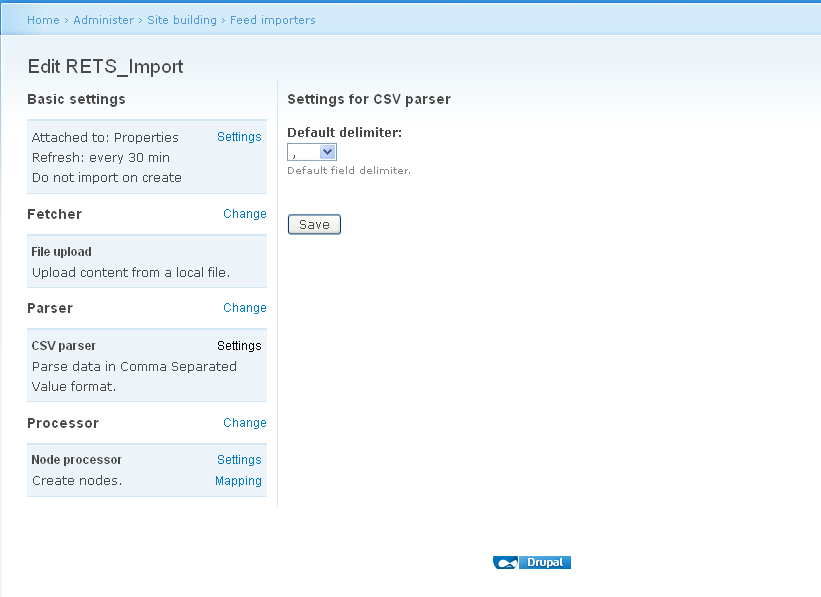
This is fresh install of Drupal 6.17. Added the feeds module, went to configure a feed and all I am getting in the CSV parser screen is the "Default delimiter: " dropdown and the save button. No File field textbox, no upload button. I've checked and rechecked everything I could think of, read the manuals. Now I'm just at a loss. Any suggestions on how to resolve this issue would be greatly appreciated.
Regards,
| Comment | File | Size | Author |
|---|---|---|---|
| csv-screen.png | 20.38 KB | Reevescorp |

Comments
Comment #1
DanielR commentedYou configure your Feed Importer on one page (probably site.com/admin/build/feeds), but the actual importing is done on another page (site.com/import).
On my site, there's a link to this import page that shows up in my admin user navigation block, called "Import".
Comment #2
Reevescorp commentedOk, I see what you are talking about. Kind of a strange way to do that (specially when the screenshots show the file upload being in the csv parser screen)
Let me get my mappings in place and fire it off. I'll update if that takes care of my issue.
Thank you.
Regards,
Comment #3
Reevescorp commentedWell, I put in all the mappings... went to do the import... put in the filename... hit the save... and now getting "Could not retrieve title from feed."
If I type in a title name... it will bypass the error but doesn't import any of the other fields I have mapped.
The title is mapped.. checked it. Moved the csv around to make sure it's seeing the file (it shows a file error if it can't find it)
Thought I saw an issue with file encoding on one of the other threads... but can't seem to find it again.
Don't know if I should close this issue off and start another or leave this here. Definitely a noob when it comes to posting issues with Drupal.
Regards,
Comment #4
Reevescorp commentedFigured out I have to set the import to stand alone form in the Feeds import Basic Settings. Have it importing now. This issue can be closed.
Comment #5
Reevescorp commented