Hi, This Internet Explorer display problem appeared with the 2.1 upgrade to Views Slideshow and did not disappear with the 2.2 upgrade.
I have a View Slideshow instance formed from a content type we have set up called Promo Slide in a block using the type of code that follows from the body of the Promo Slide.
<p><a href="/page/first-sunday"><img height="228" width="236" src="/sites/default/files/firstsunday%20july.jpg" alt="" /></a></p>
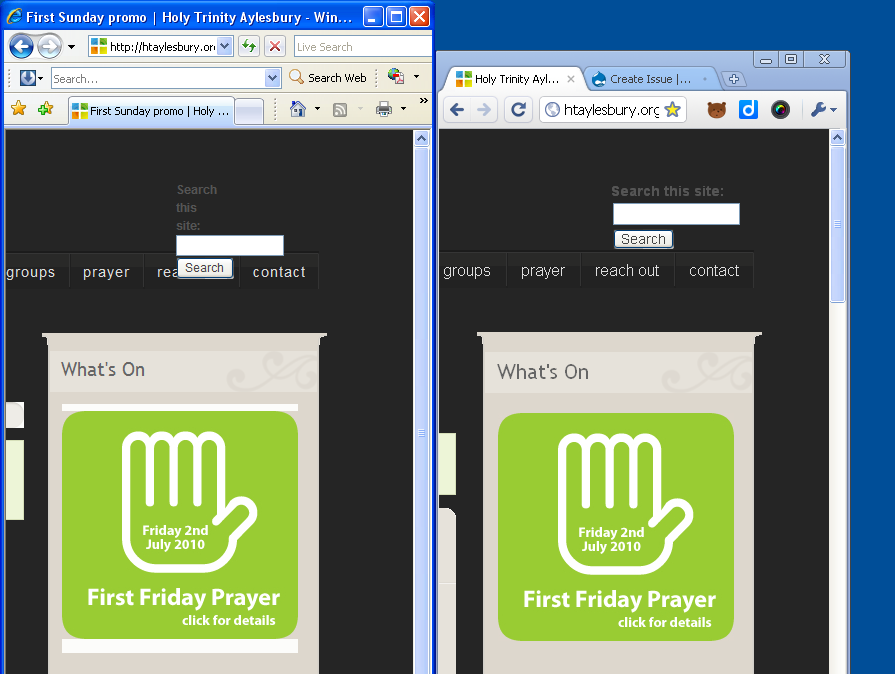
Unfortunately Internet Explorer was ok before Views Slideshow 2.1 but with that upgrade introduced a white band above and below the slides. Chrome, Firefox, etc., are unaffected.
I have attached screenshot showing IE and chrome next to each other. You can see the live version at Holy Trinity Aylesbury.
Herewith the Drupal settings code.
<!--//--><![CDATA[//><!--
jQuery.extend(Drupal.settings, { "basePath": "/", "admin_menu": { "margin_top": 1 }, "dhtmlMenu": { "slide": "slide", "clone": "clone", "siblings": 0, "relativity": 0, "children": 0, "doubleclick": 0 }, "googleanalytics": { "trackOutgoing": 1, "trackMailto": 1, "trackDownload": 1, "trackDownloadExtensions": "7z|aac|avi|csv|doc|exe|flv|gif|gz|jpe?g|js|mp(3|4|e?g)|mov|pdf|phps|png|ppt|rar|sit|tar|torrent|txt|wma|wmv|xls|xml|zip" }, "viewsSlideshowSingleFrame": { "#views_slideshow_singleframe_main_promo_slideshow-block_1": { "num_divs": 3, "id_prefix": "#views_slideshow_singleframe_main_", "div_prefix": "#views_slideshow_singleframe_div_", "vss_id": "promo_slideshow-block_1", "timeout": "5000", "sort": 1, "effect": "fade", "speed": "700", "start_paused": 0, "delay": "0", "fixed_height": "1", "random": "0", "pause": "1", "pause_on_click": "0", "remember_slide": 0, "remember_slide_days": "1", "controls": "0", "pager": "0", "pager_type": "Numbered", "page_hover": 2, "pager_click_to_page": 0, "image_count": "0", "nowrap": "0", "sync": "1", "advanced": "", "ie": { "cleartype": "true", "cleartypenobg": "false" }, "pager_hover": "1" } }, "views": { "ajax_path": "/views/ajax", "ajaxViews": [ { "view_name": "Panel_1", "view_display_id": "block_1", "view_args": "", "view_path": "node", "view_base_path": "panel_1", "view_dom_id": 2, "pager_element": 0 } ] } });
//--><!]]>
Herewith Views Code for the block (full HTML for whole page attached as text file).
<div id="sidebar-right" class="sidebar">
<div id="block-views-promo_slideshow-block_1" class="block block-views block-title block-odd">
<div class="blockinner">
<h2 class="title">What's On</h2>
<div class="content">
<div class="view view-promo-slideshow view-id-promo_slideshow view-display-id-block_1 view-dom-id-1">
<div class="views-admin-links views-hide">
<ul class="links"><li class="0 first"><a href="/admin/build/views/edit/promo_slideshow?destination=node#views-tab-block_1">Edit</a></li>
<li class="1"><a href="/admin/build/views/export/promo_slideshow">Export</a></li>
<li class="2 last"><a href="/admin/build/views/clone/promo_slideshow">Clone</a></li>
</ul>
</div>
<div class="view-content">
<div id="views_slideshow_singleframe_main_promo_slideshow-block_1" class="views_slideshow_singleframe_main views_slideshow_main">
<div id="views_slideshow_singleframe_teaser_section_promo_slideshow-block_1" class="views_slideshow_singleframe_teaser_section">
<div class="views_slideshow_singleframe_slide views_slideshow_slide views-row-1 views-row-odd" id="views_slideshow_singleframe_div_promo_slideshow-block_1_0">
<div class="views-field-body">
<div class="field-content"><p><a href="/page/prayer" rel="nofollow"><img width="236" height="228" alt="" src="/sites/default/files/first%20friday%20promo.jpg" /></a></p>
</div>
</div>
</div>
<div class="views_slideshow_singleframe_slide views_slideshow_slide views-row-2 views_slideshow_singleframe_hidden views-row-even" id="views_slideshow_singleframe_div_promo_slideshow-block_1_1">
<div class="views-field-body">
<div class="field-content"><p><a href="/page/first-sunday" rel="nofollow"><img height="228" alt="" width="236" src="/sites/default/files/firstsunday%20july.jpg" /></a></p>
</div>
</div>
</div>
<div class="views_slideshow_singleframe_slide views_slideshow_slide views-row-3 views_slideshow_singleframe_hidden views-row-odd" id="views_slideshow_singleframe_div_promo_slideshow-block_1_2">
<div class="views-field-body">
<div class="field-content"><p><a href="/page/trinity-coffee-shop" rel="nofollow"><img alt="" width="236" height="228" src="/sites/default/files/coffee%20promo_4.jpg" /></a></p>
</div>
</div>
</div>
</div>
</div>
</div>
</div>
</div>
</div>
</div>
We are using a marvellous theme called Deco -- which really looks much better than the squashed up bit I have uploaded here as you can see at the original.
Any help / pointers / workaround / fex even would be much appreciated :-)
Many thanks,
Jocelyn


Comments
Comment #1
Jocelyn Chappell commentedComment #2
loophole080 commentedconfirmed same problem
having played around with the CSS for an IE7 workaround, it appears that it's related specifically to ".viewsSlideshowSingleFrame-processed" - trying to set this to transparent has no effect, but setting a solid background colour or image does work
i also discovered that giving it a negative z-index works (so if there's images behind the slideshow, as i have, then it shows over the top of the background fill on the ".viewsSlideshowSingleFrame-processed", which i'm using as a work around to get rid of the white background caused by this bug)
tested in IE7 only btw
Comment #3
loophole080 commentedps i also had the identical problem with the views rotator module i used to use (http://drupal.org/project/issues/views_rotator) so... think it's some IE7 CSS bug myself
Comment #4
redndahead commentedHave you tried any of the IE options in views slideshow? Sometimes a combination of those fixes ie issues.
Comment #5
stoltoguzzi commentedhad the same problem
disable both of this settings in slideshow works for IE8
Comment #6
redndahead commentedMarking as fixed.
Comment #8
Bevan commentedThis may well have actually been duplicate of #1031176: Controls div always rendered.
Comment #9
Dret commentedSeems not be a duplicated...!! The problem is not rendering of control DIV but an inline property setting a not useful background property (white) only on IE.