

Closed (won't fix)
Project:
Date
Version:
6.x-2.4
Component:
Code
Priority:
Normal
Category:
Bug report
Assigned:
Unassigned
Reporter:
Created:
20 Jul 2010 at 15:38 UTC
Updated:
26 Oct 2018 at 02:49 UTC
Jump to comment: Most recent, Most recent file



Comments
Comment #1
sp_key commentedI still haven't managed to sort this out - if anyone has any suggestions please speak out :)
Comment #2
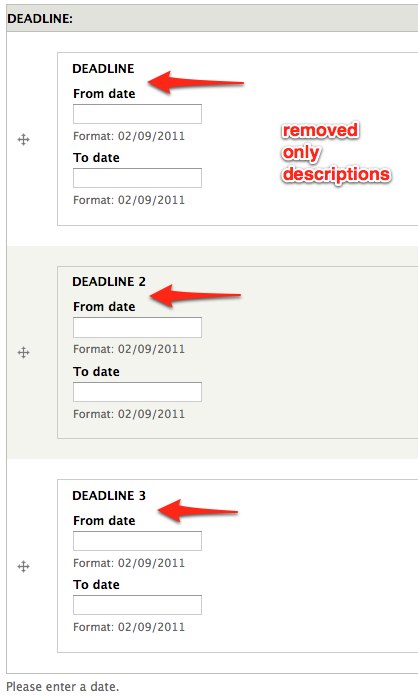
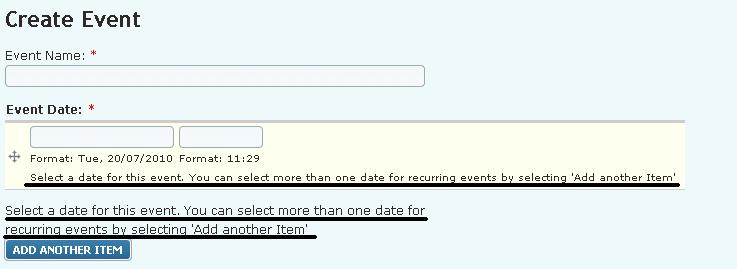
froboyI've seen this in both D6 and D7—the label and help text is rendered both inside of every instance and outside of the group. If 3 dates are allowed for a field, each of these will be rendered 4 times. This behavior also persists anywhere that you have an editable date field (I've seen it it editable views fields).
I've done a little digging around the Date module but am not familiar enough with details of form rendering to be able to figure out where this is coming from. Anyone?
Comment #3
froboySo I'm now a little more familiar with the workings of the Date module and form rendering :) and here's what I found:
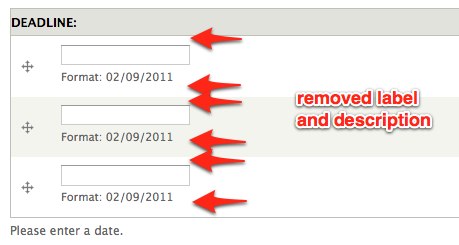
These elements are controlled in date_elements.inc in the date_combo_element_process function. Depending on whether there are on or multiple values, and either from only or to and from dates, the field is rendered differently (see first attachment). The placement and duplication of these fields could probably (or possibly was) the subject of a great UI debate, but I made my best guess at what the experts would deem necessary and unnecessary.
With the following code inserted at line 297 of date_elements.inc, I was able to come up with the cleaner versions in the other two attachments.
I'm intentionally not posting a patch because I don't think this is quite fully baked yet, and I want to see what people think as far as the usability of these things...
EDIT: Sorry, I did these tweaks in d7 with Date 7.x-1.0-alpha2
Comment #4
dgale commentedI wasn't able to make the above code fix work on 6.x-2.8. However, I was able to fix this problem through CSS:
This will cause all of the help text attached to each entry to be hidden, and keep one instance of the help text at the bottom. I wish that help text was above the widgets, but at least this is better than having it all over the place.
Comment #5
damienmckennaUnfortunately the Drupal 6 version of the Date module is no longer supported. That said, we appreciate that you took time to work on this issue. Should this request still be relevant for Drupal 7 please feel free to reopen it. Thank you.