

Closed (fixed)
Project:
Date
Version:
7.x-1.x-dev
Component:
Code
Priority:
Critical
Category:
Bug report
Assigned:
Unassigned
Reporter:
Created:
30 Sep 2006 at 14:06 UTC
Updated:
15 Oct 2006 at 20:00 UTC
Jump to comment: Most recent file

Comments
Comment #1
dodorama commentedI'm using date cvs version with drupal 4.7.3 . Is this correct ?
Comment #2
karens commentedIf you're using a version with Sept 9 as a date you don't have the latest version. You should start using the 4.7 version with the 4.7 version of cck an drupal 4.7x. The cvs and 4.7 version are going to start splitting off in different directions.
I haven't tested the preview lately, so I will take another look at that.
Comment #3
dodorama commentedSorry Karen. I meant 29 sept version.
And the problem I'm experiencing isn't releated just to the preview but it seems that the same default value is stored whatever date I submit.
So when I view the node the date field always show the first day of the current year.
But since my drupal install is a little bit messy I'll perform a fresh install a see if the problem still exist.
Comment #4
karens commentedI've been using this without any problems, so I can't replicate it. If you still have a problem after reinstalling, please give me some info to help me reproduce the problem. I need:
1) the type of date field (iso or timestamp)
2) the type of widget (selector, jscalendar, or text)
3) the timezone option you are using
4) the granularity you are using
Comment #5
karens commentedOh, and whether you have selected multiple values or required.
Comment #6
dodorama commentedFresh install:
drupal 4.7.3
cck 4.7.0 (sept 19)
date 4.7.0 ( I downloaded 10 minutes ago all the single files tagged 4.7 from the CVS repository)
created a new content type with:
a date type select list ( granularity set to YMDHM, didn't change site timezone and timezone settings time. date display set to 01/08/2006)
a datestamp type select list (almost the same)
a date type Text Field with strtotime validation (almost the same)
I didn't selected the required and multiple values checkbox.
this is what happens:
1. On submission;
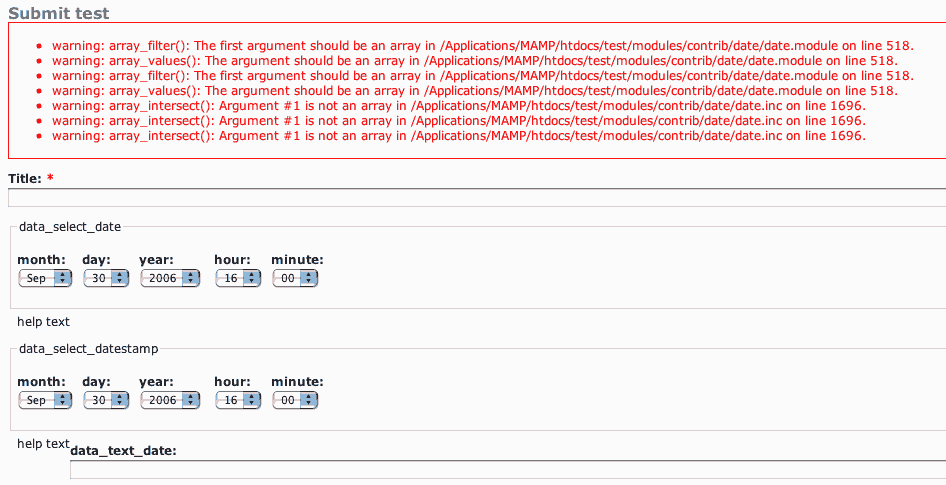
when enabling the date type Text Field with strtotime validation a lot of warnings appear (see screenshot) and the date textfield is empty (the current date isn't displayed)
2. On preview
None of the Values are displayed
3. On node view
date type select list value is reset to first day of the current year (01/01/2006 00:00)
datestamp type select list value is always 01/01/1970 00:00
a date type Text Field with strtotime validation is empty
I will perform further testing tomorrow once the 4.7.0 package will be avaiable and updated with your last commites (just to be sure that I didn't mess things up by downloading files one by one directly from the repository)
Hope this helps
Comment #7
karens commentedMay be related to http://drupal.org/node/86762, maybe something bad in latest commit. I'm trying it in several installations to see if I can reproduce the error and fix it. Just sit tight, hopefully it will be fixed soon...
Comment #8
karens commentedPlease try something else for me. Go to settings > content > content types and pull up the content type in question. Select the date field you're having trouble with and make sure it is set up right. Save the field even if you don't make any changes to it. Then go back and see if you can create a new node of that type OK. If that works, pull up a previously-created node and see if that works.
Comment #9
karens commentedI think I found the problem. Grab the latest version of date.module and it (hopefully) will be fixed.
Comment #10
catchI've tried:
1) the type of date field (iso or timestamp)
have tried both
2) the type of widget (selector, jscalendar, or text)
tried selector and text
3) the timezone option you are using
GMT or none.
4) the granularity you are using
ddmm
or
ddmmyyyy
tried editing field and saving etc., same error.
Comment #11
dodorama commentednot sure what 'pull up' means in this case (sorry i'm italian).
anyway what I did is saving both the content type and the field type again (even if I didn't make any changes).
But the results are the same.
Trying to investigate where's the problem I tested the 4.7 module from Sept. 18 and it works fine. So it's something releated with the last commits.
Comment #12
catchsorry Karen - latest 4.7.0 (which still says 18/09) or latest cvs?
Comment #13
dodorama commentedGrabbed latest date.module and....
it works!
Thanks Karen!
I will perform further testing on the module trying all the new features and let you know.
@catch
You have to wait till tomorrow to see the packaged (and updated) 4.7 version of the module on the download page. In the meanwhile you can grab all the needed files one by one from the repository.
Comment #14
karens commentedYou'll have to get it from the cvs repository since I just committed it and the download won't get updated right away. The correct version will have today's date on it.
Don't worry about my previous comment about pulling it up (I just meant look at it). Just make sure you have the right version of the module and confirm whether things are working.
Comment #15
karens commentedShould be fixed in yesterday's commit.
Comment #16
(not verified) commented