Closed (fixed)
Project:
Date
Version:
6.x-2.6
Component:
Date Timezone
Priority:
Minor
Category:
Bug report
Assigned:
Reporter:
Created:
15 Aug 2010 at 12:08 UTC
Updated:
27 Jun 2011 at 16:22 UTC
Jump to comment: Most recent file


in /admin/settings/date-time where admin should set default time zone for the site, Asia/Tehran with timezone +0330, is missing.
please provide it.
| Comment | File | Size | Author |
|---|---|---|---|
| #5 | timezone_cache_delete.jpg | 142.31 KB | arlinsandbulte |
| #4 | time.php_.txt | 138 bytes | arlinsandbulte |
| #3 | asia-tehran.jpg | 106.37 KB | arlinsandbulte |


Comments
Comment #1
arlinsandbulte commentedI am unable to reproduce this.
What is your PHP version?
Comment #2
pendashteh commentedthere is no 'Asia/Tehran' in select list. can it be related to PHP version? however i use 5.3
Comment #3
arlinsandbulte commentedHmmm... OK, I am on PHP5.2.14 and I DO get Asia/Tehran in the select list.
It might be a PHP 5.3 issue. I will check that out when I get the chance.
Comment #4
arlinsandbulte commentedHere is a quick & easy way to rule out a bug (or change) in PHP 5.3:
Just put the attached file into your root directory.
Rename it to time.php
Browse to http://your_site/time.php in your browser.
Is Asia/Tehran in the list?
If not, it is in issue with PHP 5.3 or maybe the PHP settings on your server.
Remember to delete the time.php file when you are done.
Comment #5
arlinsandbulte commentedEdit: Ignore all of this. I was wrong. See #6 below.
Ok, I think I figured this out.Looks like this might be a problem with the way Date module caches the timezone list.
When displaying the timezones, Date module looks to see if a timezone list is stored in cache at 'date_timezone_identifiers_list'
If there is a list there, Date ALWAYS uses that list. (Clearing Drupals cache does not clear this list).
If there is NOT a list stored there, Date generates the list using the php function: timezone_identifiers_list. AND stores the result in the cache so it never has to call that function again (not sure why...Karen, can you explain?).
So, if the cached list at 'date_timezone_identifiers_list' was improperly constucted once upon a time (ex. without Asia/Tehran), it will never be displayed.
Clearing this cache row should solve the problem *I Think* Be sure to backup your database before clearing this, just in case.
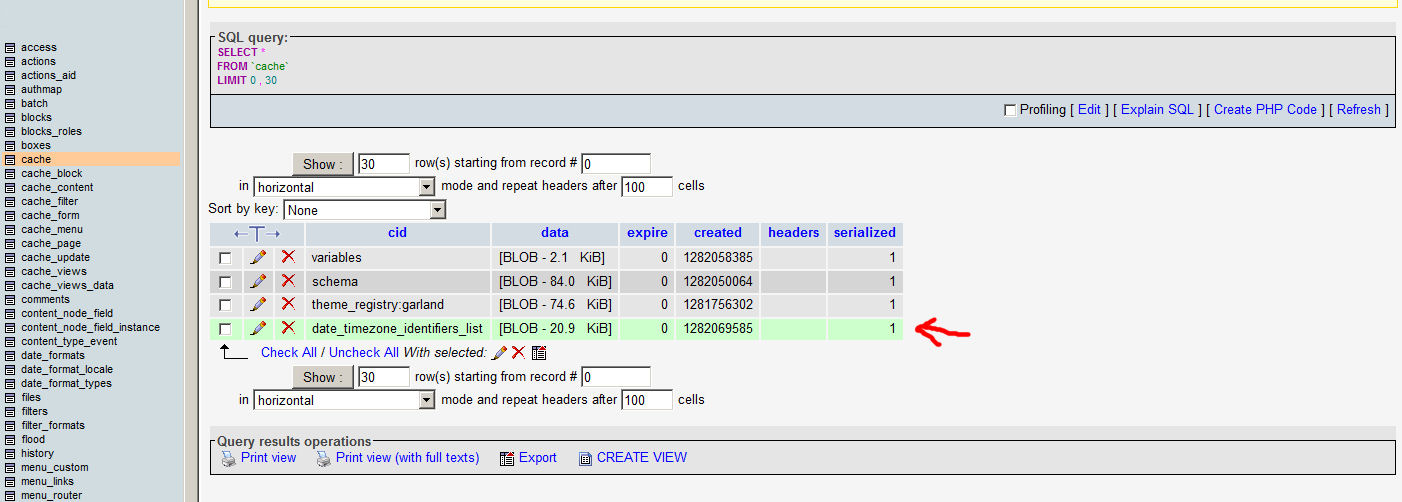
You can clear it by going to phpMyAdmin, browsing to the 'cache' table and deleting the 'date_timezone_identifiers_list' entry (see attached screenshot).
I probably did not describe that in the right terms, but I am not a database guru (yet).
P.S.
Maybe this is intended behavior. It might provide a useful way for a site admin to limit the available time zone choices if they wish by manipulating this cache table entry.... just a thought.
Comment #6
arlinsandbulte commentedAha! I think I figured this out:
You have PHP 5.3, but you have the PHP4 module enabled... the PHP4 module should be disabled.
You need to disable the PHP4 module and clear the cache.
That should fix it!
It was just by sheer luck that I happened to do the same thing (mistakenly enabled the PHP4 module).
Comment #7
pendashteh commentedthanks. you right.
but there was a mistake on your answer. i don't use php4.module; but disabling date_php4.module solved the issue.
Comment #8
arlinsandbulte commentedYep, exactly.
Date_PHP4 is what I meant.
(I did not know there was a PHP4 standalone module).
Comment #9
ah0 commentedI'm trying to get the drupal time (Date and Time) to be set to Asian/Tehran but no luck.
My configurations is:
- installed the Calander Systems 6.x-1.50
- Date module 6.x-2.7 ( http://drupal.org/project/date ) [ Enabled: Date, Date API, Date Timezone ]
The calendar system has turned my calendar to Farsi/Persian just fine but then I installed the Date module just to ensure I can set exact timezone to Asian/Tehran; but when I'm at the Time and Date looking at the format ( admin/settings/date-time/formats ) I see the time to be correct and shoiwing Tehran's time; however, when I post some content, the time of the content post is shown incorrectly.
ie. say if the correct Tehran's time is 19:04 :
Time and Date Formats ( admin/settings/date-time/formats ) shows correctly: 19:04
but when posting any content the time of the post is shown incorrectly 8:04 instead of 19:04
I'm quite clueless any hints, that would be much appreciated,
Thanks,
Comment #10
pendashteh commented@ah0: I recommend you to start debugging the PHP code to find out where exactly the fault happens. Sometimes it's the developer's mistake.