After updating forum_access from 6.x-1.3 to version 6.x-1.4, when viewing admin/content/forum the links under 'operations' to 'edit container' and 'edit forum' are missing from all containers or forums that are not public. Rebuilding permissions did not seem to fix this.
I completely lost control of two hidden forums until the user 1 account added my account back as a moderator to these forums. My account has always had permissions to administer the hidden forums as set up in roles and /admin/user/permissions. Now those roles and permissions are being overridden by the Forum Access Moderator permissions.
Bottom line - the Forum Access Moderator role is abusing the security posture/policy set up by the master permissions and other roles. This is a MAJOR security issue.



Comments
Comment #1
salvisPlease see #892658: Forum Access Moderator role permissions are being automatically granted to other roles and clarify what you mean with "Forum Access Moderator role." You seem to be confused about what that is.
I can only assume that your role had the 'administer forums' permission but not the View access to those two forums. This is how it's supposed to work. If you don't have View access, then you shouldn't be able to access the administration page of the forum where you could give one of your roles View access (or Delete access, for that matter), or assign yourself to be moderator.
If anything, that is a security improvement rather than a "MAJOR security issue".
Again, if you want to pursue this, please explain, name the role you refer to, and list the permissions that you have assigned to that role. Also, hover your mouse over the role and read the hint that pops up. Please post a screenshot with the pop-up hint.
(Resetting the flags, because so far I don't see anything that is not working as designed.)
Comment #2
JohnnyX commented@Salvis:
So users with permission to administer forums are only allowed to administer boards with view access rights? If I'm right I can give a user administrator permissions to a section of the forum? Sounds great! :)
Comment #3
salvisExactly, although your terminology is a little bit off. What you call 'board' is called 'forum' in Drupal.
Comment #4
Anonymous (not verified) commentedI am having what I think is the same problem.
Drupal 6.19
ACL 6.x-1.2
Content Access 6.x-1.2
Forum Access 6.x-1.4
Module Grants 6.x-3.6
Module Grants Monitor 6.x-3.6
Node Tools 6.x-3.6
User Permissions 6.x-1.0
User Tools 6.x-3.6
The role 'Administrator' has all site-wide Drupal permissions.
I go to the Forums and Containers page admin/content/forum and see all 'edit container' and 'edit forum' links.
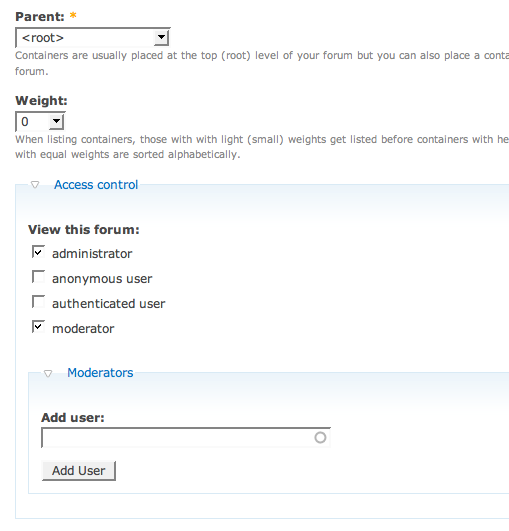
I choose 'edit forum' and choose 'Administrator' for the View forum permissions, as this is the only Drupal role that I want to be able to tinker with this Forum settings page.
Click save which returns me to the Forums and Containers page, where there is no 'edit forum' link anymore.
[I can reverse this in the forum_access table by editing the grant view permission to 1.]
What am I doing wrong?
Comment #5
salvisPlease update to the -dev version.
What role/permissions/uid did you use to do that?
You're saying that uid had access to the forum's administration page and that uid lost it after you gave View to the Administrator role?
What about uid 1? Does it also lose access?
We need a lot more very precise information to be able to recreate your scenario.
Comment #6
Anonymous (not verified) commentedI don't have access to the site ownership as uid 1.
EDIT: Ok, I stole uid 1 from the site owner while they slept by fiddling with the database.
If I 'edit forum' (as uid 1) and choose the role 'Administrator' (a role that has all the site permissions available to be assigned to it in the Permissions UI) for the View forum permissions, and save, the 'edit forum' link remains intact on the original Forums and Containers page (admin/content/forum).
Going back in to check that specific forum shows the role permission for 'Administrator' as unassigned (ie not checked) again.
That role is the only role that is italicised. The hover text says "This role has the 'administer forums' permission, and granting 'View' enables the role holders to change the settings on this page, including Access Control! Because the role also has the 'administer nodes' permission, it has full access to any nodes either way."
Comment #7
salvisThat's good information. Have you updated to the -dev version yet?
See forum_access 6.x-1.x-dev and click on the CHANGELOG.txt link to see that
- Fix inability to save Create and View access for roles with the 'administer nodes' permission.
is fixed in the -dev version.
Maybe you did that before, but the link was pointing to the wrong version of CHANGELOG.txt. I've just fixed the link.
I'm marking this fixed. Please let us know what you find after updating to the -dev version. If the same issue is still present, then set the status back to active; if you see other misbehavior, then please open a new issue.
Comment #8
csavio commentedI have the issue described in the initial post.
I updated to the latest dev version and the problem is still present. Turning off registered users and telling site admin user group (a role that has all the site permissions available to be assigned to it in the Permissions UI) they have access causes users in the site admin category to lose the ability to view or edit the forum once the registered user view/see access is changed.
Immediately after step 2 from the image attached you can no longer change permissions on the forum despite having the permission to do so set for the admin user group this user is a part of.
I've attached screenshots of the steps taken and the permissions of the "site admin" user group.
Setting the user to moderator does appear to be a workaround that allows the user to continue editing the forum.
Comment #9
salvisPlease do this as uid 1. Then go back into the forum administration and take another "step 2.0" snapshot.
I'm confused by your step2.0.png snapshot. It looks like it only has one column. It should have four columns. Can you explain that?
Comment #10
csavio commentedI used the lullabot screenshot because I had a ton of usergroups set up in my development environment. I'll rescreenshot... Containers have two columns for me at the moment.
Comment #11
csavio commentedOK I logged in as the uid 1, updated and now it all looks fine. I even rolled back my DB to a previous snapshot and could still update the admin forum as needed, so I'm a bit perplexed as to what has happened.
I was investigating the issue because a coworker was having the same problem, but now I can't reproduce the issue sorry. I'll post more details later if we run into this again later in another environment, but I think you are correct the issue had been resolved in the dev release.
Thanks!
Comment #12
Anonymous (not verified) commentedFixed in dev. No further issues. Thanks
Comment #13
salvisOk, thanks for your confirmations.