

Closed (works as designed)
Project:
Date
Version:
6.x-2.6
Component:
Date Popup
Priority:
Normal
Category:
Bug report
Assigned:
Unassigned
Reporter:
Created:
31 Aug 2010 at 09:38 UTC
Updated:
7 Jun 2015 at 20:35 UTC
Jump to comment: Most recent, Most recent file


Comments
Comment #1
jaydub commentedPossibly related to
#898024: path to ui.datepicker.css incorrect when using jQuery UI 1.7+
#898324: Datepicker CSS
#834288: date_popup_css_file variable not set during update
Comment #2
ludo.rIs there a js parameter in the function call to activate those fields?
Comment #3
mattsmith3 commentedI am having the same problem on 2 different sites. The date pop-up can be seen in the attachment. Same specs- except I am not using the webform module with a datepicker (yet).
dolu02, is this what your screen looks like?
Comment #4
mattsmith3 commentedscratch that. I've leaped too soon. Followed instructions as per comment #2 http://drupal.org/node/834288#comment-3387766 and only had to click "Save configuration" on the settings page. All was fixed! Sorry for the confusion.
Comment #5
karens commentedIt looks like we are back to the original report. What happens if you disable webform? Do things work right then?
Comment #6
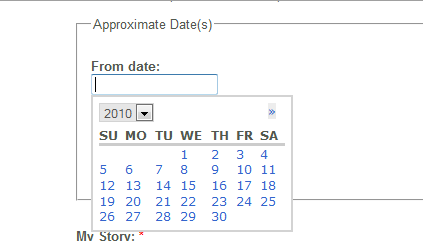
jenlamptonIn my date pop-up calendar I have a drop-down for year, but then nothing for month or day. (see date_picker.png)
I have a right-facing arrow, that when clicked moves forward in time, but no indication that the month-grid of days below has changed (even though it has - this becomes obvious if you move another month forward, where the dates fall on other days of the week). But, now that I've determined that the month is changing, there is no way to go back a month, since there is no left-facing arrow.
I don't remember this being an issue with previous versions of the date picker, but now that it is dependent on the jQuery UI, it seems to be behaving differently. :(
My set up:
Date 6.x-2.6
jQuery UI 6.x-1.4
Drupal 6.19
Comment #7
jenlamptonupdating title, category, and status.
Comment #8
acb commentedAlso seeing this issue. / Subscribing
Comment #9
jenlamptonI found it, the issue is with the latest version of jQuery UI. If you downgarde to 1.2.6 the date pop-up works as intended.
Comment #10
Aurélien commentedSubscribe
My set up:
Date 6.x-2.6
jQuery UI 6.x-1.4
Drupal 6.19
Comment #11
jenlamptonWhat version of the jQuery Library are you using? you need 1.6 not 1.7.
Comment #12
Anonymous (not verified) commentedIt's only a css problem, the year select float over the month select and the prev arrow
Comment #13
drclaw commentedUsually just clicking 'Save' on the date-popup configuration page fixes this for me...
Comment #14
dadderley commentedYup worked for me too. Thanks
Comment #15
frishaynes commentedSaving worked for me too. Thanks
Comment #16
j_ten_man commentedSaving does not do the trick for me. I had to add a little CSS to get mine to work. This isn't perfect and definitely specific for the English version:
.ui-datepicker-header select.ui-datepicker-month {
left: 2em;
}
.ui-datepicker-header select.ui-datepicker-year {
left: 7em;
}
This is just my workaround for the problem. Not sure what the actual solution is to the problem.
Comment #17
stacysimpson commentedSaving worked for us. We use JQuery UI 1.7.3.
Comment #18
jiv_e commentedNo activity. Probably works as designed, already fixed or not important. I'll close the ticket.