

 The 2026 Drupal Business Survey is open. Your response will help shape the future of the Drupal business ecosystem.
First off, thanks for all the work on the module.
I am running a test with the latest webform and am having trouble with the main Filemaker settings fields. I fill them out and save, but they don't seem to get saved. That is, when I return to the config screen immediately after saving the server address, database name, layout name, user, pass all of the fields are empty and the toggle is set back to 'No' in the 'Enabled' radio set.
I'm not sure what information would be helpful for debugging. If there's anything I can provide please let me know.
| Comment | File | Size | Author |
|---|---|---|---|
| #15 | fm-drupal.png | 537.08 KB | daengo |

Comments
Comment #1
flamingvan commentedI'd very much like to help you debug that. Could you let me know the following and I'll see if I can reporoduce the issue (assuming I have access to the platform)?
Platform (LAMP, windows, etc?)
Drupal version
Webform version
Thanks!
Comment #2
roginald commentedHere's the setup:
OSX Leopard Server
MYSQL 5.0.45
Apache/2.2.14
PHP/5.2.5
Drupal 6.19
Webform 3.2
To follow up to make sure I've done everything correctly, does there *need* to be a script that is run when the webform is submitted on the Filemaker side, or can that field be left blank? I have been leaving it blank, but everything else I am filling in with the proper information.
I also notice that after I submit that a couple of watchdog log entries are produced in an 'insert' category that seem to be related to the FM webform module. But again, i don't believe the actual inserts to FM are working.
Comment #3
flamingvan commentedHi roginald,
You are indeed correct that the script field is optional, it is only used when you want to run a filemaker script.
I installed the software that you are using and was able to replicate the problem and it should be fixed in the beta 8 version that I just released. The problem was related to the new version of Webform. I initially developed the filemakerform module with the beta version of the module. Things have changed.
Unfortunately, I think you're going to run into some other issues. Some are simple problems that I should be able to fix this week (I don't have access to FM server right now). A larger issue is related to your being on a mac platform. Another user was unable to get this module working on a mac and I was never able to resolve the problem (http://drupal.org/node/875214).
I might have the answer. What I didn't relaize is that there is a separate version of FX.php for the mac, but the one I included with my module is for Linux.
I do not have access to OSX Loepard and I was wondering if you could help me debug the module this coming week, either by running some tests or by giving me access to your server?
I will first focus on fixing remaining generic issues with the module that are related to the Webform upgrade. If you're available I'd then like you to test my module by using the mac version of FX.php. I will send instructions soon.
Comment #4
roginald commentedthanks for all the help. i would be more than happy to help testing in any way i can, except for server access, which i can't give for work related reasons.
i'll upgrade and grab the mac version of fx.php and see what i can see and report back.
thanks again for the help.
Comment #5
roginald commentedhi again,
so i updated to the latest(beta8) and the settings seem to be saved and maintained now. i haven't changed out the fx.php script yet. i googled for fx.php and found the what i believe to be the home page, but do not see a reference to a linux vs. mac version of the script. at any rate, if you have a mac version i will gladly test it.
when testing the module with a simple two field form, i am getting the WSOD and this in my error log:
PHP Fatal error: Cannot use object of type FX_Error as array in /path/to/drupal/sites/all/modules/filemakerform/includes/filemaker.inc on line 21, referer: http://www.mydomain.com/test/register
hope this helps.
Comment #6
flamingvan commentedHi,
I'm not exactly sure what's happening there. Seems like it might be a mac related problem.
The fx.php download is here: http://www.iviking.org/downloads/fx.zip
When you unzip that archive you'll find two folders, one labeled FX and the other labeled MACOSX, so you might need to use that MACOSX version. I don't have any experience with it but I'll assume it works the same way.
In the module FX resides in the 'includes' directory, so you will need to replace that folder with the mac version. I don't know why, but all the FX mac file names start with "._" (ie "._FX.php") so you may also need to change the include_once statements in the module. So in the file includes/filemaker.inc you might need to replace every instance of this line:
with this:
But like I said I'm not sure about that. I am getting a fair amount of interest from mac users so I am hoping somebody will lend me an OSX server to debug this thing on. Otherwise I might see if I can purchase hosting somewhere.
Comment #7
roginald commentedI downloaded the archive and unzipped, but only see the FX directory, no MACSOSX.
Also, it seems odd that there would be a separate MAC version since Filemaker is so Mac-Centric to start with. And the README doesn't mention a need for differing scripts.
Please let me know if I am missing something, or if I did something wrong.
Comment #8
flamingvan commentedThat's strange because I definitely see another folder named __MACOSX in that archive. However, I don't understand why there would be a separate version either.
I managed to reproduce your bug by setting the wrong FM password in the form settings. Could you double-check your settings and permissions? In the meantime I am going to add some code to the module which should test settings and help users debug them. I should have that to you soon.
Comment #9
roginald commentedI still need to check the Filemaker permissions, but I grabbed your latest module version, and now no WSOD, but I get this in watchdog:
Couldn't insert data into filemaker. FM error code: 100
Hope this helps.
Comment #10
roginald commentedFollow up. Sorry for the hassle but it would appear as though, for the moment, we aren't being allowed to use the PHP service feature of Filemaker Server, and so I can't test this module. Sad, as it sounds really awesome. I'll test again if I do manage to get it turned on.
Comment #11
flamingvan commentedHi,
I actually JUST released a beta11 version of the module with some improved error reporting. This one is working very smoothly on my platform and I have been unable to break it.
Error code 100 means "file is missing". However, when I set an incorrect username or password I also get that error code.
I hope you'll be able to test the module. I have been working hard on it.
Moses
Comment #12
flamingvan commentedPS
If you'd be interested in testing the module I could set up drupal on my own server to interact with your database. If that would help just let me know.
Comment #13
roginald commentedSUCCESS! I was able to get permissions enabled and updated to your latest module and am happy to report a successful test submission and insertion into my FM database.
Thanks again and I'll report back if I find anything else.
Comment #14
flamingvan commentedFantastic! Thanks for testing that out and reporting back. Please do let me know if there's anything else.
Comment #15
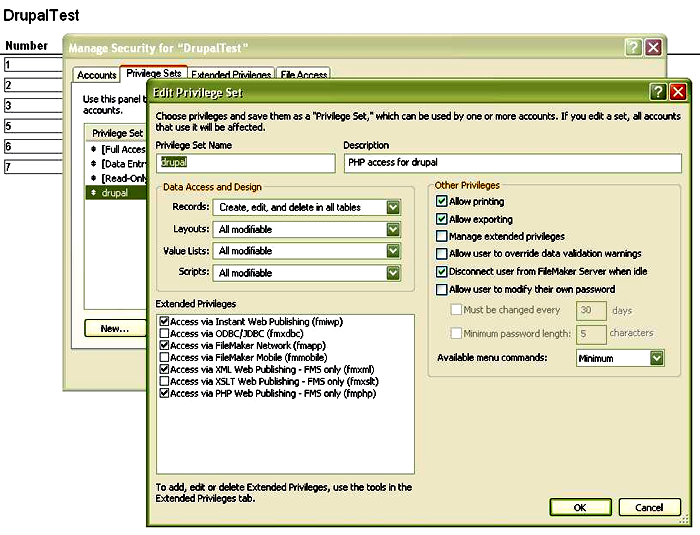
daengo commentedwe kept getting the error 100 message in my recent errors log:
Couldn't insert data into filemaker. FM error code: 100
we then went to the permissions and updated them per the screenshot and now this module works like a charm!
dan
Comment #16
flamingvan commentedThe Error code 100 seems to be occurring when there is an invalid username/password.
Comment #17
flamingvan commented