

Needs work
Project:
FFmpeg Wrapper
Version:
6.x-1.1-beta2
Component:
Documentation
Priority:
Normal
Category:
Bug report
Assigned:
Unassigned
Reporter:
Created:
16 Sep 2010 at 08:59 UTC
Updated:
4 Oct 2010 at 13:41 UTC
Jump to comment: Most recent file

Comments
Comment #1
imDhaval commentedComment #2
imDhaval commentedat http://drupal.org/node/690950 ifound this
Setup: Windows Server 2008 + IIS 7 + MySQL 5.1 + PHP 5.2
To make the ffmpeg thumbnailer function correctly you need to do a few things and make sure they are done properly;
1. ffmpeg.exe needs to be located at C:\ffmpeg\ffmpeg.exe <- copy this directory and paste it in the Video Converter Path setting
2. ffmpeg.exe is a command script, if you are on Windows like I am then go to your server C:\Windows\cmd.exe <- open Security and set permissions for Internet Guest Account (usually: IUSR_computername) to READ AND EXECUTE
3. Go to Site Config > File System > make sure the Temporary Directory gives * IIS_IUSRS READ AND EXECUTE PERMISSIONS * <- VERY IMPORTANT
4. If you still receive errors but the movie uploads and is playable you have permission problems, took me hours to figure this out.
so i do like that,
i put ffmpeg.exe at "C:\ffmpeg\ffmpeg.exe"
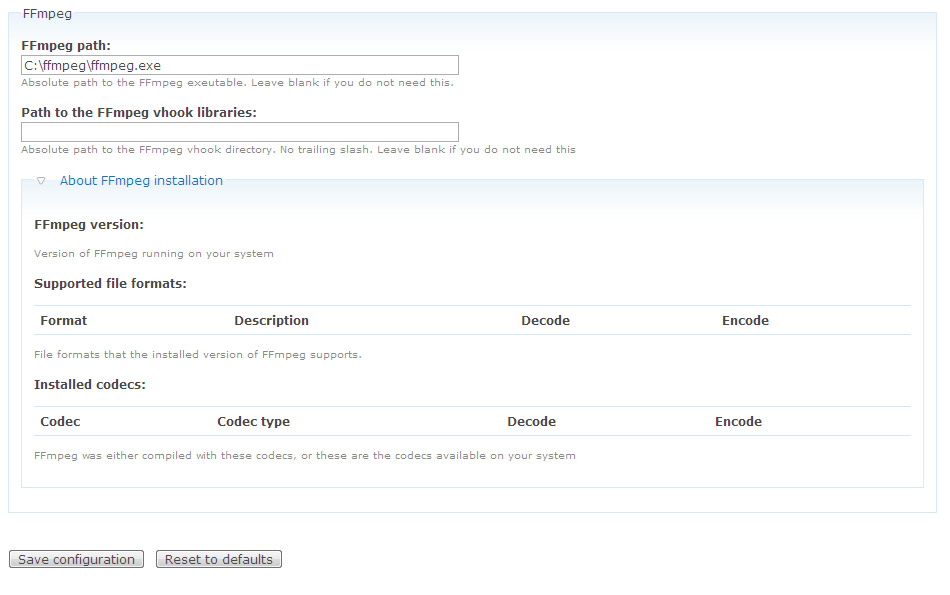
n at FFmpeg Wrapper Settings page , i set FFmpeg path to "C:\ffmpeg\ffmpeg.exe"
n i save this
so this error is solved
FFmpeg Wrapper could not find the path to the FFmpeg binary. You will need to set this by hand at: admin/settings/ffmpeg_wrapperbut in About FFmpeg installation , i can't see the FFmpeg version info
i downloaded ffmpeg.exe from http://ffmpeg.arrozcru.org/autobuilds
please help me......
Comment #3
imDhaval commentedComment #4
imDhaval commentedat FFmpeg Wrapper Settings page , i set FFmpeg path to "C:/ffmpeg/ffmpeg.exe" instead of "C:\ffmpeg\ffmpeg.exe"
n now i can see the FFmpeg version info
like this
FFmpeg version:
FFmpeg version SVN-r25128, Copyright (c) 2000-2010 the FFmpeg developers built on Sep 16 2010 04:13:19 with gcc 4.4.2 configuration: --enable-gpl --enable-version3 --enable-libgsm --enable-pthreads --enable-libvorbis --enable-libtheora --enable-libspeex --enable-libmp3lame --enable-libopenjpeg --enable-libschroedinger --enable-libopencore_amrwb --enable-libopencore_amrnb --enable-libvpx --arch=x86 --enable-runtime-cpudetect --enable-libxvid --enable-libx264 --extra-libs='-lx264 -lpthread' --enable-librtmp --extra-libs='-lrtmp -lpolarssl -lws2_32 -lwinmm' --target-os=mingw32 --enable-avisynth --cross-prefix=i686-mingw32- --cc='ccache i686-mingw32-gcc' --enable-memalign-hack libavutil 50.27. 0 / 50.27. 0 libavcore 0. 9. 0 / 0. 9. 0 libavcodec 52.89. 0 / 52.89. 0 libavformat 52.78. 5 / 52.78. 5 libavdevice 52. 2. 2 / 52. 2. 2 libavfilter 1.39. 0 / 1.39. 0 libswscale 0.11. 0 / 0.11. 0 Expected number for v but found: -v
Comment #6
verta commentedCould we put something in the docs or maybe even on the screen to say that if you use backslashes, it will not work? (Seems like this might actually be a code bug, but I will leave that to the devs.)