
What is Managing News
On this page
- Introduction
- Both a product and a platform
- Out of the box
- Maps and geotagging
- Summary
- How do I get started?
- See also
Introduction
Managing News is a pluggable, open source news and data aggregator with visualization and workflow tools that are highly customizable and extensible. The code is now in open beta and is available for download on http://www.managingnews.com/download. Managing News offers:
- Aggregation of RSS/Atom/Pubsubhubub news
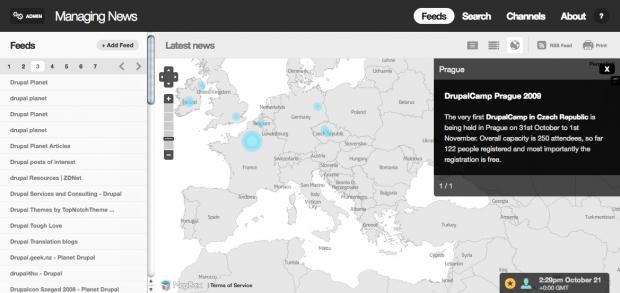
- Displays of news as lists, on a map or as an activity graph
- Searchable news
- Republishing of news by bundling articles into channels
- Configurable location tagging
- Configurable maps
Both a product and a platform
Managing News is both a product and a platform. Out of the box it can help your communications team manage a brand reputation, allow geographically dispersed clusters of NGOs stay on the same page, or act as a simple thematic news planet to share feeds with the world. It can also serve as a platform to build highly custom data aggregators that suck in everything from CSV to RDF to custom XML formats and that need unique workflows and visualizations. Managing News is built on Drupal and uses Features, which makes it highly extensible.
Out of the box
It takes just a few minutes to install it (read the system requirements). Once it's installed, you can immediately add news feeds or import your OPML, and Managing News will start aggregating stories, geotagging articles, and mapping it all.
Once news is aggregated in Managing News, you can run full text searches across all sources, save searches, graph term activity, and flag stories by creating channels (which are like story buckets used to collect articles). Managing News provides full RSS feeds of each page and of each channel, so you can broadcast out saved searches and channels.
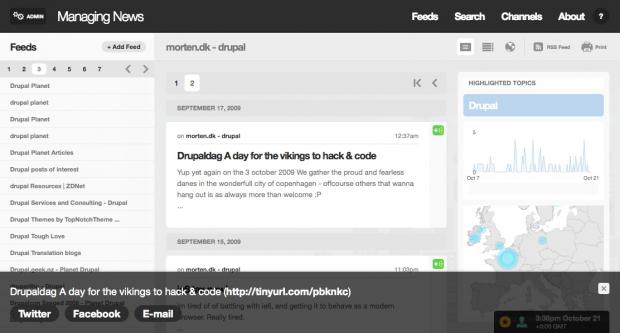
Every page in Managing News - even the map view - can be printed in nice print reports, which are helpful if you're doing news clippings or want to share the news in a non-digital medium. There's also a share feature that allows you to post stories directly to Twitter, Facebook, and email with integrated URL shortening, allowing you to control your online presence from one place as well as share stories with colleagues.
Each channel, search and display type also includes an embeddable widget which displays a feed of the most recent content and can be added to virtually any other web site.
Maps and geotagging
Managing News ships with four maps of the world: world glass (transparent), light gray, dark purple versions from MapBox.com, and the classic OpenStreetMap map. Geotagging content is simple - it's just a full text look up on all countries and the top 1,100 cities in the world, but this is highly extensible. As you can see in the examples of Managing News in use (1 2 3), you can add your own geo terms to the geotagging feature, or even use Yahoo Placemaker for automatic geotagging.
Summary
Managing News is about more than tracking breaking news. It's a starting point for building serious aggregation and data visualization tools. We see Managing News growing into a dynamic tool for crisis mapping, one of its many valuable use cases.
The Managing News package that's available today is the culmination of a lot of experimentation and experience working on aggregation and data visualization tools. We are working to integrate some of the successful outcomes from this experimentation into our day to day business, and we're also working with several different open source communities to ensure that this innovation is sustainable. In the end, everyone wins when tools are open source, and we thank the Knight Foundation for having the vision to help us make this happen. We can't wait to see the awesome applications people build on top of Managing News, and we look forward to working together in the forums on future releases of Managing News that will create even more possibilities.
How do I get started?
First, take a look at the Quick Start Guide. This will walk you through the steps of installing and setting up your first feeds in Managing News. Then, browse through the case studies section, which demonstrates a few practical applications. Finally, as you have time, read through the other documentation pages (there's not too many) to discover the full feature set of Managing News.
See also
Related pages
- Search and Saved Searches
- Broadcasting News with Channels
- Customizing Maps
- Public Facing Site
- Starting Point for Custom Applications (Afghanistan Election Site)
- How to Install
- Hosting Requirements and Suggestions
- Adding and Modifying Feeds
- Glossary
- Press Clipping Tool
- Share News Via E-mail or Social Networks
- Case Studies
- Quick Start Guide
External resources
Help improve this page
You can:
- Log in, click Edit, and edit this page
- Log in, click Discuss, update the Page status value, and suggest an improvement
- Log in and create a Documentation issue with your suggestion
