

Needs work
Project:
Auto Assign Role Blocks
Version:
6.x-1.0
Component:
Code
Priority:
Normal
Category:
Support request
Assigned:
Unassigned
Issue tags:
Reporter:
Created:
24 Sep 2010 at 03:57 UTC
Updated:
8 Dec 2011 at 19:21 UTC
Jump to comment: Most recent file


Comments
Comment #1
nicholas.alipaz commentedI can't reproduce this nor does this module do anything on cron runs (or rather implement hook_cron()). Please test again on a default drupal installation with only this module and it's requirements. My only idea for you is that one of your other modules only takes a poop when this one is enabled, conflicts with another module in some other way, or perhaps you are reaching some sort of server/php memory threshold whenever enabling this module along side of the others you have enabled.
Comment #2
davethedruper commentedThank you for the response, I've reproduced it again on a third site with a limited amount of modules. Running cron didn't have an affect on it but I seem to have focused it on moving the AutoAssign Role Blocks to the content section. I've just created my own blocks with the links inside of them because I'm not sure how to fix this, maybe it's the way I set up AutoAssign Role or that I'm using AutoAssign Role 6x 1.1. Thanks again for your help but I'll just create my own blocks because I need to use version 1.1 for my sites. Just in case here is the error again with the other site.
Fatal error: Cannot use string offset as an array in /home/content/a/r/c/mysite/html/includes/form.inc on line 990
Comment #3
nicholas.alipaz commentedUnless someone can tell me the settings and such to reproduce this with only this module and it's required modules or perhaps name other modules that conflict to cause this then I am postponing. If I don't receive any further feedback then I will just have to close as "can't reproduce."
Comment #4
nicholas.alipaz commentedComment #5
JayKayAu commentedI came across the same problem. Though not with cron, but while I was trying to access the site with two different browsers (each logged in as a different user).
1. Start with an "Assign from path" configured for a particular role, as well as a corresponding block.
2. Remove the "Assign from path" for that role (as well as the corresponding block?) is if to discard it.
3. In another (secondary) browser I was already logged into the site but wanted to logout then login as a different user.
4. Immediately on logging out I got the above error message.
5. My main browser kept working, I suspect, because I remained logged in. Let me just test if Chrome has the same issue on logout... yep, it happens on logout.
6. After disabling autoassignroleblocks with Drush, I'm able to view the site again, and I get this message:
warning: extract() [function.extract]: First argument should be an array in [site-name]/modules/autoassignroleblocks/autoassignroleblocks.module on line 206.
I don't know how to roll patches and fix this stuff by myself yet, but I hope that helps regardless :)
Comment #6
nicholas.alipaz commentedThe steps you outlined are useful in troubleshooting the error, and perhaps there should be some way of disabling the misconfiguration of this module. From what I can tell, you are doing something the module would not like. I believe it requires a path for each registration to work, perhaps that should also be noted in documentation.
Comment #7
iknowbryan commentedI'm having an issue that I think belongs here. I set up content profile and AAR (dev) - that seemed to be working great.
Then I added AAR blocks. The site was fine when logged in. But when not logged in I get a white screen of death on any page that contains the AAR Block.
I hit the back button to the last page and (sometimes) see
"warning: extract() [function.extract]: First argument should be an array in [site-name]/modules/autoassignroleblocks/autoassignroleblocks.module on line 206."
Please let me knoe if you need any other info to get this fixed up.
One note - I saw the comment that " it requires a path for each registration to work" not sure what this means... please explain so I can try to see if this helps my issue
Thanks!
-=b=-
Comment #8
nicholas.alipaz commentedWhen setting up the auto assign role module, you should set a path for each role. If you don't, this module will not be able to operate properly.
Thanks for the extract() error. I can probably write a check to see if the element is actually an array, that might help with that part.
Comment #9
ufku commentedThis is because of the $form argument by reference in autoassignroleblocks_drupal_get_form.
I think this module should just use drupal_get_form and hook_form_alter to change form's action attribute.
Some global variables can be set before calling drupal_get_form so they can be checked in form alter.
The function autoassignroleblocks_user_registration_formalterations seems unnecessary as admins can do it using CSS.
Comment #10
nicholas.alipaz commentedThe css approach could be a solution. I know that I did the autoassignroleblocks_drupal_get_form and etc for a good reason. It is because drupal_get_form returns a string, and not a $form array. I did it to reconstruct the array and have access to changing the action and other elements. If anyone has a better solution to what it was I did in the module, then I would be glad to accept suggestions/patches.
As for the error, I don't see how the error is related to the reference, but am open to a more in depth explanation. In my experience it is due to configuring the module without each role having a path set for the autoassignrole page. I currently plan on implementing a better check for this misconfiguration and some sort of validation.
Comment #11
j0e commentedHi Nicholas, I got this same fatal error (not related to cron) when I switched from the original version of this module you developed with the auto assign role block namespace to this one on d.o. I've attached essentially the one i have and edited the version info and updated the name to reflect the new name. This exact copy I've attached is working perfectly on my server right now, whereas the module on d.o. does not work on my server and throws Fatal error: Cannot use string offset as an array. It could be perhaps a setting that we're misconfiguring, but because i have been through this multiple times, and can only get the one i'm attaching to work, perhaps the root of the problem is that something was emended, or not emended, when the name was switched. Also, in the one I've attached, i have removed /user from line 189 of the .module file, as that prepends a /user path to the registration path already entered in the auto assign role assign from path settings. When I remove /user, I don't get a 404 error anymore and everything works properly.
Regards,
Joseph
Comment #12
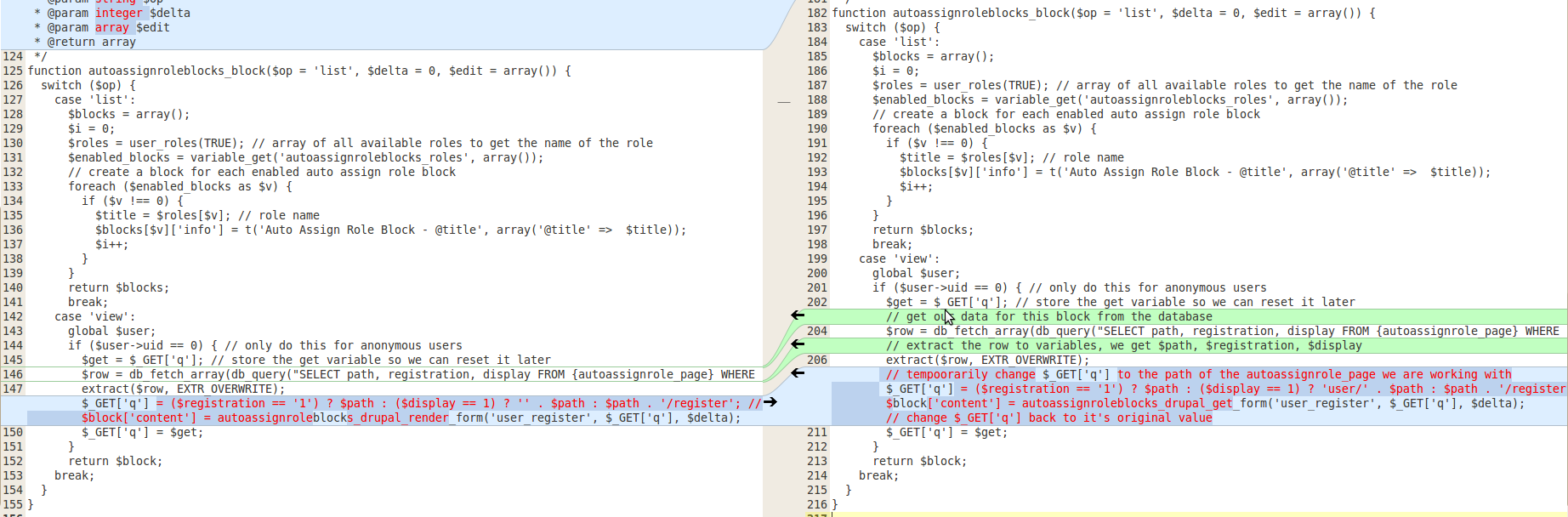
nicholas.alipaz commentedI did a quick meld diff view of the version you have posted to see if there are any striking differences initially. From what I can tell, there is nothing too serious. Let me know if anyone else sees anything obvious in the differences in the attached images.
The left column is j0e's version and the right is the current 6.x release.
Comment #13
nicholas.alipaz commentedperhaps it has to be an issue with the $form variable not being set in the Screenshot-6. i could add a check before running that function.
Comment #14
john.money commentedConfirm wsod with following install:
...at least those are the modules which impact user registration. Block is placed in a Panels pane.
Attached is patch which solves wsod. These are same changes proposed in #11.
Tested two separate role blocks. Block for any role which does not replace the default registration page submits perfectly, including preserving any form values on form error. Block for the default registration page loses all values (no errors shown, redirected to empty form).
Not sure intent of the $_GET['q'] registration, display logic, but simply setting that to $path works for both non-default and default, preserving any form values on form error.
Comment #15
Enemy commentedIt's works! Good!
Comment #16
nicholas.alipaz commentedJohn Money, I believe that in some configurations of autoassignrole that your patch might not work since you removed all the parameters to $_GET['q']:
I will mark this as 'needs review' since it seems to me it might need to be tested in more configurations.
Comment #17
nicholas.alipaz commentedComment #18
crash98 commented#14 works perfectly - no problems so far while embedding the AAR forms in content panes on various pages.
Tested with:
-Drupal 6.22
-AAR 6x-1.2
-Content Profile 6x-1.0
-LoginToboggan 6x-1.1
After submitting a form with required fields left blanc (or any other error), the destination is the AAR path for the specific role.
So still a fix is required setting the destination to where the form is at.
Thx for the fix man!