

 Come together with the global Drupal community in Rotterdam, 28 Sept – 1 Oct 2026. Sessions, contribution, connection, and Early Bird savings until 8 June.
I'm trying to theme the date browser label of a view I created.
I'd like to substitute the 'month of 03/06/2006' label with the name of the month (eg. June).
To do so I overrided the label theme function but I don't understand how to change it.
This is my template.php file:
<?php
function phptemplate_date_views_browser_period_label($period, $date) {
  include_once(drupal_get_path('module', 'date') .'/date.inc');
  // use the m/d/Y part of the preferred short date format
  if ($period != 'hour') {
    $format = array_shift(explode(' ', variable_get('date_format_short', 'm/d/Y - H:i')));
  }
  else {
    $format = str_replace(':i', '', variable_get('date_format_short', 'm/d/Y - H:i'));
  }
  return t('%period of %date', array('%period' => ucwords($period), '%date' => date_gmdate($format, $date)));
}
?>
Any help appreciated.
Dodo


Comments
Comment #1
dodorama commentedI finally solved it my self.
I post here the solution in case people want to do it.
This will print 'August 2006' instead of Month of '01/08/2006'
Comment #2
dodorama commentedComment #3
dodorama commentedI re-opened and changed this to bug report cause as stated here the theme function that display the period label doesn't take in account different from default date format as set in the drupal date and time settings.
Comment #4
karens commentedI don't understand. You can set up whatever you want in the theme, so what is the bug?
Comment #5
dodorama commentedThe problem is that actually the theme function take the medium format string, explode it using spaces as separator and print the first value of the array.
This means that if I keep the medium format default value it prints 08/01/2006 but if I change the display of medium format in drupal date settings (for example 2006, August 1 - 12:00) it prints just "2006,".
It's true that I can theme it and change that function (as I did) but for normal user this is a weird behaviour.
So, I was wondering if there's a way to recognize which format I'm using or to use the format I set in the date field setting.
Hope this is clear, now.
Thanks,
Dodo
P.S. I tried to find a solution but I haven't be able to.
Comment #6
karens commentedOK, now I understand. I'll take a look at it soon.
Comment #7
karens commentedI thought the theme in the module was using the medium format, which won't work this way, but it uses the short format, which will work fine. There is no problem in the module, the problem is in the way you altered the theme. You just need to find a different way to get the results you want since you can't explode the medium format and get the right results. There's nothing to change in the module.
Comment #8
dodorama commentedIt's true; it uses the short format, but this doesn't change the fact that if I choose to display the short format in a different way from default (i.e. '2006 Nov 19 - 14:58' ) it just will display '2006' as label since the original function explode the string using spaces as separators and than (array_shift) return the first value.
therefor with the default short format ( 11/19/2006 - 14:58) everything is ok but once I make a change, it won't work correctly.
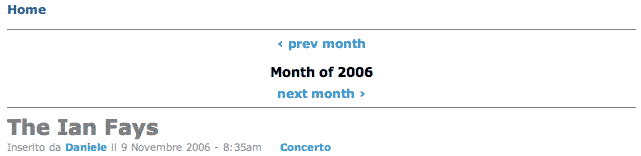
There's a screenshot that shows what happens with the above short format selected(there's no ovveride applied).
Anyway I think this a minor issue that can be left as is since the function is themable.
Tell me if I'm wrong.
In the meanwhile I re-open the issue.
Thanks.
Comment #9
karens commentedI'm not saying you're wrong, I'm saying the included theme works fine. If you want to change the included theme, for instance, by using a medium date format instead of a short date format, it's up to you to figure out how to make it do what you want. I can't create a module where you alter the theme and make any guarantees that your altered theme will work.
You can use any of the php date format strings in your theme instead of trying to make something work by manipulating the medium date format. My method of exploding the short date format was just an easy way to get a result and it only works on the short date format because the other date format strings are less predictable.
Comment #10
dodorama commentedI'm really sorry, Karen. I didn't mean to bother you.
I promise that this is my last post on this issue and I'm not going to reopen it (I had enough, too), but I think that I wasn't able to let you understand where's the problem (for sure because of my bad english and cause I mixed different topics together)...
anyway, this is my last attempt:
The problem occurs with the included theme (therefor without applying any customization (no theme override, no custom template, no customization at all!)) simply by selecting a short date format (in drupal/admin/settings) that display the date using spaces as separator instead of slashes (for example the one selected in the screenshot).
So forget my theme override template I proposed above and try this in a fresh drupal installation:
1. create a date browser view.
2. go to www_yourtestsite_com/admin/settings and choose the last select option (should something like '2006 Nov 20 - 02:05') as short date format on the date settings collapsible.
3. visit your date browser view URL
4. The label should display 'month of 2006 that doesn't mean anything.
In case this doesn't happen consider me a sucker.
feel free to skip this post and go on with the great job you're doing with this indispensable module.
Dodo
Comment #11
karens commentedOK, now I really understand. Yes, you are right. I'll have to think of another way to do this. And it is no bother, you have been very helpful on this module so I don't mind when you insist I am missing something, especially when you are right :-)
Comment #12
(not verified) commented