

 The 2026 Drupal Business Survey is open. Your response will help shape the future of the Drupal business ecosystem.
Hi,
I am trying to have a Date argument work as intended without success.
In my example I have two nodes, one created 12 October 2010, another created 13 October 2010.
I created a View with a Date(node) argument.
As a Date Field(s) I checked "Node: Post date"
As granularity I checked "hour"
Now I run it at:
www.mysite.com/myview/DATEARGUMENT
and the behaviour is this:
1) if DATEARGUMENT is 2010-10-12 both posts are shown (wrong, only the one created in that date should be shown)
2) if DATEARGUMENT is 2010-10-13 both posts are shown (wrong, like above)
3) if DATEARGUMENT is 2010-10-11 no post is shown (correct)
4) if DATEARGUMENT is xyz or other random strings, both posts are shown (wrong)
I just want to display nodes created in the Argument's DAY. What am I doing wrong?
| Comment | File | Size | Author |
|---|---|---|---|
| #3 | Capture.JPG | 108.23 KB | arlinsandbulte |

Comments
Comment #1
arlinsandbulte commentedThe granularity of your argument setting should be set to "day"
Comment #2
Aldus commentedI did it right now, tested it, the situation is still the same. Might an export of my view be of any help?
Comment #3
arlinsandbulte commentedI've never really tried either importing a view or deciphering the output.
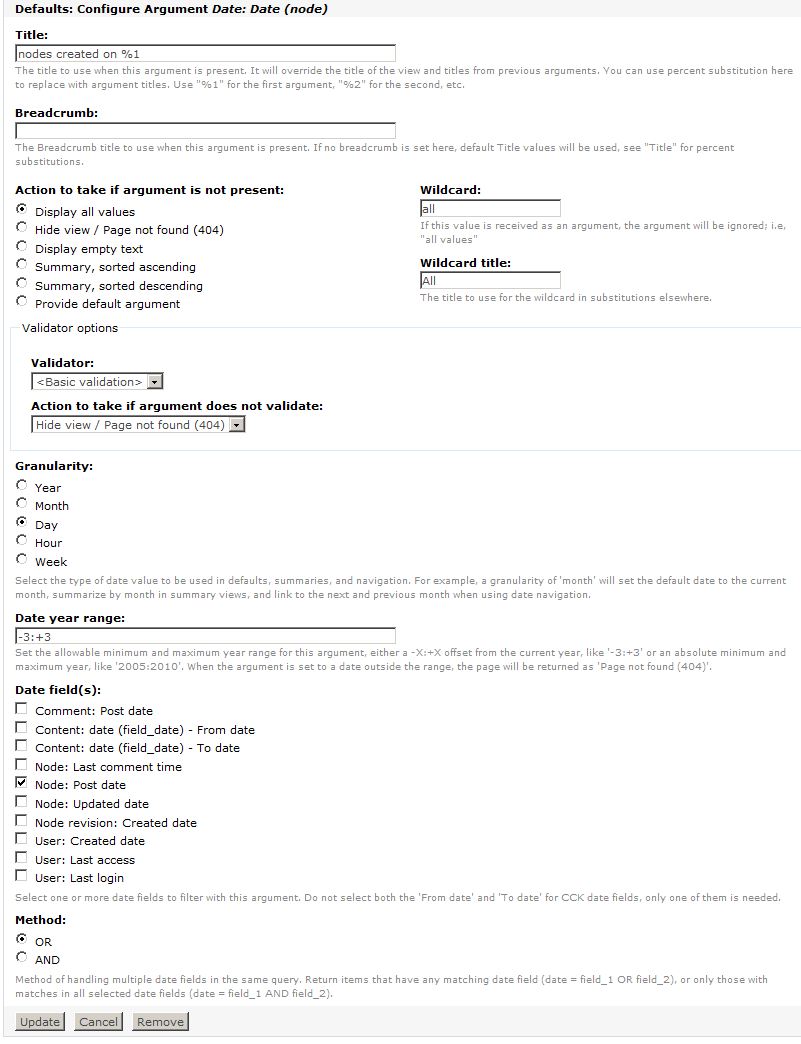
Here is a screenshot of a quick view I created with argument settings that seem to work for me.
Comment #4
Aldus commentedSeems identical to what I have. WHen you give the argument, do you pass it as YYYY-MM-DD ?
I call my page this way:
http://mysite.com/myview/2010-10-13
Comment #5
arlinsandbulte commentedPretty much, yes.
I use a path of http://mysite.com/view_path/2010-10-13
Comment #6
Aldus commentedIt seems like working if I use Node Revision: Created as an argument. But i.e. doesn't work with the Node Updated date.
Setting the date argument as Node: Updated (granularity Day) and Calling:
www.mysite.com/myview/2010-10-13
gives me also a result for a node which was updated 2010-10-12. This is proved by the use of the Node: Updated date Field, which is clearly outputting 2010-10-12.
Maybe I should turn this to a bug report
Comment #7
Aldus commentedComment #8
Aldus commentedThe mistake seems to be located in the generated query.
To reproduce simply create a view, add Node: Title as a field and a Date(Node) as an argument. Pick node(updated date) as date field and "Day" as granularity. Then run the view passing as argument the value 2010-10-12... It will generate this query:
This query is wrong and returns ALL THE NODES as soon as it finds some node which was updates in that date!
The correct query would be this one:
I'm not sure I'm able to patch it, but I'll give it a try
Comment #9
Aldus commentedinteresting update: if I use the node revision: Created Date filter, the bug doesn't appear: the SQL code is in facts correct (see below).
Unfortunately for my application is trivial to select only nodes filtered by updated date and a range (which is the reason to use DateAPI instead of the standard Node: Updated Date field).
If there is something I can look in to help please let me know, thanks
Comment #10
arlinsandbulte commentedHere is the SQL code I get which is working...
This was made with a newly created view. The ONLY things I did to the view was add the argument as above & added a page display.
No filters, no sorting, no relationships...
Comment #11
Aldus commentedInteresting... I also pasted code from a newly created view.
The presence of this in my code:
LEFT JOIN node node2 ON node.tnid = node2.tnid
is probably related to translations/multilingual system (it checks tnid). Do you make use of locale / i18n?
However I'm going to try it in a fresh install and see what comes out.
Comment #12
Aldus commentedI confirm that the bug appears when the Content translation module is enabled. Unfortunately I have no idea where to get started to work on it, where is the problem born? In DateAPI, in Views, in Content translation?
Some workaround using relationships?
The bug is blocking for anyone needing to use DateAPI arguments in a multilingual site.
Comment #13
drinkingcoffee commentedI can confirm this on my site.
That extra LEFT JOIN node node2 ON node.tnid = node2.tnid makes mysql *very* upset.
I can also confirm that switching from using the Date API to Node:updated seems to do the trick.
Now I'm going to have to hunt through all the views on this site to see if this problem is appearing elsewhere (but with less noticeable effects).
Comment #14
kdebaas commentedsubscribing
Comment #15
Ecio commentedsame problem here, looks like the problem is related to Date API:
http://drupal.org/node/904038
http://drupal.org/node/477068
i think i will switch from Date to Node:Created (another workaround seems to be disabling content translation module)
subscribing.
Comment #16
Aldus commentedI think those are not workarounds for anyone using a multilingual site. Also, I need to use date range features (like 2009-12-20--@).
If someone has some hints about how to get started fixing this, would be appreciated
Comment #17
rup3rt commentedSubscribe
Comment #18
MichaelP commentedConfirming the
LEFT JOIN node node2 ON node.tnid = node2.tnidphenomenon on a multilingual site.Bit of a show stopper, but a workaround I am able to use is the Node: Created year + month argument, which doesn't seem to suffer from this issue.
Comment #19
MichaelP commentedActually patch at #904146: Double join on the node table when using the date argument for the node creation date seems to fix this.
Marking this as fixed, as from the heading it hardly seems like a dupe.