

 Come together with the global Drupal community in Rotterdam, 28 Sept – 1 Oct 2026. Sessions, contribution, connection, and Early Bird savings until 8 June.
I have a clean install of the latest Drupal 4.7.4 (with back ported garland theme), latest CCK 4.7, latest Views 4.7 and latest Date 4.7 modules. Minimal install with very few core modules enabled.
I created a new node type and added Date field to it, saved it, then changed it's configuration to allow multiple fields.
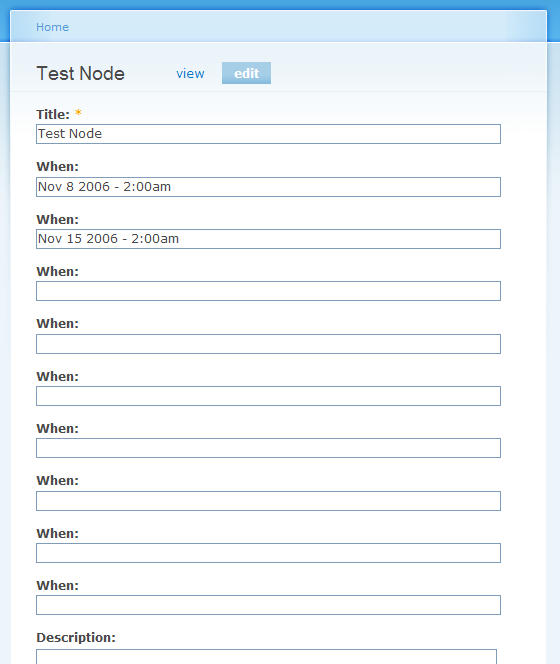
When I create a node of this type I am given 3 blank Date fields to start with. I leave them empty or fill them up with some dates and saved the node. When I edit this node again I now have 6 Date fields regardless of whether all 3 original fields were filled or not. If I save it and edit it again it becomes 9 and number keeps growing after every save. So every time I edit the node I have 3 additional empty Date fields added.
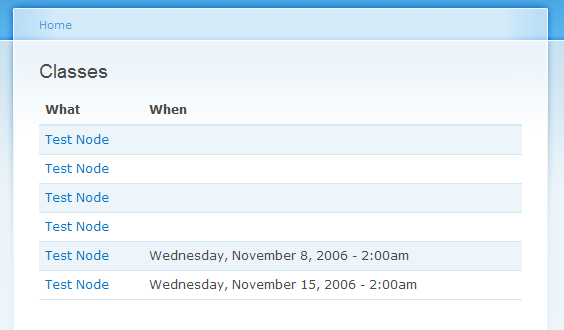
Another problem I noticed when a node with multiple Date fields displayed in a table view, the table will show the same node in multiple rows, creating as many rows as there are dates in the node (which is expected), but it also adds a row for every empty date field, which should not happen, especially when there are 9 or more empty fields.
I'm guessing the contents of the additional Date fields are not being checked and when node is saved these empty fields are still stored in the database.
| Comment | File | Size | Author |
|---|---|---|---|
| #6 | view_1.png | 16.58 KB | sshvetsov |
| #1 | view_0.png | 18.11 KB | sshvetsov |
| edit_0.png | 19.7 KB | sshvetsov |


Comments
Comment #1
sshvetsov commentedHere's how the view looks with one node in it.
Comment #2
karens commentedThe second issue is a basic CCK multiple fields issue -- all CCK multiple fields behave this way and the Date module can't do anything about it. There is a CCK issue exploring fixes for that.
The second I suspect has to do with the recent change to fix the handling of non-required fields, but I need to explore it to be sure of the best solution.
Comment #3
karens commentedI found the problem and committed a fix to both cvs and 4.7 branches.
Comment #4
karens commentedBTW, the current behavior is to display 3 blank fields after any saved fields. This is the current CCK handling method which is being discussed, since we need to identify exactly how many instances to display. I won't fix this until a decision is made generally about how CCK will handle this.
My latest commit should fix the problem of saving all those blank fields, though. If you leave the field blank, it won't get saved.
Comment #5
sshvetsov commentedI have no problem with three empty fields showing up when page is being edited. It makes sense. I just don't want the empty fields to be saved. If they aren't saved, they probably won't show in the view either. I'll give this fix a try right away. Thank you for working on this module.
Comment #6
sshvetsov commentedTested, works perfectly.
Now only the non-empty fields are stored in the database and no extra rows created in the table view. Exactly the behavior I would expect. Thanks for the fix.
Comment #7
Paso commented" When I create a node of this type I am given 3 blank Date fields to start with. I leave them empty and saved the node. When I edit this node again I now have 6 empty Date fields. If I save it and edit it again it becomes 9 and number keeps growing after every save. So every time I edit the node I have 3 additional empty Date fields added."
This Bug still exist.
Only filled fields would be inserted in database... and when i delete a date from node, the item would be deleted from database, not update with empty value.
Thanks for your job.
Comment #8
karens commentedWhat version of the module are you using? You may have an outdated version.
Comment #9
Paso commentedI'm using current default release (4.7.x-1.0, 20/11/2006 - 08:45, 49.32 KB).
I've also tried version 4.7.x-1.x , but i've the same problem.
Comment #10
Paso commentedFor best debug, the setting of my date field is:
Date - Select List - Multiple
Comment #11
Paso commentedUpdate: I've the problem only setting the field as "Select List".
Setting the field as "Text Field" it work fine.
Comment #12
(not verified) commentedComment #13
bones commentedI have this problem still, I was using date-4.7.x-1.0 and then found this bug report so updated to date-4.7.x-1.x-dev but the problem still persists. I am using date fields with text entry.
Comment #14
bones commentedAfter altering the date fields, the existing date fields now bring up sql errors:
user warning: Column 'field_multi_date_test_value' cannot be null query: INSERT INTO node_data_field_multi_date_test (field_multi_date_test_value, vid, nid, delta) VALUES (NULL, 52, 30, 0) in /drupal/includes/database.mysql.inc on line 121.
I then created a new date field, and this field has the original bug, it keeps on increasing the number of fields.
Is this still a bug, or is it that I have not updated the module correctly?
Comment #15
bones commentedI looked into KarenS previous fix to see where this problem is coming from, as it does not update the database tables the previous error is unrelated. In that fix it checks if the value is null: (line 472)
if (!$item['value'].....I found that this is not null, because it still is an array, but each value in the array is null. I therefor changed it to:if (!$item['value']['year'].....so it will now check if year is null and it works a treat.I am not really a coder so apologies if this isn't a proper fix!
Comment #16
karens commented@bones, thanks! That was indeed the source of the problem. I need to change your solution a bit to keep it from breaking multiple value fields that were not selects, but the fix has been committed to all branches.
Comment #17
(not verified) commented