

Active
Project:
CKEditor SWF - Enhanced Flash embedding plugin
Version:
7.x-1.0-beta1
Component:
Miscellaneous
Priority:
Normal
Category:
Support request
Assigned:
Unassigned
Reporter:
Created:
15 Oct 2010 at 08:42 UTC
Updated:
27 Sep 2011 at 07:26 UTC
Jump to comment: Most recent file



Comments
Comment #1
anrikun commentedHi samdds.
Obviously, you did not configure the module properly.
Please do it again reading the full documentation on the project page.
Or use my contact form and send me credentials to login to your site so that I do it for you.
Comment #2
Applebee commentedI've got exactly the same issue. And I suppose I followed the steps. Could you help me?
Comment #3
anrikun commentedPlease use my contact form and send me credentials to login to your site so that I check your configuration.
Comment #4
Meeyo commentedsubscribing
Comment #5
ikarusweb commentedsame problem, dont see the flv player but load a white flash quad.
can u help me plz?
Comment #6
anrikun commentedI cannot help you without knowing more.
Most likely you did not follow the project page instructions properly.
If you want, I can check your config but I need some credentials to login to your site.
You can send them using my contact form.
Comment #7
pablogy commentedHow do I setup flowplayer as the video player?
I downloaded flowplayer and changed the settings in the ckeditor swf menu
----------------------------------------------------
return array(
'video/x-flv' => array(
'path' => 'sites/all/libraries/flowplayer/flowplayer-3.2.5.swf',
'offsetHeight' => 24,
'fileName' => 'file',
----------------------------
the flowplayer shows up but would not play the video.
Comment #8
anrikun commented@pablogy (#7): please post this as a separate issue as it is a different problem.
Comment #9
benovic commentedsubscribing.
same here, followed the installation instructions.
setup:
* localhost (LAMP)
* CKEditor 3.4.2, IMCE, CKEditor SWF
* JW Player 5
* input filter: html purifier
if anyone of the commenters above could solve this - i'd be glad to hear how to!
Comment #10
anrikun commentedHi Benovic,
Could you please try the last dev? http://drupal.org/node/917024
Follow the configure instructions again.
Tell me if it works better then.
Comment #11
KeesMK commentedHi all,
In the settings from CKEditor SWF in the first part of the screen you have to insert some code for example from the example configurations displayed. For example copy "Sample configuration #1":
return array(
'video/x-flv' => array(
'path' => 'sites/all/libraries/mediaplayer/player.swf',
'offsetHeight' => 24,
'fileName' => 'file',
),
'audio/mpeg' => array(
'path' => 'sites/all/libraries/mediaplayer/player.swf',
'offsetHeight' => 0,
'fileName' => 'file',
'defaultWidth' => 280,
'defaultHeight' => 24,
),
);
And paste this in the "Players configuration PHP code" part from the screen.
A red "*" indicates this is requered but it is not mentioned on the site you have to fill this.
Comment #12
anrikun commentedIt is just required to return a PHP array.
If you don't need FLV or MP3 support, just let the default
return array();By the way, this is mentioned on the settings page:
Comment #13
benovic commentedthank you! it was an issue with getid3().
Comment #14
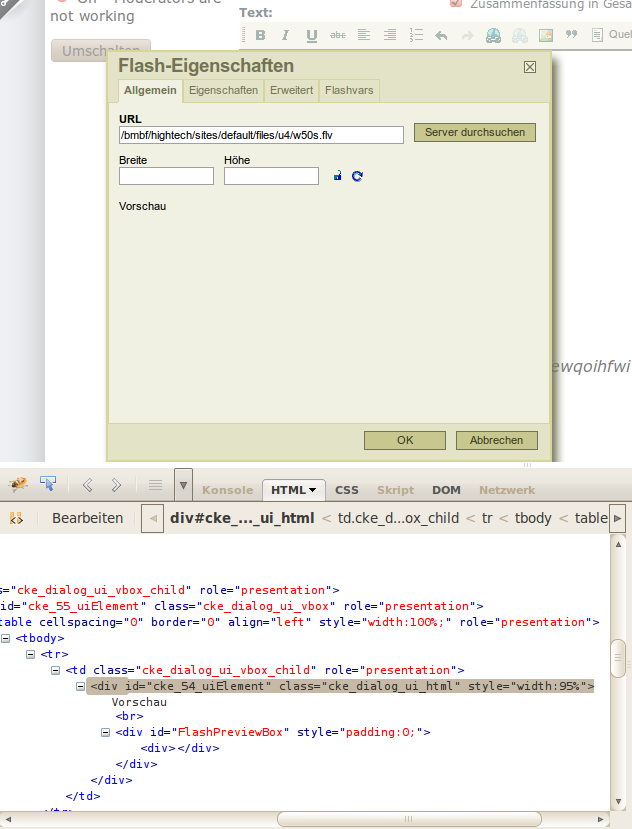
rpruitt625 commentedI am running Drupal 7 with ckeditor_swf-7.x-1.0-beta1, and am having problems with no display or previews.
Comment #15
rpruitt625 commentedThanks to anrikun for helping me get to bottom of this. I had to add flv and swf to my drupal.conf rewrite rules - now everything works great!
# Rewrite current-style URLs of the form 'index.php?q=x'.
RewriteCond %{REQUEST_FILENAME} !^/$
RewriteCond %{REQUEST_FILENAME} !^/(files|misc|uploads)(/.*)?
RewriteCond %{REQUEST_FILENAME} !\.(php|ico|png|jpg|gif|css|flv|swf|js|html?)(\W.*)?
RewriteRule ^(.*)$ /index.php?q=$1 [L,QSA]
p.s. - this is a call from httpd.conf so that Clean URLs work.
Comment #16
twilightelf commentedHi
I am running Drupal 7 with ckeditor_swf-7.x-1.0-beta1, and am having problems with no display or previews to. screenshot same as this http://drupal.org/files/issues/Afbeelding%207_0.png
Can you help me?
Comment #17
johan2 commentedHi,
I had the same issue, the .flv file was not loading. It worked after I added in the htaccess file the following:
RewriteCond %{REQUEST_FILENAME} !\.(php|ico|png|jpg|gif|css|flv|swf|js|html?)(\W.*)?
I don't know if the other rewrites from #15 are necessary?
The only issue I have now is that the movie ends with a black screen instead of ending on the last frame of the movie. I think this can be solved with some setting but I don't know where. I want to end up with the first frame at the beginning and the last frame at the end (something like quicktime does automatically with the video module).
I use the mediaplayer5 for the moment... still I am in doubt to switch to quicktime (with a .mov file), the only backdraw is the implementation in a block (I think for the moment it has to be created with a view...?)
regards, johan
Comment #18
Robert Hubbs commentedI had the no preview problem in when loading flv through CKEditor SWF in 6x. I forced it to load a preview image with flashvars
When I open the Flash Properties page and after I Browse Server to find the video I go to the Flashvars Tab and and add a var named image and the value being the full URL to the image I want to have as my preview.
The image selected for preview is also displayed when the video ends not the black screen.
Do not know how relevant this is in 7x as I have not loaded it yet.
FWIW - Robert
Comment #19
anrikun commented@Robert: FYI, the preview you are talking about is not what other people here mean by "preview". You mean adding an image to the player as a video preview. People here are referring to the preview area of the Flash dialog.
Anyway, you are right that the Flashvars tab is the right way to add properties to the player :-)
Comment #20
Chris Lozinski commentedHi anrikun
Thanks for a great module
I have the same problem and have tried the suggestions in this post but no joy.
I get an php error report in the Administration/ Reports page as follows:
Notice: Undefined index: src in ckeditor_swf_getinfo() (line 53 of /home/name/public_html/sitename/sites/all/modules/ckeditor_swf/ckeditor_swf.module).I am happy to give you some credentials to log in if you think this might help.
Thanks again
Chiseller
Comment #21
Chris Lozinski commentedHi anrikun
Thanks for all your support in resolving this issue.
The problem I had was caused through very tight mod_security settings set by my hosting service. (hostgator.com).
They are an excellent server provider however because I have a shared hosting package security is set very high.
I tried various .htaccess fixes but none worked. Eventually hostgator resolved the problem by placing the offending request "/ckeditor_swf/getinfo" on a white-list and he presto! Problem solved.
I hope this is of some value to others who may have the same problem.
Comment #22
johannesjvorstermans commentedThank John2, the .htaccess code you shared in #17 sorted out my problem. I spent several hours trying to get this going and happy I can move on now.
Great work the grwat work wth this module. It is great now that I have it going.
Comment #23
Panic commentedSo far what's talked about in #15 and #17 sound like the problem I'm having, the thing is I don't know enough to do what they say.
Could someone break it down for someone not good at this and tell me where I have to go to find the files and how I change them? I'm not as advanced and pretty much everyone in here but I'm learning.
It would be a huge help to me and my site, thanks
Comment #24
knalstaaf commentedI'm not sure if it's thanks to #17 or the fact I switched the Script access to Always (Properties-tab of dialogue) once, but it's working now.
Now the mentionned line in the .htaccess has been removed again and the Script access-field is not being filled out - and it's still working eventhough I had cleared the site's cache before. Odd, but it works.
Comment #25
adf1969 commentedNot sure if this will help anyone but I had to do the following to configure it to work on my system (note: I don't consider this a "bug" but more of a documentation issue - although with open-source, the documentation always exists in the code...if you want/can look - which is what I did to solve this).
First, for some reason this call took forever:
I"m not sure *why* it runs so slow, but it takes 60sec to run.
I commented it out for now so my system *always* uses getid3().
If someone knows why the @getimagesize() runs so slow, let me know.
Second, I found out that because I was now using getid3(), the "mime" results I was getting were *not* the same, so I had to make some modifications to my settings that can be found here: admin/config/content/ckeditor_swf
My "Player configuration PHP code" looks as follows:
Nothing special, but the entry of the "video/quicktime" was what I was missing.
Once I added that, things worked much better.
Initially, I was not sure what this code did, I just blindly cut/pasted the code below and made sure the paths were correct.
When that did not work, I went diving into the ckeditor_swf code and found this little tidbit of logic (in swf\plugin.js):
This is critical: as you can see, on the last line, it checks the "players" config (from the PHP code config above) and checks whatever the "getinfo" HTTP call returns and if it returns "video/quicktime" and you don't *have* a "video/quicktime" entry in your PHP code array, it won't work...so...you better have one.
It could be that everyone else already knows this, and I'm just slow...but, if not, hopefully this might save someone else some time pounding through the code (or on their head).
And BTW: anrikun. This module rocks.
Thanks for all your hard work getting this running so we can use it.
Andrew.
Comment #26
anrikun commentedThank you for posting this Andrew. Sure it will help people.
Once I get some time, I want to offer a more user-friendly way to configure players and mime types.