Problem/Motivation
The install.php script and the "Reports > Status" Report both check for the files directory to have read/write permissions, but they should be checking for read/write/execute permissions instead.
This can cause various hard-to-troubleshoot permission-related errors with the files directory, including on Docker environments.
Steps to reproduce
- Drupal is already installed
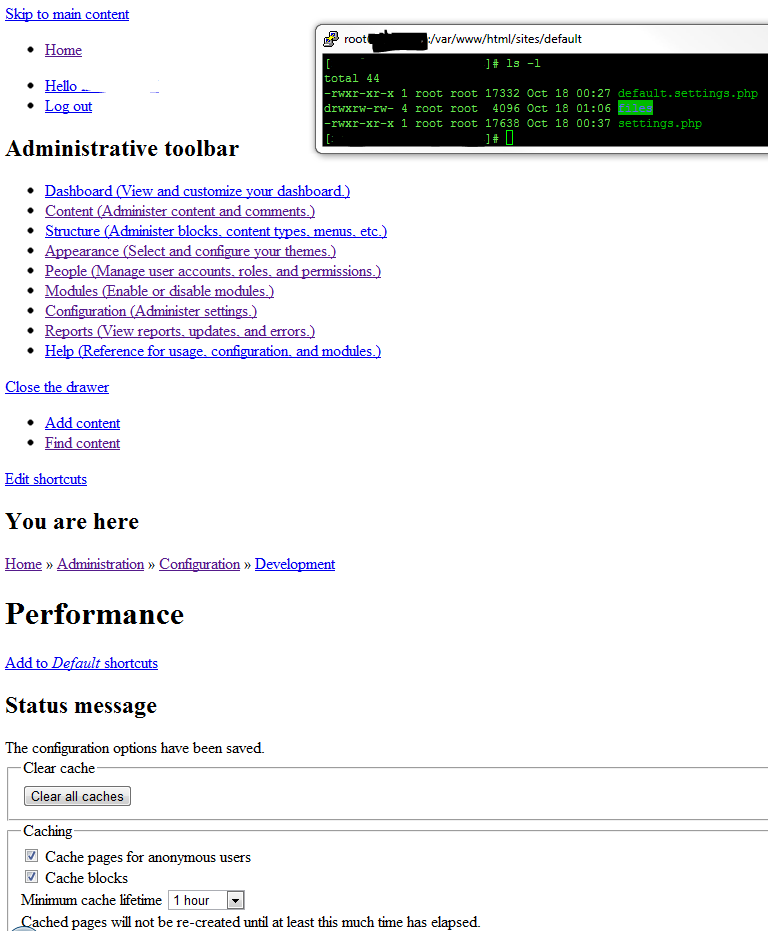
- (goof up permissions) chmod 766 ./sites/default/files
- Click Reports > Status Report
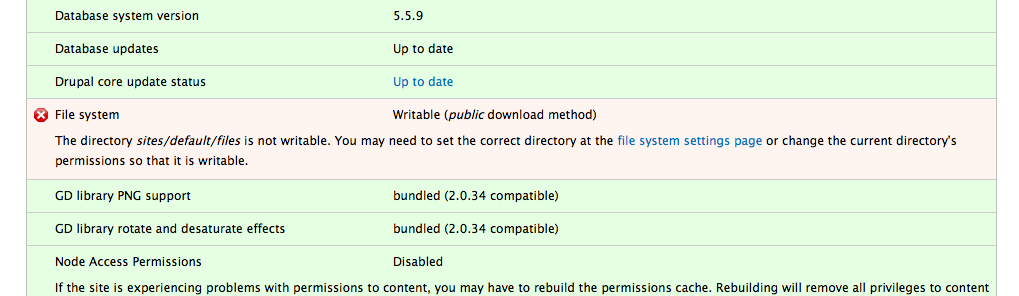
- File System is green (should be red here, directory is not executable). No big deal yet
- Click on Configuration > Performance
- Click either Aggregate checkboxes under Bandwidth optimization or both
- Clear all caches
- You'll notice the CSS problem right away if that's what you selected to aggregate
Results
The specified file temporary://file6GnL0E could not be copied, because the destination directory is not properly configured. This may be caused by a problem with file or directory permissions. More information is available in the system log.
Proposed resolution
Install.php and Reports > Status should check for read/write/execute permissions (x77) on the directory in question
Remaining tasks
- The patch needs to be rerolled for the latest version of Drupal 8.
- It is not possible to add a reliable automated test for this issue.
Contributor tasks needed
| Task |
Novice task? |
Contributor instructions |
Complete? |
| Reroll the patch if it no longer applies. |
|
Instructions |
|
| Update the issue summary |
|
Instructions |
|
| Update the issue summary noting if allowed during the beta |
|
Instructions |
|
User interface changes
API changes
Two functions will be added to the API:
file_directory_is_writable($uri)drupal_is_executable($uri)
Original report by [mlehner616]
The install.php script checks for the files directory to have read/write permissions (x66), should be checking for read/write/execute instead (x77).
If the files directory is created with just read/write permissions, turning on caching/compression strips off CSS and displays errors regarding temporary files.
Install.php should check for this correctly, as well as the status report script.
Basically these two scripts don't care if execute permissions are set on ./sites/default/files
This may be a critical issue but I'll let someone more technical triage this one.
Tested multiple times and was able to reproduce this behavior:
Scenario 1
Drupal is already installed
(goof up permissions) chmod 766 ./sites/default/files
Click Reports > Status Report
File System is green (should be red here, directory is not executable). No big deal yet
Click on Configuration > Performance
Click either Aggregate checkboxes under Bandwidth optimization or both
Clear all caches
You'll notice the CSS problem right away if that's what you selected to aggregate
Here are the errors:
The specified file temporary://file6GnL0E could not be copied, because the destination directory is not properly configured. This may be caused by a problem with file or directory permissions. More information is available in the system log.
The specified file temporary://fileNY1O4m could not be copied, because the destination directory is not properly configured. This may be caused by a problem with file or directory permissions. More information is available in the system log.
The specified file temporary://fileSsnd94 could not be copied, because the destination directory is not properly configured. This may be caused by a problem with file or directory permissions. More information is available in the system log.
The specified file temporary://fileV3PZdN could not be copied, because the destination directory is not properly configured. This may be caused by a problem with file or directory permissions. More information is available in the system log.
The specified file temporary://fileSFTvjv could not be copied, because the destination directory is not properly configured. This may be caused by a problem with file or directory permissions. More information is available in the system log.
The specified file temporary://fileLB2jpd could not be copied, because the destination directory is not properly configured. This may be caused by a problem with file or directory permissions. More information is available in the system log.
The specified file temporary://fileSKgNvV could not be copied, because the destination directory is not properly configured. This may be caused by a problem with file or directory permissions. More information is available in the system log.
The specified file temporary://file1KkKCD could not be copied, because the destination directory is not properly configured. This may be caused by a problem with file or directory permissions. More information is available in the system log.
The specified file temporary://fileCHUVJl could not be copied, because the destination directory is not properly configured. This may be caused by a problem with file or directory permissions. More information is available in the system log.
The specified file temporary://fileNcdmR3 could not be copied, because the destination directory is not properly configured. This may be caused by a problem with file or directory permissions. More information is available in the system log.
What's expected:
Install.php and Reports > Status Report should red flag the non-executable files directory (permissions must be 777)
Install.php actually does the same thing. It doesn't care that ./sites/default/files directory is 766 when it should be 777


 Show commands
 changes

Comments
Comment #1
anavarreI have the same problem in 7.0-beta 2 and was forced to manually delete both the js and css directories within files to make the errors go even though I unchecked CSS/JS minification.
Comment #2
mlehner616 commentedI see this as a major issue. It's not a show stopper but thinking of the less tech savvy users of Drupal perhaps we should bump it up. We don't seem to be getting the attention of the developers here.
Comment #3
anavarreNow with 7.0-beta3, everything seems fine.
Comment #4
zerodeux commentedTesting files access and ownership within PHP will never work correctly. You can't emulate the filesystem logic for all OS, ACL variant and whatever NFS strangeties. It just failed on a very simple case for me 10min ago.
If you need to know if a file can be written to, you fopen($filename, "r+") and check the result. Then use the handle or close it.
Besides it's racy (and thus risky) to check file permission, then manipulate the file. Countless security issues arise from this misconception.
Fixing this is quite complicated since drupal_verify_install_file() check if files, dirs or symlinks can be read, written or executed. Callers should actually *try* to do what they're only checking (read, write, exec), and then handling exceptions as usual.
And this function heavily calls drupal_install_fix_file() which means that drupal_verify_... does modify files. It tries to fix things, and user-friendlines is part of Drupal experience, so let's be it. But it will pass a given test if drupal_install_fix_file() succeeds *without* re-running the test. On a NFS setup it's possible for a chmod() to succeed without having the intended effect on bitmask (because the NFS server logic decides and it sometimes looks funny to a client). This:
if (!is_writable($file) && !drupal_install_fix_file($file, $mask)) { return FALSE; }Should be (ugly, yes):
if (is_writable($file)) { return TRUE; }
elsif (drupal_install_fix_file($file, $mask) && is_writable($file)) { return TRUE; }
else { return FALSE; }
I see 12 calls of drupal_verify_install_file() in Core. Worth patching ? It's maybe not a security risk, although this design is flaky.
Comment #5
mlehner616 commentedWhat about PHP's fileperms function? I'm not a familiar yet with the Drupal API but it seems that PHP's implementation of fileperms seems to work MOST of the time and should certainly work on a no frills CentOS 5.5 server which is the OS I'm having issues with.
substr(decoct( fileperms('.') ), 2); // To get '777'
substr(decoct( fileperms('.') ), 1); // To get '0777'
right?
Comment #6
mlehner616 commentedpulled directly from http://us3.php.net/manual/en/function.fileperms.php
Comment #7
lvbeck commentedsame issue with 7.0-rc1
Comment #8
David_Rothstein commentedThis should be "active", not "needs review", since there is no patch yet. It's probably not hard to write one, though :)
Let's keep this focused on the original bug report. Some of the last few comments seem like they're about something different.
Comment #9
David_Rothstein commentedHere's a patch. I've only tested it lightly, though.
It seems there are a number of places where we check these permissions on directories. The issue really doesn't have a whole lot to do with the installer itself, so I'm moving it to the "file system" component also.
Comment #11
David_Rothstein commentedApparently is_executable() is one of the PHP functions that doesn't always work well with stream wrapper URIs - that is causing many (if not all) of the failing tests.
Let's try it with a Drupal wrapper for that function instead, similar to some of the other replacement functions in file.inc.
Comment #12
David_Rothstein commentedOK, so the tests pass. I guess it also makes sense to create a helper function for the combined writable/executable check, rather than repeating it everywhere. The attached patch does that.
Comment #13
mlehner616 commented#12: directory-executable-944582-12.patch queued for re-testing.
Comment #14
mgiffordThat patch applied well to my last RC. Still not sure if that works through the permissions problem on the site I've been trying to upgrade mind you.
Comment #15
xaav commentedI'm also getting this error.
See attached screenshot.
Comment #16
christopher james francis rodgers commented2011.06.07
This solution relates strictly to the Drupal 7 error...
===
Error:
The specified file temporary://file****** could not be copied, because the destination directory is not properly configured. This may be caused by a problem with file or directory permissions. More information is available in the system log.
===
The Solution for me was simply..
.
Go to 'Configuration' > 'Media' > 'File System'
[*root*]/admin/config/media/file-system
and change the 'Temporary directory' from...
/tmp
...to...
tmp
(Do Not use a "/" to begin the directory specification)
See also http://drupal.org/node/1106492#comment-4562780
for all of my known details of that error.
Comment #17
hbblogger commentedI have the same problem. I thought that it had to do with my server as drupal 7 works fine on WAMP, but I see that I am not alone! If I copy the file using Filezilla, all is well but if I have a file that needs to write something to a directory (such as an image) the problem returns. I get the same error as geoffreyfishing. I have tried changing group permissions to 'write' in my site and include directories but it has had no effect. I get an error when I try to change the name of the tmp file (basically saying that it is unable to create the file). I see that David produced some code presumably to fix the problem, but I am not sure what to do with this. This is a serious problem as it makes drupal very difficult to use.
Comment #18
sunComment #19
christopher james francis rodgers commentedMoved: Consolidated into comment #16 above.
http://drupal.org/node/944582#comment-4231504
Comment #20
NotNotCow commented#16 My god,
All afternoon trying to figure it out and that's the flippin solution!
[smacks forehead]
Thanks for posting!
NNC
Comment #21
rickmanelius commentedWhen trying to use development version of devel to generate content in Drupal 7, I get this same error. #16 doesn't solve. So hopefully the backported patch corrects this!
Comment #22
rickmanelius commentedSolved my problem.
So when you specify a file or image field in a content type, the directory isn't necessarily available already. If you try to run devel generate to make a batch of content, the lack of this destination folder throws the same type of error as original post above.
If you manually create a single node and enter the information for these fields, then devel can add additional items without a problem. So there is some disconnect with the field folders. Perhaps they should be created on the content type configuration save. But that still may lead to issues if something tries to access it programmatically before that.
Comment #23
a_webb commentedI get the #19 bolded error code, and cannot seem to fix. i am upgrading from 7.2 to 7.4. i tried #16 solution to no avail. my file.inc specifies the /sites/default/files/tmp folder, which is there and has 777 permissions. There is no upload_tmp_directory set in my php.ini file (as that setting is commented out.) I am at a total loss as everything else with my upgrade went fine. This is a big site for a college, so stuff like this *kills* productivity. Kudos to anyone who can help, I'll return the favor sometime!
Comment #24
gaurav26570 commentedFor me Solution #16 worked..Thanks.
Comment #25
xjmTagging issues not yet using summary template.
Comment #26
maxchock commentedI'm using Panels and this error cause all my page layout with Panel doesn't work.. error message from log:
my tmp folder work fine, but the "ctools/css/" just empty...
Comment #27
Fannon commentedGot this error with the latest 7.7 Version after an upgrade from 6.x
Solved this with giving 777 Permissions on several folders. But which ones need it really?
Greets,
Simon
Comment #28
rowbotony commentedI had this problem too after moving my local development site to be live on a shared hosting environment - #16 fix worked partially - I was still getting errors on several other pages such as
admin/appearance. Looking at the recent log entries,admin/reports/dblog, I found that this was due to Drupal wanting to recreate it's own cache directories. For example - the log entry showed the error:I deleted the css directory at
sites/default/files/css, then Drupal would happily recreate the css directory with the proper owner and permissions. This was also true for the directorysites/default/files/js. Once Drupal recreated those all of the errors were gone and all was right with the world.Comment #29
nikkubhai commentedI am facing same problem. Changing /tmp to tmp does not work!
Comment #30
xjmThis needs to be rerolled for both #22336: Move all core Drupal files under a /core folder to improve usability and upgrades and the git migration. Tagging as novice for the task of rerolling the patch.
If you need help rerolling this patch, you can come to core office hours or ask in #drupal-gitsupport on IRC.
Comment #31
kathyh commentedupdate for #30 - d8 /core and git. change this to needs work after testbot for other issues/comments. carry on.
Comment #32
andypostI think this related and should be included #484554-7: Stop relying on Apache for determining the current path
Comment #33
mlehner616 commented#12: directory-executable-944582-12.patch queued for re-testing.
Comment #34
mesr01 commented@nikkubhai (#29), you may try to manually create a subfolder inside /tmp, let's say /tmp/d7/subdomain.example.com (replacing last part with actual site folder name for recognition purpose, although any subfolder name would be equivalent). Set permissions to 777 for all three folders and change the setting in admin/config/media/file-system accordingly.
I noticed that writing directly to /tmp, even with permissions set to 777, won't work with some D7 installs. I don't know at this point if this is a problem with D7 or a hosting account feature.
Comment #34.0
transitionkojo commentedUpdated summary to comply with Issue Summary Standards
Comment #34.1
transitionkojo commentedLeft out my username: Transition (with help from XJM)
Comment #34.2
transitionkojo commentedadded "code" tags around error message in results section; User: Transition
Comment #34.3
transitionkojo commentedUpdated "API changes" section to reflect 2 API Additions; user: Transition
Comment #34.4
transitionkojo commentedadded "related issues" sub-section in "Remaining Tasks" section; user=Transition
Comment #34.5
transitionkojo commentedUpdated "Remaining Tasks" section; user=Transition
Comment #34.6
transitionkojo commentedCorrected link to Item #31; User=Transition
Comment #34.7
transitionkojo commentedfixed typo in "
"; user=Transition
Comment #35
xjmSummary added by Transition.
Comment #36
jagalbraith commentedGuys this is an easy fix. It is only a Unix files permission problem. Here is the fix:
1. Change directory to the root of your Drupal site.
cd /var/www2. Set your permissions to 777 and try it out. You can back off permissions to lock it down later, but get it working for now. Ensure to do it RECURSIVE. the -R is what is killing people in this post because there are already files in the directory that need to be writable for Drupal to work properly.
chmod 777 -R sites/default/files3. Now create a directory called tmp at the root of your site.
mkdir tmp4. Set the permissions there too.
chmod 777 -R tmpEnjoy.
John Galbraith
www.binarybb.info
Comment #37
Tor Arne Thune commentedComment #38
xjmTagging for manual testing.
Comment #38.0
xjmUpdated issue summary.
Comment #39
ryan.ryan commentedI will test it.
Comment #40
ryan.ryan commentedI went through the steps and was able to reproduce the issue.
I then tested the patch and upon clearing the cache received a warning message that there was something wrong with my Drupal installation.
After navigating the to startus report page, I had the appropriate error. (See screenshot)
So, the patch looks good :D
Let me know if I missed something or need to do something else.
Thanks all! And thanks xjm for your continued help and support.
Comment #40.0
ryan.ryan commentedUpdated issue summary.
Comment #41
xjmAlright, based on @ryanissamson's testing, I think this is RTBC. I also updated the issue summary. (It's not possibly to test this reliably with an automated test, as indicated in the summary.) Thanks everyone!
Comment #42
xjmComment #43
catchdrupal_realpath() doesn't work for remote stream wrappers. That's now documented for drupal_realpath() and it's even marked as deprecated.
So if we have no choice other than to use it, we need a similar comment here, so no-one ever tries to use this for remote stream wrappers. Same for the other helper functions added. To an extent I'd consider actually dropping the helpers here and just inlining these checks, since we actively want to discourage people from using these in 99% of cases.
12 days to next Drupal core point release.
Comment #44
xjmOkay I was totally confused by #43 until I realized it actually refers to this function (not the one quoted above):
I read the doc for drupal_realpath(); unfortunately, it doesn't seem to indicate what one is supposed to use instead:
Comment #45
wooody commentedHi , i copy my site to new domain , and i made database and import the sql file.
everything work fine , but i can't install any new module.
this message
And in Status report i saw file system green
File system Writable (public download method)
Any help.
Comment #46
catchMarked #1333390: file_prepare_directory() / is_writable() on Linux don't support ACLs as duplicate.
Comment #47
OnkelTem commentedDrupal doesn't support ACLs.
One solution was provided here 5 months ago and didn't get enough feedback. It is marked 'duplicate' by @catch for now. No other solution I seen, and it seems that nobody actually using ACLs. Ok, I don't care anymore about this.
Comment #48
orlitzky commentedThe patch here doesn't fix #1333390: file_prepare_directory() / is_writable() on Linux don't support ACLs. PHP's
is_writable()returnsfalsewhen the directory is writable, so thefile_directory_is_writable()function introduced here still fails since it callsis_writable().The patch that OnkelTem posted in #1333390 does fix it; and as a side effect, fixes this, because it actually writes the file. You can't do that if the directory isn't executable. (See the comments in #4)
This is rather important to me, as I'm attempting to migrate a large number of Drupal sites to a server that uses ACLs. I'll have to manually patch every install after every update until this is fixed.
Comment #49
paularmand commentedAgreeing on #48: I also have ACLS set on the files directory, and this is not a marginal phenomenon. I agree with mjorlitzky: testing by writing to file (and handling errors in the test) is at this moment our best possible option.
Comment #50
xjmI re-closed #1333390: file_prepare_directory() / is_writable() on Linux don't support ACLs as a duplicate. Let's broaden the scope of this issue to include that bug, and update the patch here to use the technique from that issue:
This is the patch we should incorporate into #31:
http://drupal.org/files/linux-acl-drupal-is-writable-d7.9.patch
We also still need to address catch's feedback from #43.
Comment #51
orlitzky commentedThanks, this seems like the most sensible solution to me.
Comment #52
OnkelTem commentedagreed
Comment #53
David_Rothstein commentedI don't think I understand what's going on here but maybe my brain is fuzzy.
The issue summary in #1333390: file_prepare_directory() / is_writable() on Linux don't support ACLs says that the only problem with ACLs comes when is_writable() is called on a stream. My patch above dealt with a similar issue for is_executable(); the solution I tried was to convert to a non-stream using drupal_realpath().
@catch pointed out in #43 that this function is deprecated (because it doesn't work on remote stream wrappers), but (as he also pointed out) that doesn't mean we can't use it or something like it here... we just have to be careful to make sure we're only using it on local files (which I believe is the case), and document what we're doing rather than trying to make generically reusable functions.
So if we do what @catch suggested, and additionally do it for is_writable() - rather than just for is_executable() - won't that solve all the problems at once, in a relatively simple way?
I really am not excited about any solution that resorts to writing "test" files to determine writability. I believe we do that in one place in Drupal currently (when writing settings.php in the installer) but that's a very special case, and the resulting code to deal with all the edge cases involved with that is a bit of a mess. I would not like to start doing that everwhere in Drupal except as an absolute last resort.
Comment #54
OnkelTem commented@David_Rothstein
Would you clarify your proposition via providing alternative patch which we can test on ACL-enabled setups?
Comment #55
orlitzky commentedThe currently writability test just looks at some filesystem bits. This does not take into account,
Therefore it does not actually test writability. I agree that writing a test file is ugly, but there's no better way to do it (if someone can think of one, by all means, implement it).
Comment #56
David_Rothstein commentedSure, here's a patch along the lines of what I had in mind.
It would need more work to be a real patch, but I think this is probably good enough to test. The essential change is from this:
to this:
***
@mjorlitzky: So is the issue summary at #1333390: file_prepare_directory() / is_writable() on Linux don't support ACLs incorrect, then? In any case, seems like this is worth testing.
Comment #57
orlitzky commentedI'm not even sure anymore...
All of our sites where this is a real issue are running 7.12 and the patch won't apply that far back. For what it's worth, I set up an 8.x-dev installation on my local machine and IMCE (which calls
file_prepare_directory) seems to work with the patch.Comment #58
xjm@mjorlitzky, if the patch is accepted, it will also be backported to Drupal 7. We can probably create a "draft" D7 version for testing as well.
Comment #59
xjmLike these. The first applies to 7.x HEAD, the second to 7.12.
Comment #60
orlitzky commentedThank you, I'll try to move a few sites to our new server later tonight and they'll need to be patched. I'll let you know how it goes.
Comment #61
orlitzky commentedWell, I've moved a 7.12 site, patched, and the issue with IMCE is fixed. Thanks!
Comment #62
OnkelTem commentedI confirm that patch works on clean Drupal 7.12 on ACL-enabled setup.
I haven't tested on remote file-systems though, which is actually not very important in most setups.
Both approaches - test-writing and with using drupal_realpath() have some drawbacks, but I personally like this solution more, despite this warning in docs:
The use of drupal_realpath() is discouraged, and is slowly being removed from core functions where possible.I hope we will find another solution until drupal_realpath() is removed from core.
xjm, David_Rothstein - thank you!
Comment #63
maxterner23 commentedI got the same problem and resolved by making small modification as #36 and #28 suggested in the comment.
chmod 777 -f sites/default/files/js
chmod 777 -f sites/default/files/css
and it resolves the issue
Comment #64
anarcat commentedI was able to apply http://drupal.org/files/d7-944582-59-do-not-test.patch to Drupal 7.15 and it works.
I think this is a major WTF for users on shared hosting that use ACLs. Quite hard to diagnose too!
I wonder if D6 is affected... probably not, because it doesn't use stream wrappers.
Comment #65
webchickHm. I tried to duplicate this error using the (well-written, thanks!) reproduction instructions from the OP in 8.x and was unable to do so. :( Upon submitting the performance form, I got just a simple "The configuration options have been saved." message.
Also, the patch in #56 no longer applies, so needs work for that.
Could someone please provide instructions on how to cause this error on D8? Or is it a D7 only issue?
Comment #66
OnkelTem commented@anarcat
Yes, D6 is affected. At least I remember for sure that I have been creating ugly 'write-test' patch for it.
Comment #67
wrg20 commentedI recently installed upgrades/security fixes for feeds, workbench moderation, pathologic and fontyourface. I got the same error "The specified file temporary://******** could not be copied...". My status report looked fine.
I fixed the problem by implementing #36 and #63.
Comment #68
orlitzky commentedI tried installing D8 but I get a symfony error, so... unknown.
The patch in #59 still works for D7, can we have that reviewed/tested? The issue that we ran into was that if an ACL allowed read/write access to the (otherwise unreadable) sites/default/files directory, IMCE would claim that it couldn't write there and fail.
Comment #69
orlitzky commentedPIng. Another release I'm patching manually to get Drupal to work at all with ACLs.
Comment #70
orlitzky commentedAnd again. Here's a patch rebased for 7.18.
Comment #71
orlitzky commentedAnd again. The patch from comment #70 still applies cleanly to 7.19.
Comment #72
yesct commentedI want to see what the bot says about 7.x (we can change this back to 8.x when the bot comes back).
Also, slightly related: #1885510: Can't install on some systems (like windows) due to folder permissions (executable check not needed) and #1886164: Install in different language requirement warns translations dir not executable, when the dir is executable on some systems
Comment #73
gábor hojtsyYes, in fact #1885510: Can't install on some systems (like windows) due to folder permissions (executable check not needed) in fact deal with *removing* the directory executability check because it was bugos on Windows. Looks like these two issues contradict each other?
Comment #74
yesct commentedYes. In those issues, we used the rational that the files dir was not tested for being executable for a reason to take out the executable checking. Another thought there was that trouble with a non-executable directory was so rare, checking was not needed.
So, I'm wondering if people who are familiar with this issue, can provide some guidance and an update:
1) How common is the problem with D7 (or D6) that someone installing or running a site will have incorrect permissions that need to be fixed? Here and in those other issues, to test, the execute permission was deliberately removed. Aside from that, does the situation happen?
2) checkout the approach in #1886164: Install in different language requirement warns translations dir not executable, when the dir is executable on some systems. That tries to keep the checks for executable in, but make it work for windows by checking if whatever/. is readable since the is_executable() function does not work for all systems. How is that different from the approach here?
Comment #75
orlitzky commentedAnother ticket, #1333390: file_prepare_directory() / is_writable() on Linux don't support ACLs, was merged into this one and the patch here was made to solve both problems. Half of that solution somewhat conflicts with #1885510: Can't install on some systems (like windows) due to folder permissions (executable check not needed), it seems, and the other half (the ACL fixes) should not.
One half of the fix, from #1333390, just makes the writable/executable check work in the presence of ACLs. It does this by adding new functions file_directory_is_writable and drupal_is_executable. This has nothing to do with #1885510 and should be fine to apply anyway.
The other half from this ticket adds the executable check to the installer, and may conflict with #1885510. This is visible in the patch by the change,
I personally would be happy without the executable check at install time. My primary concern is that the unpatched writable/executable checks fail in the presence of ACLs. This breaks IMCE, and all of our websites.
Comment #76
gábor hojtsy#1885510: Can't install on some systems (like windows) due to folder permissions (executable check not needed) got committed, so that would need to be taken into account for any further patch updates here
Comment #77
orlitzky commentedIf you want the "executable" check to work on both Windows and sane operating systems, you need to forget the
is_executable()nonsense, and create e.g.drupal_is_traversable()instead.On Windows, that can just return true, or delete My Photos, or whatever -- I don't care. Everywhere else it should do the drupal_is_executable() check.
In any case, it was clearly a mistake to merge these two issues. Can we please create a separate issue for fixing the existing permissions checks which make drupal unusable? This has been a huge waste of time for something so basic as "can I create a file in this directory".
Comment #78
David_Rothstein commentedWell, there's no reason to make the installer inconsistent with everything else, so that doesn't seem like a meaningful way to split things to me. But if you think #1333390: file_prepare_directory() / is_writable() on Linux don't support ACLs can be solved without running into the issues here you should consider reopening that one.
As far as I can tell, though, this is all pretty crazy, and #1885510: Can't install on some systems (like windows) due to folder permissions (executable check not needed) at most just worked around the problem? If it's really true that Windows will fail if the directories are (forced to be) executable and Linux will fail if they aren't, that is a tough one to solve :) I certainly didn't realize that before.
Comment #79
orlitzky commentedI just created #1899126: [D7] Add wrappers to fix permission checks with a new patch that doesn't touch the installer.
We don't really care if the directory is executable, we care that its traversable. On everything else, you just check the execute bit. On Windows, that doesn't work -- so one possible fix is to just traverse the damn thing and see if it works. There's a note about this in the PHP
is_executable()documentation.Comment #80
star-szrThis should go back to 8.x at least…
Comment #81
yesct commentedadding issue summary initiative tag to encorporate what we have found out about the related issues (wrapper for permission check, can't install on windows) and to try and write out some remaining tasks and next steps here.
Comment #82
kurt.iverson commentedThis worked for me. Thanks!
Comment #83
Blooniverse commentedSince #1987262: [Installation Error] Symfony: "The service definition 'request' does not exist." is related: any recommendations for us there? Any input how to proceed best?
Comment #84
jair commentedComment #85
pratik60 commentedOn changing sudo chmod 766 ./sites/default/files, I get a white screen of death on 'admin/reports'.
On checking the logs, I got this
'PHP Fatal error: Call to undefined function user_access() in /var/www/d8/core/includes/menu.inc on line 599'
On further checking, I found on https://drupal.org/node/2049309, that user_access() got converted to a method on the user/accountInterface. On the page, the description states that '
The user_access() method was directly replaced by AccountInterface::hasPermission()'
Hence the error!
Comment #85.0
pratik60 commentedUpdated issue summary.
Comment #86
mkapst commented#16 worked for me. Cheers to Christopher James Francis Rodgers!
Comment #87
XTCHost commentedI just fixed my ./sites/default/files directory permission with from the site domain or default folder, whichever you use
chown -R user:user files
user being the CPanel username on linux server
Comment #88
arkestra commented70: issue_944582-drupal-7.18.patch queued for re-testing.
Comment #91
superspring commentedRerolled
Comment #92
johnish commentedI'm going to try and reroll this.
Comment #93
johnish commentedI rerolled this.
Comment #94
johnish commentedComment #95
mgiffordJust a reroll...
Comment #96
yesct commentedComment #97
yesct commentedComment #98
adci_contributor commentedTrying to reroll
Comment #100
ankitgarg commentedRerolled #95.
Comment #102
alvar0hurtad0rerolled
Comment #103
yesct commentedchanging status to needs review so the testbot will run on the patch.
Comment #105
pbuyle commentedComing from https://www.drupal.org/node/2018947
This would not properly support remote filesystem exposed as stream (eg. Amazon S3) as
drupal_realpath()only support local URI.The proper way would be something like
Comment #106
pbuyle commentedA bit more information on the issue. Everything was working fine when we were using NFS v3, we started to have issue once switching to NFS v4.
When using NFS v4, all the files are shown as owned by "nobody:nogroup" with the rwx for both the user and the group, and r-x for others. But all users are actually able to write all files.
Using Drupal 7.42, we can observe different results when using
is_writable()on a local file path vs. the path to the same file using the public:// stream wrappe:is_writable(drupal_realpath('public://styles'))returnsTRUE, whileis_writable('public://styles')returnsFALSE.Using the patch in #70 fixes to issue for us (but with the same remote file system issue as reported in #105.
Comment #107
OnkelTem commentedFor those still seeking solution for Drupal 7 — patch from #70 (for 7.18) still applies fine on 7.43.
Without it Linux ACL won't work.
Comment #109
serundeputy commentedComment #110
mvcReroll of #102 for 8.2.x-dev, plus added the wrapper to a few missing instances of is_writable() and is_executable().
@pbuyle I didn't extend this to cover Amazon S3 since I need the patch only for NFSv4 & extended ACL's but wrapping all calls with file_directory_is_writable() should at least make fixing that issue simpler.
Comment #113
nicodh commentedHi
#70 works for me (Drupal 7.51).
I had a weird issue : drupal in a docker container (derived from official php container) doesn't let me upload files with the "cck" file field. However, simple form API' file field works well (eg. in appearance > settings > logo field).
After investigating, I found that was php
is_writablewhich returned a falsefalseinfile_prepare_directory(includes/file.inc), while my directory was in fact writable : if I bypassis_writablecheck, upload works like a charm :-) even in the case of the directory doesn't exist. I think it's related to the docker mounted volume and the way php handles uri inis_writable, but withdrupal_realpath,is_writable' return is correct.Could we hope a patch in a future 7.x release ?
Thanks anyway for the patch !
Comment #114
FrenchBarbu commentedHi
Got the exact same issue on D8 and Docker : is_writable and URI return false. If I comment this part everything is ok so the directory is writable. Any clues ?
Comment #115
jproctorReroll of #110 for current 8.2.x-dev, plus added the wrapper to a couple more occurrences of is_writable().
This doesn't solve the similar-but-unrelated problem I was having and it fails testing for me, but my rig has other problems so I figured I'd at least get the patch applying cleanly in case there's value in moving it forward.
Comment #118
acidrobot commentedI'm using linux NFSv4 ACLs and this was a real headache!
Using the patch #70 works for me.
I also verified when removing the patch that I was unable to upload files to sites/default/files.
I'm quite surprised that Drupal isn't supporting ACLs inherently.
IMHO chmod 777 to ANY file | folder is never a secure solution, and I would never implement it on a production environment.
TL;DR::
Patch #70 Fixes issues with uploading files & permissions with Linux ACLs.
Comment #119
b-prod commentedTested #115: it fixes the issue.
Context: Docker image with mounted volume.
Without this patch, the directories inside "public://", including this last itself, are stated as non writeable even if they are.
Comment #120
fonski commentedTried to reroll the patch for 8.3
Comment #121
jeremylichtman commentedI've tested out patches #115 and #120. Doesn't full resolve the issue, because the function file_unmanaged_save_data (circa line 1005 in web\core\includes\file.inc) calls the php function file_put_contents, which fails for all of the reasons noted above.
Comment #123
loicLEMEUT commentedHi,
Here is my patch for Drupal 8.3.7, patch #120 doesnt work with this Drupal version.
Thanks
Comment #124
jofitzRe-rolled.
Comment #126
a.milkovskyThe latest patch works for Drupal 8.4 as well.
Comment #127
a.milkovskyThe Jenkins error looks like this:
I looks like legacy include (\Drupal\Core\DrupalKernel::loadLegacyIncludes) did not work.
We should include the file.inc here or use a service.
Comment #128
ptmkenny commentedUpdated issue summary.
Comment #129
ruudvanoijen commentedThis patch doesn't apply anymore because of issue: 2880445 In this issue config.install is removed. So I Rerolled a patch for 8.4-dev
I don't know why 8.5-dev is missing the logic for a test in HtmlOutputPrinter. Removed this in the patch for 8.5-dev.
Comment #130
ruudvanoijen commentedNew patch for 8.4.
Comment #131
jonathanshawThe patch uses drupal_realpath(). @Catch points out in #43 that
@pbuyle devised an improvement in #105 which we should adopt:
This is also going to need tests. The tests for file_is_writable and file_is_executable can be very simple.
More difficult is the test for the underlying stream wrapper issue. Can we reproduce this? Can we find a uri that returns false for is_writable() but converts OK using drupal_realpath()?
Comment #133
solotandem commentedPatch removes calls to drupal_realpath($uri) as this is unnecessary and introduces a guaranteed failure for any remote stream wrapper. Even if core does not support a remote wrapper this function will be used by contributed modules and it will NOT solve the problem in all cases.
Also, I have not found is_writable() to be at issue here, only the lack of an is_executable() check (which the discussion herein seems to agree with as well as inspection of the PHP source code).
Comment #135
solotandem commentedLast patch inadvertently had a 7.x function call.
Comment #137
solotandem commentedAttempt to fix test fail.
Comment #139
solotandem commentedThird time could be the charm.
Comment #141
seanbRerolled #130 for 8.5 and 8.6 (works on both). Added 2 extra changes for
core/modules/media/media.installandcore/modules/migrate/src/Plugin/migrate/process/FileCopy.php. Moved the change fromcore/tests/Drupal/Tests/Listeners/HtmlOutputPrinter.phptocore/tests/Drupal/Tests/Listeners/HtmlOutputPrinterTrait.php.Comment #143
seanbSo
\Drupal\Component\FileSystem\FileSystem::getOsTemporaryDirectory()is called bycore/scripts/run-tests.shwhilecore/includes/file.incis not included yet. Not sure what the best fix is? I guess we should includefile.incbut I'm not sure howcore/scripts/run-tests.shwill handle this.When I change
core/scripts/run-tests.shI still get an error when running the tests:Not sure if anyone has any ideas?
Comment #144
seanbReverted the changes in
\Drupal\Component\FileSystem\FileSystemandDrupal\Tests\Listeners\HtmlOutputPrinterTraitand added a nativeis_executable()call to both to fix the tests. Components can't rely on Drupal being available.Let's see if this works.
Comment #146
jonathanshaw"not a writable and executable directory"?
Comment #147
Pascal- commentedThis patch solves an issue with Lando, where you are unable to upload any files using the CMS.
You can upload one file, after that you're no longer allowed to upload anything.
If you remove your files folder you're allowed one upload again.
This patch seems to fix it.
I'm allowed to upload files again.
Tested against Drupal 8.4.4
Comment #148
jofitzAdded the improvement proposed in #105.
is_executable()always returnsFALSEfor a directory, so I have changeddrupal_is_executable()to also check foris_dir()and added a comment to explain this.Comment #150
slydevil commentedComment #151
slydevil commentedReverting, updated the wrong ticket.
Comment #152
Pascal- commentedChanging this to critical since it's blocking development on Docker / Lando
I'm not sure if this is for all Docker applications, but when using Lando, it's not possible to upload files using the CMS because of this permission check.
Would be awesome if we could get a working patch into Core asap!
Comment #153
anavarreReverting priority according to https://www.drupal.org/core/issue-priority
I don't have this issue against HEAD. Please provide more details and steps to reproduce.
Comment #154
Pascal- commented@anavarre
Set up a Drupal 8 site with Lando/Lando (I'm running Windows 10)
https://github.com/lando/lando
Create a content type with an image field.
Add content, upload image (works first time)
Try to add another piece of content with image (image will no longer upload)
The first time it manages to create the files folder and upload the image.
The second time it checks the permissions on the files folder and concludes it is not allowed to upload there (I assume)
Edit: this is on Windows 10
Comment #155
anavarreSorry, I can't reproduce with Lando or any other LAMP stack. I'm running Linux so I'd be better if someone else running Windows 10 would test and report back here.
Comment #156
Pascal- commentedI have 2 colleagues with Windows 10 who have the same issue.
The issue also persists over multiple projects.
Comment #157
maacl commentedWorking with file permissions for files in a volume mapping in Docker on Windows is very limited. More Information and discussion (and other workarounds) can be found here: https://github.com/wodby/docker4drupal/issues/29#issuecomment-316055081
Comment #158
anavarre@maacl makes a good point. I'd recommend you try with a non-containerized env (e.g. WAMP) or try on simplytest.me to confirm you're no longer seeing the issue.
Comment #159
maacl commented@anavarre actually the patch from this issue should resolve the problem in a containerized env on Docker on Win10 (as explained in https://github.com/wodby/docker4drupal/issues/29#issuecomment-316055081), so this is why @Pascal is asking for commit/progress.
Comment #160
jonathanshawYeah, the issue is real for docker on Windows 10.
Comment #161
Pascal- commented@maacl & anavarre
It works fine on WAMP (without patching) or with this patch on Docker
This patch does indeed solve the issue on docker, that's why I'd love to see this comitted.
I'm sure there are a lot of people having the same issue who are unable to find this bug report since it doesn't seem related.
There's issues about it on Lando and Docker too!
Comment #162
jonathanshawIt can't be committed yet, it needs tests.
Comment #163
Pascal- commentedJust ran into the exact same issue on Drupal 7 with Windows 10 + Docker (Lando)
Patch it #70 applied and fixed it!
Comment #164
Pascal- commentedShould there be separate D7 & D8 issues for this?
Could we add something about Docker + Windows 10 to the title so people can actually find this issue?
Comment #165
cilefen commentedComment #166
bbcTrying on Lando on Windows 10 and ran into the same issue. Hadn't tried uploading yet, but was unable to enable the Media module on a clean install. Can confirm that #144 fixes the issue.
Comment #168
drdam commented#144 is OK for RTBC for me
Comment #169
idebr commentedReroll against 8.7.x after #2950851: invalid conf file warnings when skip_permissions_hardening is on was committed.
Comment #172
das-peter commentedRe-rolled for latest 8.7x branch.
Since
file_prepare_directory()now is inDrupal/Component/FileSystem/FileSystem.phpI've decided to add the new writable / executable checks to that service too. I've keptfile_directory_is_writableanddrupal_is_executablein place but they now use the service\Drupal::service('file_system'). For now I didn't add a deprecation notice even thought that might be "necessary" to align withfile_prepare_directory().Comment #173
das-peter commentedHmm, the previous patch had a typo that broke it. Not happy that it seemed to have passed the tests nonetheless :|
Fixed the typo and corrected the reported coding standard violation too.
Comment #175
jonathanshawMy understanding is that we're moving away from global functions towards OOP; therefore I doubt we should be creating new ones if there's no absolute need to do so.
Could we just use the new service instead of calling these wrapper functions?
Comment #176
Pascal- commentedFYI This is no longer an issue with the latest Docker version on Windows.
Well, the issue is probably still there, but it's no longer affecting uploading images/files
Not sure if Docker fixed it or if it was fixed in Drupal somewhere.
I did still have the issue on the older Docker version (with the latest Drupal version), so I'm guessing Docker.
Comment #178
das-peter commentedUpdated patch to apply to 8.8.x / 8.9.x.
This patch has been around for a long time and I've to assume that there are usages that rely on the procedural functions - hence I've just adjusted the approach to match the current setup which throws deprecated warnings in case the procedural functions are used.
However, the core usage relies on the extended FileSystemInterface.
Comment #181
thomscode commentedRe-rolling patch for Drupal 8.8 and 8.9.
Comment #184
pinoloPatch for 9.2/9.3 based on previous patches
Comment #185
pinoloUpdated patch w/code QA fix
Comment #187
shaneonabike commentedHere's the latest patch for D7 for those that need it. Rebased
Comment #190
nicodh commentedHi!
Patch #185 fixes issues for me (mainly in Linux ACL context, but also weird issues that make image styles not available...)
is_writable('translations://') return false, but now FileSystem::isWritable('translations://') return true :-)
Well done! Need this in core!
Comment #192
ilianoz commentedComment #193
vesnag commentedThank you IliaNoz for this patch. It works fine.
Comment #194
jurgenhaasRe-rolled for 11.x
Comment #197
kim.pepperCreated an MR from #194 so we can run ci pipelines.
Comment #198
kim.pepperLeft some feedback and updated the title.
These tests
Drupal\FunctionalTests\Installer\InstallerTest\Drupal\Tests\system\Functional\System\SitesDirectoryHardeningTestare failing which look related.
Also hid a load of outdated patch files.
Comment #199
jurgenhaasRebased the MR.
Comment #200
kim.pepperStill a few unsresolved comments on the MR
Comment #203
ilianoz commented