

 Come together with the global Drupal community in Rotterdam, 28 Sept – 1 Oct 2026. Sessions, contribution, connection, and Early Bird savings until 8 June.
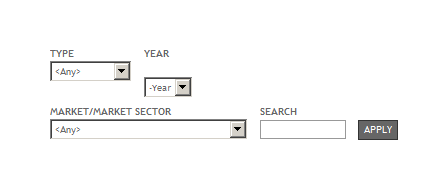
Date elements in Views exposed forms have a bunch of margin added to and minimum width imposed on them, resulting in strange positioning like that depicted in the attachment. I find myself overriding it all on every site I do. Can anyone enlighten me as to its purpose? Can it be removed?
date.css line 24:
.container-inline-date .form-item input,
.container-inline-date .form-item select,
.container-inline-date .form-item option {
  margin-right: 5px; /* LTR */
}
date.css line 86:
.date-views-filter-wrapper {
  min-width:250px;
}

| Comment | File | Size | Author |
|---|---|---|---|
| date-widgets-2.gif | 3.3 KB | traviscarden |

Comments
Comment #1
patcon commentedAgreed. If you're only showing something like a year select list, the min-width property makes the formatting all wonky. What's the purpose?
Comment #2
traviscarden commentedComment #2.0
traviscarden commentedUpdated issue summary.
Comment #3
damienmckennaUnfortunately the Drupal 6 version of the Date module is no longer supported. That said, we appreciate that you took time to work on this issue. Should this request still be relevant for Drupal 7 please feel free to reopen it. Thank you.