

Closed (fixed)
Project:
CKEditor SWF - Enhanced Flash embedding plugin
Version:
6.x-2.1
Component:
User interface
Priority:
Normal
Category:
Support request
Assigned:
Unassigned
Reporter:
Created:
25 Oct 2010 at 21:43 UTC
Updated:
27 Oct 2010 at 07:39 UTC
Jump to comment: Most recent file

Comments
Comment #1
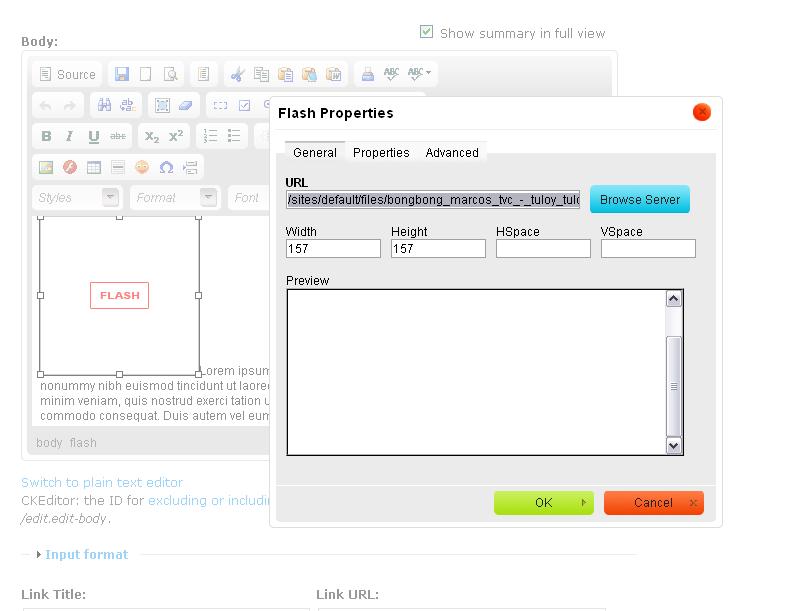
anrikun commentedPlease attach a screenshot of your Flash dialog.
Comment #2
Meeyo commentedI've attached a screenshot.
Fortunately saw another issue same with http://drupal.org/node/942336#comment-3626490 which is a blank screen.
Thanks,
Comment #3
anrikun commentedWhat you have here is the default Flash dialog.
So you must not have added the required 4 lines into your ckeditor.config.js file.
Please read about this again on the project page.
You can also post your ckeditor.config.js file here.
Comment #4
Meeyo commentedHere's what inside of ckeditor.config.js
// $Id: ckeditor.config.js,v 1.2.2.7 2010/03/11 12:39:54 wwalc Exp $
/*
WARNING: clear browser's cache after you modify this file.
If you don't do this, you may notice that browser is ignoring all your changes.
*/
CKEDITOR.editorConfig = function(config) {
config.indentClasses = [ 'rteindent1', 'rteindent2', 'rteindent3', 'rteindent4' ];
// [ Left, Center, Right, Justified ]
config.justifyClasses = [ 'rteleft', 'rtecenter', 'rteright', 'rtejustify' ];
// The minimum editor width, in pixels, when resizing it with the resize handle.
config.resize_minWidth = 450;
// Protect PHP code tags (<?...?>) so CKEditor will not break them when
// switching from Source to WYSIWYG.
// Uncommenting this line doesn't mean the user will not be able to type PHP
// code in the source. This kind of prevention must be done in the server
// side
// (as does Drupal), so just leave this line as is.
config.protectedSource.push(/<\?[\s\S]*?\?>/g); // PHP Code
config.extraPlugins = '';
if (Drupal.ckeditorCompareVersion('3.1')) {
config.extraPlugins += (config.extraPlugins ? ',drupalbreaks' : 'drupalbreaks' );
}
if (Drupal.settings.ckeditor.linktocontent_node) {
config.extraPlugins += (config.extraPlugins ? ',linktonode' : 'linktonode' );
}
if (Drupal.settings.ckeditor.linktocontent_menu) {
config.extraPlugins += (config.extraPlugins ? ',linktomenu' : 'linktomenu' );
}
// Define as many toolbars as you need, you can change toolbar names and remove or add buttons.
// List of all buttons is here: http://docs.cksource.com/ckeditor_api/symbols/CKEDITOR.config.html#.tool...
// This toolbar should work fine with "Filtered HTML" filter
config.toolbar_DrupalFiltered = [
['Source'],
['Cut','Copy','Paste','PasteText','PasteFromWord','-','SpellChecker', 'Scayt'],
['Undo','Redo','Find','Replace','-','SelectAll','RemoveFormat'],
['Image','Flash','Table','HorizontalRule','Smiley','SpecialChar'],
['Maximize', 'ShowBlocks'],
'/',
['Format'],
['Bold','Italic','Underline','Strike','-','Subscript','Superscript'],
['NumberedList','BulletedList','-','Outdent','Indent','Blockquote'],
['JustifyLeft','JustifyCenter','JustifyRight','JustifyBlock'],
['Link','Unlink','Anchor','LinkToNode', 'LinkToMenu'],
['DrupalBreak', 'DrupalPageBreak']
];
/*
* DrupalBasic will be forced on some smaller textareas (if enabled)
* if you change the name of DrupalBasic, you have to update
* CKEDITOR_FORCE_SIMPLE_TOOLBAR_NAME in ckeditor.module
*/
config.toolbar_DrupalBasic = [ [ 'Format', '-', 'Bold', 'Italic', '-', 'NumberedList','BulletedList', '-', 'Link', 'Unlink', 'Image' ] ];
/*
* This toolbar is dedicated to users with "Full HTML" access some of commands
* used here (like 'FontName') use inline styles, which unfortunately are
* stripped by "Filtered HTML" filter
*/
config.toolbar_DrupalFull = [
['Source'],
['Cut','Copy','Paste','PasteText','PasteFromWord','-','SpellChecker', 'Scayt'],
['Undo','Redo','Find','Replace','-','SelectAll','RemoveFormat'],
['Image','Flash','Table','HorizontalRule','Smiley','SpecialChar'],
'/',
['Bold','Italic','Underline','Strike','-','Subscript','Superscript'],
['NumberedList','BulletedList','-','Outdent','Indent','Blockquote'],
['JustifyLeft','JustifyCenter','JustifyRight','JustifyBlock'],
['Link','Unlink','Anchor','LinkToNode', 'LinkToMenu'],
'/',
['Format','Font','FontSize'],
['TextColor','BGColor'],
['Maximize', 'ShowBlocks'],
['DrupalBreak', 'DrupalPageBreak']
];
/*
* Append here extra CSS rules that should be applied into the editing area.
* Example:
* config.extraCss = 'body {color:#FF0000;}';
*/
config.extraCss = '';
/**
* Sample extraCss code for the "marinelli" theme.
*/
if (Drupal.settings.ckeditor.theme == "marinelli") {
config.extraCss += "body{background:#FFF;text-align:left;font-size:0.8em;}";
config.extraCss += "#primary ol, #primary ul{margin:10px 0 10px 25px;}";
}
if (Drupal.settings.ckeditor.theme == "newsflash") {
config.extraCss = "body{min-width:400px}";
}
/**
* CKEditor's editing area body ID & class.
* See http://drupal.ckeditor.com/tricks
* This setting can be used if CKEditor does not work well with your theme by default.
*/
config.bodyClass = '';
config.bodyId = '';
/**
* Sample bodyClass and BodyId for the "marinelli" theme.
*/
if (Drupal.settings.ckeditor.theme == "marinelli") {
config.bodyClass = 'singlepage';
config.bodyId = 'primary';
}
if (Drupal.ckeditorCompareVersion('3.1')) {
CKEDITOR.plugins.addExternal('drupalbreaks', Drupal.settings.ckeditor.module_path + '/plugins/drupalbreaks/');
}
if (Drupal.settings.ckeditor.linktocontent_menu) {
CKEDITOR.plugins.addExternal('linktomenu', Drupal.settings.ckeditor.module_path + '/plugins/linktomenu/');
Drupal.settings.ckeditor.linktomenu_basepath = Drupal.settings.basePath;
}
if (Drupal.settings.ckeditor.linktocontent_node) {
CKEDITOR.plugins.addExternal('linktonode', Drupal.settings.ckeditor.module_path + '/plugins/linktonode/');
Drupal.settings.ckeditor.linktonode_basepath = Drupal.settings.basePath;
}
// 'MediaEmbed' plugin. To enable it, uncomment lines below and add 'MediaEmbed' button to selected toolbars.
//config.extraPlugins += (config.extraPlugins ? ',mediaembed' : 'mediaembed' );
//CKEDITOR.plugins.addExternal('mediaembed', Drupal.settings.ckeditor.module_path + '/plugins/mediaembed/');
// 'IMCE' plugin. If IMCE module is enabled, you may uncomment lines below and add an 'IMCE' button to selected toolbar.
//config.extraPlugins += (config.extraPlugins ? ',imce' : 'imce' );
//CKEDITOR.plugins.addExternal('imce', Drupal.settings.ckeditor.module_path + '/plugins/imce/');
};
Comment #5
Meeyo commentedOk. That did the trick. I know I added the 4 lines but when I check the file on the server, it still the original file that was uploaded. Thanks a lot.
Comment #6
anrikun commentedDid you clear your cache?
Comment #7
Meeyo commentedNo. I just reuploaded the file. May be I missed saving it before I upload it the first time.
Comment #8
anrikun commented